1. Introduction
Thank you for choosing the Dioche Meridian Massage Brush. This device is designed to provide a comprehensive massage experience, incorporating vibration, micro-electric current, infrared light, and heat. Please read this manual thoroughly before use to ensure safe and effective operation.
2. Important Safety Information
WARNING: To reduce the risk of burns, fire, electric shock, or injury to persons:
- Always unplug the device immediately after use and before cleaning.
- Do not use while bathing or in a shower.
- Do not place or store the device where it can fall or be pulled into a tub or sink.
- Do not place in or drop into water or other liquid.
- Do not reach for a device that has fallen into water. Unplug immediately.
- Never operate this device if it has a damaged cord or plug, if it is not working properly, if it has been dropped or damaged, or dropped into water.
- Keep the cord away from heated surfaces.
- Never use while drowsy or sleeping.
- Do not use on infants, invalids, or on a sleeping or unconscious person.
- Do not use on insensitive skin or on a person with poor blood circulation.
- Consult a physician before use if you have any medical conditions, including but not limited to heart conditions, pregnancy, skin conditions, or if you are using a pacemaker.
- This device is not intended for medical use. It is intended only to provide a soothing massage.
- Do not use on swollen, inflamed, or broken skin areas.
- Do not use on areas with rashes, warts, moles, or varicose veins.
- Discontinue use if you experience any discomfort or adverse reactions.
3. Product Overview and Components
The Dioche Meridian Massage Brush features a unique design with multiple functions to enhance your massage experience.

Image 3.1: The Dioche Meridian Massage Brush connected to its power adapter.
Key Features:
- Far Infrared Light: 8 infrared lights emit energy to penetrate the epidermis.
- Hot Compress: 5 levels of heating to promote blood circulation.
- DC Micro-Electric Current: 9V low voltage micro-electric current to stimulate cell activity.
- Vibration Massage: 2 levels of vibration to relieve fatigue.
- Scraping Therapy: Combines traditional techniques with modern technology.
- Stainless Steel Probes: 30 pieces, smooth surface, anti-corrosion.
- Ergonomic Handle: Curved design for comfortable grip and operation.

Image 3.2: Diagram illustrating the main features of the Meridian Massage Brush.
Control Panel:
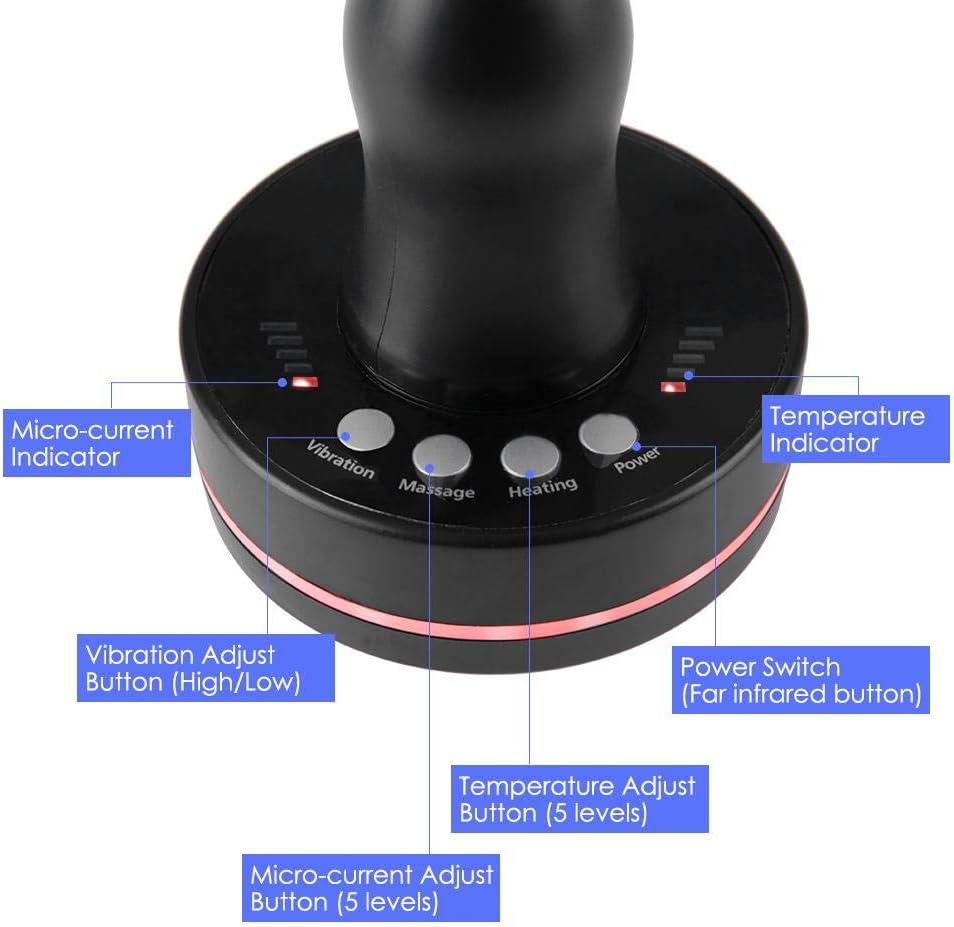
Image 3.3: Detailed view of the control panel and its functions.
- Power Switch: Turns the device on/off and controls Far Infrared light.
- Vibration Button: Adjusts vibration levels (High/Low).
- Massage Button: Adjusts micro-current levels (5 levels).
- Heating Button: Adjusts temperature levels (5 levels).
- Micro-current Indicator: Displays current micro-current level.
- Temperature Indicator: Displays current heating level.
4. Setup
- Unpack: Carefully remove the Meridian Massage Brush and all accessories from the packaging.
- Inspect: Check the device and power adapter for any signs of damage. Do not use if damaged.
- Connect Power: Insert the power adapter cable into the device's power port.
- Plug In: Plug the power adapter into a suitable electrical outlet (AC110-240V 50/60Hz).

Image 4.1: Connecting the power adapter to the device.
5. Operating Instructions
Before operating, ensure your skin is clean and dry. For best results, a small amount of massage oil or lotion can be applied to the skin.
- Power On: Press the Power button to turn on the device. The Far Infrared lights will activate.
- Adjust Vibration: Press the Vibration button to cycle through the 2 vibration levels (High/Low).
- Adjust Micro-current: Press the Massage button to select one of the 5 micro-current levels. The Micro-current Indicator will show the selected level.
- Adjust Heating: Press the Heating button to select one of the 5 temperature levels. The Temperature Indicator will show the selected level.
- Application: Gently place the brush head on the desired area of your body. Move the brush in slow, circular, or sweeping motions.
- Duration: Use for approximately 10-20 minutes per session, or as desired, ensuring comfort.
- Power Off: After use, press the Power button to turn off the device. Unplug the power adapter from the wall outlet.

Image 5.1: Examples of using the Meridian Massage Brush on different body areas.
Note: The device is designed for use on various body parts. Avoid sensitive areas and consult the safety guidelines before use.
6. Maintenance and Care
- Cleaning: After each use, ensure the device is unplugged. Wipe the brush head and body with a soft, damp cloth. Do not use abrasive cleaners or immerse the device in water.
- Storage: Store the device in a cool, dry place, away from direct sunlight and moisture. Keep out of reach of children.
- Cord Care: Do not wrap the power cord around the device. Avoid twisting or kinking the cord.
7. Troubleshooting
| Problem | Possible Cause | Solution |
|---|---|---|
| Device does not turn on. | Not plugged in correctly; Power outlet malfunction; Damaged power cord. | Ensure the power adapter is securely plugged into both the device and a working electrical outlet. Try a different outlet. If the cord is damaged, discontinue use and contact support. |
| No heat or insufficient heat. | Heating function not activated; Low heat setting selected. | Press the Heating button to increase the temperature level. Ensure the device has been on for a few minutes to reach desired temperature. |
| No vibration or weak vibration. | Vibration function not activated; Low vibration setting selected. | Press the Vibration button to increase the vibration level. |
| Experiencing discomfort or tingling sensation. | Micro-current level too high; Sensitive skin; Improper application. | Reduce the micro-current level using the Massage button. Ensure skin is adequately moisturized. If discomfort persists, discontinue use. |
8. Specifications
- Model: B085XQF5JF
- Brand: Dioche
- Product Dimensions: 0.39 x 0.39 x 0.39 inches
- Weight: 1.41 Pounds
- Power Source: Electric (AC110-240V 50/60Hz)
- Material: Plastic, Stainless Steel Probes
- Color: Black
- Manufacturer: Dioche
9. Warranty Information
Specific warranty information for the Dioche Meridian Massage Brush is not available in this manual. Please refer to the product packaging or contact the retailer/manufacturer for details regarding warranty coverage and terms.
10. Customer Support
For further assistance, questions, or concerns regarding your Dioche Meridian Massage Brush, please contact your point of purchase or the manufacturer directly. Contact information may be available on the product packaging or the manufacturer's official website.