
Tronsmart Onyx Ace
Tronsmart Onyx Ace True Wireless Bluetooth Earbuds User Manual
Model: Onyx Ace | Brand: Tronsmart
1. Introduction
Thank you for choosing the Tronsmart Onyx Ace True Wireless Bluetooth Earbuds. This manual provides detailed instructions on how to set up, operate, and maintain your earbuds to ensure optimal performance and longevity. Please read this manual thoroughly before using the product.
2. Package Contents
- Tronsmart Onyx Ace True Wireless Earbuds (Left & Right)
- Charging Case
- USB-C Charging Cable
- User Manual
3. Product Overview
Familiarize yourself with the components of your Tronsmart Onyx Ace earbuds and charging case.

The Tronsmart Onyx Ace True Wireless Earbuds are shown in their open charging case, highlighting their compact design and white finish.
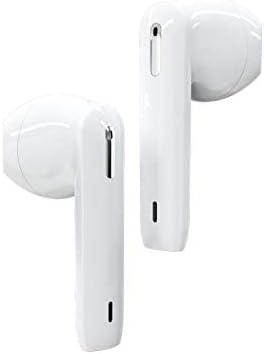
A detailed view of the left and right Tronsmart Onyx Ace earbuds, showcasing their ergonomic design and in-ear fit.
Key Components:
- Earbuds: Left (L) and Right (R) earbuds with touch control areas.
- Charging Case: Stores and charges the earbuds, with LED indicators for battery status.
- USB-C Port: For charging the case.
- Microphones: Integrated for calls and voice assistant.
4. Setup
4.1 Initial Charging
Before first use, fully charge the charging case and earbuds. Connect the USB-C cable to the charging port on the case and a power source. The LED indicators on the case will show charging status.
4.2 Pairing with Your Device
- Open the charging case lid. The earbuds will automatically enter pairing mode.
- On your device (smartphone, tablet, etc.), enable Bluetooth.
- Search for "Tronsmart Onyx Ace" in the list of available Bluetooth devices.
- Select "Tronsmart Onyx Ace" to connect. Once connected, you will hear a confirmation tone.
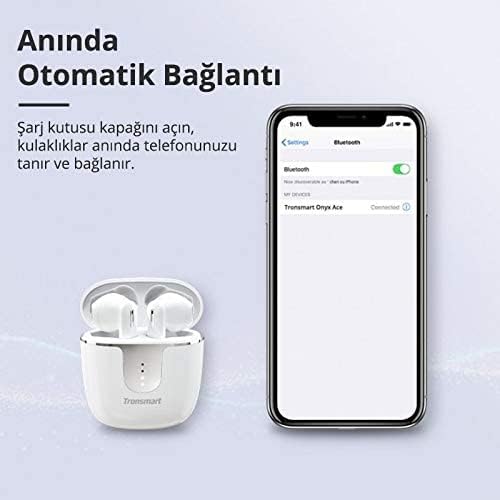
The image demonstrates the instant automatic connection feature: simply open the charging case lid, and the earbuds will automatically connect to your phone, as shown with a phone displaying a Bluetooth connection.
5. Operating Instructions
The Tronsmart Onyx Ace earbuds feature intuitive touch controls for various functions.
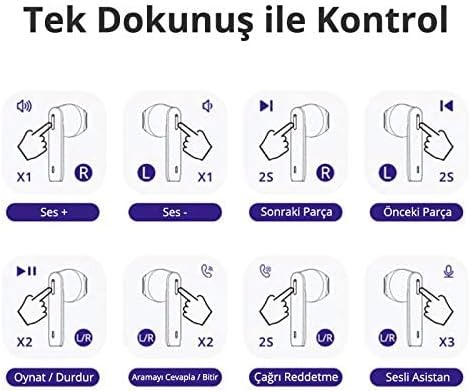
This diagram illustrates the touch controls: Single tap on R for Volume Up, L for Volume Down. Hold R for 2 seconds for Next Track, L for 2 seconds for Previous Track. Double tap U/R for Play/Pause or Answer/End Call. Hold U/R for 2 seconds to Reject Call. Triple tap U/R for Voice Assistant.
5.1 Power On/Off
- Power On: Open the charging case lid, or take the earbuds out of the case. They will power on automatically.
- Power Off: Place the earbuds back into the charging case and close the lid. They will power off automatically.
5.2 Music Playback Controls
- Play/Pause: Double tap either the Left (L) or Right (R) earbud.
- Volume Up: Single tap the Right (R) earbud.
- Volume Down: Single tap the Left (L) earbud.
- Next Track: Hold the Right (R) earbud for 2 seconds.
- Previous Track: Hold the Left (L) earbud for 2 seconds.
5.3 Call Management
- Answer/End Call: Double tap either the Left (L) or Right (R) earbud.
- Reject Call: Hold either the Left (L) or Right (R) earbud for 2 seconds.
5.4 Voice Assistant Activation
- Activate Voice Assistant: Triple tap either the Left (L) or Right (R) earbud.
5.5 Mono/Stereo Mode
The earbuds can be used individually (mono mode) or together (stereo mode).
- Mono Mode: Simply take one earbud out of the case. It will automatically connect to your device.
- Stereo Mode: Take both earbuds out of the case. They will automatically pair with each other and then connect to your device.

This image shows the flexibility of using the earbuds in either mono (single earbud) or stereo (both earbuds) mode, allowing users to feel free based on their preference.
6. Features Highlight
6.1 Superior Audio Quality
Experience stereo Hi-Fi sound with exceptional clarity, powered by Qualcomm aptX technology for CD-like audio and a 13mm driver for rich bass and clear treble.

The image highlights the audio quality features, including Stereo Hi-Fi sound with exceptional clarity, Qualcomm aptX for CD-like audio, AAC for balanced sound on iOS, and a 13mm driver for rich bass and clear treble. Lossless aptX audio is available for compatible devices.
6.2 Crystal-Clear Calls
Equipped with 4 microphones and Environment Noise Cancellation (ENC) technology, the earbuds guarantee crystal-clear and loud call quality by effectively reducing ambient noise.

This image depicts a user making a call, illustrating that the 4 microphones and Environment Noise Cancellation technology ensure crystal-clear and loud call quality by reducing ambient noise.
6.3 IPX5 Sweatproof
The IPX5 rating ensures your earbuds are protected against sweat, splashes, and rain, making them ideal for workouts and outdoor activities.

This image illustrates the IPX5 sweatproof rating, indicating the earbuds are protected against sweat, splashes, and rain, making them suitable for workouts and outdoor activities.
6.4 Pressure-Free Design
The semi-in-ear design provides a comfortable and secure fit, allowing for extended listening sessions without discomfort.
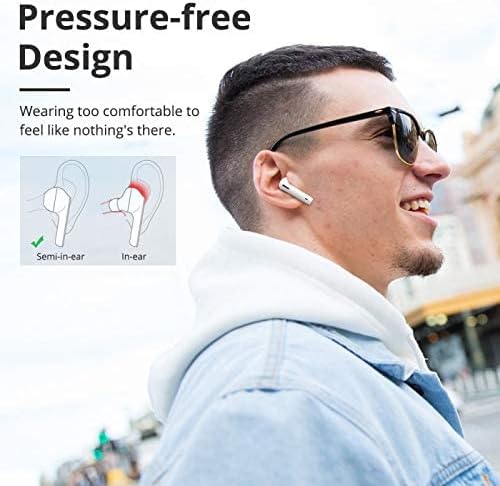
The image compares semi-in-ear and in-ear designs, highlighting the Tronsmart Onyx Ace's semi-in-ear design for a comfortable, pressure-free fit that feels almost imperceptible during wear.
6.5 Genuine Qualcomm Chip
Equipped with a genuine Qualcomm QCC3020 chip, the earbuds offer faster transmission, ultra-low latency, and low-power consumption for the most stable wireless connection.
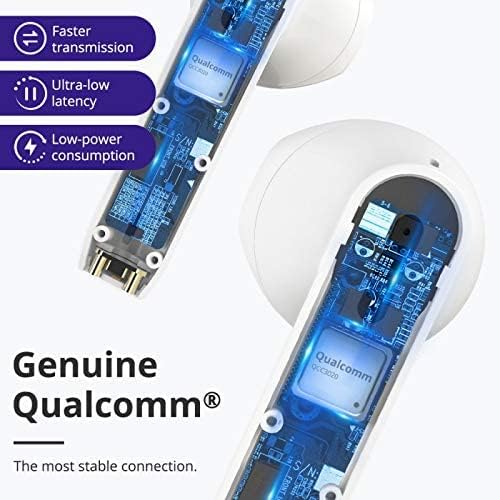
A cutaway view of the earbud showing the internal Qualcomm QCC3020 chip, emphasizing faster transmission, ultra-low latency, and low-power consumption for a stable connection.
7. Charging
7.1 Charging the Earbuds
Place the earbuds into the charging case. The earbuds will automatically begin charging. The LED indicators on the earbuds will show their charging status.
7.2 Charging the Case
Connect the provided USB-C cable to the charging port on the case and a USB power adapter (not included). The LED indicators on the case will light up to show the charging progress. A full charge provides up to 24 hours of total playtime with the earbuds.

This image displays the battery life capabilities: up to 5 hours on a single charge for the earbuds, and up to 24 hours total playtime with the charging case. Data is based on 50% volume.
8. Maintenance and Care
- Clean the earbuds and charging case regularly with a soft, dry cloth.
- Do not use abrasive cleaners or solvents.
- Keep the charging contacts on the earbuds and in the case clean to ensure proper charging.
- Store the earbuds in their charging case when not in use to protect them and conserve battery life.
- Avoid exposing the earbuds to extreme temperatures, humidity, or direct sunlight.
9. Troubleshooting
9.1 Earbuds Not Pairing/Connecting
- Ensure the earbuds are charged and out of the charging case.
- Turn off and on Bluetooth on your device.
- Forget "Tronsmart Onyx Ace" from your device's Bluetooth list and try pairing again.
- Try resetting the earbuds (refer to the next section).
9.2 No Sound or Low Volume
- Check the volume level on both your device and the earbuds.
- Ensure the earbuds are properly connected to your device.
- Clean any debris from the earbud speakers.
9.3 Charging Issues
- Ensure the charging cable is securely connected to both the case and the power source.
- Check if the charging contacts on the earbuds and in the case are clean and free of obstruction.
- Try a different USB-C cable or power adapter.
9.4 Resetting the Earbuds
If you experience persistent issues, you may need to reset your earbuds. Consult the official Tronsmart support website or contact customer service for specific reset instructions for the Onyx Ace model, as procedures can vary.
10. Specifications
Detailed technical specifications for the Tronsmart Onyx Ace True Wireless Bluetooth Earbuds.
| Feature | Detail |
|---|---|
| Brand Name | Tronsmart |
| Model Name | Onyx Ace |
| Item Model Number | Onyx Ace |
| Connectivity Technology | Wireless |
| Wireless Communication Technology | Bluetooth |
| Headphones Ear Placement | In Ear |
| Headphones Form Factor | In Ear |
| Color | White |
| Sensitivity | 95 dB |
| Noise Control | None |
| Headphones Jack | None (True Wireless Design) |
| Product Dimensions | 4 x 9 x 11.8 cm; 150 g |
| Manufacturer | Tronsmart |
| Date First Available | 24 June 2020 |
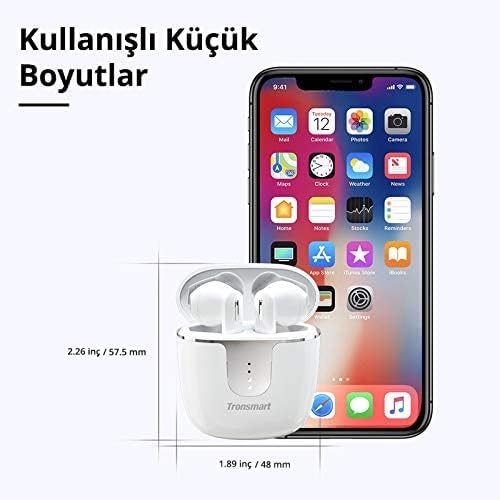
The image provides the compact dimensions of the Tronsmart Onyx Ace charging case: approximately 2.26 inches (57.5 mm) in height and 1.89 inches (48 mm) in width, demonstrating its portability.
11. Warranty and Support
Tronsmart products typically come with a standard warranty. For detailed warranty information, product registration, or technical support, please visit the official Tronsmart website or contact their customer service directly. Keep your purchase receipt for warranty claims.
Official Website: www.tronsmart.com
Related documentsOnyx Ace


Ask a question about this manual
Ask about setup, troubleshooting, compatibility, parts, safety, or missing instructions. Manuals+ will review the question and use this page’s manual context to help answer it.