
Introduction
This manual provides instructions for the USARMT AA59-00600A replacement remote control. This remote is designed to function as a direct replacement for the original Samsung AA59-00600A remote, offering full compatibility with a wide range of Samsung television models. Please read this manual carefully to ensure proper setup and operation.
Compatibility
The USARMT AA59-00600A remote control is compatible with the following Samsung TV models:
- LT22B350ND, LT22B350ND/ZA, LT22B350NDZA
- LT24B350, LT24B350ND, LT24B350ND/ZA, LT24B350NDZA
- LT24D310NH, LT24D310NH/ZA, LT24D310NHZA
- LT27A300, LT27A300ND, LT27A300ND/ZA, LT27A300NDZA
- LT27B350ND, LT27B350ND/ZA, LT27B350NDZA
- LT28D310NH, LT28D310NH/ZA, LT28D310NHZA
- PN43E440, PN43E440A2F, PN43E440A2FXZA
- PN43E450, PN43E450A1, PN43E450A1F, PN43E450A1FXZA, PN43E450A1FXZATS02
- PN51E440, PN51E440A2F, PN51E440A2FXZA
- PN51E450, PN51E450A1, PN51E450A1F, PN51E450A1FXZA, PN51E450A1FXZATD02
- PN51E530, PN51E530A3, PN51E530A3F, PN51E530A3FXZA, PN51E530A3FXZASS01, PN51E530A3FXZATD04
- PN51E535, PN51E535A3, PN51E535A3F, PN51E535A3FXZA
- PN51E550D1FXZA
- PN60E530, PN60E530A3F, PN60E530A3FXZA, PN60E530A3FXZATS01, PN60E530A3FXZATS02
- PN60E535, PN60E535A3F, PN60E535A3FXZA
- T22B350ND, T24B350ND, T27B350ND, T28D310NH
- TM1240
- UN19F4000, UN19F4000AF, UN19F4000AFXZA, UN19F4000BFXZA
- UN22F5000, UN22F5000AF, UN22F5000AFXZA, UN22F5000AFXZA0
- UN26EH4000, UN26EH4000F, UN26EH4000FXZA, UN26EH4000FXZACS01
- UN28F4000, UN28F4000AFXZA
- UN29F4000, UN29F4000AF, UN29F4000AFXZA
- UN32EH4000, UN32EH4000F, UN32EH4000FXZA, UN32EH4000FXZACS01
- UN32EH4050F, UN32EH4050FXZA
- UN32EH5000, UN32EH5000F, UN32EH5000FXZA, UN32EH5000FXZATS01
- UN32F4000, UN32F4000AFXZA
- UN32F4050, UN32F4050AFXZA
- UN32F5000, UN32F5000AF, UN32F5000AFXZA
- UN32F5050, UN32F5050AF, UN32F5050AFXZA
- UN32H4003FXZA
- UN32J4002AFXZA
- UN37EH5000, UN37EH5000F, UN37EH5000FXZA
- UN39FH5000, UN39FH5000AFXZA, UN39FH5000F, UN39FH5000FXZA
- UN40EH5000, UN40EH5000F, UN40EH5000FXZA
- UN40EH5050, UN40EH5050F, UN40EH5050FXZA
- UN40EH6000, UN40EH6000F, UN40EH6000FXZA, UN40EH6000FXZATS02
- UN40EH6050, UN40EH6050F, UN40EH6050FXZA
- UN40F5000, UN40F5000AF, UN40F5000AFXZA
- UN40F5050, UN40F5050AFXZA
- UN43J5000BFXZA
- UN46EH5000, UN46EH5000F, UN46EH5000FXZA, UN46EH5000XZA
- UN46EH5050, UN46EH5050F, UN46EH5050FXZA
- UN46EH6000, UN46EH6000F, UN46EH6000FXZA, UN46EH6000FXZACS01, UN46EH6000FXZATS02
- UN46F5000, UN46F5000AF, UN46F5000AFXZA
- UN46F5050, UN46F5050AFXZA
- UN49M5300AFXZA
- UN50EH5000, UN50EH5000F, UN50EH5000FXZA, UN50EH5000V, UN50EH5000VXZA
- UN50EH5050, UN50EH5050F
Setup
Installing Batteries
- Locate the battery compartment on the back of the remote control.
- Slide the battery compartment cover downwards or outwards to open it.
- Insert two (2) AA batteries, ensuring the positive (+) and negative (-) terminals align correctly with the markings inside the compartment.
- Close the battery compartment cover by sliding it back into place until it clicks securely.
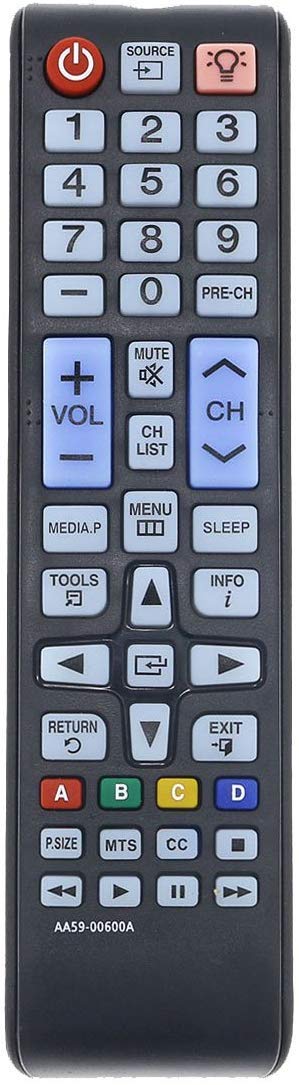
Image: Back view of the remote control, highlighting the battery compartment.
Note: Batteries are not included with the remote control. Always use new batteries and dispose of old batteries responsibly.
Operating Instructions
The USARMT AA59-00600A remote control is designed for immediate use with compatible Samsung TVs without requiring programming. Simply point the remote at your television and press the desired button.
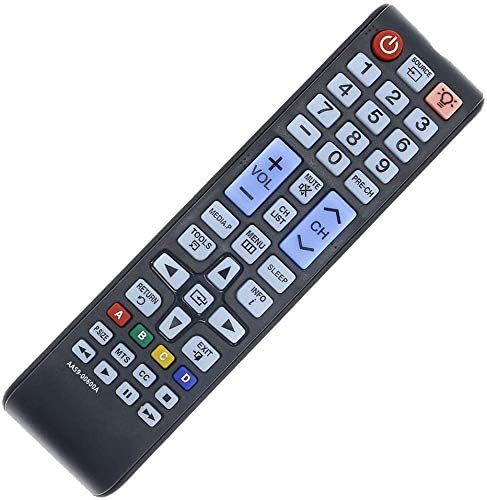
Image: Front view of the remote control, displaying all functional buttons.
Key Functions:
- Power (Red Button): Turns the TV on or off.
- Source: Selects input sources (HDMI, AV, Component, etc.).
- Number Buttons (0-9): Directly enters channel numbers.
- Volume (+/-): Increases or decreases the volume level.
- Mute: Silences the TV audio.
- Channel (CH +/-): Changes channels up or down.
- Menu: Accesses the TV's main menu.
- Tools: Opens a quick menu with common functions.
- Info: Displays information about the current program.
- Directional Pad (Up/Down/Left/Right) & Enter: Navigates through menus and confirms selections.
- Return: Goes back to the previous screen or menu.
- Exit: Closes the current menu or application.
- Color Buttons (A, B, C, D): Used for specific functions within certain TV menus or applications.
- Media Playback Controls (Play, Pause, Stop, Fast Forward, Rewind): Controls media playback on compatible devices or TV functions.
Maintenance
Cleaning the Remote
To clean the remote control, use a soft, dry cloth. For stubborn dirt, slightly dampen the cloth with water or a mild cleaning solution. Avoid using harsh chemicals or abrasive cleaners, as these can damage the remote's surface or internal components.
Battery Replacement
Replace batteries when the remote's response becomes sluggish or stops working. Always replace both batteries at the same time with new ones of the same type (AA). Do not mix old and new batteries, or different types of batteries, as this can lead to leakage or malfunction.
Storage
Store the remote control in a cool, dry place away from direct sunlight and extreme temperatures. If the remote will not be used for an extended period, it is recommended to remove the batteries to prevent potential leakage.
Troubleshooting
- Remote not responding:
- Ensure batteries are inserted correctly with the correct polarity (+/-).
- Replace old batteries with new ones.
- Check for any obstructions between the remote and the TV's infrared sensor.
- Ensure you are within the effective range and pointing the remote directly at the TV.
- Some buttons not working:
- This may indicate low battery power; try replacing the batteries.
- Ensure the remote is clean and there is no debris obstructing the buttons.
- TV not turning on/off:
- Verify the TV is plugged into a working power outlet.
- Confirm the remote is compatible with your specific TV model (refer to the Compatibility section).
Specifications
| Feature | Detail |
|---|---|
| Brand | USARMT |
| Model Number | AA59-00600A |
| Compatible Devices | Samsung Televisions (specific models listed in Compatibility section) |
| Connectivity Technology | Infrared |
| Battery Type | 2 x AA batteries (not included) |
| Special Feature | Ergonomic design |
| Item Weight | 3 Ounces |
| UPC | 303948965029 |
Warranty and Support
For warranty information or technical support, please refer to the retailer or manufacturer's official website where the product was purchased. Keep your purchase receipt as proof of purchase.