
DogRook Orange
Contents
DogRook Dog Bark Collar Instruction Manual
Model: Orange
Introduction
The DogRook No-Shock Bark Collar is designed to provide a safe and effective solution for managing excessive barking in dogs. Utilizing progressive sound and vibration, this collar helps train your dog to reduce unwanted barking without causing harm or discomfort. It features smart sensitivity levels and is built to be durable and waterproof for various environments.

Figure 1: The DogRook No-Shock Bark Training Collar, designed for sound and vibration only.
Package Contents
Before you begin, please ensure all components are present in your package:
- Bark control unit
- Adjustable strap
- USB charging cable
- User guide (this manual)
- Prong covers (for long-haired breeds)
Figure 2: All components included for successful bark training.
Setup
1. Charging the Collar
The DogRook Bark Collar is rechargeable and offers up to 14 days of battery life on a single charge. Before first use, fully charge the device.
- Connect the provided USB charging cable to the collar's charging port.
- Plug the other end of the USB cable into a USB adapter, power bank, car charger, or laptop.
- The indicator light on the collar will show charging status. Once fully charged, the light will change (refer to the collar's LED indicator guide for specific colors/patterns).

Figure 3: The collar is USB rechargeable, offering up to 14 days of battery life.
2. Fitting the Collar
Proper fit is crucial for the collar's effectiveness and your dog's comfort. The collar is adjustable and suitable for dogs between 8 and 110 lbs, with a maximum adjustable length of 22 inches.
- Place the collar around your dog's neck, ensuring the bark control unit is positioned centrally on their throat.
- Adjust the strap so that it is snug but not too tight. You should be able to fit one or two fingers comfortably between the collar and your dog's neck.
- For long-haired breeds, use the provided prong covers to ensure proper contact with the skin.
- Trim any excess strap length for a neat fit.

Figure 4: The collar is designed to fit most dog shapes and sizes, from 8 to 110 lbs.
Operating Instructions
1. Powering On/Off
To power on the collar, press and hold the power button until the indicator light illuminates. To power off, press and hold the power button again until the light turns off.
2. Sensitivity Levels
The DogRook Bark Collar features a smart microphone that detects your dog's unique bark. It has 5 adjustable sensitivity levels to adapt to different environments and noise levels.
- Levels 1-3: Suitable for high noise environments (e.g., listening to music, dog park).
- Levels 3-4: Ideal for normal noise levels (e.g., watching TV, having a conversation).
- Levels 4-5: Best for low noise environments (e.g., reading a book, sleeping).
Adjust the sensitivity by pressing the 'M' button. Experiment to find the optimal level that triggers only when your dog barks excessively.
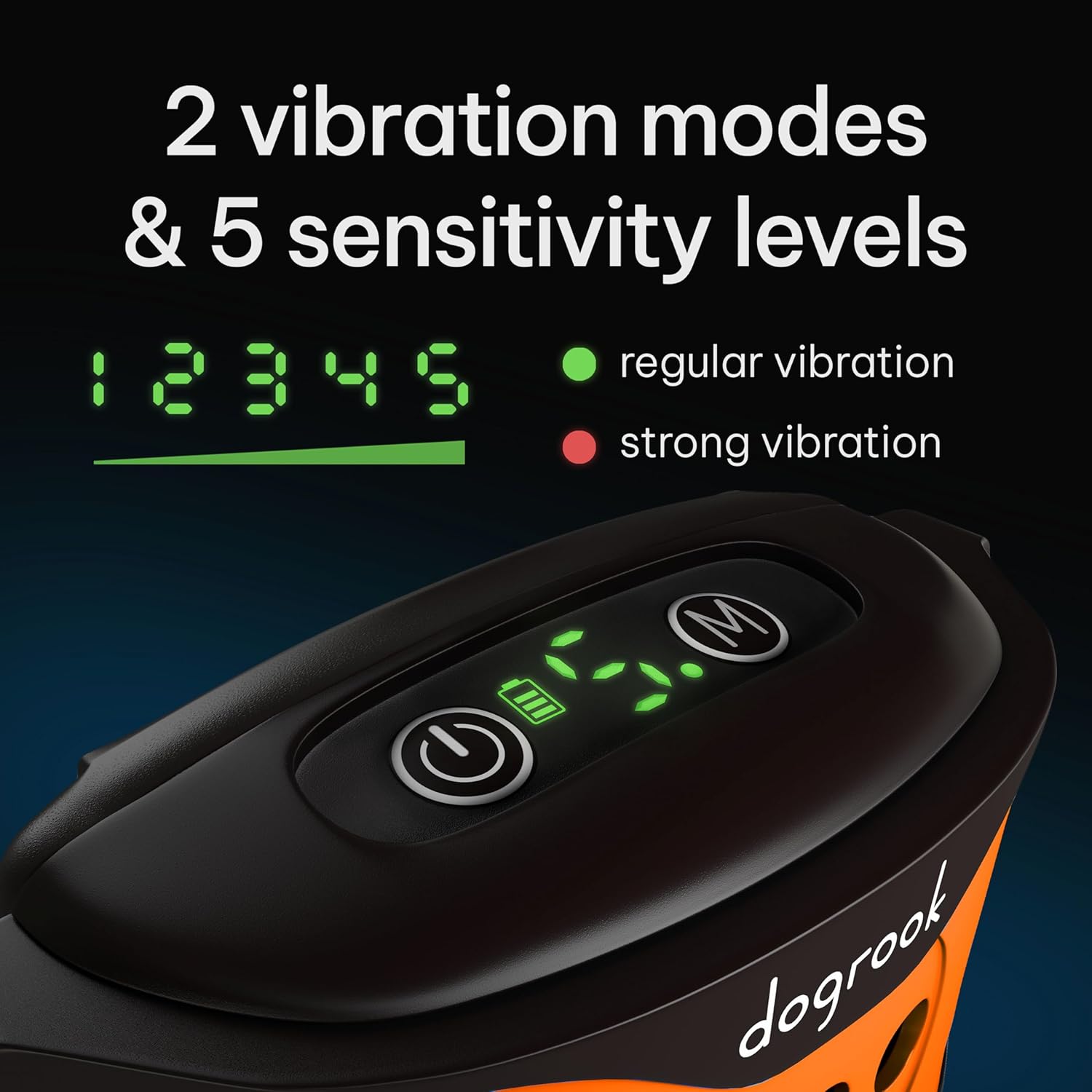
Figure 5: The collar offers 2 vibration modes and 5 sensitivity levels for customized training.
3. Vibration Modes and Sound Progression
The collar combines sound and vibration to provide progressive feedback. There are two main vibration modes: Regular Vibration and Strong Vibration.
- When your dog barks, the collar will first emit a beep sound.
- If barking continues, the vibration intensity and sound stages will progressively increase through 7 stages.
- The system resets to the first stage if your dog stops barking for 1 minute.
This progressive approach helps your dog associate their barking with the collar's feedback, encouraging them to reduce excessive noise.
Maintenance
1. Cleaning
To maintain the collar's performance and hygiene, clean it regularly. Use a soft, damp cloth to wipe down the unit and strap. Do not use harsh chemicals or abrasive cleaners.
2. Waterproofing
The DogRook Bark Collar is IP67 waterproof, making it resistant to rain, snow, and splashes. This allows for both indoor and outdoor use. However, it is not recommended for prolonged submersion in water (e.g., swimming).

Figure 6: The collar is IP67 waterproof for versatile indoor and outdoor use.
3. Storage
When not in use for extended periods, store the collar in a cool, dry place. Ensure it is fully charged before storing to preserve battery health.
Troubleshooting
| Problem | Possible Cause | Solution |
|---|---|---|
| Collar not activating when dog barks. | Low battery; incorrect sensitivity level; improper fit. | Charge the collar; increase sensitivity level; adjust collar fit to ensure proper contact. |
| Collar activating without dog barking (false triggers). | Too high sensitivity level; external loud noises. | Decrease sensitivity level; ensure collar is not exposed to excessive external noise. |
| Dog still barking excessively. | Dog has adapted to current settings; underlying behavioral issues. | Try a different vibration mode or adjust sensitivity; consult a professional dog trainer for persistent issues. |
| Collar not charging. | Faulty cable or adapter; charging port issue. | Try a different USB cable or power source; contact customer support if the issue persists. |
Specifications
| Feature | Detail |
|---|---|
| Brand | DogRook |
| Model Name | Orange |
| Color | Orange |
| Size | Adjustable, 8-110 lbs |
| Material | Plastic |
| Item Weight | 5 ounces |
| Product Dimensions (LxWxH) | 2.8 x 1 x 0.04 inches |
| Battery Type | 1 Lithium Ion battery (included) |
| Battery Life | Up to 14 days |
| Waterproof Rating | IP67 |
| Sensitivity Levels | 5 |
| Vibration Modes | 2 (Regular, Strong) |
| Sound Stages | 7 progressive stages |
| Included Components | User manual, prong covers, USB cable |
Warranty and Support
For warranty information or technical support, please refer to the contact details provided on the product packaging or visit the official DogRook website. Keep your purchase receipt as proof of purchase.
You can also visit the DogRook Store on Amazon for more information and products.
Ask a question about this manual
Ask about setup, troubleshooting, compatibility, parts, safety, or missing instructions. Manuals+ will review the question and use this page’s manual context to help answer it.