
1. Introduction
This manual provides essential instructions for the installation, operation, and maintenance of your Cooler Depot SD1.9L3 Commercial Glass Door Freezer. This 52 cubic foot upright reach-in display merchandiser is designed for commercial use, maintaining temperatures between -10°F and 0°F, making it suitable for storing and displaying frozen food products. Please read this manual thoroughly before operating the unit to ensure safe and efficient performance.

Figure 1: Front view of the Cooler Depot SD1.9L3 Commercial Glass Door Freezer.
2. Safety Information
Always adhere to the following safety precautions to prevent injury or damage to the unit. This appliance uses R290 flammable refrigerant. Service should only be performed by trained and authorized personnel.
- Electrical Safety: Ensure the unit is connected to a properly grounded 115V/60Hz electrical outlet with a dedicated circuit. Do not use extension cords.
- Flammable Refrigerant: This unit contains R290 (Propane) refrigerant. Do not puncture the refrigerant tubing. Keep ventilation openings clear of obstruction.
- Ventilation: Maintain adequate clearance around the unit for proper airflow to the condenser.
- Installation: Install the unit on a level, sturdy surface capable of supporting its weight (approximately 500 lbs empty).
- Cleaning: Disconnect power before cleaning or performing maintenance.
- Repairs: All repairs and servicing must be performed by qualified service technicians.

Figure 2: Controls and internal warning label indicating the use of flammable refrigerant.
3. Setup
3.1 Unpacking
Carefully remove all packaging materials, including any protective films or tapes from the interior and exterior surfaces. Inspect the unit for any shipping damage. Report any damage to your carrier immediately.
3.2 Placement
Place the freezer on a firm, level surface. Ensure there is adequate space around the unit for proper ventilation. Avoid direct sunlight or proximity to heat-generating equipment.
3.3 Leveling
The unit is equipped with heavy-duty casters for easy movement. Use the leveling feet on the casters to ensure the unit is stable and level. A level unit ensures proper door sealing and efficient operation.
3.4 Electrical Connection
Connect the freezer to a dedicated 115V/60Hz, 20.5A electrical outlet. The unit requires a NEMA 5-20P plug configuration. Consult a qualified electrician if you are unsure about your electrical supply.
3.5 Shelf Installation
Install the 12 provided shelves into the interior shelf brackets. Ensure shelves are securely seated and evenly distributed to support product weight. The interior features an attractive aluminum liner with a stainless steel floor and rounded corners for easy cleaning.

Figure 3: Interior of the freezer with adjustable shelves.
Video 1: Overview of the Cooler Depot 3-door display freezer, demonstrating interior access and shelf setup.
4. Operating Instructions
4.1 Power On/Off
Locate the red 'Power Switch' on the control panel (refer to Figure 2). Flip the switch to the 'ON' position to power on the unit. Flip to 'OFF' to power down.
4.2 Temperature Control
The freezer is equipped with an electronic control system (Dixell controller, see Figure 2) for precise temperature management. The factory preset temperature range is -10°F to 0°F. To adjust the temperature set point, refer to the specific instructions provided with the Dixell controller or contact customer support.
4.3 LED Lighting
The interior LED lighting can be controlled by the green 'Light Switch' on the control panel (refer to Figure 2). Turn the switch 'ON' for illumination and 'OFF' to conserve energy.

Figure 4: Interior LED lighting for product visibility.
4.4 Loading Products
Load products evenly on the shelves. Do not block the internal air vents, as this can impede airflow and reduce cooling efficiency. The triple-pane thermal insulated glass doors provide excellent insulation while allowing product visibility.
5. Maintenance
5.1 Cleaning the Interior
Regularly clean the aluminum interior and stainless steel floor with a mild detergent and warm water. The rounded corners design facilitates easy cleaning. Rinse thoroughly and dry completely to prevent odors and maintain hygiene.
5.2 Cleaning the Exterior
Wipe down the coated steel exterior with a soft cloth and mild cleaner. Avoid abrasive cleaners that could damage the finish.
5.3 Condenser Coil Cleaning
The bottom-mounted condenser unit features an easily accessible condenser coil. Regularly clean the coil to ensure optimal cooling performance and energy efficiency. Dust and debris buildup can significantly reduce the unit's effectiveness. Disconnect power before cleaning.
5.4 Manual Defrost
This unit features a manual defrost system. When ice buildup becomes excessive (approximately 1/4 inch thick), initiate a manual defrost cycle. Remove all products, turn off the unit, and allow the ice to melt naturally. Do not use sharp objects to remove ice. Clean and dry the interior thoroughly after defrosting before restarting the unit.
5.5 Door Gaskets
Inspect door gaskets regularly for cracks or tears. Clean them with warm, soapy water to maintain a tight seal, which is crucial for energy efficiency and temperature retention.
6. Troubleshooting
The electronic control system can display error codes to assist in diagnosing service issues. Refer to the Dixell controller manual for a list of error codes and their meanings. For common issues, consider the following:
- Unit Not Cooling: Check power supply, ensure the power switch is ON, verify temperature settings, and clean the condenser coil.
- Excessive Noise: Check for loose components, ensure the unit is level, and inspect fan blades for obstructions.
- Light Not Working: Check the light switch, ensure the unit has power, and inspect the LED light strip for damage.
- Ice Buildup: Ensure doors are sealing properly, check for excessive humidity in the environment, and perform manual defrost as needed.
If problems persist, contact Cooler Depot customer support or a qualified service technician.
7. Specifications
Below are the technical specifications for the Cooler Depot SD1.9L3 Commercial Glass Door Freezer.
| Feature | Specification |
|---|---|
| Model | SD1.9L3 |
| Overall Dimensions (L x D x H) | 80" x 31" x 81" (203.2 cm x 78.7 cm x 205.7 cm) |
| Capacity | 52 Cubic Feet |
| Voltage | 115V / 60Hz |
| Amperage | 20.5 Amps |
| Wattage | 1500 Watts |
| Temperature Range | -10°F to 0°F (-23°C to -18°C) |
| Refrigerant | R290 |
| Number of Doors | 3 (Glass) |
| Number of Shelves | 12 |
| Exterior Material | Coated Steel |
| Interior Material | Aluminum Liner with Stainless Steel Floor |
| Net Weight | 500 lbs (227 kg) |
| NEMA Plug Configuration | 5-20P |
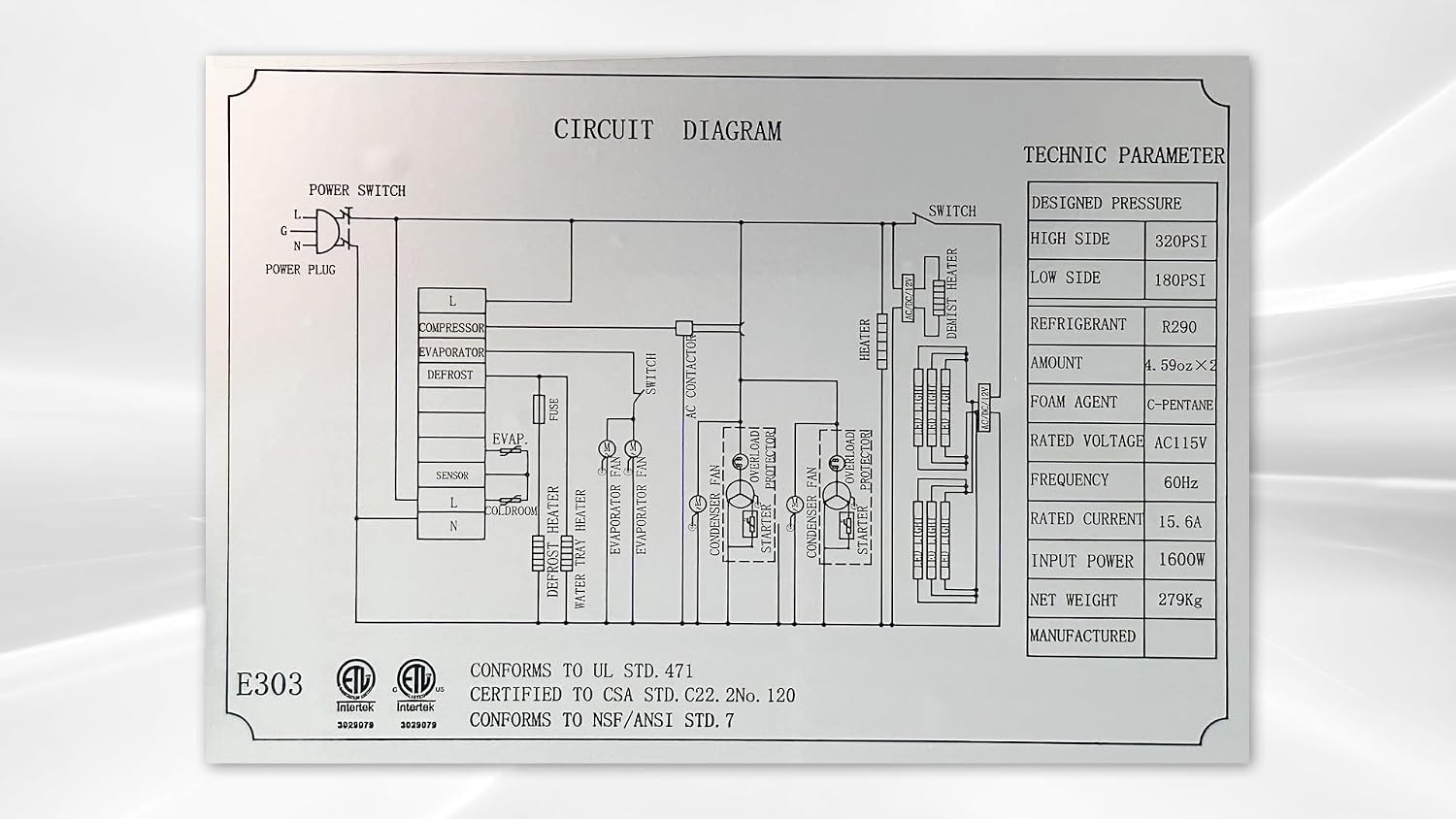
Figure 5: Circuit diagram and technical parameters, including refrigerant type.
8. Warranty and Support
8.1 Warranty Information
Cooler Depot provides the following warranty for this product:
- 3 Years All-Parts Warranty: Covers all parts for a period of three years from the date of purchase.
- 6 Years Compressor Warranty: Covers the compressor for a period of six years from the date of purchase.
- 1 Year Labor Warranty: Covers labor costs for repairs for one year from the date of purchase.
For functional failures within one month of the delivery date, a full refund may be applied for. Please retain the original pallet, as returns cannot be processed without the product being bound to the pallet and wrapped.
8.2 Customer Support
For technical assistance, warranty claims, or general inquiries, please contact Cooler Depot customer support:
- Manufacturer: HONEY MANAGEMENT GROUP INC.
- Address: 14923 PROCTOR AVE, CITY OF INDUSTRY, CA 91746
- Email: coolerdepotservice@gmail.com
- Phone: (626)336-0436, (626)333-8233, (626)800-8537, (626)827-6793, (626)771-5174, (626)800-8109, (626)506-1381, (626)800-7215, (626)665-1926


