1. Introduction
Thank you for choosing Sony WF-XB700/L Truly Wireless Headphones. These headphones are designed to provide a high-quality audio experience with the freedom of a truly wireless design and enhanced bass. This manual provides essential information for the proper setup, operation, and maintenance of your device.
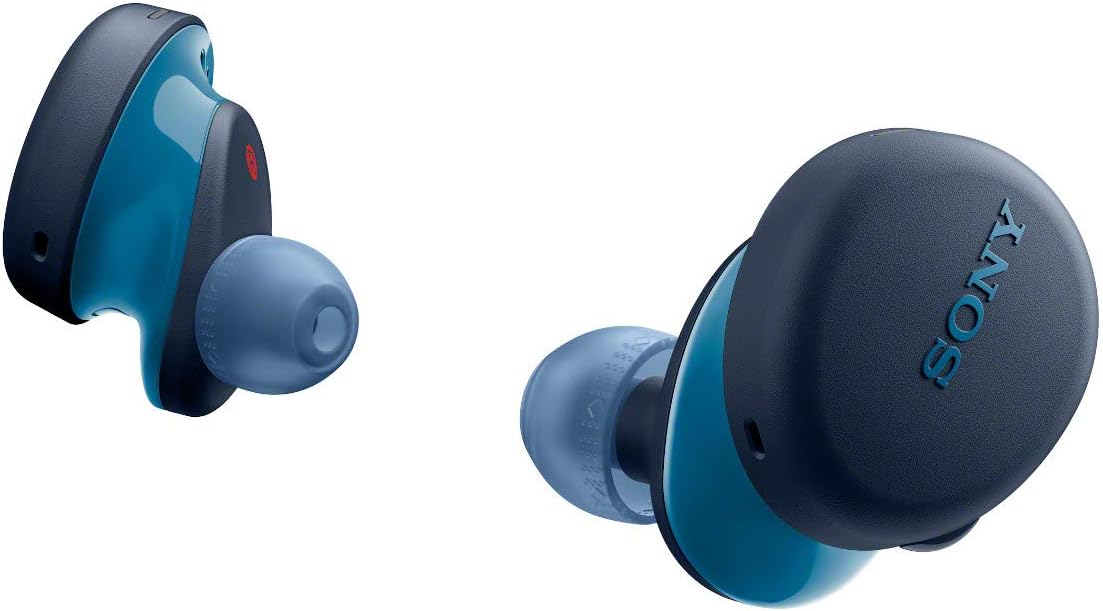
Image: Sony WF-XB700/L Truly Wireless Headphones, showcasing the design of both earbuds.
2. What's in the Box
- Sony WF-XB700/L Truly Wireless Headphones (Left and Right earbuds)
- Charging Case
- USB Type-C Cable for charging
- Multiple sizes of Hybrid Silicone Rubber Earbuds (SS, S, M, L)
3. Setup
3.1 Charging the Headphones and Charging Case
Before initial use, fully charge the headphones and the charging case. The charging case provides additional battery life for the earbuds.
- Place the left and right headphones into the charging case. Ensure they are seated correctly.
- Connect the charging case to a USB power source using the supplied USB Type-C cable.
- The indicator lights on the charging case will illuminate during charging. Once fully charged, the lights will turn off.

Image: The charging case for the Sony WF-XB700/L headphones, showing the indicator lights.
3.2 Bluetooth Pairing
To connect your headphones to a device (e.g., smartphone, tablet), follow these steps:
- Ensure the headphones are in the charging case.
- Open the lid of the charging case. The headphones will automatically enter pairing mode. The indicator lights on the earbuds will flash blue.
- On your device, enable Bluetooth and search for available devices.
- Select "WF-XB700" from the list of detected devices.
- Once connected, the indicator lights on the earbuds will stop flashing.
Note: If pairing issues occur, ensure the headphones are fully charged and try rebooting your device before attempting to pair again.
4. Operating the Headphones
4.1 Wearing the Headphones
For optimal sound quality and comfort, select the earbud tips that best fit your ears. Gently insert the earbuds into your ears and twist them slightly to secure them.

Image: A person wearing a Sony WF-XB700/L earbud, demonstrating proper fit.
4.2 Basic Controls
The WF-XB700/L headphones feature physical buttons for control:
- Play/Pause: Press the button on either earbud once.
- Next Track: Press the button on the right earbud twice.
- Previous Track: Press the button on the right earbud three times.
- Volume Up: Press the button on the left earbud twice.
- Volume Down: Press the button on the left earbud three times.
- Answer/End Call: Press the button on either earbud once during an incoming call.
- Reject Call: Press and hold the button on either earbud for approximately 2 seconds during an incoming call.
- Activate Voice Assistant: Press and hold the button on either earbud for approximately 2 seconds (when not on a call).
4.3 Water Resistance (IPX4)
The headphones have an IPX4 water resistance rating, meaning they are protected against splashing water from any direction. This makes them suitable for use during light rain or sweaty workouts. However, they are not designed for submersion in water or exposure to heavy water streams.
5. Maintenance
5.1 Cleaning
Regular cleaning helps maintain the performance and hygiene of your headphones:
- Wipe the earbuds and charging case with a soft, dry cloth.
- Remove earbud tips and clean them with a mild detergent solution if necessary, then rinse thoroughly and dry completely before reattaching.
- Gently clean the mesh and sound outlets of the earbuds with a dry cotton swab to remove any earwax or debris.
Caution: Do not use abrasive cleaners, alcohol, or solvents. Ensure no moisture enters the charging port or speaker openings.
6. Troubleshooting
- No Sound/Low Volume: Ensure headphones are properly paired and connected. Check volume levels on both the headphones and the connected device.
- Cannot Pair: Ensure Bluetooth is enabled on your device and the headphones are in pairing mode. Try turning Bluetooth off and on, or restarting your device.
- Intermittent Connection: Move closer to your connected device. Avoid obstacles between the headphones and the device. Ensure no other strong wireless signals are interfering.
- Microphone Issues (Callers cannot hear you): Ensure the microphone is not obstructed. For optimal call quality, use the headphones in a quiet environment.
- Battery Drains Quickly: Ensure headphones and case are fully charged. Battery life can vary based on usage and volume levels.
If issues persist, refer to the official Sony support website for further assistance.
7. Specifications
| Feature | Specification |
|---|---|
| Model Name | WF-XB700/L |
| Connectivity Technology | Wireless (Bluetooth) |
| Wireless Communication Technology | Bluetooth |
| Battery Life (Headphones) | Up to 9 hours |
| Total Battery Life (with Charging Case) | Up to 18 hours |
| Charging Time | Approx. 2.5 hours (headphones), Approx. 3 hours (charging case) |
| Water Resistance Level | IPX4 (Splash-proof) |
| Weight | Approx. 8g x 2 (earbuds), Approx. 46g (charging case) |
| Compatible Devices | Smartphones, Tablets, Laptops, Desktops, Smart Speakers |
| Material | Hybrid silicone rubber |
| Control Type | Media Control (Physical Buttons) |
8. Warranty and Support
Sony provides a limited warranty for its products. For detailed warranty information, product registration, and technical support, please visit the official Sony support website or contact your local Sony customer service center. Keep your proof of purchase for warranty claims.
For the most up-to-date information and support resources, please visit: www.sony.com/electronics/support


