
Introduction
The Sony WF-XB700 EXTRA BASS True Wireless Earbuds are designed to provide deep, punchy sound with total freedom thanks to Bluetooth wireless technology. This manual provides essential information for setting up, operating, and maintaining your earbuds.

Image: Sony WF-XB700 EXTRA BASS True Wireless Earbuds and their charging case.
Key Features:
- Truly wireless design with BLUETOOTH wireless technology for total freedom.
- EXTRA BASS for deep, punchy sound.
- Up to 9 hours battery life, total 18 hours with charging case.
- Easy and clear hands-free calling.
- IPX4 water resistance against rain and sweat.
- Ergonomic Tri-hold structure for a secure, comfortable fit.
- Quickly access your smartphone’s voice assistant with a quick touch.
Setup
Wearing the Earbuds:
The WF-XB700 earbuds feature an Ergonomic Tri-hold structure designed for a secure and comfortable fit. It is important to ensure the earbud tips match the size of your ear canals for optimal sound quality and call performance. If the fit is not snug, try changing the earbud tips to a different size provided.
Video: Demonstrates the correct way to wear the Sony WF-XB700 earbuds for a secure fit.

Image: A person inserting a Sony WF-XB700 earbud into their ear, demonstrating the ergonomic fit.
Pairing:
To pair the earbuds with your device, ensure Bluetooth is enabled on your smartphone or other compatible device. The earbuds will automatically enter pairing mode when removed from the charging case for the first time or when the pairing button is held. Follow the on-screen instructions on your device to complete the pairing process.
Operating
Controls:
The WF-XB700 earbuds feature physical buttons on each earbud for control. These buttons allow you to manage playback, calls, and voice assistant functions. Refer to your device's manual for specific button press combinations for various functions.
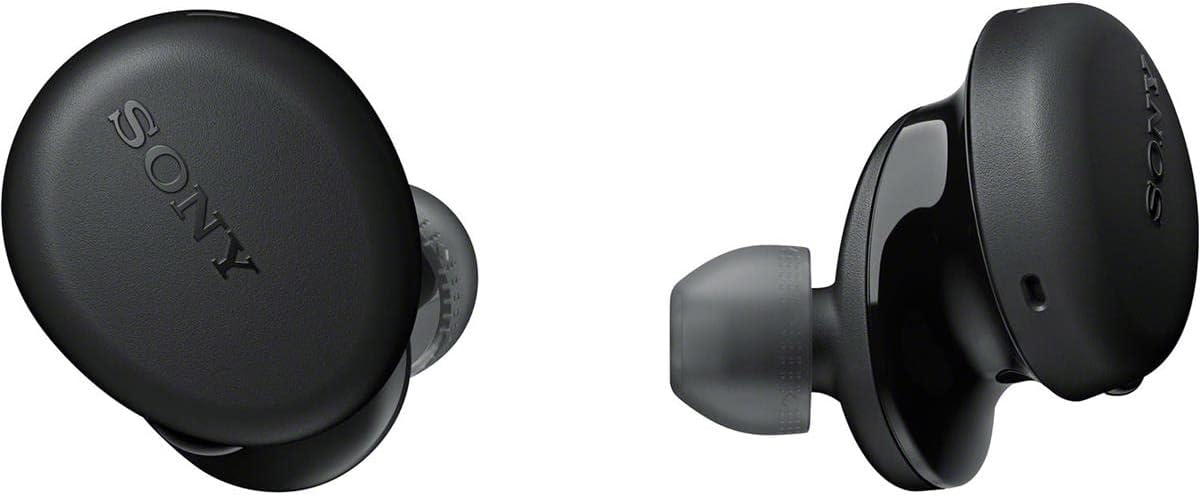
Image: Side view of the Sony WF-XB700 earbuds, highlighting the physical control buttons.
A simple button press connects you to your smartphone's voice assistant to get directions, play music, and communicate with contacts. The earbuds do not support a companion app for custom EQ settings or advanced controls; any sound adjustments must be made through your music player's settings.
Battery Life & Charging:
The earbuds provide up to 9 hours of battery life on a single charge. The charging case offers an additional 9 hours, extending the total playback time to 18 hours. The charging case is equipped with a USB Type-C port for charging.

Image: The Sony WF-XB700 charging case with earbuds, illustrating the battery life of up to 9 hours per charge and 18 hours total with the case.
Quick charging is supported; a 10-minute charge can provide up to 60 minutes of playback. The charging case itself takes approximately 2.5 hours to fully charge from empty.
Connectivity:
The earbuds utilize Bluetooth wireless technology (Bluetooth Version 1) with a range of up to 10 meters (30 feet). This allows for stable connection to your compatible devices.
Maintenance
Water Resistance:
The WF-XB700 earbuds are rated IPX4 for water resistance, meaning they are protected against splashes of water from any direction. This makes them suitable for everyday use, including light rain and protection against sweat during workouts. However, the charging case is not water resistant, and the earbuds should not be submerged in water.

Image: Sony WF-XB700 earbuds with water droplets, highlighting their IPX4 water resistance for everyday use.
Troubleshooting
Common Issues:
- Earbud Fit: If sound quality or call performance is not optimal, ensure the earbud tips fit snugly in your ears. Try different sizes of hybrid silicone rubber ear tips provided.
- Earbuds Wiggling Loose: While designed for a secure fit, aggressive head movements during intense activities may cause earbuds to loosen. They are rated IPX4 for sweat resistance, but may not be ideal for very high-impact workouts.
- No Automatic Pause: These earbuds do not feature an automatic pause function when removed from the ear. You will need to manually pause your media using the physical buttons on the earbuds or your connected device.
- No App Controls: The WF-XB700 does not support a dedicated Sony app for custom equalizer settings. Any sound adjustments must be made via your music player or device settings.
- Pairing Issues: If the earbuds unpair or fail to connect, ensure they are in pairing mode (indicated by a flashing blue light) and your device's Bluetooth is active. Hold the button on the earbud to re-enter pairing mode if necessary.
Specifications
| Feature | Specification |
|---|---|
| Model Name | WF-XB700 |
| Connectivity Technology | Bluetooth |
| Wireless Communication Technology | Bluetooth |
| Bluetooth Version | 1 |
| Bluetooth Range | 10 Meters |
| Battery Life (Earbuds) | 9 Hours |
| Total Battery Life (with Case) | 18 Hours |
| Charging Time (Case) | 2.5 Hours |
| Quick Charge | 10 min charge for 60 min play |
| Water Resistance Level | IPX4 (Water Resistant) |
| Noise Control | None |
| Control Method | Physical Buttons, Voice Control |
| Audio Driver Type | Dynamic Driver |
| Audio Driver Size | 30 Millimeters |
| Audio Latency | 20 Milliseconds |
| Material | Hybrid Silicone Rubber |
| Item Weight | 1.6 Ounces |
| Product Dimensions | 4.3 x 2.36 x 5.71 inches |
What's in the Box
The Sony WF-XB700 earbuds come with the following items:
- Sony WF-XB700 True Wireless Earbuds
- Charging Case
- USB Type-C Cable (USB-A to USB-C) (approx. 20 cm)
- Hybrid Silicone Rubber Ear Tips (various sizes)
Warranty and Support
For warranty information and customer support, please refer to the documentation included in your product packaging or visit the official Sony support website.