
Introduction
This manual provides essential information for the proper installation, operation, and maintenance of your RecPro RV 4 Chamber Water Pump. Please read these instructions thoroughly before use to ensure safe and efficient performance.
The RecPro RV 4 Chamber Water Pump is designed for reliable and quiet water delivery in recreational vehicles. It features a self-priming mechanism, low power draw, and corrosion-resistant components, ensuring long-lasting performance.
Product Features
- Quiet Operation: Engineered for reduced noise during use, providing a more comfortable RV experience.
- Self-Priming: Capable of drawing water from a tank without external priming.
- Low Power Draw: Efficient design minimizes energy consumption, preserving battery life.
- Durable Construction: Features corrosion-resistant valves and a Santoprene diaphragm for extended lifespan.
- Run Dry Capability: Designed to operate without damage even if the water supply temporarily runs out.
- Integrated Strainer and Silencer: Enhances pump protection and reduces noise.
Safety Information
Always disconnect power before installing or servicing the pump. Ensure all electrical connections are secure and properly insulated. Do not pump flammable liquids. This pump is designed for intermittent use in RV freshwater systems.
Setup and Installation
Proper installation is crucial for the optimal performance and longevity of your water pump. Follow these steps carefully:
- Mounting Location: Choose a dry, well-ventilated location as close to the water tank as possible. The pump should be mounted on a solid surface to minimize vibration and noise. Ensure there is adequate space for maintenance and hose connections.
- Mounting the Pump: Secure the pump using appropriate fasteners through the mounting holes on the base. Refer to the diagram below for mounting hole measurements.
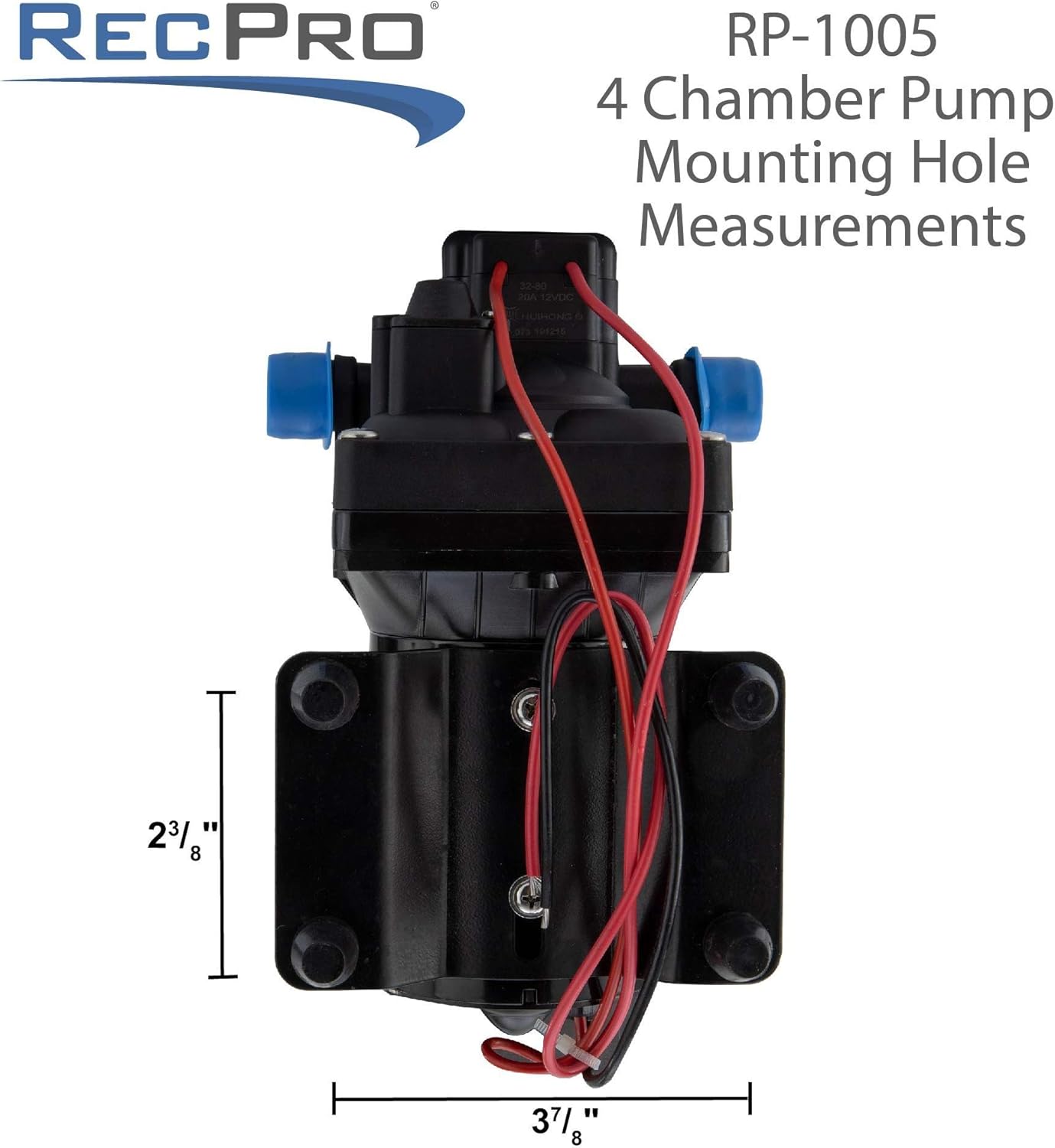
Image: RecPro RP-1005 4 Chamber Pump with mounting hole dimensions. The image shows the pump from a top-down perspective, highlighting the base with four mounting holes. Dimensions are indicated: 2 3/8 inches vertically between holes and 3 7/8 inches horizontally between holes.
- Plumbing Connections:
- Connect the inlet port (marked with an arrow pointing towards the pump) to your freshwater tank.
- Connect the outlet port (marked with an arrow pointing away from the pump) to your RV's water distribution system.
- Ensure all connections are tight to prevent leaks. Use thread sealant or Teflon tape on threaded fittings if necessary.
- This model includes a strainer and silencer. Install the strainer on the inlet side to protect the pump from debris. The silencer should be installed in line with the water flow to reduce noise.

Image: The RecPro RV 4 Chamber Water Pump shown with its included strainer and silencer components. The main pump unit is black with blue caps on the ports, and separate blue hoses, a small threaded connector, and a clear strainer with a black elbow are visible.
- Electrical Connections:
- The pump operates on 12V DC. Connect the red wire to the positive (+) terminal of your 12V power source and the black wire to the negative (-) terminal.
- It is recommended to install an inline fuse (not included) appropriate for the pump's amperage (8.0AMP max) to protect the circuit.
- Ensure all electrical connections are clean, tight, and protected from moisture.

Image: A close-up of the RecPro Water Pressure Pump's label, displaying key specifications such as Model: RP-1005, Open Flow: 11.3LPM/3.0GPM, Volts: 12V, Amps: 3.5A, Max Amps: 7.5A, Max Lift: 55PSI/3.8Bar. It also states "DO NOT PUMP FLAMMABLE LIQUIDS" and notes "Thermal Overload, Automatic Restart".
Operating Instructions
- Initial Priming: Before first use, ensure the water tank has sufficient water. Open a faucet in your RV to allow air to escape the system. Turn on the pump. The pump will self-prime, and water should begin flowing steadily from the faucet. Once water flows consistently, close the faucet. The pump should shut off automatically once pressure is built.
- Normal Operation: The pump is designed to operate on demand. When a faucet is opened, the pressure drops, and the pump will automatically turn on. When the faucet is closed, the pressure builds, and the pump will turn off.
- Intermittent Use: This pump is intended for intermittent use, typical for RV water systems. Avoid continuous running for extended periods.
Maintenance
Regular maintenance ensures the longevity and efficiency of your water pump.
- Strainer Cleaning: Periodically inspect and clean the inlet strainer to prevent debris from entering the pump. Turn off the pump and relieve system pressure before removing the strainer for cleaning.
- Winterization: Before freezing temperatures, drain all water from the pump and plumbing system to prevent damage. You can use compressed air or RV antifreeze.
- Leak Inspection: Regularly check all plumbing connections for leaks. Tighten connections as needed.
- Electrical Check: Ensure electrical connections remain clean and tight.
Troubleshooting
| Problem | Possible Cause | Solution |
|---|---|---|
| Pump runs but no water flows. |
|
|
| Pump cycles on and off rapidly. |
|
|
| Pump does not turn on. |
|
|
| Excessive noise or vibration. |
|
|
Specifications
| Attribute | Value |
|---|---|
| Model Number | RP-1005 |
| Brand | RecPro |
| Voltage | 12 Volts DC |
| Maximum Amperage | 8.0 AMP |
| Maximum Flow Rate | 3 Gallons Per Minute (GPM) / 11.3 Liters Per Minute (LPM) |
| Maximum Pressure | 45 PSI / 3.8 Bar |
| Maximum Lifting Height | 6 Feet |
| Item Weight | 5.63 Pounds |
| Package Dimensions | 12 x 12 x 8 inches |
| Power Source | Corded Electric |
| Style | Diaphragm |
| UPC | 193652035015 |
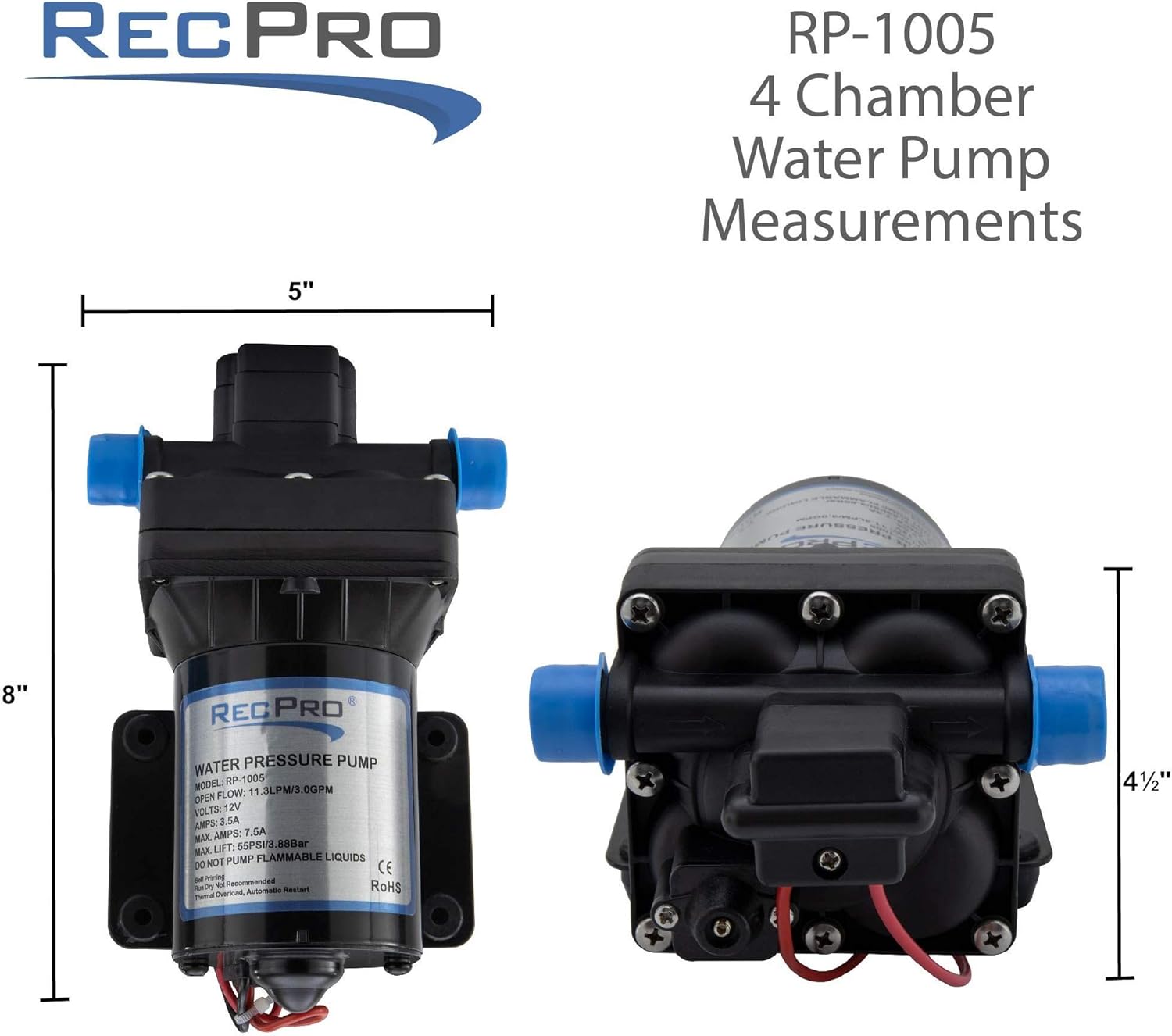
Image: Diagram showing the overall dimensions of the RecPro RP-1005 4 Chamber Water Pump. The pump is shown from the front and side, indicating a height of 8 inches, a width of 5 inches, and a depth of 4 1/2 inches.
Warranty and Support
RecPro products are designed for quality and durability. For warranty information or technical support, please contact RecPro directly. Refer to your purchase documentation or the official RecPro website for the most current warranty terms and contact details.
Manufacturer: RecPro
Website: Visit the RecPro Store on Amazon
First Available Date: March 12, 2020