
1. Product Overview
The AIOMEST AI-100 Digital Anemometer is a handheld device designed for accurately measuring wind speed and air temperature. It features an 8-leaf wind wheel for sensitive measurements, a dual wind chill sensor, and a clear LCD display with backlight. This instrument is suitable for various applications including home use, field measurements, HVAC installation, CFM calculation, and duct vent maintenance.

Figure 1: Front view of the AIOMEST AI-100 Digital Anemometer, showing the display and control buttons.
2. Package Contents
Upon opening the package, ensure all the following items are present:
- AIOMEST AI-100 Digital Anemometer
- Carrying Case
- Wrist Strap
- User Manual
- AAA Batteries (2x)

Figure 2: Contents of the AIOMEST AI-100 Anemometer package, including the device, carrying case, and manual.
3. Setup
3.1 Battery Installation
- Locate the battery compartment on the back of the anemometer.
- Using a small screwdriver, remove the screw securing the battery cover.
- Insert two AAA batteries, ensuring correct polarity (+/-).
- Replace the battery cover and secure it with the screw.
Video 1: Demonstrates the process of installing batteries into the AIOMEST AI-100 Digital Anemometer and attaching the wrist strap.
3.2 Attaching the Wrist Strap
Attach the provided wrist strap to the designated loop on the anemometer for secure handling during use.
4. Operating Instructions
4.1 Power On/Off
- Press the red power button to turn the device on. The symbol "①" will blink for 1 second on the display.
- The device features an auto-off function to conserve battery power.
- To manually turn off, press and hold the red power button.
4.2 Unit Selection
Press the UNIT button to cycle through the available wind speed units: m/s, km/h, ft/min, knots, and Mph. The selected unit will be displayed on the LCD.
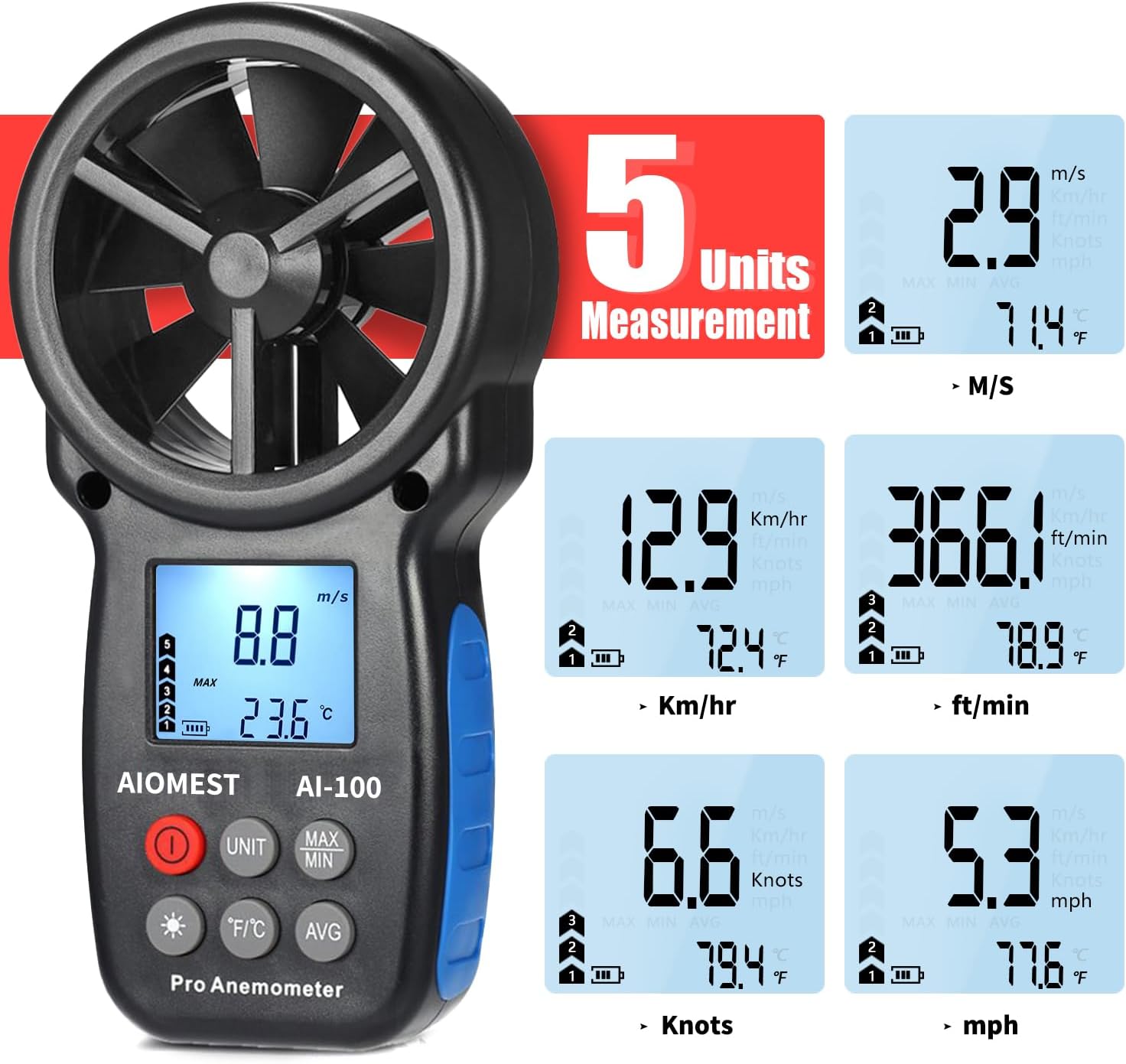
Figure 3: The anemometer display showing different measurement units for wind speed and temperature.
4.3 Temperature Unit Selection
Press the °F/°C button to switch between Celsius and Fahrenheit temperature units.
4.4 Measurement Modes (MAX/MIN/AVG)
Press the MAX/MIN button to display the maximum or minimum wind speed recorded. Press the AVG button to view the average wind speed.
4.5 Backlight Function
Press the light bulb button to turn the LCD backlight on or off. The backlight will automatically turn off after 15 seconds of inactivity to save power.
4.6 Wind Chill Indication
When the wind speed and temperature are measured, if the temperature falls below 0°C (32°F), a wind chill symbol will appear on the LCD.
4.7 Continuous Measurement
The AI-100 features a built-in 1/4" screw hole at the bottom, allowing it to be mounted on a tripod for continuous, hands-free wind monitoring. This is particularly useful for outdoor applications or long-term data collection.

Figure 4: The anemometer shown mounted on a tripod, demonstrating its continuous measurement capability.
5. Maintenance
- Keep the device clean and dry. Wipe with a soft, damp cloth if necessary. Do not use abrasive cleaners or solvents.
- Store the anemometer in its protective carrying case when not in use to prevent damage.
- If the device will not be used for an extended period, remove the batteries to prevent leakage.
- Ensure the wind impeller is free from obstructions for accurate readings.
6. Troubleshooting
- Device does not power on: Check if the batteries are installed correctly with the right polarity. Replace with fresh AAA batteries if necessary.
- Inaccurate readings: Ensure the anemometer's wind wheel is unobstructed and facing the wind direction correctly. Calibrate the device if you suspect consistent inaccuracies (refer to professional calibration services if needed).
- Temperature readings seem off: While the device provides temperature measurements, minor variations compared to other thermometers can occur. For critical temperature measurements, consider using a dedicated thermometer.
7. Specifications
| Feature | Specification |
|---|---|
| Brand | AIOMEST |
| Model | AI-100 (AN-100) |
| Material | Plastic |
| Dimensions (L x W x H) | 6.49 x 3.34 x 1.49 inches (165 x 85 x 38 mm) |
| Item Weight | 4.6 ounces (130g) |
| Wind Speed Range | 1~65 Mph (0.3~30 m/s) |
| Wind Speed Accuracy | ±5% |
| Temperature Range | -10°C to 45°C (14°F to 113°F) |
| Temperature Accuracy | ±2°C (±3.6°F) |
| Battery Type | 2 x AAA 1.5V |
| Operating Temperature | -10°C to 45°C (14°F to 113°F) |
| Relative Humidity | <90% RH |
| Storage Temperature | -40°C to 60°C (-40°F to 140°F) |
| Thread Type | 1/4-20 |
8. Warranty and Support
AIOMEST provides a 12-month product warranty from the date of purchase. Additionally, lifetime technical support is available for this product. For warranty claims or technical assistance, please contact AIOMEST customer service through the official website or your retailer.


