
Introduction
Welcome to the user manual for your SNDWAY SW-T60 Digital Laser Rangefinder. This device is designed for precise and efficient measurement of distances, areas, and volumes. Please read this manual carefully before using the device to ensure safe and optimal operation and to understand all features.
Safety Information
Laser Safety
The SNDWAY SW-T60 emits a Class II laser. Observe the following precautions:
- Do not stare directly into the laser beam.
- Do not aim the laser beam at people or animals.
- Avoid direct eye exposure.
- Do not disassemble or modify the device.
General Safety
- Keep the device out of reach of children.
- Do not use the device in explosive environments.
- Protect the device from moisture and direct sunlight.
- Use only specified batteries (2 x 1.5V AAA).
Product Overview
Device Components
The following image illustrates the main components of the SNDWAY SW-T60.

A front view of the SNDWAY SW-T60 Digital Laser Rangefinder, showing the display screen, "READ" button, and other function buttons. A bubble level is visible on the right side.

A close-up view highlighting the integrated bubble level on the side of the SNDWAY SW-T60, used for ensuring horizontal alignment during measurements.
Display Layout
The LCD provides various measurement readings and status indicators. Key elements include:
- Power Supply Indicator: Shows battery level.
- Record/Memory Indicator: Indicates data storage status.
- Laser On Indicator: Confirms laser is active.
- Maximum/Minimum Value Display: Shows highest and lowest values in continuous measurement.
- Length Measurement Display: For single distance measurements.
- Area, Volume, and Pythagorean Measurement Indicators: Icons for selected measurement modes.
- Continuous Measuring Indicator: Active during tracking mode.
- Major Display: The primary measurement result.
- Auxiliary Display: Secondary measurement results or previous values.
Keyboard Functions
The device features several buttons for different operations:
- READ: Activates the laser, initiates a measurement, or confirms a selection.
- +: Used for adding measurements.
- -: Used for subtracting measurements.
- Area/Volume/Pythagorean: Cycles through Area, Volume, and various Pythagorean measurement modes.
- Save/Memory: Saves current measurement data or recalls stored data.
- Reference Point/Unit Switch: Toggles the measurement reference point (front/rear edge) or switches between measurement units (m/in/ft).
- OFF/CLEAR: Turns off the device or clears the current measurement/selection.
Setup
Battery Installation
The SNDWAY SW-T60 requires two 1.5V AAA batteries for operation.
- Locate the battery compartment cover on the back of the device.
- Slide or open the cover to access the battery slots.
- Insert two AAA batteries, ensuring that the positive (+) and negative (-) terminals match the indicators inside the compartment.
- Close the battery compartment cover securely.
Operating Instructions
Turning On/Off
- To turn on the device, press the READ button.
- To turn off, press and hold the OFF/CLEAR button. The device will automatically shut off after 150 seconds of inactivity to conserve battery.
Basic Distance Measurement
- Press the READ button once to activate the laser.
- Aim the laser dot at the target point.
- Press the READ button again to take a measurement. The result will be displayed on the main screen.

The SNDWAY SW-T60 shown alongside a reflective plate. A reflective plate can be used to improve measurement accuracy and range, especially in bright conditions or on non-reflective surfaces.
Unit Switching
To switch between measurement units (meters, inches, feet), press the Reference Point/Unit Switch button briefly.
Reference Point Setting
The device can measure from the front or rear edge. Press and hold the Reference Point/Unit Switch button to toggle the reference point. An icon on the display will indicate the current reference point (e.g., an arrow pointing from the top or bottom of the device icon).
Continuous Measurement (Tracking)
This mode allows for dynamic measurement, displaying minimum and maximum distances as you move the device.
- From standby, press and hold the READ button.
- The device will continuously measure and display the current, minimum, and maximum distances.
- Press READ again to stop continuous measurement.
Area Measurement
To measure the area of a rectangular space:

A close-up of the device's display showing the icon for area measurement, which is a square.
- Press the Area/Volume/Pythagorean button once until the area icon (square) appears on the display.
- Measure the first side (length) by pressing READ.
- Measure the second side (width) by pressing READ.
- The device will automatically calculate and display the area.
Volume Measurement
To measure the volume of a space:

A close-up of the device's display showing the icon for volume measurement, which is a cube.
- Press the Area/Volume/Pythagorean button twice until the volume icon (cube) appears.
- Measure the length by pressing READ.
- Measure the width by pressing READ.
- Measure the height by pressing READ.
- The device will automatically calculate and display the volume.
Pythagorean Measurement
The device supports various Pythagorean modes for indirect measurements, useful for calculating heights or distances that cannot be measured directly.
A close-up of the device's display showing the icon for Pythagorean measurement, which is a triangle.
- Press the Area/Volume/Pythagorean button repeatedly until the desired Pythagorean mode icon appears (e.g., single Pythagorean for height, double Pythagorean for partial height).
- Follow the on-screen prompts to measure the required sides (e.g., hypotenuse, base).
- The device will calculate and display the unknown side.
Addition and Subtraction
To add or subtract measurements:
- Take the first measurement.
- Press the + button for addition or the - button for subtraction.
- Take the second measurement.
- The result will be displayed. You can continue adding or subtracting further measurements.
Data Storage and Recall
The device can store up to 30 sets of measurement data.
- After a measurement, press the Save/Memory button to save the result.
- To recall stored data, press and hold the Save/Memory button. Use the + and - buttons to navigate through stored records.
Maintenance
- Clean the device with a soft, damp cloth. Do not use abrasive cleaners or solvents.
- Ensure the laser lens is clean for accurate measurements.
- Remove batteries if the device will not be used for an extended period.
- Store the device in a dry, dust-free environment.
- The device has an IP54 rating, meaning it is protected against dust and splashing water, but it is not waterproof.
Troubleshooting
| Problem | Possible Cause | Solution |
|---|---|---|
| Device does not turn on | Low or dead batteries, incorrect battery polarity | Replace batteries, check polarity |
| Inaccurate measurements | Dirty laser lens, unstable measuring surface, target too reflective/dark | Clean lens, ensure stable position, use a reflective plate for difficult targets |
| Laser not visible | Bright ambient light | Use in lower light conditions, use a target plate |
| Error message on display | Measurement out of range, internal error | Re-measure within range, restart device |
If problems persist, please contact customer support for further assistance.
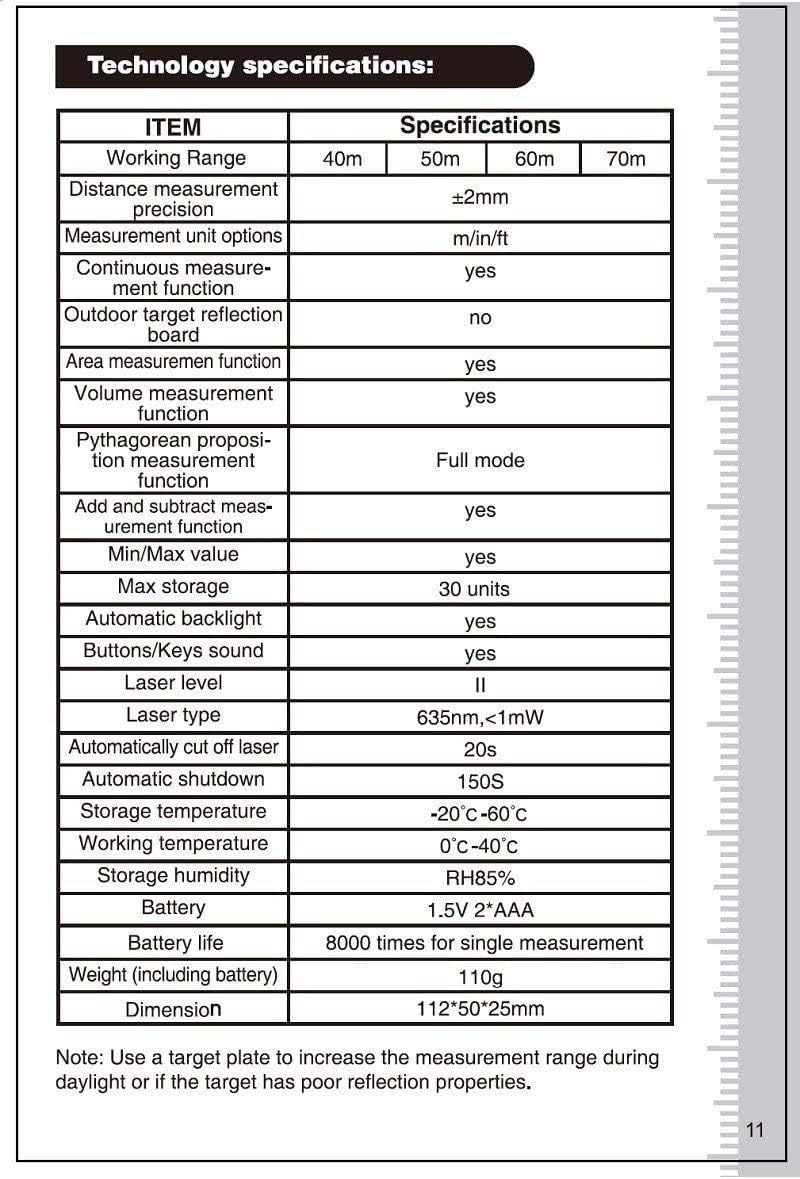
Specifications
| Item | Specification |
|---|---|
| Working Range | 0.05 - 60m |
| Distance Measurement Precision | ±2mm |
| Measurement Unit Options | m/in/ft |
| Continuous Measurement Function | Yes |
| Outdoor Target Reflection Board | No (recommended for daylight/poor targets) |
| Area Measurement Function | Yes |
| Volume Measurement Function | Yes |
| Pythagorean Measurement Function | Full mode |
| Add and Subtract Measurement Function | Yes |
| Min/Max Value | Yes |
| Max Storage | 30 units |
| Automatic Backlight | Yes |
| Buttons/Keys Sound | Yes |
| Laser Level | II |
| Laser Type | 635nm, <1mW |
| Automatically Cut Off Laser | 20s |
| Automatic Shutdown | 150s |
| Storage Temperature | -20°C - 60°C |
| Working Temperature | 0°C - 40°C |
| Storage Humidity | RH85% |
| Battery | 1.5V * 2 AAA |
| Battery Life | 8000 times for single measurement |
| Weight (including battery) | 110g |
| Dimension | 112 x 50 x 25mm |
| International Protection Rating | IP54 |
Note: A target plate is recommended to increase the measurement range during daylight or if the target has poor reflection properties.
Warranty and Support
For warranty information and technical support, please refer to the documentation provided with your purchase or contact SNDWAY customer service. Keep your purchase receipt as proof of purchase for any warranty claims.


