
1. Product Overview
The Idatalink Maestro KIT-JGC1 is a specialized dash kit, T-harness, and USB interface designed to facilitate the installation of an aftermarket car stereo head unit in 2014-2021 Jeep Grand Cherokee vehicles. This kit ensures seamless integration while retaining factory features.
Note: An Idatalink Maestro Interface Module (ADS-MRR or ADS-MRR2) is required and sold separately for full functionality.

Figure 1.1: Idatalink Maestro KIT-JGC1 Dash Kit and its retail packaging, showing the main components and compatibility information.
2. Compatibility
This kit is compatible with the following Jeep Grand Cherokee models:
- 2014-2021 Jeep Grand Cherokee with Amplifier (without Harman Kardon)
- 2014-2021 Jeep Grand Cherokee with Harman Kardon
- 2014-2021 Jeep Grand Cherokee without Amplifier

Figure 2.1: Vehicle coverage chart indicating compatibility for Jeep Grand Cherokee models from 2014 to 2021, alongside an image of the integrated dash with an aftermarket head unit displaying vehicle information.
3. Kit Contents
The KIT-JGC1 package includes the following components:
- Dash Kit (with provisions for two different climate controls)
- T-Harness (HRN-HRR Plug & Play)
- USB Interface (for USB hub replacement)
- Gold and Silver Trim options
Important: The ADS-MRR or ADS-MRR2 module and the corresponding Idatalink Maestro Car Stereo Head-Unit T-Harness (e.g., ACC-HU-ALP1, ACC-HU-PIO1, etc.) are sold separately and are required for a complete installation.

Figure 3.1: All components of the Idatalink Maestro KIT-JGC1 laid out, including the dash bezel, mounting brackets, wiring harnesses, and USB interface.
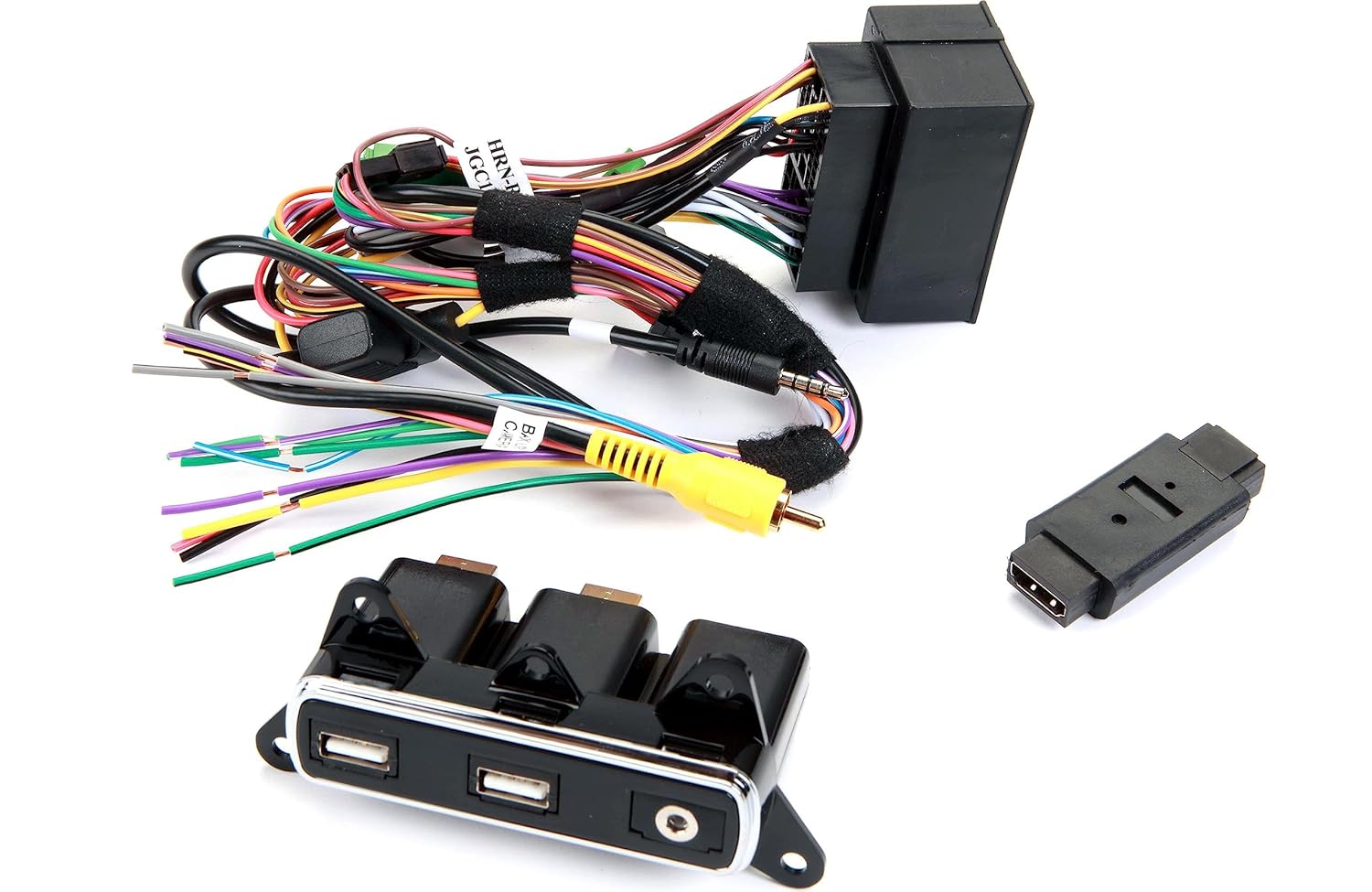
Figure 3.2: Close-up view of the T-harness and USB interface components included in the kit.

Figure 3.3: The dash kit components showing the provisions for integrating different climate control modules.
4. Setup and Installation
Professional installation is required for this product. The following steps provide a general overview; refer to the official Idatalink installation manual for detailed, vehicle-specific instructions.
- Preparation: Ensure the vehicle's battery is disconnected before beginning any electrical work.
- Dash Disassembly: Carefully remove the factory dash components to access the existing head unit and wiring.
- Maestro Module Connection: Connect the Idatalink Maestro Interface Module (ADS-MRR or ADS-MRR2, sold separately) to the KIT-JGC1 T-Harness.
- Head Unit Adapter: Connect the appropriate Idatalink Maestro Car Stereo Head-Unit T-Harness (e.g., ACC-HU-ALP1, ACC-HU-PIO1, etc., sold separately) to your aftermarket head unit and then to the KIT-JGC1 T-Harness.
- Wiring Connections:
- For factory amplified systems, connect the Black and White connectors on the main harness as shown in the wiring diagram (Figure 4.1).
- For non-amplified factory systems, connect the White to White and Black to Black.
- On some versions, the Black connectors are Green.
- Connect the "B" harness connector to the connector from the vehicle's Green Can Junction Module.
- If not using the adapter, cut off the connector and splice wires directly to the harness from the new head unit (cut 1/2 inch from the connector).
- USB Interface: Install the new USB interface provided with the kit, replacing the factory USB hub.
- Dash Kit Assembly: Assemble the new dash kit with your aftermarket head unit and climate controls.
- Reassembly: Carefully reassemble the dash components, ensuring all connections are secure and no wires are pinched.

Figure 4.1: Detailed wiring diagram for the Idatalink KIT-JGC1 with the Maestro MRR module, showing connections for amplified and non-amplified systems, and head unit adapters.

Figure 4.2: The dash kit showing the "Headunit Adapter Ready" label, indicating compatibility with various aftermarket head unit harnesses.

Figure 4.3: A visual comparison of the Jeep Grand Cherokee dashboard with the OEM dash (bottom) and with the Idatalink KIT-JGC1 installed (top), showcasing the integrated aftermarket head unit.
5. Operating Instructions
Once installed, the Idatalink Maestro KIT-JGC1 allows your aftermarket head unit to integrate with and control various factory features of your Jeep Grand Cherokee. The specific functionalities will depend on the capabilities of your chosen aftermarket head unit and the Idatalink Maestro Interface Module (ADS-MRR or ADS-MRR2).
Common retained features may include:
- Steering Wheel Controls
- Factory Amplifier Integration
- Vehicle Information Display (e.g., tire pressure, check engine, battery voltage)
- Climate Control Display and Functionality
- Parking Assist Features
Refer to your aftermarket head unit's user manual and the Idatalink Maestro module's specific instructions for detailed operation of these integrated features.
6. Maintenance
The Idatalink Maestro KIT-JGC1 is designed for long-term durability and typically requires minimal maintenance once installed correctly.
- Cleaning: Clean the dash kit surface with a soft, damp cloth. Avoid harsh chemicals or abrasive cleaners that could damage the finish.
- Connections: Periodically check that all wiring connections remain secure, especially if you experience any intermittent issues with your head unit or retained factory features. This typically requires professional assistance.
- Software Updates: The Idatalink Maestro Interface Module (ADS-MRR or ADS-MRR2) may receive firmware updates to improve compatibility or add new features. Visit the official Idatalink website for information on available updates and the necessary tools (e.g., ADS-USB cable, Weblink Mobile) for performing them.
7. Troubleshooting
If you encounter issues after installing the KIT-JGC1, consider the following troubleshooting steps:
- No Power to Head Unit:
- Verify all power connections from the T-harness to the head unit and vehicle's power source.
- Check vehicle fuses and the fuse on the aftermarket head unit.
- Ensure the Idatalink Maestro module is properly connected and powered.
- Steering Wheel Controls Not Working:
- Confirm the steering wheel control wires are correctly connected from the T-harness to the head unit.
- Ensure the Maestro module is programmed correctly for your vehicle and head unit. Refer to the Maestro module's programming guide.
- No Sound or Intermittent Sound:
- Check speaker wire connections.
- If your vehicle has a factory amplifier, ensure the amplifier turn-on wire from the T-harness is connected to the head unit's amplifier remote output.
- Verify the correct wiring for amplified vs. non-amplified systems as per Figure 4.1.
- Factory Features Not Retained:
- Ensure the Maestro module is correctly programmed and updated to the latest firmware.
- Double-check all data bus connections (e.g., CAN bus wires) from the T-harness to the vehicle.
For complex issues, it is recommended to consult with a professional car audio installer or contact Idatalink technical support.
8. Specifications
| Feature | Detail |
|---|---|
| Product Model Number | KIT-JGC1 |
| Compatible Vehicles | 2014-2021 Jeep Grand Cherokee (all amplifier configurations) |
| Kit Components | Dash Kit, T-Harness, USB Interface |
| Required Additional Module | Idatalink Maestro ADS-MRR or ADS-MRR2 (sold separately) |
| Material | Acrylonitrile Butadiene Styrene |
| Product Dimensions | 18 x 18 x 6 inches |
| Item Weight | 3.96 Pounds |
| Connector Type | USB Type A |
9. Support and Additional Resources
For further assistance, detailed installation guides, and firmware updates, please refer to the official Idatalink resources:
- Official Installation Manual (PDF): Download PDF
- Idatalink Website: Visit the official Idatalink website for product registration, technical support, and the latest firmware for your Maestro module.
- Professional Installation: Due to the complexity of vehicle electronics, professional installation is highly recommended.


