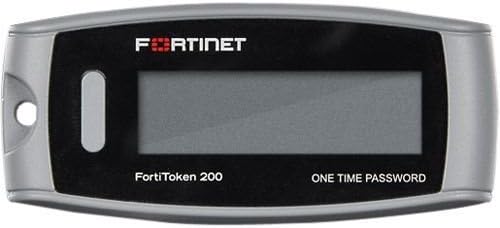
The FortiToken-200 is a hardware token designed to generate secure One-Time Passwords (OTPs) for two-factor authentication. This manual provides essential information for the proper setup, operation, and maintenance of your FortiToken-200 device, ensuring secure access to your Fortinet-protected resources.
This image shows the FortiToken-200 hardware token, a compact device with a display screen. The Fortinet logo is visible at the top left, 'FortiToken 200' at the bottom left, and 'ONE TIME PASSWORD' at the bottom right. A button is visible on the left side of the display.
2. Setup
2.1 Initial Activation
Your FortiToken-200 hardware token is typically pre-provisioned or requires activation with your Fortinet security appliance (e.g., FortiGate). Consult your system administrator for the specific activation procedure relevant to your organization's security infrastructure.
Receive Token: Ensure you have received your FortiToken-200 device.
Contact Administrator: Your IT administrator will provide instructions for associating the token's serial number with your user account on the Fortinet system.
Synchronization: In some cases, an initial synchronization may be required. This typically involves generating an OTP and entering it into a designated portal or system as instructed by your administrator.
3. Operating the FortiToken-200
3.1 Generating a One-Time Password (OTP)
To generate an OTP, press the button located on the left side of the FortiToken-200 device. A six-digit or eight-digit numerical code will appear on the display. This code is valid for a limited time, typically 60 seconds.
Press Button: Locate and press the oval-shaped button on the left side of the token.
Read OTP: Observe the numerical code displayed on the screen.
Enter OTP: Input this code into the designated field on the login screen or application requiring two-factor authentication, along with your username and primary password.
Time-Based: Be aware that the OTP is time-sensitive. If the code expires before you can enter it, simply press the button again to generate a new one.
3.2 Display Indicators
The display may show various indicators:
Numerical Code: The active OTP.
Countdown Timer: Some models may show a small countdown or progress bar indicating the remaining validity time for the current OTP.
Low Battery Indicator: A specific icon or message may appear when the battery is low.
4. Maintenance
4.1 Battery Life and Replacement
The FortiToken-200 is powered by a non-replaceable, long-life battery. The typical battery life is several years under normal usage conditions. When the battery is low, the device may display a low battery indicator or the display may become dim or unresponsive. Once the battery is depleted, the token will cease to function and must be replaced.
4.2 Care and Storage
Avoid Extreme Conditions: Do not expose the token to extreme temperatures, direct sunlight, or high humidity.
Keep Dry: Protect the device from water and other liquids.
Handle with Care: Avoid dropping the token or subjecting it to strong impacts.
Cleaning: Clean the exterior with a soft, dry cloth. Do not use abrasive cleaners or solvents.
Storage: Store the token in a safe place when not in use, away from strong magnetic fields.
5. Troubleshooting
5.1 Common Issues and Solutions
Problem
Possible Cause
Solution
Display is blank or dim.
Low or depleted battery.
The battery is non-replaceable. Contact your IT administrator for a replacement token.
OTP is not accepted.
Time synchronization issue; OTP expired; Incorrect OTP entered.
Generate a new OTP immediately. Ensure your system's time is synchronized. Verify you are entering the correct OTP. If issues persist, contact your IT administrator for token re-synchronization.
Button is unresponsive.
Physical damage; Battery depleted.
Inspect for visible damage. If none, the battery may be depleted. Contact your IT administrator for a replacement.
Dimensions: (Typical for hardware tokens, exact dimensions may vary) Approximately 60mm x 25mm x 10mm
Weight: (Typical for hardware tokens) Approximately 15-25 grams
Operating Temperature: (Typical) 0°C to 40°C (32°F to 104°F)
Documents and downloads
Ask a question about this manual
Ask about setup, troubleshooting, compatibility, parts, safety, or missing instructions. Manuals+ will review the question and use this page’s manual context to help answer it.