
1. Introduction
This manual provides essential information for the safe and efficient operation, maintenance, and troubleshooting of your Numatic HVR-169 Henry Parquet vacuum cleaner. Please read these instructions carefully before using the appliance and retain them for future reference.
2. Safety Information
- Always disconnect the vacuum cleaner from the power supply before cleaning or performing any maintenance.
- Do not use the appliance to pick up liquids, flammable materials, or hot ashes.
- Ensure the dust bag and filters are correctly installed before operation.
- Keep hair, loose clothing, fingers, and all parts of the body away from openings and moving parts.
- This appliance is not intended for use by persons with reduced physical, sensory, or mental capabilities, or lack of experience and knowledge, unless they have been given supervision or instruction.
- Do not operate the vacuum cleaner with a damaged cord or plug.
3. Product Components
The Numatic HVR-169 Henry Parquet vacuum cleaner comes with various components designed for effective cleaning across different surfaces. Familiarize yourself with these parts for optimal use.
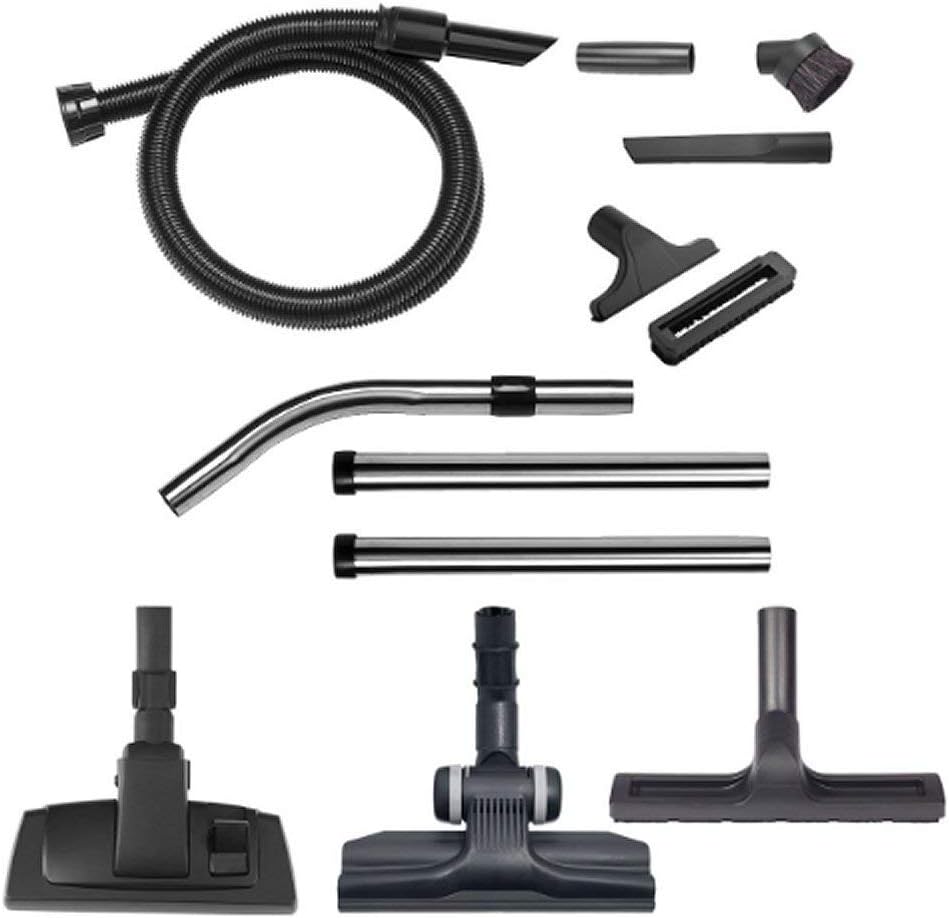
Image 1: Overview of Numatic HVR-169 Henry Parquet vacuum cleaner components. This includes the flexible hose, curved and straight extension wands, a crevice tool, a dusting brush, an upholstery tool, and three distinct floor tools, one of which is specifically designed for parquet floors.
- Flexible Hose: Connects to the vacuum cleaner and provides the main suction path.
- Curved Metal Wand: Used for comfortable handling and attachment of accessories.
- Straight Metal Extension Wands (x2): Extend reach for floor cleaning and high-level dusting.
- Crevice Tool: Ideal for narrow gaps, corners, and edges.
- Dusting Brush: For delicate surfaces, shelves, and intricate areas.
- Upholstery Tool: Designed for cleaning fabric surfaces like sofas and curtains.
- Parquet Floor Tool: Features soft bristles for gentle and effective cleaning of hard floors, especially parquet.
- Combination Floor Tool: A versatile tool for both carpets and hard floors, often with a switch to adjust brush height.
4. Setup
- Unpacking: Carefully remove all components from the packaging.
- Dust Bag Installation: Open the vacuum cleaner head. Ensure a dust bag is correctly fitted inside the drum. If not, insert a new Numatic HepaFlo bag, ensuring the collar is securely seated in the inlet.
- Hose Connection: Insert the flexible hose into the suction inlet on the front of the vacuum cleaner until it clicks securely into place.
- Wand Assembly: Connect the two straight metal extension wands to the curved metal wand. Then, attach the curved metal wand to the end of the flexible hose.
- Floor Tool Attachment: Select the appropriate floor tool (e.g., Parquet Floor Tool for hard floors) and attach it to the end of the assembled wands.
5. Operating Instructions
- Power Connection: Extend the power cable from the cable rewind system. Plug the power cord into a suitable mains socket.
- Power On/Off: Press the red 'ON/OFF' switch located on the top of the vacuum cleaner to start or stop the appliance.
- Using Attachments:
- For floors, use the assembled wands and a floor tool.
- For upholstery, remove the wands and attach the upholstery tool directly to the curved wand or hose end.
- For crevices and tight spaces, use the crevice tool.
- For dusting, use the dusting brush.
- Cable Rewind: When finished, unplug the vacuum cleaner. Gently press the foot pedal or pull the cable slightly to activate the automatic cable rewind system. Guide the cable to prevent tangling.
6. Maintenance
Regular maintenance ensures optimal performance and extends the life of your vacuum cleaner.
6.1. Dust Bag Replacement
- Disconnect the vacuum cleaner from the power supply.
- Unclip the head of the vacuum cleaner and lift it off.
- Carefully remove the full dust bag by pulling the cardboard collar away from the inlet. Seal the bag if it has a sealing mechanism.
- Insert a new Numatic HepaFlo dust bag, ensuring the collar is fully seated in the inlet.
- Replace the vacuum cleaner head and secure the clips.
6.2. Filter Cleaning
The main filter (usually a large cloth filter) should be checked periodically. If it appears dirty, gently shake or brush off loose dust. Do not wash the main filter unless specifically instructed by Numatic, as this can damage it.
6.3. Hose and Attachment Cleaning
Check the hose and attachments regularly for blockages. If a blockage is found, disconnect the component and carefully remove the obstruction. Wipe attachments with a damp cloth if necessary.
7. Troubleshooting
| Problem | Possible Cause | Solution |
|---|---|---|
| Vacuum cleaner does not switch on. | No power supply. | Check if the plug is correctly inserted and the wall socket is functional. |
| Loss of suction. | Full dust bag or blocked hose/filter. | Replace the dust bag. Check the hose, wands, and floor tool for blockages. Inspect and clean the main filter. |
| Unusual noise during operation. | Foreign object in the fan or motor area. | Immediately switch off and unplug. Check for any visible obstructions in the hose or attachments. If the noise persists, contact customer support. |
8. Specifications
- Brand: Numatic
- Model Number: HVR16911
- Product Name: Henry Parquet
- Power: 620 Watts
- Item Weight: Approximately 1 Kilogram
9. Warranty and Support
For warranty information, please refer to the documentation provided with your purchase or visit the official Numatic website. If you encounter issues not covered in this manual or require further assistance, please contact Numatic customer support.