
WEILY 01
Contents
WEILY Makeup Mirror User Manual
Model: 01
1. Product Overview
The WEILY Tri-Fold Vanity Mirror is designed to provide optimal lighting and magnification for makeup application and personal grooming. Featuring 21 adjustable LED lights, multiple magnification options (1x, 2x, 3x), and dual power supply modes, this mirror offers versatility and convenience for various settings, including bedrooms, dressing rooms, and home offices.

Figure 1: WEILY Tri-Fold Makeup Mirror (Gold)
2. Safety Information
WARNING:
- This mirror can be adjusted up to 180 degrees. Always ensure the mirror is securely fixed in your desired position before use to prevent it from falling and breaking.
- Exercise caution around the edges of the mirror to avoid injury.
- Keep out of reach of small children.
- Do not expose the mirror to direct sunlight or extreme temperatures.
3. Package Contents
- WEILY Tri-Fold Makeup Mirror
- USB Charging Cable
- User Manual (this document)
4. Setup Guide
4.1 Assembly
The WEILY Makeup Mirror typically comes pre-assembled. If the base is detached, align the mirror stand with the slot on the base and gently push down until it clicks into place. Ensure it is stable before proceeding.
4.2 Power Supply Options
The mirror supports two power supply modes:
- AAA Batteries (Not Included): Open the battery compartment on the back of the mirror and insert 4 new AAA batteries, ensuring correct polarity (+/-).
- USB Cable: Connect the provided USB cable to the Micro USB Port on the back of the mirror. Plug the other end into a 5V charging adapter, power bank, notebook, or car charger (adapters not included).
Note: The mirror itself does not store electricity; it requires continuous power from either batteries or the USB cable to operate the lights.
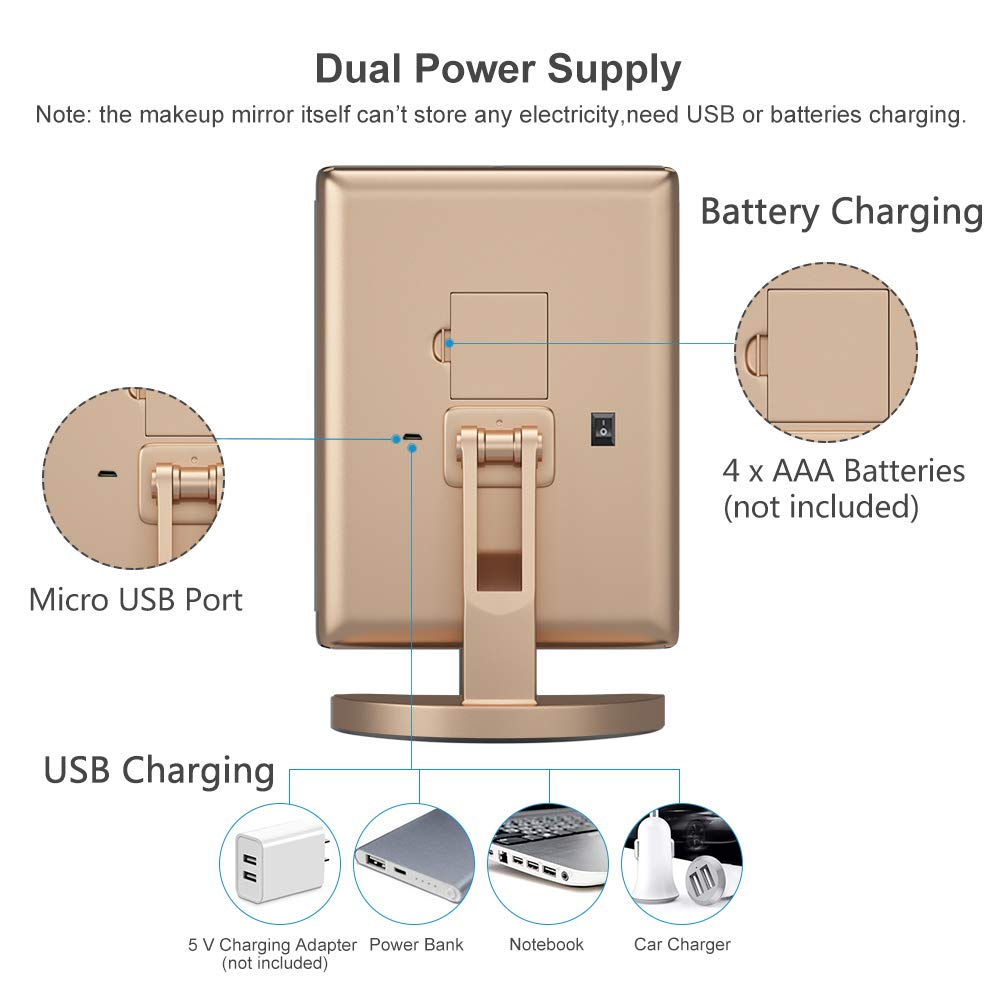
Figure 2: Dual Power Supply Options
5. Operating Instructions
5.1 Turning On/Off the Lights
Before using the touch screen switch, ensure the master ON/OFF switch on the back of the mirror is in the "ON" position.
- To Turn On: Lightly tap the circular touch sensor switch located at the bottom center of the main mirror panel.
- To Adjust Brightness: Press and hold the touch sensor switch. The brightness of the LED lights will gradually increase or decrease. Release when the desired brightness is achieved.
- To Turn Off: Tap the touch sensor switch again.

Figure 3: How to Use Dimmable LED Lights
5.2 Adjusting Mirror Angle
The mirror features a 180° rotating bracket, allowing you to tilt the mirror up or down to find your perfect viewing angle. Gently adjust the mirror panel to the desired position.
5.3 Using Magnification Panels
The right side of the tri-fold mirror includes 2X and 3X magnifying panels. These are ideal for detailed tasks such as applying eyeliner, mascara, shaping eyebrows, or inserting contact lenses, providing a clearer and more precise view.

Figure 4: 1X/2X/3X Magnification Panels
6. Maintenance
- Cleaning: Use a soft, lint-free cloth to wipe the mirror surfaces. For stubborn spots, a small amount of glass cleaner can be applied to the cloth (not directly to the mirror). Avoid abrasive cleaners.
- Storage: When not in use, fold the side panels inward to protect the mirror surfaces from dust and scratches. Store in a cool, dry place.
- UV Coating: The mirror features a UV coating for enhanced durability and scratch resistance. Avoid sharp objects that could damage this coating.
7. Troubleshooting
- Lights Not Turning On:
- Ensure the master ON/OFF switch on the back of the mirror is in the "ON" position.
- Check if batteries are inserted correctly and are not depleted. Replace if necessary.
- If using USB power, ensure the cable is securely connected and the power source is active.
- Lights Too Dim/Bright:
- Press and hold the touch sensor switch on the main mirror panel to adjust brightness.
- Mirror Unstable:
- Ensure the mirror stand is fully inserted and securely attached to the base.
- Place the mirror on a flat, stable surface.
8. Specifications
| Feature | Detail |
|---|---|
| Brand | WEILY |
| Model Number | 01 |
| Dimensions (L x W x H) | 10.82 x 7.09 x 0.98 inches (folded) |
| Weight | 1.7 Pounds |
| LED Lights | 21 adjustable LED lights |
| Magnification | 1X, 2X, 3X |
| Power Supply | 4 x AAA Batteries (not included) or USB Cable (included) |
| Rotation Angle | 180° vertical rotation |
| Frame Material | Acrylonitrile Butadiene Styrene (ABS) |

Figure 5: Product Dimensions and Features
9. Warranty and Support
For warranty information and customer support, please refer to the product packaging or contact WEILY customer service directly. Keep your purchase receipt for any warranty claims.
Manufacturer: YingFu
Ask a question about this manual
Ask about setup, troubleshooting, compatibility, parts, safety, or missing instructions. Manuals+ will review the question and use this page’s manual context to help answer it.