
Introduction
This manual provides essential information for the safe and effective operation, setup, and maintenance of your New Bright 1:16 Scale Remote Control Ravager Buggy 1640C-NB. Please read all instructions carefully before use to ensure proper function and to prevent damage.
Product Overview
The New Bright 1:16 Scale Remote Control Ravager Buggy 1640C-NB is designed for off-road play. It features knobby tires and spring suspension for navigating varied terrains. The vehicle operates with full-function radio control and 2.4GHz technology, allowing for forward, reverse, left, and right steering.
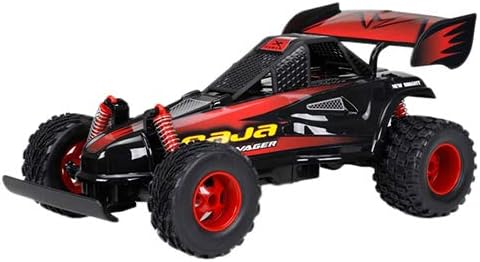
An image of the New Bright 1:16 Scale Remote Control Ravager Buggy 1640C-NB, showcasing its black and red body, knobby tires, and rear spoiler.
Setup
Battery Installation
Proper battery installation is crucial for vehicle operation. Always use fresh batteries and ensure correct polarity.
- Vehicle Battery: Locate the battery compartment on the underside of the buggy. Open the compartment cover. Insert the required battery pack (not included, typically a rechargeable NiMH or Li-ion pack) according to the polarity indicators. Securely close the compartment cover.
- Transmitter (Controller) Batteries: Locate the battery compartment on the back of the transmitter. Open the cover. Insert 2 AA batteries (not included) ensuring correct polarity (+/-). Close the compartment cover.
Pairing the Transmitter and Vehicle
The 2.4GHz technology allows for automatic pairing. Follow these steps:
- Ensure fresh batteries are installed in both the vehicle and the transmitter.
- Turn on the vehicle using the ON/OFF switch, usually located on the chassis.
- Turn on the transmitter using its ON/OFF switch.
- The transmitter and vehicle should automatically link. A light on the transmitter may indicate a successful connection. If not, turn both off and repeat the process.
Operating Instructions
Controls
- Forward/Reverse: Use the trigger on the transmitter. Pull the trigger towards you to move forward. Push the trigger away from you to move in reverse.
- Left/Right Steering: Use the steering wheel on the transmitter. Turn the wheel left to steer the vehicle left, and right to steer the vehicle right.
Driving Tips
- Operate the vehicle on flat, open surfaces free of obstacles.
- Avoid driving in wet conditions, sand, or tall grass, as this can damage the vehicle's electronics and motor.
- Maintain a clear line of sight between the transmitter and the vehicle for optimal control range.
- Practice gentle steering and throttle inputs to gain control before attempting higher speeds.
Maintenance
Cleaning
- After each use, gently wipe the vehicle with a clean, dry cloth to remove dirt and debris.
- Do not use water or chemical cleaners, as they can damage electronic components.
- Use a soft brush to remove dirt from hard-to-reach areas, such as around the wheels and suspension.
Storage
- Always remove batteries from both the vehicle and the transmitter when not in use for extended periods to prevent leakage and corrosion.
- Store the vehicle and transmitter in a cool, dry place, away from direct sunlight and extreme temperatures.
- Keep the product in its original packaging or a protective container to prevent dust accumulation and physical damage.
Troubleshooting
| Problem | Possible Cause | Solution |
|---|---|---|
| Vehicle does not respond to transmitter. | Batteries are low or incorrectly installed. Not paired. | Replace batteries in both vehicle and transmitter. Ensure correct polarity. Re-pair the vehicle and transmitter. |
| Short control range or erratic behavior. | Low batteries. Interference from other 2.4GHz devices. Obstacles blocking signal. | Replace batteries. Move to an area with less interference. Ensure clear line of sight. |
| Vehicle moves slowly or lacks power. | Low vehicle battery. | Recharge or replace the vehicle battery. |
Specifications
- Brand: New Bright
- Model Number: 1640C-NB
- Scale: 1:16
- Control Type: Full Function Radio Control
- Frequency: 2.4 GHz
- Functions: Forward, Reverse, Left Steering, Right Steering
- Product Dimensions (L x W x H): 41.91 cm x 22.86 cm x 22.23 cm
- Product Weight: 1.1 kg
- Recommended Age: 6 - 9 Years
- UPC-A: 050211164046
Safety Information
- Age Recommendation: This product is suitable for ages 6-9 years. Adult supervision is recommended during operation.
- Battery Safety: Do not mix old and new batteries. Do not mix alkaline, standard (carbon-zinc), or rechargeable (nickel-cadmium) batteries. Remove batteries when not in use.
- Operating Environment: Do not operate near people, pets, or obstacles. Avoid driving in streets, near water, or in hazardous areas.
- Avoid Impact: Do not intentionally crash the vehicle into objects or people.
- Choking Hazard: This product contains small parts and is not suitable for children under 3 years of age.
Warranty and Support
For warranty information or technical support regarding your New Bright 1:16 Scale Remote Control Ravager Buggy 1640C-NB, please refer to the contact information provided on the product packaging or visit the official New Bright website. Keep your purchase receipt as proof of purchase.


