
Serjur bfcz-01
Serjur Multi-Function LED Tactical Flashlight bfcz-01 User Manual
Model: bfcz-01
1. Introduction
The Serjur Multi-Function LED Tactical Flashlight (model bfcz-01) is a versatile tool designed for various situations, including outdoor activities, emergencies, and daily use. This device integrates multiple functions such as a powerful LED flashlight, glass breaker, seatbelt cutter, alarm, and a portable power bank. It features both solar and USB charging capabilities, ensuring readiness when needed. This manual provides essential information for the safe and effective operation and maintenance of your flashlight.

Figure 1.1: Serjur Multi-Function LED Tactical Flashlight (Model bfcz-01) and its packaging. This image displays the flashlight with its main light illuminated, showcasing its robust design and the included emergency tools.
2. Safety Information
Please read and understand all safety instructions before using this product. Failure to follow these instructions may result in injury or damage to the product.
- Do not direct the flashlight beam into eyes, as this may cause injury.
- Do not disassemble the flashlight head frequently to avoid damaging the LED bulb.
- Clean the flashlight with a soft cloth after use.
- If the product comes into contact with corrosive liquids, clean and dry it immediately.
- Avoid direct sunlight and high temperatures during storage.
- There is a risk of explosion if the battery is not used correctly. The battery contains lithium and must be used and disposed of properly.
- Do not discard or soak the product in water. Do not heat to more than 100 degrees Celsius (212 degrees Fahrenheit).
- Do not attempt to open or repair the device if you are not a qualified professional.
- The glass breaker and seatbelt cutter are emergency tools. Use them responsibly and only when necessary.
3. Product Components
Familiarize yourself with the various parts of your Serjur Multi-Function LED Tactical Flashlight.

Figure 3.1: Flashlight Composition Design. This diagram highlights key features including the non-slip handle, single operation button, safety cutter, strong magnetic base, window breaker, solar charging panel, super bright LED, 7 lighting modes, weather resistance, explosion-proof, dust-proof, and shockproof construction.
- Headlight: Main LED light for illumination.
- Sidelight: COB LED panel for broader area lighting.
- Control Button: Activates and cycles through lighting modes.
- Solar Panel: For solar recharging.
- USB Charging Port: For USB recharging and power bank function.
- Glass Breaker: Hardened tip for emergency window breaking.
- Seatbelt Cutter: Concealed blade for emergency seatbelt cutting.
- Alarm Button: Activates the emergency alarm and SOS strobe.
- Magnetic Base: Allows attachment to metallic surfaces.
- Non-slip Handle: Provides a secure grip.
4. Setup and Initial Charging
Before first use, it is recommended to fully charge the flashlight using the USB charging method.
4.1. USB Charging
- Locate the USB charging port on the flashlight.
- Connect the provided USB cable to the flashlight's USB C input port.
- Connect the other end of the USB cable to a standard USB power adapter (e.g., wall charger, car charger) or a computer's USB port.
- The charging indicator light will illuminate, typically red, during charging and turn green or off when fully charged.
- A full charge may take several hours.
4.2. Solar Charging
The integrated solar panel provides a convenient way to maintain battery charge or for emergency charging when other power sources are unavailable.
- Place the flashlight with the solar panel facing direct sunlight.
- Solar charging is slower than USB charging and is best used for maintaining charge or as a backup.
- Ensure the solar panel is clean and unobstructed for optimal charging efficiency.
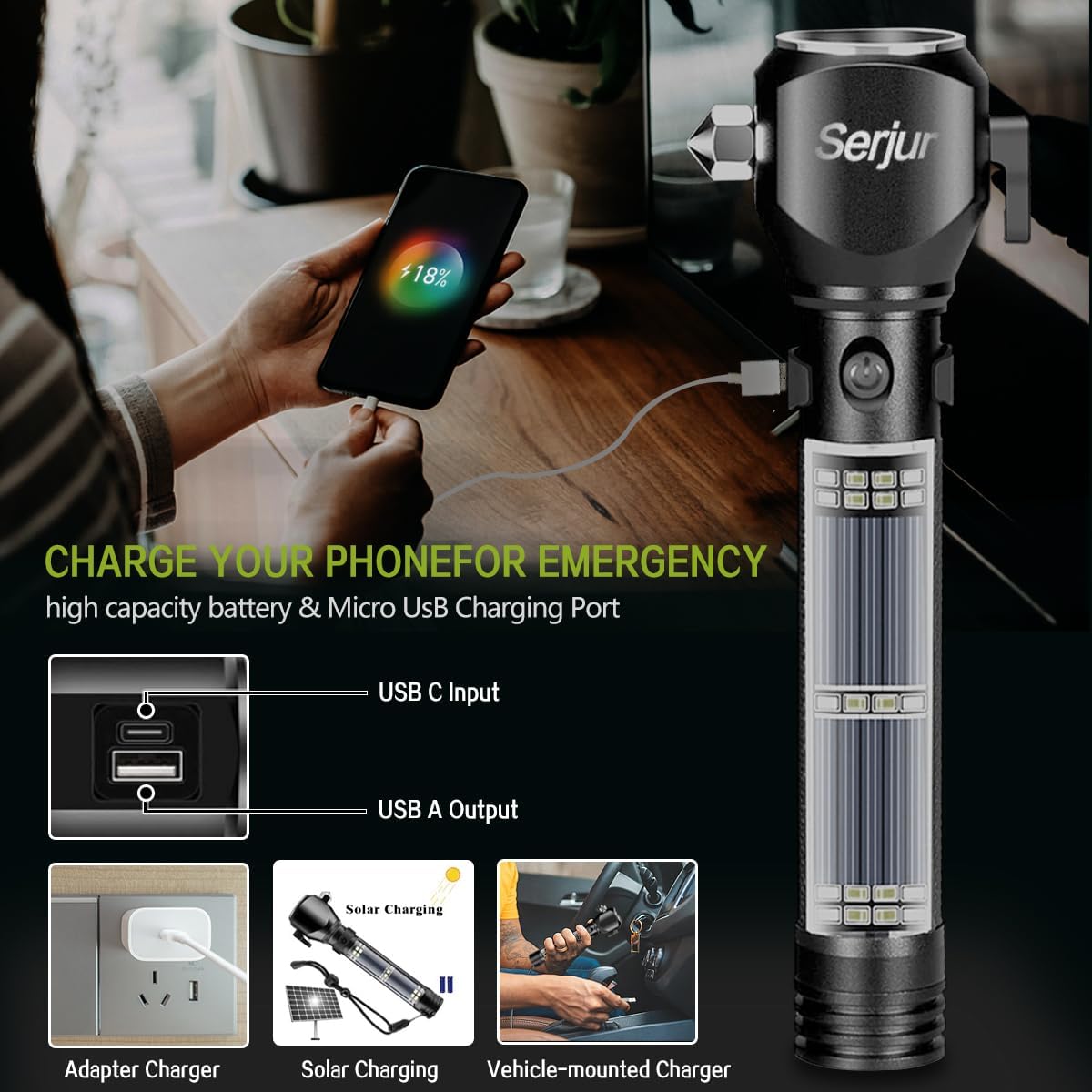
Figure 4.1: Charging Your Phone for Emergency. This image illustrates the USB C input and USB A output ports, demonstrating how the flashlight can charge a mobile phone. It also shows various charging methods: adapter charger, solar charging, and vehicle-mounted charger.
5. Operating Instructions
5.1. Flashlight Operation (Headlight & Sidelight)
The main control button cycles through the headlight modes. A long press activates the sidelight modes.
- Headlight Modes:
- Press the control button once for High brightness.
- Press again for Medium brightness.
- Press a third time for Strobe mode.
- Press a fourth time to turn the headlight OFF.
- Sidelight Modes:
- From any headlight mode, press and hold the control button for 3 seconds to activate the white sidelight in High brightness.
- Press the button again for Medium brightness.
- Press a third time to turn the sidelight OFF.

Figure 5.1: Tactical Flashlight - 7 Modes. This image illustrates the various lighting modes: High, Medium, Flash for the main headlight, and Bright Light, Weak Light, Strobe Beacon, and SOS Alarm & Strobe for the sidelights. It shows how to press the switch to change modes.
5.2. Emergency SOS Alarm & Strobe
The flashlight features an emergency alarm with alternating red and blue strobe lights.
- To activate the SOS alarm and red/blue strobe, press the dedicated alarm button located at the end of the flashlight body.
- Press the alarm button again to turn it OFF.
5.3. Glass Breaker
The hardened tip at the head of the flashlight is designed to break vehicle windows in emergency situations.
- In an emergency, firmly press the glass breaker tip against a corner of the side window.
- Apply sufficient force to shatter the glass.
- Caution: Use only in emergency situations. Keep away from children.

Figure 5.2: Multifunctional Car Lifesaving Flashlight. This image highlights the safety cutter, window breaker, and three modes of siren, along with icons for weather resistance, explosion-proof, dust-proof, and shockproof features.
5.4. Seatbelt Cutter
The integrated seatbelt cutter is designed to quickly cut through seatbelts in an emergency.
- In an emergency, pull the seatbelt away from your body.
- Hook the seatbelt into the cutter's blade and pull the flashlight across the belt to cut it.
- Caution: The blade is sharp. Use with extreme care and only in emergency situations. Keep away from children.
5.5. Power Bank Function
The flashlight can be used to charge other USB-powered devices, such as mobile phones, in an emergency.
- Connect your device's charging cable to the flashlight's USB A output port.
- The flashlight will begin charging your device.
- Note that using the power bank function will deplete the flashlight's battery.
5.6. Magnetic Attachment
The strong magnetic base allows the flashlight to be securely attached to metallic surfaces, providing hands-free illumination.
- Simply place the magnetic base onto any suitable metal surface (e.g., car hood, metal cabinet).
- Ensure the surface is clean and flat for the best magnetic hold.

Figure 5.3: Strong Magnetic Suction. This image shows the flashlight magnetically attached to the underside of a car hood, providing hands-free lighting for repair work.
6. Maintenance
- Cleaning: Wipe the flashlight with a soft, damp cloth. Do not use abrasive cleaners or solvents. Ensure the solar panel is kept clean for efficient charging.
- Storage: Store the flashlight in a cool, dry place away from direct sunlight and extreme temperatures. For long-term storage, ensure the battery is partially charged (around 50%) and recharge every 3-6 months to prolong battery life.
- Battery Care: The integrated lithium-ion battery is not user-replaceable. Follow safety guidelines regarding battery use and disposal.
7. Troubleshooting
| Problem | Possible Cause | Solution |
|---|---|---|
| Flashlight does not turn on. | Low battery. | Charge the flashlight using USB or solar power. |
| Flashlight does not charge via solar. | Insufficient sunlight; dirty solar panel. | Place in direct sunlight; clean the solar panel. |
| Cannot charge external devices. | Flashlight battery is too low; incorrect cable/port. | Ensure flashlight is charged; use the correct USB A output port and a functional cable. |
| Light modes are not cycling correctly. | Button malfunction; internal issue. | Ensure button is pressed firmly. If problem persists, contact customer support. |
8. Specifications
| Feature | Detail |
|---|---|
| Model Number | bfcz-01 |
| Brand | Serjur |
| Light Source Type | LED |
| Brightness | 200 Lumens (White Headlight) |
| Power Source | Battery-powered, Solar |
| Battery Type | Lithium Ion (2 required, included) |
| Voltage | 3.7 Volts |
| Material | Aluminum |
| Color | Black |
| Special Features | Non-slip Grip, Portable, Rechargeable, Glass Breaker, Seatbelt Cutter, Alarm, Power Bank, Magnetic Base |
| Water Resistance Level | Water Resistant |
| Item Weight | 0.48 Kilograms (1.06 pounds) |
| Package Dimensions | 9.72 x 3.86 x 2.36 inches |
| UPC | 794251095655 |
9. Warranty and Support
For warranty information or technical support, please refer to the product packaging or contact Serjur customer service. Keep your purchase receipt for warranty claims.
Ask a question about this manual
Ask about setup, troubleshooting, compatibility, parts, safety, or missing instructions. Manuals+ will review the question and use this page’s manual context to help answer it.