
Marantz PM8100SA
Marantz PM8100SA Integrated Amplifier User Manual
Model: PM8100SA
1. Introduction
Thank you for purchasing the Marantz PM8100SA Stereo Integrated Amplifier. This manual provides essential information for the proper setup, operation, and maintenance of your amplifier. Please read this manual thoroughly before using the unit to ensure optimal performance and safety. Keep this manual for future reference.
2. Product Overview
The Marantz PM8100SA is a high-performance stereo integrated amplifier designed to deliver exceptional audio quality. It incorporates advanced Marantz technologies to provide a clear, dynamic, and warm sound signature. Its robust construction and carefully selected components ensure long-term reliability and superior acoustic performance.
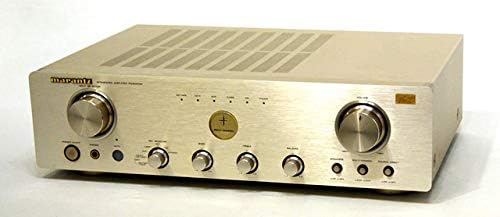
This image displays the front panel of the Marantz PM8100SA integrated amplifier. The amplifier features a silver-gold finish with prominent control knobs for volume, input selection, bass, treble, and balance. Various input and output jacks are visible, along with indicator lights. The top surface has ventilation grilles.
3. Setup
3.1 Unpacking
- Carefully remove the amplifier from its packaging.
- Retain all packing materials for future transport or servicing.
- Verify that all accessories are included.
3.2 Placement
- Place the amplifier on a stable, level surface away from direct sunlight, heat sources, and excessive moisture.
- Ensure adequate ventilation around the unit. Do not block the ventilation grilles on the top or sides.
- Avoid placing the amplifier near strong magnetic fields or other electronic devices that may cause interference.
3.3 Connections
- Speaker Connections: Connect your speakers to the speaker terminals on the rear panel. Ensure correct polarity (+ to + and - to -). The PM8100SA supports 4Ω to 8Ω speakers.
- Audio Input Connections: Connect your audio sources (CD player, tuner, etc.) to the corresponding input jacks on the rear panel using RCA cables. For optimal sound, use the dedicated CD & DVD Direct Input.
- Phono Input: If connecting a turntable, use the PHONO (MM) input. Ensure your turntable has a Moving Magnet (MM) cartridge.
- Power Connection: Connect the power cord to the AC inlet on the rear panel and then to a suitable AC 100V, 50Hz/60Hz power outlet.
4. Operating Instructions
4.1 Power On/Off
- Press the POWER button on the front panel to turn the amplifier on or off.
- When turning on, allow a few seconds for the unit to stabilize before playing audio.
4.2 Input Selection
- Rotate the INPUT SELECTOR knob on the front panel to choose your desired audio source (e.g., CD, PHONO, TUNER, AUX).
4.3 Volume Control
- Adjust the VOLUME knob to set the desired listening level.
- Start with a low volume and gradually increase it to a comfortable level.
4.4 Tone Control
- Use the BASS and TREBLE knobs to adjust the low and high frequency response according to your preference.
- For a flat frequency response, set both knobs to their center (0) position.
4.5 Balance Control
- The BALANCE knob allows you to adjust the relative volume between the left and right channels.
- Set to the center position for equal output from both channels.
5. Maintenance
- Cleaning: Disconnect the power cord before cleaning. Use a soft, dry cloth to wipe the exterior of the amplifier. Do not use abrasive cleaners, waxes, or solvents.
- Ventilation: Regularly check that the ventilation grilles are free from dust and obstructions to prevent overheating.
- Storage: If storing the amplifier for an extended period, disconnect it from the power outlet and store it in a cool, dry place, ideally in its original packaging.
6. Troubleshooting
If you experience any issues with your Marantz PM8100SA, please refer to the table below for common problems and their solutions. If the problem persists, contact Marantz customer support.
| Problem | Possible Cause | Solution |
|---|---|---|
| No power | Power cord not connected; Power outlet faulty; Unit in standby mode. | Ensure power cord is securely connected; Try a different outlet; Press the POWER button. |
| No sound | Incorrect input selected; Volume too low; Speakers not connected properly; Source device not playing. | Select correct input; Increase volume; Check speaker connections; Ensure source device is playing. |
| Distorted sound | Input level too high; Speaker impedance mismatch; Damaged cables. | Reduce source device output; Ensure speakers match amplifier impedance; Check/replace cables. |
| Humming noise | Ground loop; Nearby interference; Faulty cables. | Check grounding; Move unit away from other electronics; Replace cables. |
7. Specifications
Detailed technical specifications for the Marantz PM8100SA Integrated Amplifier:
| Parameter | Value |
|---|---|
| Type | Stereo Integrated Amplifier |
| Rated Output (20Hz-20kHz, both channels driven) | 90W + 90W (4Ω) 75W + 75W (6Ω) 60W + 60W (8Ω) |
| Total Harmonic Distortion (20Hz-20kHz, both channels driven) | 0.01% (at 8Ω load) |
| Intermodulation Distortion (SMPTE) | 0.01% |
| Output Bandwidth (8Ω load, 0.04%) | 10Hz - 50kHz |
| Frequency Response (CD, Source Direct) | 5Hz - 70kHz (+0, -1dB) |
| Damping Factor (20Hz-20kHz) | 100 (at 8Ω load) |
| Input Sensitivity/Impedance | Phono MM: 2.4mV / 47kΩ High Level: 210mV / 25kΩ |
| Signal-to-Noise Ratio (IHF A-network, input shorted) | Phono MM: 85dB High Level: 110dB |
| Tone Control | Bass: ±8dB (100Hz) Treble: ±8dB (10kHz) |
| Power Voltage | AC 100V, 50Hz/60Hz |
| Power Consumption (Electrical Appliance and Material Safety Law) | 160W |
| Maximum Dimensions (W x H x D) | 440mm x 124mm x 340mm |
| Weight | 9.0kg |
8. Warranty and Support
Marantz products are built to the highest quality standards. For information regarding warranty coverage, please refer to the warranty card included with your product or visit the official Marantz website. For technical support, service, or inquiries, please contact your local Marantz dealer or authorized service center. You can find contact information on the official Marantz website: www.marantz.com
Related documentsPM8100SA


Ask a question about this manual
Ask about setup, troubleshooting, compatibility, parts, safety, or missing instructions. Manuals+ will review the question and use this page’s manual context to help answer it.