
Introduction
The Lenovo Yoga Active Noise Cancellation Headphones are designed to provide a world-class entertainment and music experience. These Bluetooth 5.0 ANC headphones are suitable for various uses including work, travel, and conference calls. They feature advanced noise-canceling technology and Dolby-tuned drivers for clear audio. The headphones are lightweight, foldable, and crafted with stylish silicone leather, soft memory foam earcups, and an elegant metal finish for comfort during extended use.
What's in the Box
- Lenovo Yoga ANC Headphones
- Carrying Case
- 1.3 m USB-C to USB-A Braided Cable
- Quick Start Manual
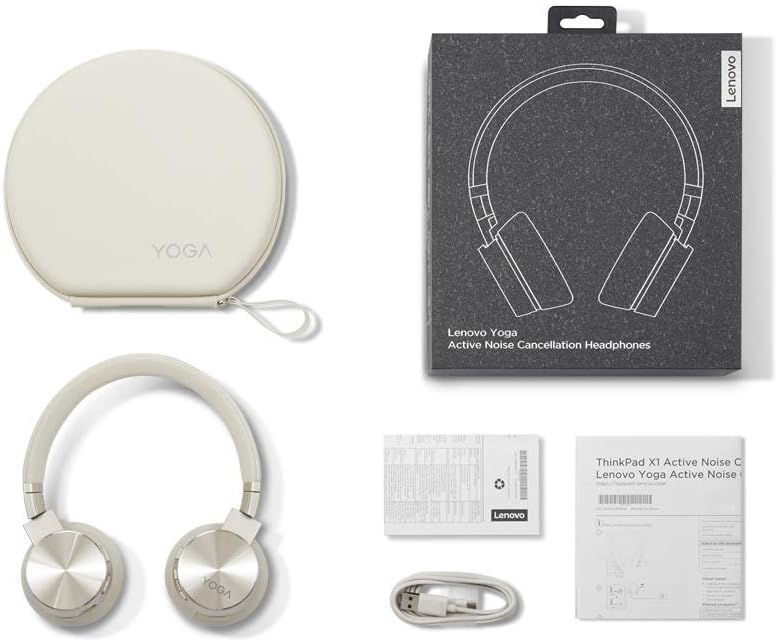
Image showing the Lenovo Yoga ANC Headphones, their protective carrying case, and the included USB-C to USB-A braided charging cable, along with the quick start manual.
Product Overview
The Lenovo Yoga ANC Headphones feature a sleek design with a Mica color finish. They are on-ear headphones with comfortable memory foam earcups and an adjustable headband. The headphones are foldable for easy storage and portability within their included hard-shell case.

Angled view of the Lenovo Yoga ANC Headphone Mica, highlighting its overall design and color.

Front view of the Lenovo Yoga ANC Headphone Mica, showing the earcups and headband.

Side view of the Lenovo Yoga ANC Headphone Mica, displaying the Lenovo branding on the headband and the metallic finish of the earcups.

Back view of the Lenovo Yoga ANC Headphone Mica, showing the rear of the earcups and the headband.
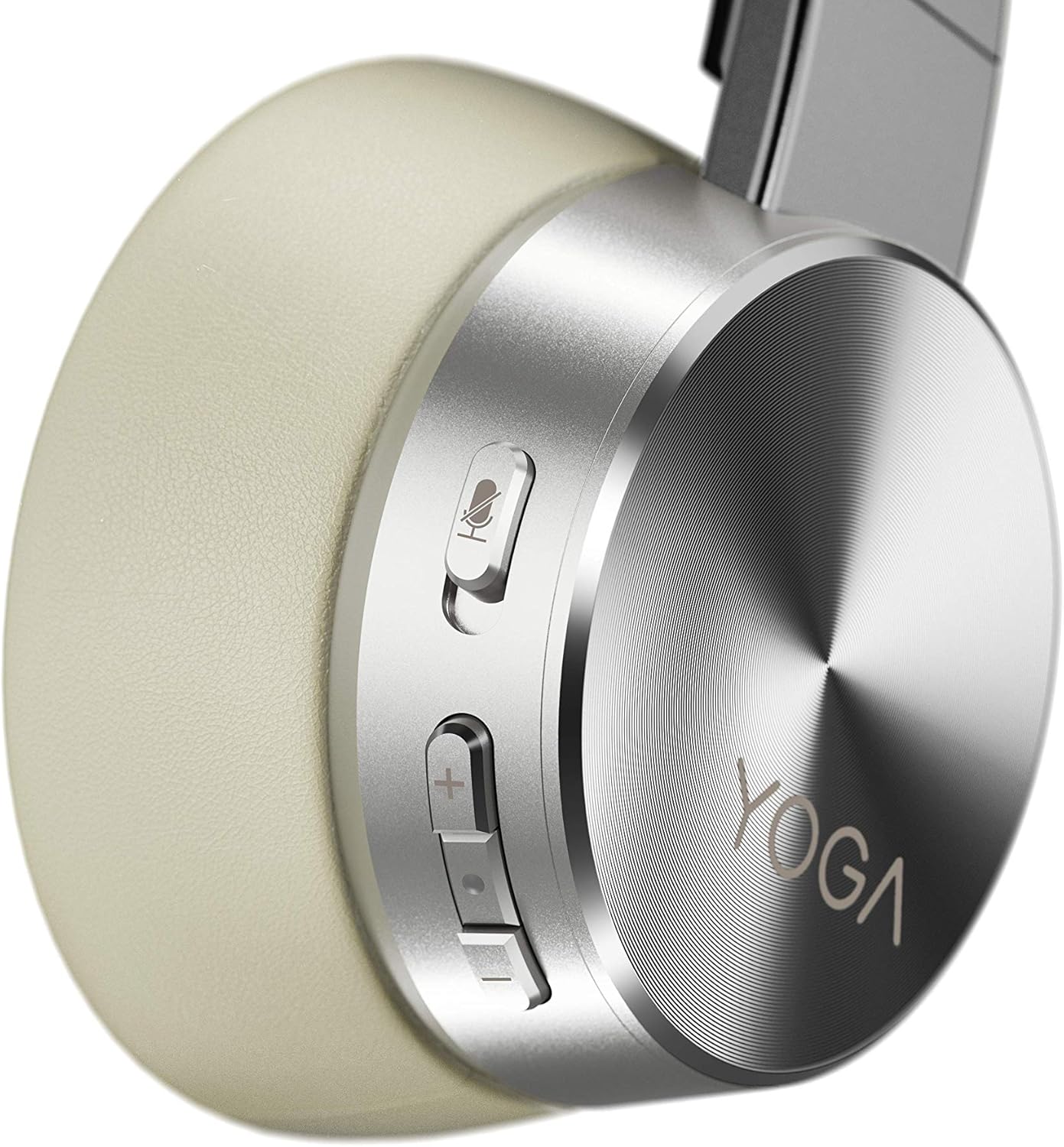
Close-up view of the right earcup of the Lenovo Yoga ANC Headphone Mica, detailing the USB-C charging port, power/Bluetooth button, and other control buttons.
Setup
Charging the Headphones
Before first use, fully charge your headphones. Connect the provided USB-C to USB-A braided cable to the charging port on the headphone and the other end to a compatible USB power source. A full charge takes approximately 3 hours. A quick 15-minute charge can provide up to 2 hours of playback.
Bluetooth Pairing
The headphones utilize Bluetooth 5.0 for stable and easy connection. To pair:
- Ensure the headphones are powered off.
- Press and hold the power/Bluetooth button until the indicator light flashes, indicating pairing mode.
- On your device (laptop, smartphone, etc.), enable Bluetooth and search for 'Lenovo Yoga ANC Headphone Mica'.
- Select the headphones from the list of available devices to complete pairing.
The headphones support dual device Bluetooth connectivity, allowing you to connect to two devices simultaneously, such as a laptop and a smartphone.
Operating Instructions
Active Noise Cancellation (ANC)
The Lenovo Yoga ANC Headphones feature Hybrid ANC with up to -30 dB noise reduction, utilizing 4 out of 6 microphones for this function. There are two levels of ANC (Level 1, Level 2) and an option to turn ANC off. The enhanced noise cancellation effectively blocks out external distractions, making them highly recommended for travel or noisy environments.
Environmental Noise Cancellation (ENC)
For clear communication, the headphones incorporate Environmental Noise Cancellation (ENC), using 4 out of 6 microphones to reduce background noise during calls.
Controls
The headphones are equipped with media control and touch control buttons on the earcups for easy management of audio playback, calls, and microphone mute functions.
Maintenance
To ensure the longevity and optimal performance of your Lenovo Yoga ANC Headphones:
- Store the headphones in their provided carrying case when not in use to protect them from dust and physical damage.
- Clean the earcups and headband regularly with a soft, dry cloth. Avoid using harsh chemicals or abrasive materials.
- Keep the charging port free of debris.
- Avoid exposing the headphones to extreme temperatures or moisture.
Troubleshooting
If you encounter issues with your headphones, try the following:
- No Power: Ensure the headphones are fully charged.
- Cannot Pair: Make sure the headphones are in pairing mode (indicator light flashing) and within range of your device. Try unpairing and re-pairing the headphones.
- Poor Audio Quality: Check the Bluetooth connection. Ensure there are no obstructions between the headphones and your device. If using ANC, try adjusting the ANC level or turning it off to see if it resolves the issue in certain environments.
- Microphone Issues: Ensure the microphone is not muted. Check device settings to confirm the correct microphone input is selected.
- Intermittent Connection: Move closer to your connected device. Avoid environments with high Wi-Fi interference.
Specifications
| Feature | Detail |
|---|---|
| Model Name | Lenovo Yoga Active Noise Cancellation Headphones |
| Item Model Number | GXD0U47643 |
| Connectivity Technology | Bluetooth 5.0, USB Digital Audio |
| Headphone Driver | 40mm Neodymium |
| Frequency Range | 20 Hz – 20 kHz |
| Impedance | 32Ω |
| Sensitivity (SPL) | >111 dBm ± 3 dBm |
| Active Noise Cancellation (ANC) | Hybrid ANC, Up to -30 dB (4 out of 6 microphones for ANC) |
| Environmental Noise Cancellation (ENC) | 4 out of 6 Microphones for ENC |
| Battery Life | 14 hours (with ANC off) |
| Battery Charge Time | <3 Hours |
| Item Weight | 214 g (0.47 lbs) |
| Product Dimensions | 2.76 x 9.14 x 8.27 inches |
| Compatible OS | Windows 10, Android 8.0 or later, iOS 10.0 or later |
| UPC | 193386060673 |
Warranty and Support
The Lenovo Yoga ANC Headphone Mica comes with a two-year warranty against factory defects. For technical support, troubleshooting assistance, or warranty claims, please refer to the contact information provided in your Quick Start Manual or visit the official Lenovo support website.


