
1. Introduction
This manual provides detailed instructions for the operation and maintenance of your FEELWORLD LUT7 7-inch Ultra-Bright Touchscreen Field Monitor. Please read this manual thoroughly before using the device to ensure proper functionality and to prevent damage. Keep this manual for future reference.
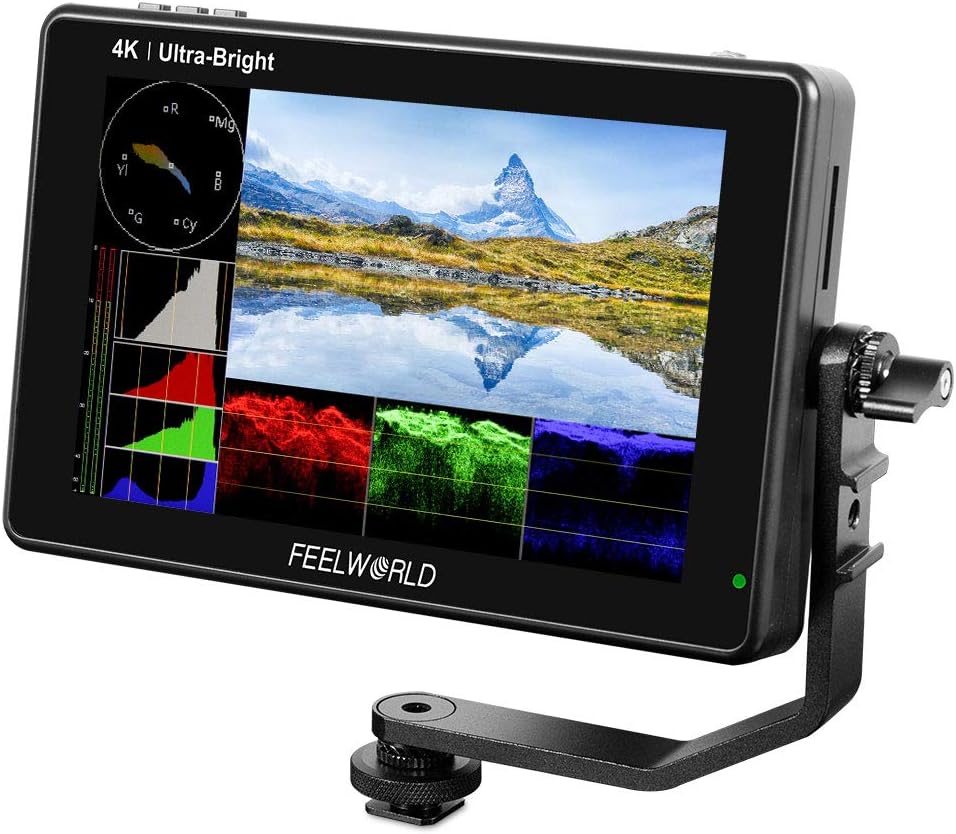
Image 1.1: The FEELWORLD LUT7 monitor, showcasing its display with professional monitoring tools.
2. Safety Information
- Do not expose the monitor to rain or moisture to avoid electric shock or fire.
- Avoid placing the monitor in direct sunlight or near heat sources.
- Use only the specified power adapters and batteries.
- Do not attempt to disassemble or modify the monitor. Refer all servicing to qualified personnel.
- Clean the screen with a soft, dry cloth. Avoid using liquid cleaners.
3. Package Contents
Verify that all items are present in your package:
- FEELWORLD LUT7 Monitor
- Mini/Micro HDMI to HDMI Cable
- Tilt Arm
- User Manual

Image 3.1: All components included in the FEELWORLD LUT7 product package.
4. Product Overview
4.1 Physical Features
The FEELWORLD LUT7 monitor features a 7-inch touchscreen display with a robust design for field use. It includes various ports and mounting options for versatile integration with camera setups.
4.2 Ports and Connectors
- HDMI Input: Connects to your camera or video source. Supports up to 4K30p.
- HDMI Output: For connecting to another monitor or device.
- DC IN 12V: Power input for external power supply.
- DC OUT 8.4V: Provides power to compatible cameras.
- 3.5mm Headphone Jack: For audio monitoring.
- SD Card Slot: For loading custom 3D LUTs.

Image 4.1: Side view of the monitor showing HDMI input/output ports.
4.3 Battery Slots
The monitor is equipped with two rear battery slots compatible with Sony L series batteries (NP-F970, F960, F950, F930, F770, F750, F730, F570, F550, F530 series). Batteries are not included.

Image 4.2: Rear panel illustrating the dual battery plate design.
5. Setup
5.1 Mounting the Monitor
Attach the included tilt arm to the 1/4-inch mounting points located on the bottom, left, or right side of the monitor. Secure the tilt arm to your camera or rig. The tilt arm allows for 360-degree rotation to achieve optimal viewing angles and provides additional mounting points for accessories.
5.2 Powering the Monitor
- Battery Power: Insert one or two compatible Sony L series batteries into the rear battery slots.
- DC Power: Connect a 12V DC power adapter (not included) to the 'DC IN 12V' port.
5.3 Connecting to a Camera
Use the provided Mini/Micro HDMI to HDMI cable to connect your camera's HDMI output to the monitor's HDMI input. Ensure the cable is securely seated in both ports.
6. Operating Instructions
6.1 Basic Operation
The monitor features an intuitive touchscreen interface for control. All functions are accessible via touch gestures.

Image 6.1: Demonstrating touch controls for adjusting monitor functions.
6.2 Brightness Control
The LUT7 features a 2200nit ultra-bright display, suitable for outdoor viewing without a sun hood. An ambient light sensor automatically adjusts screen brightness to compensate for varying light conditions, enhancing visibility outdoors and comfort indoors.

Image 6.2: The monitor's 2200nit display and automatic dimming feature for various lighting conditions.
6.3 Professional Monitoring Tools
The monitor includes a suite of professional tools to assist with accurate exposure and focus:
- Waveform: Visual representation of video signal luminance.
- RGB Parade: Displays the red, green, and blue channels separately.
- Vectorscope: Shows color information (hue and saturation).
- Histogram: Graphical display of tonal distribution.
- Audio Meter: Monitors audio levels.
- Focus Peaking: Highlights in-focus areas.
- Zoom: Magnifies a portion of the image.
- Zebra: Indicates overexposed areas.
- False Color: Helps evaluate exposure levels.
- Frame Guides & Safe Area: Assists with framing and composition.

Image 6.3: Examples of waveform monitoring tools on the LUT7 display.

Image 6.4: Overview of additional professional monitoring features.
6.4 3D LUT Support
The monitor supports loading up to 50 custom 3D LUTs via the SD card slot. This allows for real-time preview of color grades during filming.

Image 6.5: The monitor's SD card slot for loading custom 3D LUTs.

Image 6.6: Visual representation of 3D LUT application on the monitor.
6.5 Multi-Language Support
The LUT7 monitor supports up to 10 languages for its user interface, catering to diverse user needs.

Image 6.7: Screenshot showing the multi-language options available on the monitor.
7. Maintenance
- Cleaning: Gently wipe the screen and body with a soft, lint-free cloth. Do not use abrasive cleaners or solvents.
- Storage: When not in use, store the monitor in a dry, cool place, away from direct sunlight and extreme temperatures.
- Battery Care: Remove batteries if the monitor will not be used for an extended period.
8. Troubleshooting
If you encounter issues with your FEELWORLD LUT7 monitor, refer to the following common problems and solutions:
| Problem | Possible Cause | Solution |
|---|---|---|
| Monitor does not power on. | Low or depleted battery; faulty power button; power adapter issue. | Ensure batteries are charged or replace them. Check DC power connection. If the power button is unresponsive, contact support. |
| "No Signal" message displayed. | HDMI cable not connected properly; camera not outputting signal; incompatible video format. | Verify HDMI cable connections. Check camera's video output settings. Ensure output format is supported by the monitor (e.g., 4K MP4 recording may require specific settings). |
| HDMI cable connection is loose. | Cable not fully inserted or incompatible cable. | Ensure HDMI cables are fully seated. Try a different HDMI cable if the issue persists. Consider right-angle connectors if space is an issue. |
| Battery indicator is not visible. | Display settings or overlay interference. | Navigate through the monitor's menu to adjust display settings or reposition on-screen overlays to reveal the battery indicator. |
9. Specifications
| Feature | Specification |
|---|---|
| Screen Size | 7 Inches |
| Resolution | 1920 x 1200 (UXGA Wide) |
| Brightness | 2200 cd/m² |
| Aspect Ratio | 16:10 |
| Contrast Ratio | 1200:1 |
| Viewing Angle | 160°/160° |
| Product Dimensions | 6.69 x 3.94 x 1.97 inches |
| Item Weight | 2.46 pounds |
| HDMI Input/Output | Supports up to 4K30p (4096x2160p 24Hz / 3840x2160p 30/29.97/25/24/23.98Hz) |
| Power Input | DC 12V |
| Compatible Batteries | Sony L series (NP-F970, F960, F950, F930, F770, F750, F730, F570, F550, F530 series) |
10. Warranty and Support
10.1 Warranty Information
The FEELWORLD LUT7 monitor comes with a 1-year warranty. FEELWORLD provides US local after-sales support.
10.2 Additional Resources
- For a downloadable PDF version of the user manual, please visit: FEELWORLD LUT7 User Manual (PDF)
- For more information and support, visit the official FEELWORLD store: FEELWORLD Amazon Store