
1. Introduction
Thank you for choosing the XPC 60W LED Moving Head Light. This manual provides essential information for the safe and efficient operation of your new lighting fixture. Please read these instructions thoroughly before installation, operation, or maintenance to ensure proper use and to prevent damage to the product or injury to personnel.
2. Safety Instructions
- Always connect the fixture to a grounded circuit to avoid the risk of electrocution.
- Ensure the power voltage matches the voltage specified on the unit.
- Do not operate the fixture if the power cord is damaged.
- Avoid direct eye exposure to the light source.
- Ensure adequate ventilation around the fixture to prevent overheating.
- Mount the fixture securely using appropriate clamps and safety cables.
- Do not open the housing; there are no user-serviceable parts inside. Refer all servicing to qualified personnel.
- Keep the fixture away from flammable materials and liquids.
3. Product Overview
The XPC 60W LED Moving Head Light is a versatile stage lighting fixture designed for various events, clubs, and parties. It features a powerful 60W LED light source, 8 GOBO patterns, and 8 color patterns, controllable via DMX or built-in automatic modes.
3.1 Key Features
- Light Source: 60W high-power LED
- GOBO Wheel: 8 static GOBO patterns + open
- Color Wheel: 8 colors + white
- Control Modes: DMX512, Auto, Sound-Activated, Master/Slave
- DMX Channels: 9 or 11 channels
- Movement: Pan (540°), Tilt (270°)
- Dimming: 0-100% electronic dimming
- Strobe: Variable strobe effects
3.2 Components
Familiarize yourself with the main components of the moving head light:

Image Description: Multiple views of the XPC 60W LED Moving Head Light, showing its front lens, control panel, and rear connections including DMX input/output and power.
- Moving Head: Contains the LED light source, lens, GOBO wheel, and color wheel.
- Base: Houses the control electronics, power supply, and cooling fan.
- Control Panel: LCD display and buttons (MENU, UP, DOWN, ENTER) for mode selection and DMX addressing.
- DMX IN/OUT: 3-pin XLR connectors for DMX signal.
- Power IN: Power input connector.
- Cooling Fan: Integrated fan for heat dissipation.

Image Description: An image highlighting the high-power cooling fan integrated into the XPC 60W LED Moving Head Light, essential for maintaining optimal operating temperature.
4. Setup
4.1 Unpacking
Carefully remove the fixture from its packaging. Inspect for any damage during transit. Retain the packaging for future transport or storage.
4.2 Mounting
The fixture can be mounted in various orientations (floor, truss, wall) using appropriate clamps and safety cables (not included). Ensure the mounting surface or truss can support the weight of the fixture. Always use a safety cable as a secondary attachment.
4.3 Power Connection
Connect the power cable to the power input on the rear of the fixture and then to a suitable power outlet. Ensure the power source is grounded and provides the correct voltage (AC 100-240V, 50/60Hz).
4.4 DMX Connection (Optional)
For DMX control, connect a 3-pin XLR cable from your DMX controller's output to the DMX IN port of the first fixture. For multiple fixtures, daisy-chain them by connecting the DMX OUT of the first fixture to the DMX IN of the next, and so on. Terminate the last fixture in the chain with a DMX terminator.
5. Operating Instructions
5.1 Control Panel
The control panel features an LCD display and four buttons:
- MENU: Cycles through the main menu options.
- UP: Increases the value or moves up in menu options.
- DOWN: Decreases the value or moves down in menu options.
- ENTER: Confirms selection or saves changes.
5.2 Operating Modes
The fixture supports several operating modes:
- DMX512 Mode: Allows control via an external DMX controller. Set the DMX address and channel mode (9 or 11 channels) using the control panel.
- Auto Mode: The fixture runs through pre-programmed light shows automatically. Select from various built-in programs.
- Sound-Activated Mode: The light reacts to sound detected by its built-in microphone. Adjust sensitivity if needed.
- Master/Slave Mode: Link multiple fixtures where one acts as the master (running Auto or Sound mode) and others follow as slaves.
5.3 DMX Channel Functions (11-Channel Mode Example)
Below is a typical DMX channel assignment. Refer to the specific DMX chart provided with your product for exact details.
| Channel | Function | Value Range | Description |
|---|---|---|---|
| 1 | Pan | 0-255 | Horizontal movement (0-540°) |
| 2 | Tilt | 0-255 | Vertical movement (0-270°) |
| 3 | Pan/Tilt Speed | 0-255 | Adjust movement speed (slow to fast) |
| 4 | Dimmer | 0-255 | Overall brightness (0-100%) |
| 5 | Strobe | 0-255 | Strobe effect (slow to fast) |
| 6 | Color Wheel | 0-255 | Select colors (8 colors + white) |
| 7 | GOBO Wheel | 0-255 | Select GOBO patterns (8 patterns + open) |
| 8 | Program Select | 0-255 | Select built-in programs (Auto/Sound modes) |
| 9 | Program Speed | 0-255 | Adjust speed of selected program |
| 10 | Reset | 250-255 | Fixture reset |
| 11 | Special Functions | 0-255 | Various special effects |
5.4 Visual Demonstrations
Observe the dynamic lighting effects and patterns of the XPC 60W LED Moving Head Light:

Image Description: This image shows the XPC 60W LED Moving Head Light projecting multiple colored beams and GOBO patterns onto a stage floor, demonstrating its dynamic lighting capabilities.

Image Description: A detailed view of the various GOBO patterns and color options available with the XPC 60W LED Moving Head Light, including circles, dots, and abstract shapes in different hues.

Image Description: Further examples of the diverse GOBO patterns and effects produced by the XPC 60W LED Moving Head Light, showcasing intricate designs and color combinations.
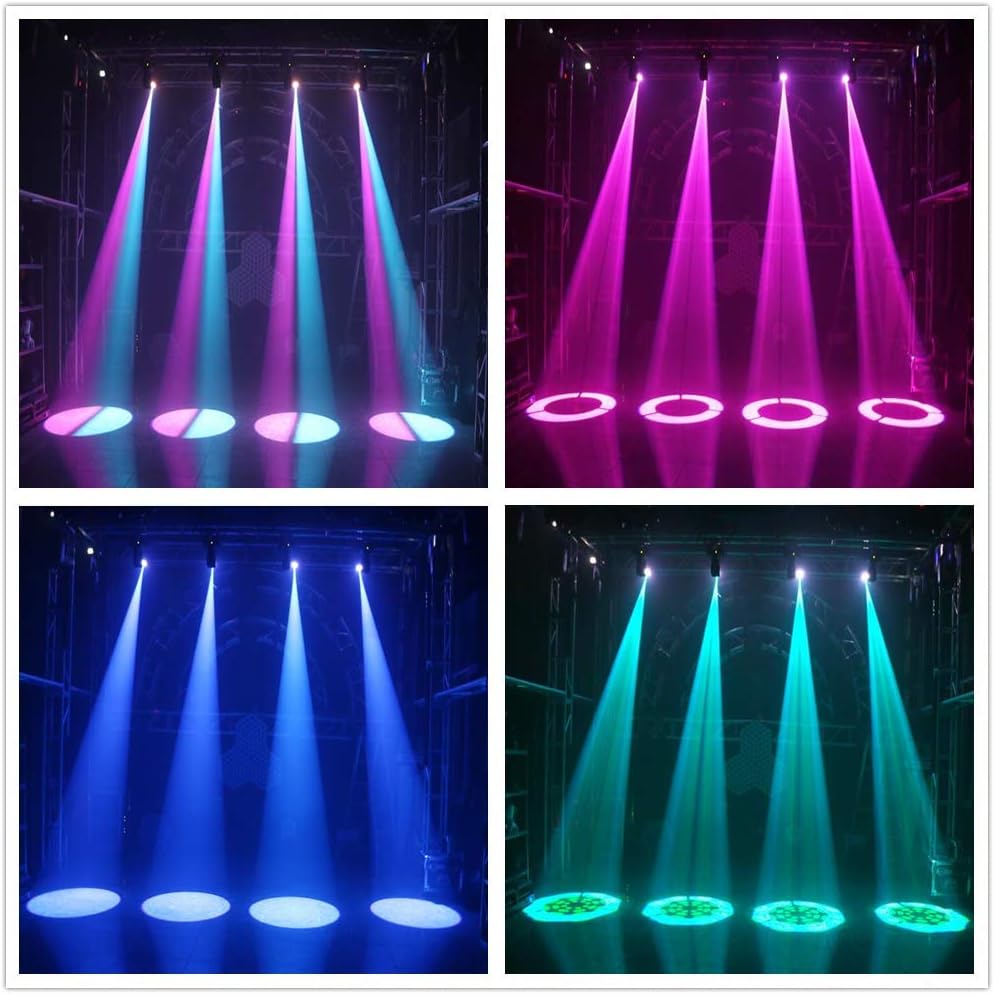
Image Description: An array of XPC 60W LED Moving Head Lights in action, projecting different colored beams and patterns onto a stage, demonstrating synchronized effects.

Image Description: Two XPC 60W LED Moving Head Lights projecting bright white and blue beams onto a stage, showcasing their powerful illumination.
5.5 Product Video
Video Description: This video showcases the dynamic capabilities of the XPC 60W LED Moving Head Light, including its pan and tilt movements, color changes, and GOBO pattern projections, suitable for stage and event lighting.
6. Maintenance
- Cleaning: Regularly clean the lens and exterior with a soft, lint-free cloth. Do not use abrasive cleaners or solvents.
- Inspection: Periodically check power cables, DMX cables, and mounting hardware for wear or damage.
- Storage: When not in use, store the fixture in its original packaging or a protective case in a dry, dust-free environment.
7. Troubleshooting
| Problem | Possible Cause | Solution |
|---|---|---|
| No power | Power cable disconnected, faulty outlet, blown fuse | Check power connections, try a different outlet, replace fuse if necessary. |
| No light output | Dimmer channel at 0, fixture in blackout mode, LED failure | Increase dimmer value, check DMX settings, contact support if LED is faulty. |
| No DMX control | Incorrect DMX address, faulty DMX cable, missing terminator, DMX controller issue | Verify DMX address, check cable connections, ensure terminator is used, test with another DMX controller. |
| Erratic movement | DMX signal interference, mechanical obstruction | Check DMX cabling and termination, ensure no physical obstructions to pan/tilt. |
8. Specifications

Image Description: A diagram illustrating the physical dimensions (length, width, height) of the XPC 60W LED Moving Head Light in centimeters.
- Brand: XPC
- Model: 60W LED Moving Head Light
- Light Source Type: LED
- Light Source Wattage: 60 Watts
- Power Source: Corded Electric
- Material: Metal
- Finish Type: Metal
- Shape: Round
- Item Dimensions (L x W x H): 6.69"L x 5.7"W x 9.25"H (approximately 17cm L x 14.5cm W x 23.5cm H)
- Batteries Included: Yes (likely for internal memory/clock, not primary power)
- UPC: 779283557814
- ASIN: B085KXWV5F
9. Warranty and Support
For warranty information and technical support, please refer to the documentation provided with your purchase or contact XPC customer service through the retailer where the product was purchased. Keep your proof of purchase for any warranty claims.