1. Overview
The Garmin HRM-Pro is a premium heart rate strap designed to provide accurate, real-time heart rate data and advanced running dynamics. It features dual transmission technology (ANT+ and BLUETOOTH Low Energy) for broad compatibility with Garmin devices, fitness equipment, and third-party training applications. The strap also stores heart rate data during activities out of range of your device, such as swimming, and automatically syncs the data once back in range. Additionally, it tracks steps, calories, and intensity minutes, syncing this information to your compatible Garmin watch.

Image: Garmin HRM-Pro Heart Rate Strap, showing the main unit and strap.
Key Features:
- Dual Transmission: Transmits real-time heart rate data via ANT+ and BLUETOOTH Low Energy.
- Running Dynamics: Captures metrics like vertical oscillation, ground contact time, and stride length.
- Data Storage: Stores heart rate data during swimming or activities out of range, then automatically sends it to your device.
- Activity Tracking: Monitors steps, calories, and intensity minutes, syncing with compatible Garmin watches.
- Comfortable Design: Small, lightweight module on a soft, comfortable strap.
- Long Battery Life: Up to one year on a single CR2032 battery.
2. What's in the Box
- Garmin HRM-Pro Heart Rate Strap
- Documentation (User Manual)
3. Setup
Wearing the Heart Rate Strap:
- Moisten the electrodes on the back of the strap with water to ensure good contact with your skin.
- Place the heart rate strap directly on your skin, just below your chest. The Garmin logo should be centered on your chest, facing forward.
- Adjust the strap to a comfortable, snug fit. It should be secure enough not to slip during activity but not so tight as to cause discomfort.

Image: A person wearing the Garmin HRM-Pro strap on their chest.
Pairing with Devices:
The HRM-Pro automatically activates when worn and begins transmitting heart rate data. To pair it with a compatible device (e.g., Garmin watch, bike computer, fitness equipment, or smartphone app):
- Ensure your device's ANT+ or Bluetooth is enabled.
- Bring the HRM-Pro within range of your device.
- On your device, navigate to the sensor pairing menu and select the HRM-Pro when it appears. Follow any on-screen prompts to complete the pairing process.
Video: Official Garmin Merchant Video demonstrating the HRM-Pro Premium Heart Rate Monitor Chest Strap.
4. Operating Instructions
Real-Time Heart Rate Data:
Once paired, your heart rate data will be displayed in real-time on your connected device. This allows you to monitor your intensity during workouts and ensure you are training within your desired heart rate zones.
Running Dynamics:
For runners, the HRM-Pro provides advanced running dynamics. These metrics, such as vertical oscillation (the bounce in your running stride), ground contact time (how long your foot is on the ground), and stride length, can help you analyze and improve your running form. This data is typically available on compatible Garmin running watches and the Garmin Connect app.
Data Storage for Out-of-Range Activities:
The HRM-Pro can store heart rate data when your paired device is out of range, such as during swimming or team sports where wearing a watch might be impractical. After the activity, when the strap is brought back within range of your Garmin device, the stored data will automatically transfer and sync.

Image: Garmin HRM-Pro in use with a bike computer, displaying heart rate data.
Activity Tracking:
Beyond heart rate, the HRM-Pro also tracks daily activity metrics including steps, calories burned, and intensity minutes. This data is stored on the strap and synced to your Garmin Connect account via a compatible Garmin watch, providing a comprehensive overview of your daily activity and fitness.
5. Maintenance
Cleaning the Strap:
To ensure accurate readings and prolong the life of your HRM-Pro, it is important to clean the strap regularly. After every 7 uses or after particularly sweaty workouts, rinse the strap with water. Hand wash the strap with mild soap and water as needed. Do not machine wash or use harsh detergents, as this can damage the electrodes and fabric.
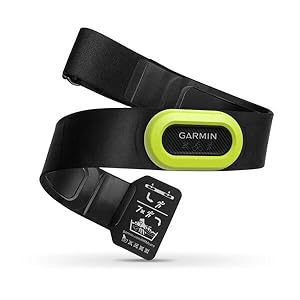
Image: Garmin HRM-Pro strap showing care and washing instructions on the tag.
Battery Replacement:
The HRM-Pro uses a replaceable CR2032 lithium coin cell battery, which typically lasts up to one year. When the battery is low, your connected Garmin device or the Garmin Connect app will notify you. To replace the battery:
- Locate the battery compartment on the back of the heart rate module.
- Use a small screwdriver or coin to carefully open the battery cover.
- Remove the old battery and insert a new CR2032 battery, ensuring the positive (+) side is facing up.
- Securely close the battery cover.
6. Troubleshooting
Inaccurate or No Heart Rate Data:
- Moisten Electrodes: Ensure the electrodes on the strap are thoroughly moistened before wearing.
- Proper Fit: Make sure the strap is snug against your skin and positioned correctly on your chest.
- Battery Level: Check the battery status in your Garmin Connect app or on your paired device. Replace the battery if it's low.
- Interference: Move away from strong electromagnetic fields or other wireless devices that might cause interference.
Pairing Issues:
- Activate Strap: Ensure the strap is being worn to activate it for pairing.
- Device Compatibility: Verify your device supports ANT+ or Bluetooth Low Energy for heart rate sensors.
- Restart Devices: Try restarting both your HRM-Pro (by removing and reinserting the battery) and your paired device.
7. Specifications
| Brand | Garmin |
| Model Number | 010-12955-00 |
| Material | Plastic |
| Color | Black |
| Product Dimensions | 5.59"L x 1.18"W x 0.47"H |
| Item Weight | 59 Grams (2.08 ounces) |
| Battery Type | CR2032 Lithium Metal (included) |
| Battery Life | Up to 12 months |
| Connectivity | ANT+, Bluetooth Low Energy |
| Water Resistance | Waterproof (suitable for swimming) |
| Compatible Devices | D2 Bravo, D2 Charlie, D2 Delta, Descent Mk1, Edge series, fēnix series, Forerunner series, GPSMAP series, Instinct, MARQ series, Oregon series, quatix series, Rino series, tactix series, VIRB series (See Garmin website for full list) |
8. Warranty and Support
Garmin products are designed for reliability and performance. For specific warranty information, please refer to the documentation included with your HRM-Pro or visit the official Garmin website. For technical support, troubleshooting assistance, or to access additional resources, please visit support.garmin.com.


