
1. Introduction
This manual provides detailed instructions for the safe and effective operation of your Godox VL300 LED Light. The Godox VL series, including the VL300, VL200, and VL150, are lightweight and compact LED light sources designed for professional photography and videography applications. They offer high performance and accurate color rendition, making them suitable for newborn photography, still life photography, portraiture, studio lighting, interview lighting, and general video recording.
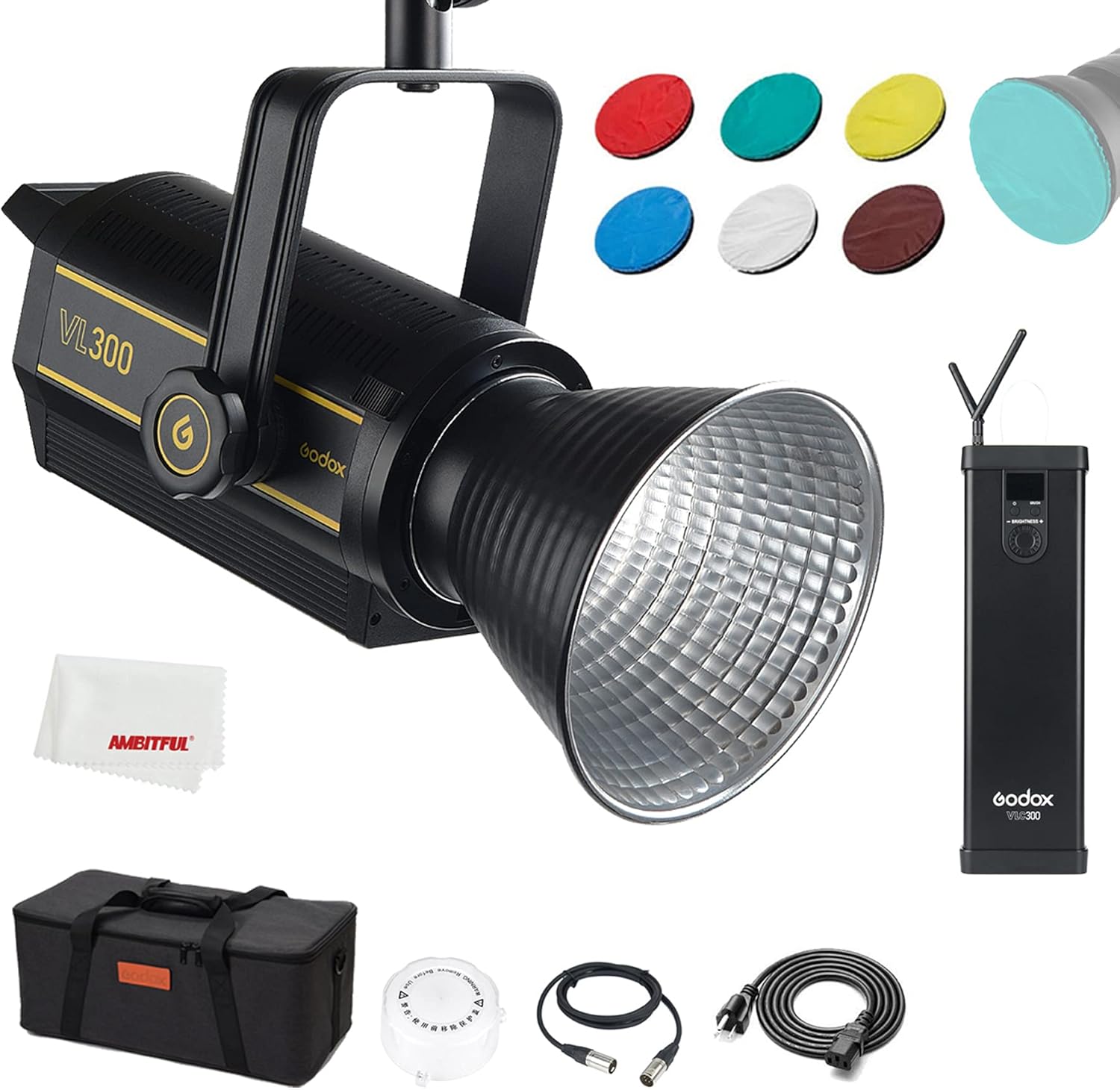
Image 1.1: Godox VL300 LED Light and included accessories.
2. Product Overview
2.1 Key Features
- Strong Power Output: The VL300 delivers 300W of continuous LED light.
- Accurate Color Rendition: Features a Color Rendering Index (CRI) of 96 and Television Lighting Consistency Index (TLCI) of 95, ensuring precise color reproduction.
- Stepless Dimming: Brightness can be adjusted continuously from 0% to 100%.
- Quiet Cooling Fan: Designed with an efficient and quiet cooling system for minimal noise during operation.
- Flexible Power Options: Can be powered by DC power or V-mount lithium batteries (sold separately) for portability.
- Separate Controller: The controller and adapter are separate from the light body, allowing for flexible mounting and reduced weight on light stands.
- Remote Control & App Support: Control the light wirelessly via a standard 433MHz remote control or the GodoxPhoto app via Bluetooth.
- Bowens Mount Compatibility: Integrated Bowens mount for compatibility with a wide range of light modifiers.
2.2 Components
The Godox VL300 LED Light system typically includes the following components:
- VL300 LED Light Head
- Controller Box
- AC Adapter
- Power Cable
- Connecting Cable (Light Head to Controller)
- Remote Control
- Reflector
- Carrying Bag

Image 2.1: Display of VL300's color rendering accuracy (CRI 96, TLCI 97) and fixed 5600K color temperature.
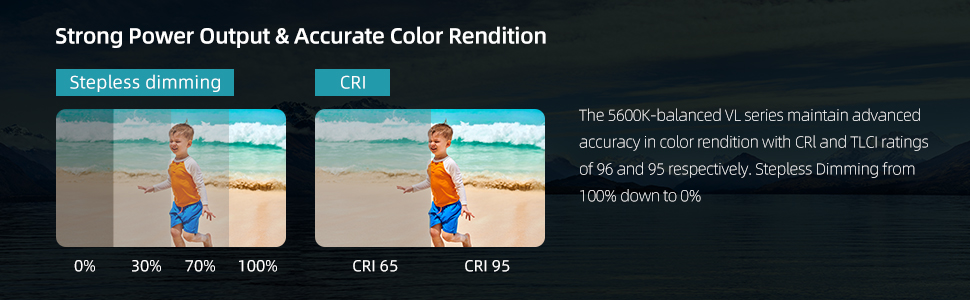
Image 2.2: Illustration of the VL series' fast cooling and quiet fan design.

Image 2.3: The VL300's rotating yoke allows for flexible angle adjustments.
3. Setup Instructions
3.1 Assembling the Light
- Attach the VL300 light head to a compatible light stand using the integrated mounting bracket. Secure it firmly.
- If using a light modifier (e.g., softbox, reflector), attach it to the Bowens mount on the front of the light head.

Image 3.1: The VL300 is compatible with Bowens mount accessories.
3.2 Powering the Unit
The VL300 offers two power options:
- AC Power: Connect the AC adapter to the controller box, then connect the power cable to a suitable power outlet. Connect the controller box to the light head using the provided connecting cable.
- V-Mount Battery (Sold Separately): Insert compatible V-mount lithium batteries into the V-mount slots on the controller box. This allows for portable operation without heavy cord systems.

Image 3.2: The controller box supports V-mount batteries for portable power.
4. Operating Instructions
4.1 Power On/Off
Once connected to a power source, press the power button on the controller box to turn the light on or off. The LCD panel on the controller will display current settings.
4.2 Brightness Adjustment
Rotate the dimming dial on the controller box to adjust the light brightness from 0% to 100% in stepless increments.

Image 4.1: Stepless dimming from 0% to 100% and accurate color rendition.
4.3 Wireless Control
The VL300 can be controlled wirelessly using the included remote control or the GodoxPhoto mobile application.
- Remote Control: The standard remote control operates at 433MHz and can control lights within 6 groups and 16 channels. Refer to the remote control's specific manual for pairing and operation details.
- Mobile App (GodoxPhoto): Download the GodoxPhoto app from your smartphone's app store (compatible with iPhone or Android). Enable Bluetooth on your device and follow the app's instructions to connect and control the VL300.

Image 4.2: Wireless control options via remote and smartphone app.
5. Maintenance
To ensure the longevity and optimal performance of your Godox VL300 LED Light, follow these maintenance guidelines:
- Cleaning: Use a soft, dry cloth to clean the light body and controller. Avoid using abrasive cleaners or solvents.
- Storage: When not in use, store the light in its carrying bag in a cool, dry place, away from direct sunlight and excessive humidity.
- Ventilation: Ensure the cooling vents on the light head and controller are not obstructed during operation to prevent overheating.
- Cable Care: Regularly inspect all cables for any signs of damage. Replace damaged cables immediately.
6. Troubleshooting
If you encounter issues with your Godox VL300 LED Light, refer to the following common troubleshooting steps:
- Light Not Turning On:
- Check if the power cable is securely connected to both the AC adapter and the power outlet.
- Ensure the connecting cable between the light head and controller is properly seated.
- If using V-mount batteries, verify they are charged and correctly inserted.
- Confirm the power button on the controller box has been pressed.
- No Response from Remote Control/App:
- For remote control, check battery levels and ensure it's within range and paired correctly.
- For the mobile app, ensure Bluetooth is enabled on your device and the light is paired within the GodoxPhoto app.
- Verify that the light and controller are set to the correct group and channel.
- Abnormal Noise or Overheating:
- Ensure the light's cooling vents are clear of obstructions.
- Operate the light in a well-ventilated area.
- If unusual noises persist, discontinue use and contact customer support.
If the issue persists after attempting these steps, please contact Godox customer support for further assistance.
7. Specifications
The following table details the specifications for the Godox VL series LED Lights, including the VL300:

Image 7.1: Parameter comparison for VL150, VL200, and VL300 models.
| Feature | VL150 | VL200 | VL300 |
|---|---|---|---|
| Powered by DC Power | AC100V-240V (50/60Hz) | ||
| DC Power Input | 2A (DC16.8V 10A) | 3.9A (DC33V 7A) | 4.3A (DC33V 10A) |
| Powered by Lithium Battery | V Mount Lithium Battery (sold separately) | ||
| Power Consumption (maximum) | 150W | 200W | 300W |
| Color Temperature | 5600K ± 200K | ||
| 100% Light Brightness (with Reflector) | 61000 LUX (1M) | 75000 LUX (1M) | 77000 LUX (1M) |
| 100% Light Brightness (Bare Bulb) | 6400 LUX (1M) | 7800 LUX (1M) | 10800 LUX (1M) |
| CRI≈ | 96 | ||
| TLCI≈ | 95 | ||
| Light Brightness Range | 0%–100% | ||
| Operation Temperature | -10°C–40°C | ||
| Channel | 16 | ||
| Group | 6 (A, B, C, D, E, F) | ||
| Light Body Size | 30x14x18cm | 30x14x18cm | 34x14x18cm |
| Net Weight (Light Body) | 1.97Kg | 2.23Kg | 2.64Kg |
| Net Weight (Controller) | 0.86Kg | 1.19Kg | 1.26Kg |
| Net Weight (Adapter) | 0.72Kg | 0.96Kg | 1.14Kg |
Additional specifications for the Godox VL300 (Item model number: VL-151):
- Product Dimensions: 11.81 x 5.51 x 7.09 inches
- Item Weight: 5.14 pounds
- Connectivity Technology: USB
- Hardware Interface: USB
8. Warranty and Support
For warranty information, product registration, and technical support, please refer to the official Godox website or contact your authorized dealer. Keep your purchase receipt as proof of purchase for warranty claims.
For further assistance, visit: www.godox.com