
1. Introduction
This manual provides detailed instructions for the assembly, operation, maintenance, and troubleshooting of your FEZIBO 63x24 Inch Electric Standing Desk with Drawer. Please read this manual thoroughly before assembly and use to ensure proper function and safety.

Image 1.1: Assembled FEZIBO Electric Standing Desk with Drawer in Rustic Brown.
2. Important Safety Information
- The maximum weight capacity for this desk is 176 lbs (79.8 kg). Do not exceed this limit.
- For enhanced stability, especially when the desk is at higher settings or supporting significant weight, ensure the desk is properly anchored if recommended by the manufacturer.
- Always power off and unplug the desk before performing any assembly, disassembly, or maintenance.
- Keep power cords and electrical components away from heat sources and liquids.
- Regularly inspect the desk for any signs of wear or damage. If issues arise, contact customer support.
- The desk features rounded corners for safety, but caution should always be exercised during use.

Image 2.1: Rounded corners on the desk surface for user safety.
3. Setup and Assembly
3.1. Included Components
Your FEZIBO Electric Standing Desk package includes:
- Standing Desk Frame and Legs
- Desktop Surface (Rustic Brown)
- Storage Drawer (Upgraded Leather)
- Control Panel
- 2 Desk Hooks
- 4 Casters (Wheels)
- Assembly Instructions with Diagram
- Basic Assembly Tools (e.g., L-shaped hex key)
3.2. Assembly Instructions
Assembly is required for this product. It is recommended that two people perform the assembly for ease and safety.
- Unpack Components: Carefully remove all parts from the packaging and verify against the included parts list.
- Assemble Desk Frame: Follow the detailed diagrams in the provided assembly manual to connect the desk legs and crossbars. Embedded screw hole locations simplify this process.
- Attach Desktop: Secure the desktop surface to the assembled frame using the designated screws.
- Install Control Panel: Mount the control panel to the underside of the desk in an accessible location.
- Install Drawer: Attach the upgraded leather drawer to the designated rails under the desktop. Ensure it slides smoothly.
- Attach Accessories: Install the two desk hooks and four casters as per the instructions. The casters allow for easy movement of the desk.
- Cable Management: Utilize the desktop cable grommets to organize and route your wires neatly.
A detailed installation video guide is available. Refer to the manufacturer's website or the QR code in the included manual for access.
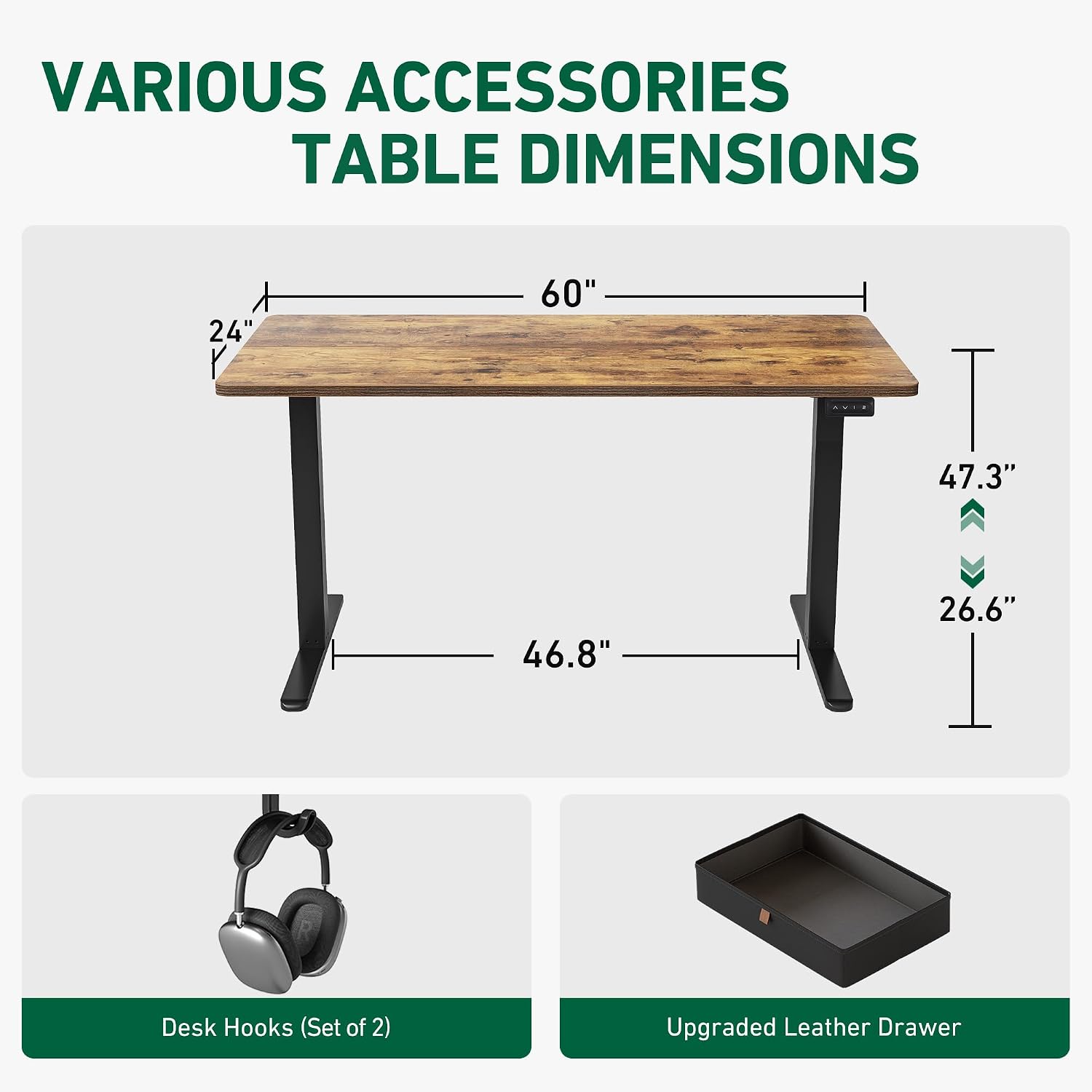
Image 3.1: Overview of desk dimensions and included accessories like desk hooks and the leather drawer.
4. Operating Instructions
4.1. Height Adjustment
The FEZIBO Electric Standing Desk features an electric motor system for smooth height adjustment. The desk can be adjusted between a minimum height of 27.7 inches (70.3 cm) and a maximum height of 46.6 inches (118 cm).

Image 4.1: Visual representation of the desk's adjustable height range and ergonomic positions.
4.2. Control Panel Functions
The control panel allows you to adjust the desk height and save preferred settings.

Image 4.2: The desk's control panel featuring up/down buttons and two programmable memory presets.
- Up/Down Buttons: Use the arrow buttons to manually raise or lower the desk to your desired height.
- Memory Presets (1, 2): The desk features 4 programmable memory positions. To save a height setting:
- Adjust the desk to the desired height.
- Press and hold one of the memory buttons (1 or 2) until you hear a beep or see a confirmation on the display (if applicable). The height is now saved.
4.3. Quiet Operation
The electric motor operates at a low noise level of approximately 45 dB, ensuring a quiet working environment.

Image 4.3: Illustration of the desk's quiet operation at 45dB and its maximum load capacity of 176 lbs.
4.4. Anti-Collision Feature
The desk is equipped with an anti-collision system. If the desk encounters an obstruction while adjusting height, it will automatically stop and reverse slightly to prevent damage.

Image 4.4: The anti-collision feature prevents damage by stopping and reversing desk movement when an obstacle is detected.
5. Maintenance
- Cleaning: Use a soft, damp cloth to clean the desktop and frame. Avoid harsh chemicals or abrasive cleaners. The upgraded leather drawer is waterproof, allowing for easy cleaning of spills.
- Inspection: Periodically check all screws and connections to ensure they are tight. Retighten if necessary.
- Cable Management: Ensure cables are not pinched or tangled, especially during height adjustments.
- Drawer Care: The leather drawer is designed for daily work and life storage. Its waterproof function helps maintain cleanliness.

Image 5.1: Details of the upgraded leather drawer, emphasizing its waterproof material and dimensions.
6. Troubleshooting
If you encounter any issues with your FEZIBO Electric Standing Desk, please refer to the following general troubleshooting steps:
- Desk Not Moving: Check if the power cord is securely plugged into both the desk and a working power outlet. Ensure no cables are obstructing the movement of the legs.
- Error Codes: If the control panel displays an error code, consult the full assembly manual for specific interpretations and solutions.
- Uneven Movement: Ensure the desk is on a level surface and that all leg components are securely fastened.
- Noise: While the desk operates quietly (45 dB), unusual or excessive noise may indicate a loose component. Inspect the frame and motor area.
For persistent issues or technical support, please contact FEZIBO customer service.
7. Specifications
| Feature | Detail |
|---|---|
| Brand | FEZIBO |
| Model Number | SDE-DC-BT |
| Product Dimensions (D x W x H) | 24"D x 63"W x 27.7"H (61cm D x 160cm W x 70.3cm H) |
| Minimum Height | 27.7 inches (70.3 cm) |
| Maximum Height | 46.6 inches (118 cm) |
| Item Weight | 27 Pounds (12.25 kg) |
| Maximum Weight Recommendation | 176.37 Pounds (79.8 kg) |
| Color | Rustic Brown |
| Top Material Type | Wood |
| Base Material | Alloy Steel |
| Number of Drawers | 1 (Upgraded Leather Drawer) |
| Drawer Storage Volume | 16.04 Liters |
| Operating Noise Level | 45 dB |
| Number of Height Positions | 4 (Programmable Memory Presets) |
| Required Assembly | Yes (Recommended 2 people) |
8. Warranty and Support
8.1. Warranty Information
The FEZIBO Electric Standing Desk comes with a Limited Warranty. For specific terms and conditions, please refer to the warranty card included with your product or visit the official FEZIBO website. A 2-year warranty is typically provided.
8.2. Customer Support
If you have any questions, require technical assistance, or need to report an issue, please contact FEZIBO Customer Service:
- Phone (U.S.): +1 702-620-5156
- Hours: Monday - Friday, 24/5
- Online: Visit the official FEZIBO website for support resources and contact forms.


