
VEVOR CF45
VEVOR 45L Portable Compression Refrigerator User Manual
Model: CF45
Brand: VEVOR
1. Introduction
This manual provides detailed instructions for the safe and efficient operation of your VEVOR 45L Portable Compression Refrigerator. Please read this manual thoroughly before using the appliance and retain it for future reference. This premium portable refrigerator features a modern design with a simple black and gray color scheme, offering efficient cooling and low noise operation.
2. Safety Instructions
To ensure safe operation and prevent damage, please observe the following safety guidelines:
- Ensure the power supply matches the voltage specified on the appliance.
- Do not operate the refrigerator if the power cord is damaged.
- Keep the appliance away from heat sources and direct sunlight.
- Ensure adequate ventilation around the unit, especially the compressor area.
- Do not immerse the refrigerator in water or expose it to excessive moisture.
- Avoid placing corrosive or flammable materials inside the refrigerator.
- Always disconnect power before cleaning or performing maintenance.
- This appliance is not intended for use by persons (including children) with reduced physical, sensory or mental capabilities, or lack of experience and knowledge, unless they have been given supervision or instruction concerning use of the appliance by a person responsible for their safety.
3. Package Contents
Upon unpacking, please verify that all items listed below are present and in good condition:
- 1 x VEVOR 45L Portable Compression Refrigerator
- 1 x DC Power Cord (12V/24V)
- 1 x AC Adapter (110-240V)
- 1 x User Manual
4. Product Features
- Adequate Storage Space: The 45L / 47.5 quart capacity provides ample room for storing food and beverages, capable of holding 48 cans of 330mL cola, 28 bottles of 550mL drinks, and 15 bottles of 750mL wines.
- Efficient Refrigeration: Equipped with compressor refrigeration technology, this 12V car freezer achieves rapid cooling from 20℃ to 0℃ (68℉ to 32℉) in just 15 minutes, with a cooling range of -20℃ to 20℃ (-4℉ to 68℉).
- Precise Control: The digital display panel allows for easy temperature and mode adjustments, enabling real-time monitoring of temperature and power.
- Humanized Design: Features include a built-in LED light for visibility, integrated handles for easy portability, a removable internal basket for organization, and cup holders for stability. Mobile app control is also available.
- Battery Protection: The refrigerator includes a three-layer battery protection system (low, medium, and high) to prevent vehicle battery drain, ensuring safe driving. It is designed for quiet operation.
- Versatile Use: Perfectly fits in car trunks, behind car seats, or in truck beds, making it suitable for RVs, camping, fishing, road trips, and various outdoor activities.
5. Product Overview

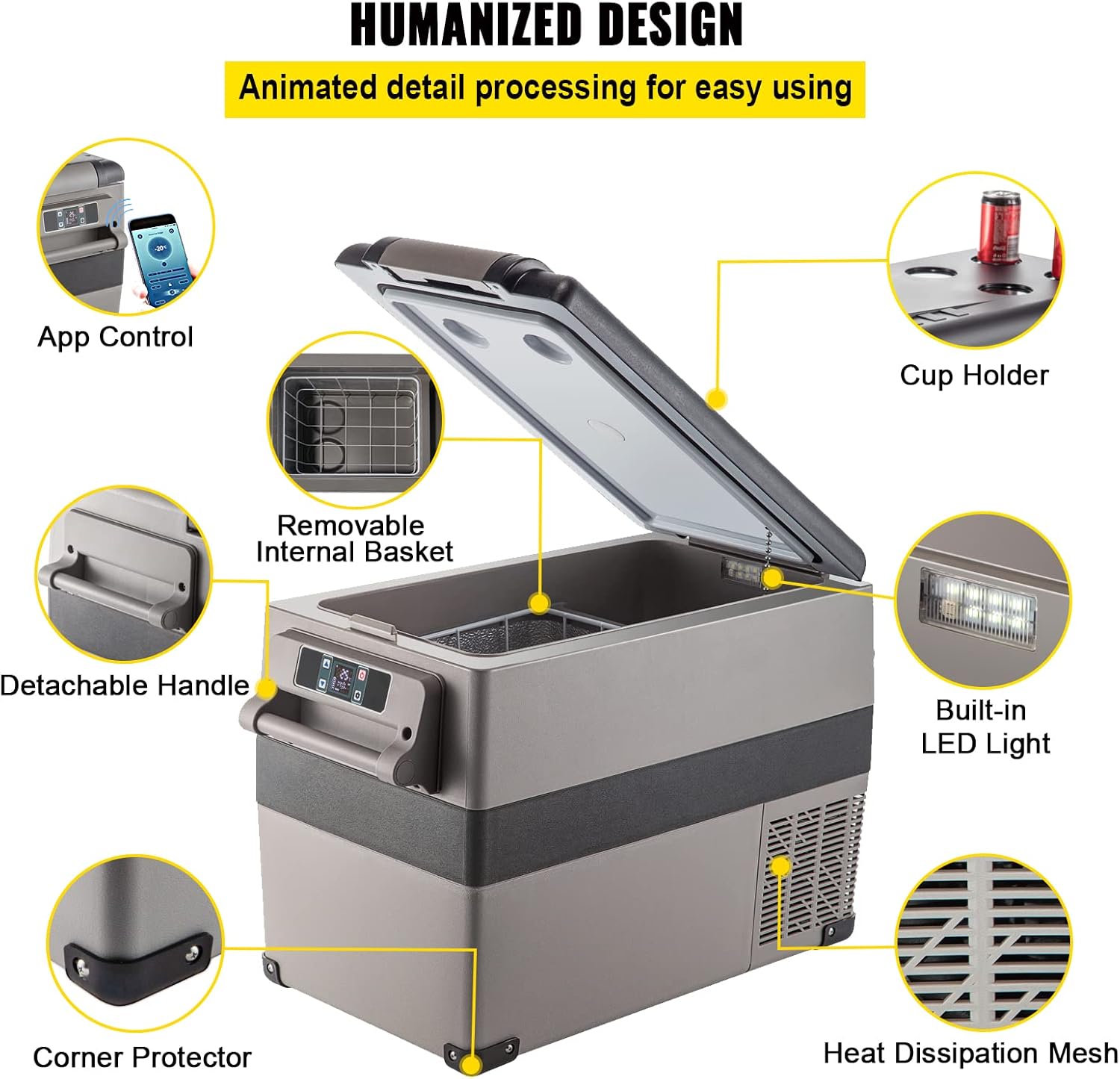


6. Setup
- Unpacking: Carefully remove the refrigerator from its packaging. Inspect for any shipping damage.
- Placement: Place the refrigerator on a flat, stable surface. Ensure there is adequate space around the unit for proper ventilation (at least 10 cm on all sides). Avoid placing it in direct sunlight or near heat sources.
- Initial Power-Up: Before connecting to power, allow the refrigerator to stand upright for at least 6 hours if it has been transported horizontally. This allows the refrigerant to settle.
- Power Connection:
- For AC (Home/Wall Outlet): Connect the AC adapter to the refrigerator's AC input port, then plug the adapter into a standard 110-240V AC wall outlet.
- For DC (Car/Vehicle): Connect the DC power cord to the refrigerator's DC input port, then plug the other end into your vehicle's 12V/24V cigarette lighter socket.
- Power On: Press the power button on the control panel to turn on the refrigerator.
7. Operating Instructions
7.1. Control Panel Functions
The digital control panel allows you to manage the refrigerator's settings:
- Power Button: Turns the unit on/off.
- SET Button: Enters temperature setting mode or switches between modes (e.g., MAX/ECO).
- +/- Buttons: Adjust temperature settings.
- Display: Shows current temperature, voltage, and operating mode.
7.2. Temperature Setting
- Press the SET button once. The temperature display will flash.
- Use the +/- buttons to set your desired temperature.
- Wait a few seconds; the display will stop flashing, and the new temperature will be set.
7.3. Operating Modes (MAX/ECO)
Press and hold the SET button for 3 seconds to switch between MAX (fast cooling) and ECO (energy-saving) modes. ECO mode is recommended for general use to conserve power.
7.4. Battery Protection Setting
The refrigerator features three levels of battery protection (H - High, M - Medium, L - Low) to prevent draining your vehicle's battery. To adjust this setting:
- With the refrigerator ON, press and hold the SET button for 3 seconds until the display shows 'E'.
- Press the SET button repeatedly to cycle through the options (E, H, M, L). Select H, M, or L using the +/- buttons.
- Wait a few seconds for the setting to save automatically.
Note: It is recommended to set the battery protection to 'H' when connected to a car battery to prevent excessive discharge.
7.5. Mobile App Control
This refrigerator supports mobile app control. Refer to the specific instructions provided with the app for pairing and operation. The app allows for remote temperature adjustment and monitoring.
8. Maintenance
8.1. Cleaning
- Always disconnect the power before cleaning.
- Clean the interior and exterior surfaces with a damp cloth and mild detergent.
- Do not use abrasive cleaners or sharp objects that could damage the surfaces.
- Ensure the ventilation grilles are free from dust and debris. Use a soft brush or vacuum cleaner to clean them.
- Dry all surfaces thoroughly before reconnecting power.
8.2. Storage
If the refrigerator will not be used for an extended period:
- Empty all contents and clean the interior thoroughly.
- Leave the lid slightly ajar to prevent odors and mold growth.
- Store the unit in a dry, well-ventilated area, away from direct sunlight and extreme temperatures.
9. Troubleshooting
| Problem | Possible Cause | Solution |
|---|---|---|
| Refrigerator not turning on | No power supply; Damaged power cord; Blown fuse in vehicle. | Check power connection; Inspect power cord; Check vehicle fuse. |
| Poor cooling performance | Lid not closed properly; Insufficient ventilation; Temperature setting too high; Overloaded with warm items. | Ensure lid is sealed; Clear ventilation; Lower temperature setting; Allow time for cooling. |
| Unit making unusual noise | Unit not level; Obstruction near fan; Compressor noise (normal). | Place on a level surface; Remove obstructions; Normal compressor operation may produce slight noise. |
| Error code on display | Specific internal issue. | Refer to the specific error code in a more detailed service manual or contact customer support. |
10. Specifications
| Brand | VEVOR |
| Model Number | CF45 |
| Capacity | 45 L / 47.5 Quarts |
| Cooling Range | -20℃ to 20℃ / -4℉ to 68℉ |
| Voltage | DC 12V/24V, AC 110-240V |
| Power | 60 W |
| Net Weight | 15.6 kg / 34.3 lbs |
| External Dimensions (L x W x H) | 693 x 345 x 456 mm / 27 x 13.6 x 18 inches |
| Large Zone Size (L x W x H) | 327 x 267 x 363 mm / 12.8 x 10.5 x 14.3 inches |
| Small Zone Size (L x W x H) | 160 x 267 x 198 mm / 6.3 x 10.5 x 7.8 inches |
| Certification | CE |
11. Warranty and Support
VEVOR products are designed for durability and performance. For warranty information, please refer to the warranty card included with your purchase or visit the official VEVOR website. If you encounter any issues or require technical assistance, please contact VEVOR customer support through their official channels. When contacting support, please have your model number (CF45) and purchase details ready.
Related Documents - CF45
 |
VEVOR Car Fridge Freezer Operating Manual and Troubleshooting Guide Official operating manual for VEVOR car fridge freezers. Includes detailed instructions for various models, safety guidelines, troubleshooting tips, and control panel explanations for optimal use. |
 |
VEVOR B35IM Car Refrigerator User Manual Comprehensive user manual for the VEVOR B35IM Car Refrigerator, covering operation, troubleshooting, safety precautions, and technical specifications. Learn how to use and maintain your portable car fridge for optimal performance. |
 |
VEVOR J20 Car Refrigerator User Manual | Operation & Troubleshooting Guide Comprehensive user manual for the VEVOR J20 Car Refrigerator. Learn about setup, operation, features, troubleshooting, and safety precautions for your portable cooling device. |
 |
VEVOR TWW95/TWW115 Car Refrigerator User Manual Comprehensive user manual for the VEVOR TWW95 and TWW115 car refrigerators. Learn about setup, operation, smart app control, troubleshooting, and safety guidelines for your portable cooling solution. |
 |
VEVOR Car Refrigerator User Manual - NLD/NLS Series Comprehensive user manual for VEVOR car refrigerators, models NLD35, NLD45, NLD55, NLS35, NLS45, NLS55. Includes setup, operation, smart control, troubleshooting, and safety guidelines. |
 |
VEVOR Portable Fridge Freezer User Manual Comprehensive user manual for VEVOR portable fridge freezers, covering troubleshooting, safety instructions, general guidelines, and model-specific operations for various VEVOR portable refrigerator and freezer models. |