
Power Dynamics PPA50
POWER DYNAMICS PPA50 Amplifier User Manual
100V 50W Amplifier with Bluetooth and MP3 Player
1. Introduction
Thank you for purchasing the Power Dynamics PPA50 Public Address Amplifier. This versatile amplifier is designed for a wide range of small to medium-sized installations, offering ease of use, excellent performance, and reliability. It features multiple input options, including microphone and line inputs, an integrated MP3 player with USB/SD card slots, and Bluetooth connectivity for wireless audio streaming. Please read this manual thoroughly before operating the unit to ensure proper use and to prevent damage.
2. Safety Instructions
To reduce the risk of electric shock, do not remove the cover. No user-serviceable parts inside. Refer servicing to qualified service personnel. Read these instructions carefully before use and retain them for future reference.
- Power Source: Connect the unit only to a grounded mains outlet with the correct voltage (100-240V AC, 50/60Hz) or a 12V DC source as specified.
- Water and Moisture: Do not expose the unit to rain or moisture. Do not place objects filled with liquids, such as vases, on the unit.
- Ventilation: Ensure adequate ventilation. Do not block ventilation openings.
- Heat: Do not place the unit near heat sources such as radiators, heat registers, stoves, or other apparatus (including amplifiers) that produce heat.
- Cleaning: Clean only with a dry cloth.
- Servicing: Do not attempt to service the unit yourself. Refer all servicing to qualified service personnel.
- Speaker Connections: Ensure correct impedance matching for speakers (8 ohms, 70V, or 100V) to prevent damage to the amplifier.
3. Package Contents
Verify that all items are present and in good condition upon opening the package:
- Power Dynamics PPA50 Amplifier
- Infrared Remote Control
- Power Cable
- User Manual (this document)
4. Product Overview
4.1 Front Panel

The front panel provides access to all primary controls and indicators for the amplifier's operation.
- MIC 1 Input: 6.3mm jack for microphone connection.
- MIC 1/2 Volume: Rotary controls for adjusting the volume of microphone inputs.
- LINE 1/2 Volume: Rotary controls for adjusting the volume of line inputs.
- MP3 Volume: Rotary control for adjusting the volume of the integrated MP3 player/Bluetooth.
- BASS/TREBLE Controls: Tone controls for adjusting low and high frequencies.
- MASTER VOLUME: Main volume control for overall output.
- MP3 Player Module: Features USB/SD card slots, LCD display, and control buttons (MODE, Play/Pause, Skip).
- Indicators: Power ON, PROT (Protection), CLIP, and output level indicators (0, 10, 20).
- Power Switch: On/Off button for the amplifier.
4.2 Rear Panel
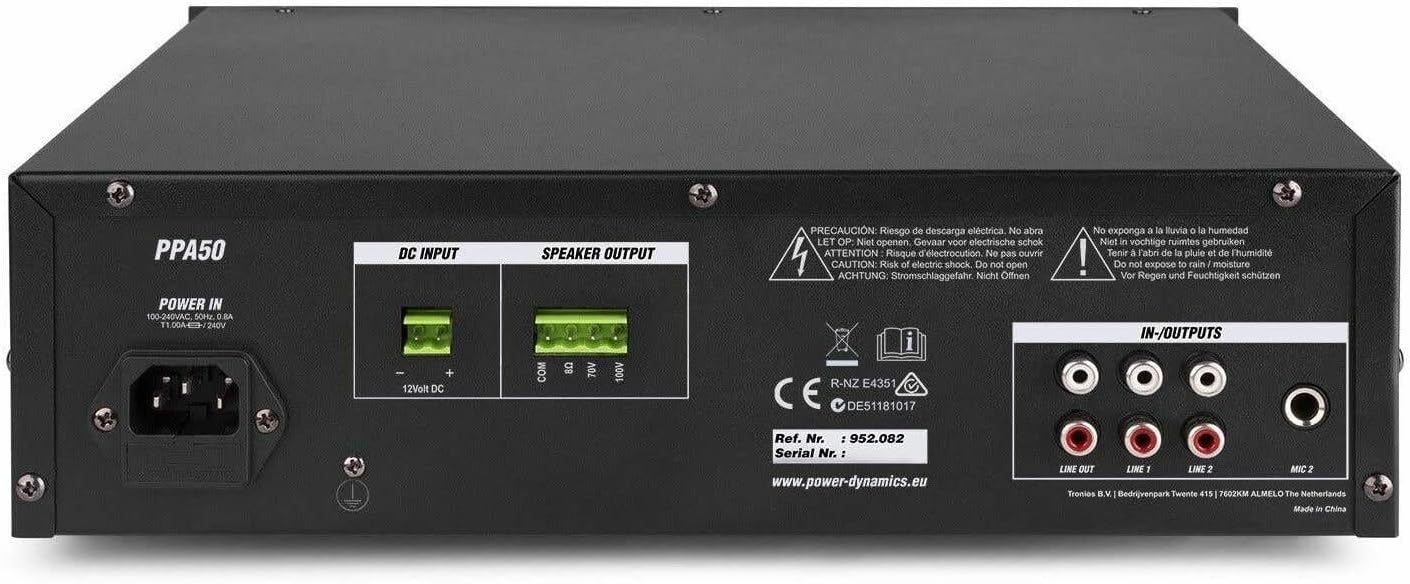
The rear panel houses all necessary connections for power, speakers, and external audio sources.
- POWER IN: AC mains input (220-240V) and 12V DC input for flexible operation.
- SPEAKER OUTPUT: Screw terminals for connecting speakers (COM, 8Ω, 70V, 100V).
- IN-OUTPUTS: RCA stereo line inputs (LINE 1, LINE 2) and a stereo RCA line output (LINE OUT).
- MIC 2 Input: RCA input for a second microphone.
4.3 Remote Control

The included infrared remote control allows for convenient operation of the MP3 player and other functions from a distance.
- PLAY/PAUSE: Play or pause current track.
- CH-/CH+: Navigate through channels or folders.
- VOL-/VOL+: Adjust volume of the MP3 player.
- EQ: Cycle through equalizer presets.
- PREV/NEXT: Skip to previous or next track.
- Number Pad (0-9): Direct track selection.
- PICK SONG: Select a song.
- RPT: Repeat mode.
- MODE: Switch between USB, SD, and Bluetooth modes.
5. Setup
5.1 Connecting Speakers
The PPA50 amplifier supports 8 ohm, 70V, and 100V speaker systems. Ensure your speakers match the amplifier's output impedance.
- For 8 Ohm Speakers: Connect the speaker's positive (+) terminal to the 8Ω terminal on the amplifier and the speaker's negative (-) terminal to the COM terminal.
- For 70V/100V Line Speakers: Connect the speaker's positive (+) terminal to the 70V or 100V terminal (depending on your speaker type) and the speaker's negative (-) terminal to the COM terminal. Ensure the total wattage of all connected 70V/100V speakers does not exceed the amplifier's output power (50W).
5.2 Connecting Microphones
The amplifier has two microphone inputs.
- Connect a microphone to the MIC 1 6.3mm jack on the front panel.
- Connect a second microphone to the MIC 2 RCA input on the rear panel.
5.3 Connecting Line Inputs
Connect external audio sources such as CD players, mixers, or other audio devices to the RCA LINE 1 or LINE 2 inputs on the rear panel.
5.4 Power Connection
The PPA50 can be powered by AC mains or a 12V DC source.
- AC Power: Connect the supplied power cable to the POWER IN socket on the rear panel and then to a suitable mains outlet.
- 12V DC Power: For flexible operation, connect a 12V DC power source (e.g., car battery) to the 12V DC INPUT terminals on the rear panel, ensuring correct polarity.
6. Operating Instructions
6.1 Powering On/Off
Press the POWER switch on the front panel to turn the amplifier on or off. The 'ON' indicator will illuminate when the unit is powered.
6.2 Master Volume Control
Adjust the overall output volume using the MASTER VOLUME knob on the front panel. Start with a low volume and gradually increase it to a comfortable listening level.
6.3 Microphone Usage
After connecting microphones, adjust their individual volume levels using the MIC 1 and MIC 2 volume knobs on the front panel.
6.4 Line Input Usage
Select the desired line input (LINE 1 or LINE 2) and adjust its volume using the corresponding LINE 1 or LINE 2 volume knobs.
6.5 MP3 Player (USB/SD) Operation
Insert a USB drive or SD card into the respective slot on the front panel. The amplifier will automatically switch to MP3 mode and begin playback. Use the control buttons (MODE, Play/Pause, Skip) or the remote control to manage playback. Adjust the MP3 volume using the MP3 volume knob.
6.6 Bluetooth Pairing and Playback
To use Bluetooth:
- Press the MODE button on the MP3 player module (or remote) until 'Bluetooth' or 'BT' is displayed.
- On your Bluetooth-enabled device (smartphone, tablet, etc.), search for available devices and select 'PPA50'.
- Once paired, you can stream audio wirelessly to the amplifier. Adjust volume using the MP3 volume knob on the amplifier or your connected device.
6.7 Bass/Treble Control
Use the BASS and TREBLE knobs to adjust the low and high frequency response of the audio output to suit your preference.
7. Maintenance
Regular maintenance ensures the longevity and optimal performance of your amplifier.
- Cleaning: Wipe the unit with a soft, dry cloth. Do not use abrasive cleaners or solvents.
- Ventilation: Keep the ventilation openings clear of dust and debris.
- Storage: If storing the unit for an extended period, disconnect it from power and store it in a cool, dry place.
8. Troubleshooting
If you encounter issues with your PPA50 amplifier, refer to the following common problems and solutions:
| Problem | Possible Cause | Solution |
|---|---|---|
| No power | Power cable not connected; Power switch off; No power from outlet. | Check power cable connection; Ensure power switch is ON; Test outlet with another device. |
| No sound output | Master volume too low; Incorrect input selected; Speaker connections loose or incorrect; Protection mode activated. | Increase MASTER VOLUME; Select correct input source; Check speaker wiring and impedance; If PROT light is on, turn off unit, check connections, and restart. |
| Distorted sound | Input signal too high (clipping); Speaker impedance mismatch; Faulty cable. | Reduce input volume; Verify speaker impedance; Replace cables. |
| Bluetooth not connecting | Amplifier not in Bluetooth mode; Device too far; Bluetooth not enabled on device. | Press MODE button to select BT; Move device closer; Enable Bluetooth on your device. |
| MP3 player not working | Incorrect file format; USB/SD card corrupted; MP3 volume too low. | Ensure files are MP3 format; Try another USB/SD card; Increase MP3 volume. |
If the problem persists after trying these solutions, please contact your dealer or qualified service personnel.
9. Specifications
| Feature | Specification |
|---|---|
| Output Power (RMS) | 50 W |
| Speaker Outputs | 8 Ohm, 70 V, 100 V |
| Frequency Response | 50 Hz - 18,000 Hz |
| Signal-to-Noise Ratio (Line) | > 80 dB |
| Signal-to-Noise Ratio (Microphone) | > 72 dB |
| Microphone Inputs | 2 (1x 6.3mm Jack, 1x RCA) |
| Line Inputs | 2 (RCA Stereo) |
| Line Output | 1 (RCA Stereo) |
| Media Player | USB, SD, Bluetooth, MP3 Equalizer |
| Tone Controls | Bass, Treble |
| Power Supply | 100-240 V AC, 50/60 Hz or 12 V DC |
| Dimensions (L x W x H) | 270 x 320 x 86 mm |
| Weight | 3.3 kg |
10. Warranty and Support
This product is covered by the standard warranty provided by your retailer. Please refer to your purchase documentation for specific warranty terms and conditions. For technical support, troubleshooting assistance beyond this manual, or warranty claims, please contact your point of purchase or the official Power Dynamics customer support channels.
You may find additional information and support on the manufacturer's website: www.power-dynamics.eu
Related documentsPPA50


Ask a question about this manual
Ask about setup, troubleshooting, compatibility, parts, safety, or missing instructions. Manuals+ will review the question and use this page’s manual context to help answer it.