
Introduction
This manual provides instructions for the ZdalaMit RM-AAU013 replacement remote control. This remote is designed to function with various Sony Home Theater Systems, including models HT-DDW790, STR-DG510, HT-DDW795, and HT-DDW685. It offers direct functionality without the need for programming or pairing.
Setup
Battery Installation
The RM-AAU013 remote control requires two (2) 1.5V AA alkaline batteries for operation. Batteries are not included with the remote control.
- Locate the battery compartment on the back of the remote control.
- Slide the battery compartment cover downwards or press the latch and lift to open.
- Insert two AA batteries, ensuring the positive (+) and negative (-) terminals align correctly with the indicators inside the compartment.
- Replace the battery compartment cover until it clicks securely into place.
Once batteries are installed, the remote control is ready for immediate use. No programming or pairing is required.
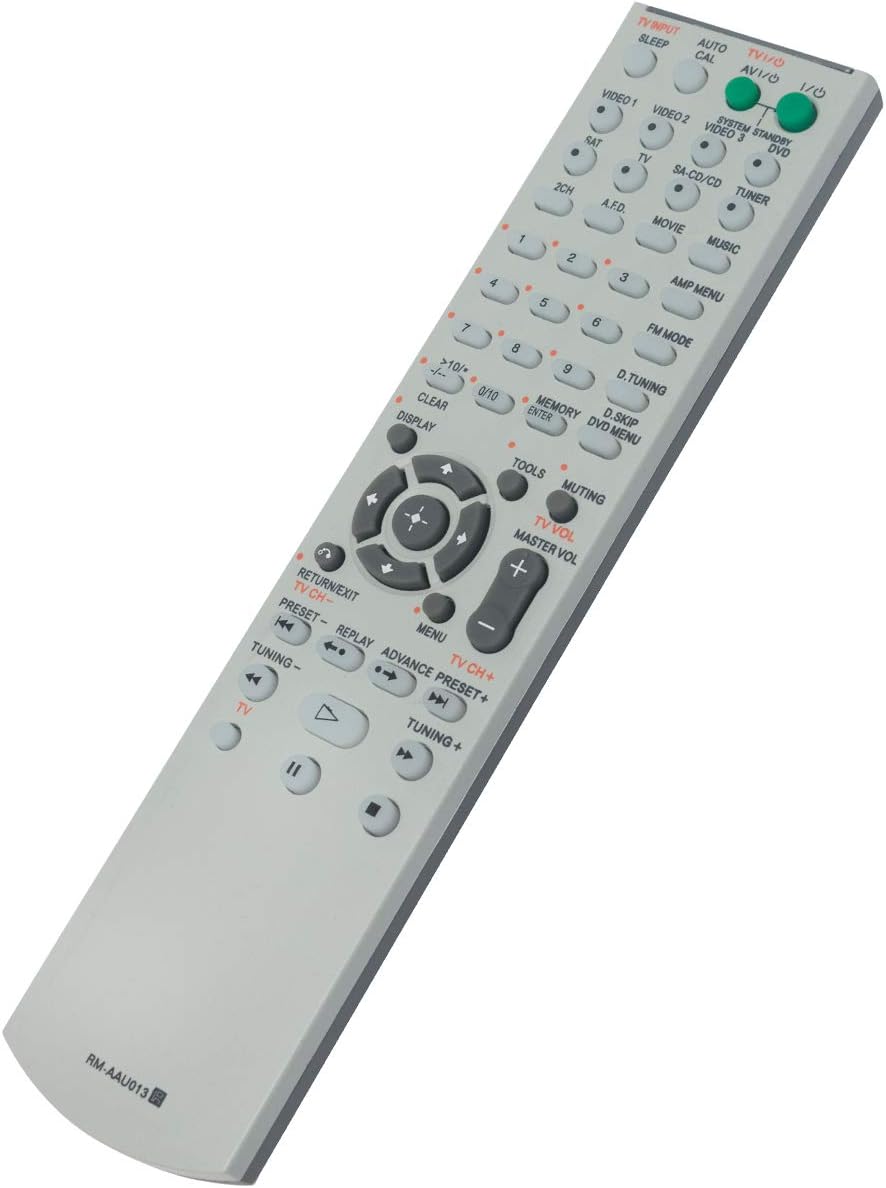
Image: Angled view of the ZdalaMit RM-AAU013 remote control. The battery compartment is located on the reverse side of the remote.
Operating Instructions
This remote control provides full functionality for your compatible Sony Home Theater System. Familiarize yourself with the button layout for optimal use.

Image: Front view of the ZdalaMit RM-AAU013 remote control, displaying all buttons and their labels.
Key Functions
- Power (I/O): Turns the home theater system and connected TV (if applicable) on or off.
- TV INPUT / AV I/O: Selects the input source for the television.
- SYSTEM STANDBY / DVD: Puts the system into standby mode or controls DVD functions.
- VIDEO 1, VIDEO 2, VIDEO 3: Selects corresponding video input sources.
- SAT, TV, SA-CD/CD, TUNER: Selects audio input sources.
- 2CH, A.F.D., MOVIE, MUSIC: Selects sound field modes.
- Numeric Keypad (1-9, 0/10, >10/-.-): Used for direct channel selection, track selection, or entering numbers.
- AMP MENU: Accesses the amplifier's menu.
- FM MODE: Changes FM tuner modes.
- D.TUNING: Direct tuning for radio frequencies.
- MEMORY / ENTER: Stores radio presets or confirms selections.
- D.SKIP / DVD MENU: Skips DVD chapters or accesses the DVD menu.
- CLEAR / DISPLAY: Clears entries or changes display information.
- Navigation (Up, Down, Left, Right, Enter): Navigates through menus and confirms selections.
- TOOLS / MUTING: Accesses system tools or mutes the audio output.
- TV VOL (+/-) / MASTER VOL (+/-): Adjusts television volume or master system volume.
- RETURN/EXIT / MENU: Returns to the previous screen or exits a menu.
- TV CH (+/-) / PRESET (+/-): Changes television channels or radio presets.
- REPLAY / ADVANCE: Skips back or forward during playback.
- TUNING (+/-): Manually tunes radio frequencies.
- Playback Controls (Play, Pause, Stop, Fast Forward, Rewind): Controls media playback.
Maintenance
Battery Replacement
Replace batteries when the remote control's response becomes sluggish or stops functioning. Always replace both batteries simultaneously with new 1.5V AA alkaline batteries. Do not mix old and new batteries, or different types of batteries. Dispose of used batteries according to local regulations.
Cleaning
To clean the remote control, use a soft, dry cloth. For stubborn dirt, lightly dampen the cloth with water or a mild cleaning solution, then wipe the remote. Avoid using abrasive cleaners, solvents, or harsh chemicals, as these can damage the remote's surface or internal components.
Troubleshooting
Remote Not Responding
- Check Batteries: Ensure batteries are inserted correctly with the correct polarity (+/-) and are not depleted. Replace with fresh batteries if necessary.
- Line of Sight: Ensure there is a clear line of sight between the remote control and the infrared sensor on your home theater system. Remove any obstructions.
- Distance: Operate the remote within the effective range of your home theater system.
- System Power: Confirm that your Sony Home Theater System is powered on.
Limited Remote Range
- Battery Strength: Weak batteries can reduce the remote's effective range. Replace them.
- Interference: Strong light sources (e.g., direct sunlight, fluorescent lights) or other electronic devices can interfere with the remote's signal. Try operating the remote in a different environment.
Specifications
| Model Number | RM-AAU013 |
| Compatible Devices | Sony Home Theater Systems: HT-DDW790, STR-DG510, HT-DDW795, HT-DDW685 |
| Power Supply | 2 x 1.5V AA Alkaline Batteries (not included) |
| Product Dimensions | 5.6 x 1.4 x 0.5 inches (approximately) |
| Item Weight | 1.41 ounces (approximately) |
| Color | Black/White/Silver (as per product variations) |
Warranty Information
Specific warranty details for the ZdalaMit RM-AAU013 replacement remote control may vary. Please refer to the warranty information provided at the time of purchase or contact the retailer/manufacturer directly for details regarding warranty coverage and terms.
Support
If you encounter any issues or have questions regarding the ZdalaMit RM-AAU013 replacement remote control that are not addressed in this manual, please contact the seller or manufacturer for assistance. Provide your product model number (RM-AAU013) and a detailed description of the issue to facilitate support.