
1. Introduction
Thank you for choosing the Emaks 65W AC Laptop Charger. This manual provides essential information for the safe and efficient use of your new power adapter. Please read these instructions carefully before use and retain them for future reference.
2. Safety Information
- Ensure the charger's voltage and current specifications match your laptop's requirements.
- Do not use the charger if the cable or adapter housing is damaged.
- Avoid exposing the charger to water, moisture, or extreme temperatures.
- Unplug the charger from the power outlet when not in use or during electrical storms.
- Keep out of reach of children.
- This charger features built-in overload, over-voltage, and short circuit protection for safe operation.
3. Package Contents
Your Emaks 65W AC Laptop Charger package includes:
- 1 x Emaks 65W Replacement AC Adapter

Image: The Emaks 65W AC Laptop Charger, including the main adapter unit and the detachable power cable.
4. Setup
- Connect the AC power cable to the main adapter unit.
- Plug the AC power cable into a standard wall outlet.
- Connect the charger's output connector (3.0mm*1.1mm tip) to your laptop's charging port.
- Ensure a secure connection at both the wall outlet and the laptop port.
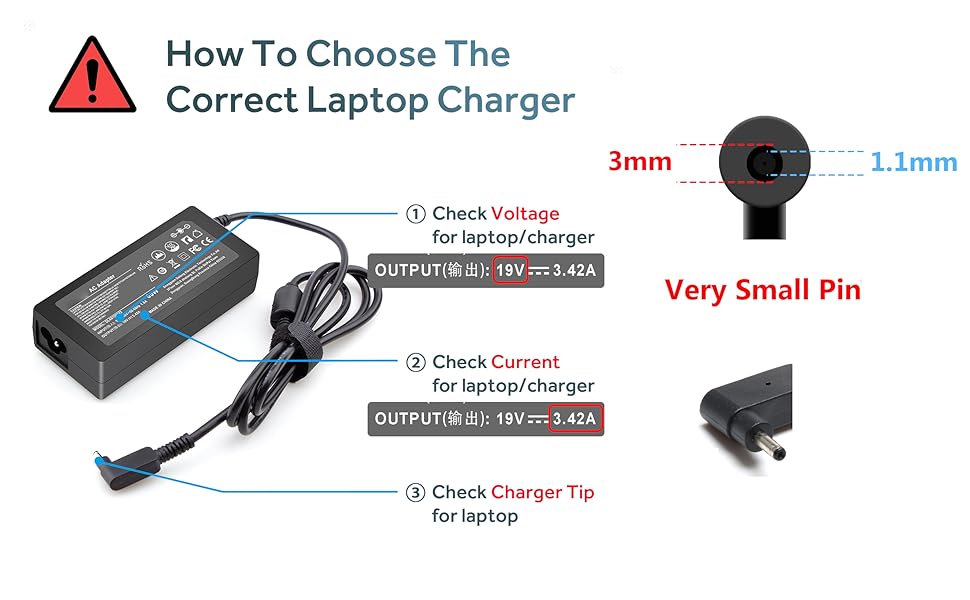
Image: The Emaks 65W charger connected to a laptop, illustrating the setup process.
5. Operating Instructions
Once connected, the charger will automatically begin charging your laptop. The charger is designed for high energy efficiency, providing reliable power to your device.
The power supply features an indicator light that illuminates when power is applied, confirming the charger is active.
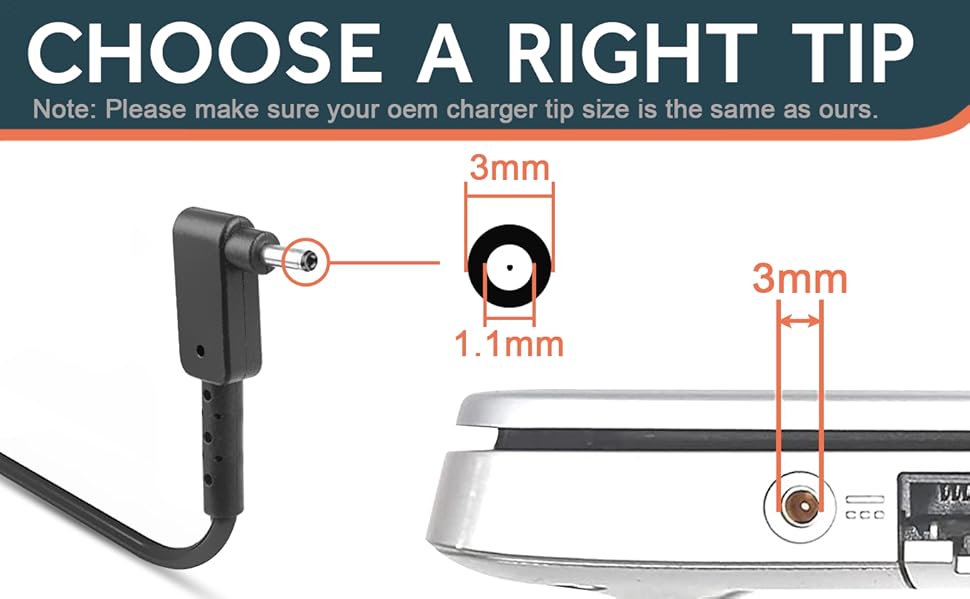
Image: An illustration demonstrating the high charge efficiency of the 65W Emaks charger compared to a lower wattage charger.
Official Product Video
Video: An official product video from Emaks-Direct showcasing the 65W Emaks Charger for Acer Laptops, highlighting its features and ease of use.
6. Compatibility
This Emaks 65W AC Laptop Charger is designed for use with various Acer Aspire laptop models. It features a 3.0mm*1.1mm connector tip. Please verify your laptop's power requirements and connector size before use.

Image: A visual guide on checking your laptop's charging port for compatibility, specifically noting the 3.0mm*1.1mm connector size and warning against using it with devices exceeding 65W.

Image: A close-up view of the 3.0mm x 1.1mm charger tip, emphasizing its small pin design.
Compatible Acer Aspire Models:
- Acer Aspire 1: A115-32, A115-32-C96U, A115-32-C7ZW, A115-32-C28P, A115-32-C1DF, A115-32-C44C
- Acer Aspire 3: A315-24P, A315-24PT, A315-58, A315-59, A315-23, A314-23P, A314-23P-R3QA, A315-24P-R7VH, A315-24PT-R4U2, A315-24PT-R90Z, A315-58-33XS, A315-58-350L, A315-58-300D, A315-58-34DA, A315-59-53ER, A315-59-71NF, A315-35, A317-53, A317-54, A317-55P, A314-22
- Acer Aspire 5: A515-44, A515-45, A515-46, A515-54, A515-54G, A515-55, A515-56, A515-58, A515-58PT, A517-52, A514-54, A515-44-R41B, A515-46-R3UB, A515-46-R14K, A515-55G, A515-55T, A515-54-59W2, A515-54-37U3, A515-54-55ZD, A515-54-597W, A515-54-79J5, A515-58PT-50UJ, A515-58-74KE, A515-58-5046, A515-58m-54lg, A515-58p-58ur, A515-45-R74Z, A515-54G-73WC, A515-54G-54QQ, A515-54G-70TZ, A515-54G-797L, A515-54G-5928, A515-54-51DJ, A515-54-56ST, A515-55-588C, A515-55-56VK, A515-55-56UK, A515-56-347N, A515-56-36UT, A515-56-32DK, A515-55-75NC, A515-55T-53AP, A517-52-59SV, A514-54-501Z
- Acer Aspire Go 15 Slim Laptop: AG15, AG15-31P, AG15-31P-3947, AG15-31P-3894, AG15-31P-P5TG, AG15-31P-352UAG15-31P-P5TG
7. Maintenance
- Keep the charger clean and free from dust.
- Store the charger in a cool, dry place when not in use.
- Avoid wrapping the cable too tightly around the adapter to prevent damage.
- Do not place heavy objects on the cable.
8. Troubleshooting
Charger Not Working / Laptop Not Charging
- Check Connections: Ensure all cables are securely plugged into the wall outlet, the adapter, and the laptop's charging port.
- Verify Power Outlet: Test the wall outlet with another device to confirm it is supplying power.
- Inspect Charger Tip: Carefully check the laptop's charging port for any obstructions or broken pieces from a previous charger. A common issue is a broken piece of an old connector remaining inside the port, preventing a new charger from making proper contact. If found, carefully remove it with tweezers if possible, or seek professional assistance.
- Laptop Compatibility: Double-check that the charger's specifications (voltage, amperage, connector size) match your laptop's requirements.
- Overload Protection: If the charger has been subjected to an overload, unplug it for a few minutes and then reconnect.
9. Specifications
| Model Number | SK90190342 |
| Input Voltage | AC 100-240V, 50-60Hz |
| Output Power | 65W |
| Output Voltage/Current | 19V 3.42A |
| Connector Type | 3.0 mm * 1.1 mm (Proprietary) |
| Special Features | Short Circuit Protection, Overload Protection, Over-voltage Protection |
| Item Weight | 10.8 ounces |
| Manufacturer | Dong Guan Simer Electronics Co LTD |

Image: A detailed view of the charger's label, displaying its model number, input/output specifications, and safety certifications.
10. Warranty and Support
For warranty information or technical support, please refer to the product packaging or contact Emaks customer service directly. Keep your purchase receipt for warranty claims.