
Product Overview
The Lutron Maestro Occupancy Sensor Switch provides automatic light control, enhancing convenience and energy efficiency in your home. This wall-mounted switch automatically turns lights on when you enter a room and off after you leave, making it ideal for areas where hands are often full, such as garages, basements, laundry rooms, and closets. Featuring Advanced XCT sensing technology, it detects subtle motions up to 30 feet, covering up to 900 square feet, ensuring lights remain on when needed. Its patented ambient light detection activates lights only when necessary based on available daylight. The switch supports various bulb types including incandescent, halogen, electronic low voltage, magnetic low voltage, CFL, and LED bulbs, and can also operate ceiling or exhaust fans. It is compatible with both single-pole and 3-way applications and requires no neutral wire for installation.
Key Features:
- Automatic Operation: Lights turn on automatically upon entry and off upon exit.
- Advanced Sensing: XCT sensing technology detects fine motion up to 30 feet, covering 900 sq ft.
- Daylight Detection: Built-in ambient light sensor prevents lights from turning on if sufficient daylight is present.
- Energy Saving: Reduces electricity usage by ensuring lights are not left on unnecessarily.
- Flexible Installation: Works in single-pole and 3-way applications, no neutral wire required.
- Broad Compatibility: Supports incandescent, halogen, ELV, MLV, CFL, and LED bulbs, as well as fans up to 3 amps.
- Customizable Settings: Adjustable time-out delays (1, 5, 15, or 30 minutes) and selectable operating modes (Occupancy or Vacancy).
Package Contents

The package includes two Lutron Maestro Motion Sensor Light Switches. Wallplates are sold separately.
Setup and Installation
Installation of the Lutron Maestro Motion Sensor Light Switch is designed to be straightforward, typically taking around 15 minutes. It is crucial to follow all safety precautions and local electrical codes during installation. This switch is compatible with single-pole and 3-way wiring configurations and does not require a neutral wire, simplifying the process for many existing homes.
General Installation Steps:
- Safety First: Always turn off power at the circuit breaker before beginning any electrical work. Verify power is off using a voltage tester.
- Remove Existing Switch: Carefully remove the existing wall plate and switch from the electrical box. Disconnect the wires, noting their original connections.
- Wire the New Switch: Connect the wires from the electrical box to the new Maestro sensor switch according to the provided wiring diagram in the product manual. The switch is designed to work without a neutral wire, connecting directly to the hot, load, and ground wires.
- Mount the Switch: Secure the new switch into the electrical box and attach the wall plate (sold separately).
- Restore Power: Turn the power back on at the circuit breaker.
- Test and Configure: Test the switch's basic functionality. Refer to the Operating Instructions section for configuring modes and time-out settings.
For detailed wiring diagrams and specific instructions for single-pole or 3-way installations, please consult the full instruction manual provided with your product or available on the Lutron website. If you are unsure about any step, it is recommended to consult a qualified electrician.
Operating Instructions
The Lutron Maestro Motion Sensor Light Switch offers flexible operation modes and customizable settings to suit various needs and preferences.
Operating Modes:
- Occupancy Mode (Auto ON, Auto OFF): In this mode, the lights automatically turn on when motion is detected and turn off after a set delay when the room is unoccupied. This mode is ideal for high-traffic areas like bathrooms, laundry rooms, kitchens, and garages, providing hands-free convenience.
- Vacancy Mode (Manual ON, Auto OFF): In this mode, lights must be manually turned on, but they will automatically turn off after a set delay when no occupancy is detected. This is suitable for bedrooms or areas with pets, where you might prefer manual control over when the lights come on.
Occupancy Mode: Lights turn on automatically when you enter and off when you leave.
Vacancy Mode: Lights are turned on manually but turn off automatically.
Customizable Timeout:
The sensor switch allows you to program the delay before lights turn off after the room becomes unoccupied. You can set this delay to 1, 5, 15, or 30 minutes. This feature is particularly useful for areas like bathrooms, where you might want the fan to run for a longer period to clear moisture.
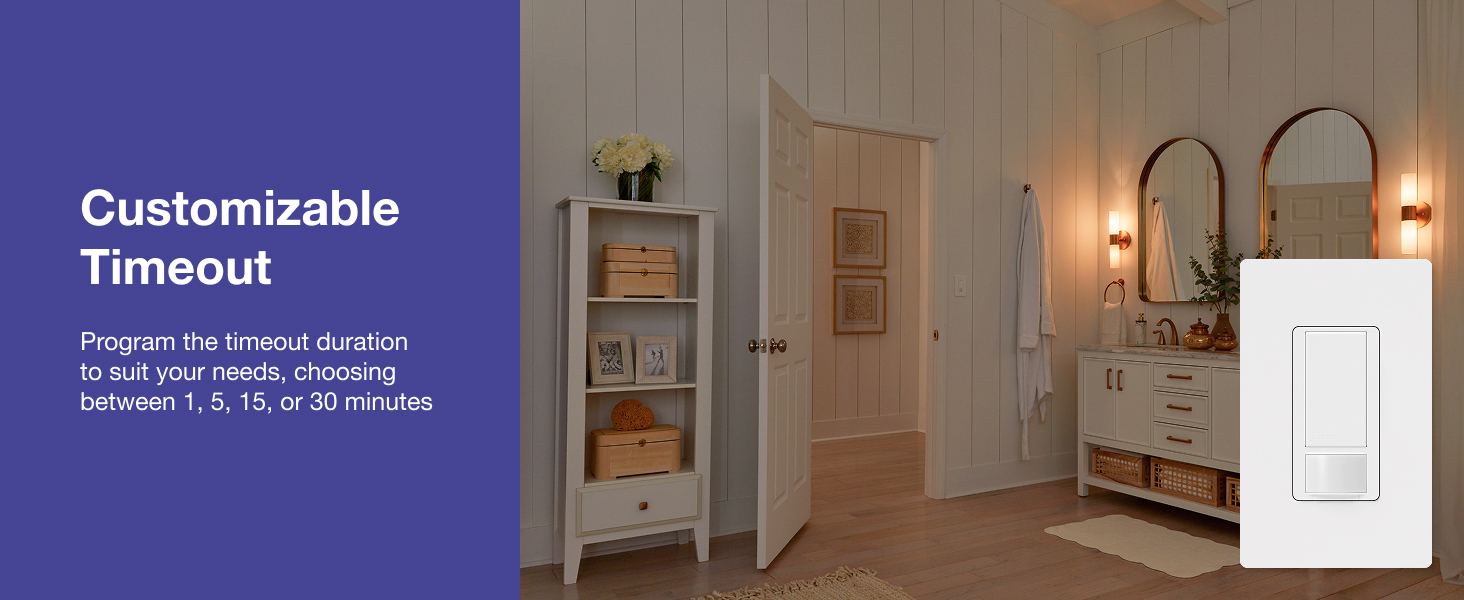
Customize the time delay for lights to turn off after the room is vacated.
Ambient Light Detection:
The Maestro sensor switch includes patented ambient light detection. This feature measures the amount of natural daylight in the room and prevents the lights from turning on if the room is already sufficiently bright, further contributing to energy savings.

The sensor detects ambient light, preventing unnecessary light activation during daylight hours.
Applications
The Lutron Maestro Motion Sensor Light Switch is versatile and can be used in various areas of your home to enhance convenience and energy efficiency.
- Laundry Room: Keep your hands free while carrying laundry. The lights will turn on automatically when you enter and off when you leave.
- Entryway: No more fumbling for light switches when your hands are full with groceries or bags.
- Bathroom: Enjoy touch-free lighting, reducing the need to touch switches, especially in high-use areas.
- Garage: Keep your focus on projects or tasks without worrying about turning lights on or off.
- Children's Bedrooms/Playrooms: Prevents lights from being left on for extended periods, saving energy and reducing frustration.

Ideal for laundry rooms, providing hands-free lighting.

Convenient for entryways when your hands are full.

Provides touch-free lighting in bathrooms.

Perfect for garages, assisting with projects and frequent entry/exit.

Helps save energy in children's rooms by automatically turning off lights.
Maintenance
The Lutron Maestro Motion Sensor Light Switch requires minimal maintenance. To ensure optimal performance and longevity:
- Cleaning: Periodically wipe the surface of the switch and sensor lens with a soft, damp cloth. Avoid using abrasive cleaners, solvents, or harsh chemicals, as these can damage the finish or internal components.
- Obstruction Check: Ensure that the sensor lens is not obstructed by furniture, decorations, or other objects that could block its view of the room, which might affect motion detection accuracy.
- Firmware Updates (if applicable): While this model is not a smart switch with app control, if future models or related products offer firmware updates, follow manufacturer guidelines for installation to ensure continued optimal performance and security.
Troubleshooting
If you encounter issues with your Lutron Maestro Motion Sensor Light Switch, consider the following common troubleshooting steps:
| Problem | Possible Cause / Solution |
|---|---|
| Lights do not turn on automatically. |
|
| Lights turn off too quickly or too slowly. |
|
| Lights flicker or do not dim properly (if using a dimmer model). |
|
| Switch is unresponsive. |
|
For more complex issues or if troubleshooting steps do not resolve the problem, please refer to the comprehensive troubleshooting guide in the full product manual or contact Lutron customer support.
Specifications
| Feature | Detail |
|---|---|
| Model Number | MS-OPS5MH-WH-2 |
| Operation Mode | Automatic (Occupancy/Vacancy) |
| Current Rating | 5 Amps |
| Operating Voltage | 120 Volts |
| Circuit Type | Single-pole or 3-way |
| Wiring Requirement | No neutral wire required |
| Motion Sensor Range | Up to 30 feet |
| Coverage Area | Up to 900 square feet |
| Compatible Bulb Types | Incandescent, Halogen, Electronic Low Voltage (up to 250W), Magnetic Low Voltage (up to 200W), CFL/LED (up to 150W) |
| Fan Compatibility | Up to 3 Amps |
| Dimensions (L x W x H) | 4.5 x 2.3 x 2.3 inches (119 x 75 mm for faceplate area) |
| Color | White |
| Material | Plastic |
| Operating Temperature | 32°F to 104°F (0°C to 40°C) |
| UPC | 784276805902 |
Physical dimensions of the Maestro Motion Sensor Light Switch.
Warranty and Support
Lutron stands behind the quality of its products. The Maestro Motion Sensor Light Switch comes with a standard warranty, which can be extended upon product registration. Lutron has over 60 years of innovation in lighting control, offering exceptional quality and design.
- Warranty Information: A 5-year warranty is typically included, with an option to extend to 10 years upon product registration. For full details, please refer to the official warranty document: Lutron Warranty (PDF).
- Customer Support: For technical assistance, installation questions, or warranty claims, please contact Lutron customer support. Their team is available to provide guidance and ensure your product functions correctly.
- Online Resources: Visit the official Lutron website or their Amazon Brand Store for additional product information, FAQs, and support resources: Lutron Amazon Store.

Lutron offers a 10-year warranty with product registration.