
1. Introduction & Product Overview
The GooingTop LED Grow Light (Model HY-021) is a versatile and efficient lighting solution designed to support the healthy growth of indoor plants. Featuring a 6000K full spectrum light, it closely mimics natural sunlight at noon, providing optimal conditions for various plant growth stages. Its flexible design, intuitive controls, and energy efficiency make it an ideal choice for both novice and experienced indoor gardeners.
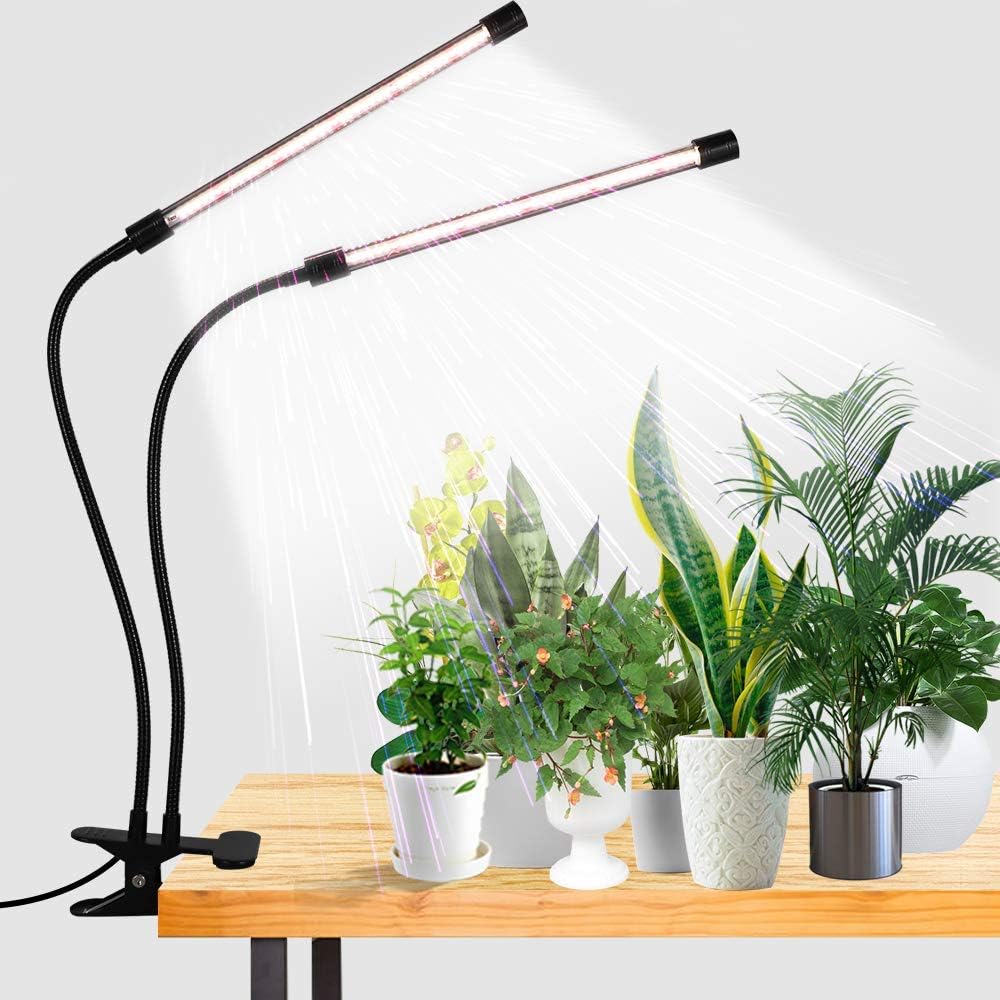
Figure 1: GooingTop LED Grow Light providing illumination to a collection of indoor plants.
2. Key Features
- Full Spectrum 6000K White Light: Equipped with 10 Red LEDs (620-660nm) and 74 White LEDs (6000K), this lamp provides light similar to natural sunlight, ideal for all growth stages of indoor plants. The high color rendering index (CRI 95) ensures soft, flicker-free illumination, also suitable for use as a reading lamp.
- Timer Function: Offers three automatic timing options: 4 hours, 8 hours, or 12 hours. The timer operates on a 24-hour cycle, automatically turning the light on and off at the set intervals.
- 5-Level Dimmable Brightness: Adjust the light intensity to suit specific plant needs and environmental conditions.
- Flexible Gooseneck & Strong Clamp: Features a 360-degree adjustable gooseneck and a robust anti-slip clamp, allowing for easy positioning and secure attachment to various surfaces like desks, shelves, or tables.
- High Efficiency LED Lamp: Consumes approximately 10 watts of power, equivalent to a 50W halogen bulb, leading to significant energy savings.
- Versatile Use: Suitable for a wide range of indoor plants, including desktop plants, mini plants, and seedlings. Can also be used in balconies, greenhouses, darkrooms, and offices.

Figure 2: Full spectrum light distribution and LED composition (10 Red, 74 White).
3. What's in the Box
- 1 x LED Grow Light Unit (with flexible goosenecks and clamp)
- 1 x USB Plug (for power)
- 1 x User Manual
4. Setup & Installation
- Choose a Location: Select a suitable location near your plants that allows for secure clamping and access to a USB port or AC power outlet.
- Attach the Clamp: Use the strong anti-slip clamp to securely attach the grow light to a desk, shelf, or any stable surface. The clamp features protective foam to prevent damage to your furniture.
- Position the Lights: Utilize the flexible 360-degree adjustable goosenecks to direct the light bars precisely over your plants, ensuring optimal light coverage and angle for their growth.
- Connect Power: Plug the USB connector into a compatible USB power adapter (not always included, but often a standard phone charger works) or directly into a USB port on a computer or power bank.

Figure 3: Example of the grow light securely clamped to a surface.
5. Operating Instructions
The control panel is conveniently located on the power cord for easy access.

Figure 4: Control panel layout.
- Power On/Off: Press the Power Button (usually indicated by a power symbol) to turn the light on or off.
- Adjust Brightness: Use the '+' and '-' buttons to cycle through the 5 available brightness levels.
- Set Timer: Press the Timer Button (usually indicated by a clock symbol) to select the desired lighting duration: 4 hours, 8 hours, or 12 hours. Once set, the light will automatically turn on for the selected duration and then off, repeating the cycle every 24 hours from the time you initially set it.
For optimal plant growth, it is generally recommended to turn on this grow light for 5-8 hours every day, adjusting based on your specific plant needs and natural light availability.
6. Care & Maintenance
- Cleaning: Ensure the light is unplugged before cleaning. Gently wipe the light bars and clamp with a soft, dry cloth. Avoid using abrasive cleaners or solvents.
- Storage: When not in use, store the grow light in a dry and well-ventilated area. Keep it away from liquids, excessive heat, or open flames.
- Handling: Handle the flexible goosenecks with care to avoid damaging the internal wiring.
7. Troubleshooting
- Light Not Turning On:
- Ensure the USB plug is securely connected to a working power source.
- Verify the power outlet is functional.
- Press the Power Button on the control panel.
- Timer Issues:
- The built-in timer operates on a 24-hour cycle from the moment it's set. If power is interrupted (e.g., unplugged, power outage), the timer settings will reset. You will need to manually restart the timer at the desired time.
- The timer offers fixed 4, 8, or 12-hour cycles. If you require different durations, consider using an external smart plug or timer.
- Inconsistent Light Output:
- Check the brightness level using the '+' and '-' buttons.
- Ensure the light bars are clean and free from dust or debris.
8. Product Specifications
| Attribute | Value |
|---|---|
| Brand | GooingTop |
| Model Number | HY-021 |
| Light Source Type | LED (10 Red + 74 White) |
| Color Temperature | 6000K (Full Spectrum Sunlight) |
| Color Rendering Index (CRI) | 95 |
| Power Consumption | Approx. 10W (Equivalent to 50W Halogen) |
| Luminous Flux | 1800 Lumen |
| Input Voltage | 5V (DC) |
| Material | Plastic, Iron |
| Product Dimensions | 2.5"D x 10.43"W x 15.74"H |
| Item Weight | 16 ounces (1 pound) |
| Life Time | 30,000 Hours |
| Water Resistance Level | Water Resistant |
9. Warranty & Support
GooingTop offers a 365-day warranty for this product. For any issues or inquiries, please contact the GooingTop service team. They provide 24-hour friendly customer service and are committed to offering replacements or full refunds for product-related concerns.
For further assistance, please refer to the contact information provided on your product packaging or the official GooingTop website.


