
1. Introduction
This manual provides detailed instructions for the safe and effective operation, maintenance, and troubleshooting of your veicomtech Ionic Detox Foot Bath Machine. Please read this manual thoroughly before initial use and retain it for future reference.
2. Safety Information
Adherence to the following safety guidelines is crucial for preventing injury and ensuring proper device function:
- Always ensure the machine is connected to a stable power source with correct voltage.
- Be aware that water color changes are a normal part of the process and do not solely indicate toxin removal.
- Ensure all connections (array, wrist strap, power cord) are secure before operation.
- The steel plate on the conductive wrist strap must maintain good contact with the skin during use.
- Do not immerse the main control unit in water or any other liquid.
- Keep the device out of reach of children.
- If the machine beeps or the array does not produce bubbles, refer to the troubleshooting section.
- Unplug the device from the power outlet when not in use or before cleaning.
3. Package Contents
Verify that all items are present in the package:
- 1 x Ionic Detox Foot Bath Machine (Main Unit)
- 1 x Far Infrared Waistbelt
- 1 x Array (Ionizer)
- 1 x Conductive Wrist Strap
- 1 x Power Cord
- 1 x Instruction Manual (this document)

Image: The complete Ionic Detox Foot Bath Machine kit, including the main unit, array, wrist strap, infrared waistbelt, and power cord, neatly packed in its aluminum carrying case.
4. Product Components
Familiarize yourself with the main components of your device:
- Main Control Unit: Houses the control panel, display, and connection ports.
- Array: The ionizer element placed in the water to facilitate the detoxification process.
- Conductive Wrist Strap: Worn on the wrist to ensure proper electrical circuit and user connection.
- Far Infrared Waistbelt: Provides additional therapeutic heat to the waist area during sessions.

Image: A detailed view of the main control unit's display and keypad, alongside the black cylindrical array, highlighting the core operational components of the system.
5. Setup Guide
Follow these steps for initial setup:
- Place the main control unit on a stable, flat surface near a power outlet.
- Connect the power cord to the back of the main unit and then plug it into a wall outlet.
- Connect the array cable to the designated port on the main unit.
- Connect the conductive wrist strap cable to its designated port.
- If using, connect the far infrared waistbelt to its designated port.

Image: The rear view of the main unit, illustrating the power input, on/off switch, and various ports for connecting the array, wrist strap, and infrared waistbelt.
6. Operating Instructions
To begin a session, follow these steps:
- Prepare the Foot Bath: Fill a suitable foot basin (not included) with warm water. The machine is compatible with various basin types.
- Add Salt: Add a small amount of salt to the water. The 'E' reading on the machine's display should be between 0.1 and 2.0. Adjust salt quantity as needed to achieve this range. Too much salt will cause the machine to beep and stop.
- Place Array and Feet: Submerge the array completely in the water. Place your feet into the water, ensuring they are comfortable.
- Wear Wrist Strap: Securely attach the conductive wrist strap to your wrist, ensuring the metal plate makes good contact with your skin.
- Start Session: Turn on the main unit. Use the control panel to set the desired session time (typically 10-30 minutes). Press 'ENT' to start the session.
- Use Waistbelt (Optional): If desired, wrap the far infrared waistbelt around your waist and turn it on for additional heat therapy.
- Monitor Progress: The machine will operate for the set duration. Observe the water color changes, which are a result of the electrolytic reaction and oxidation.
- End Session: The machine will automatically stop when the time expires. Turn off the unit and unplug it from the power source.
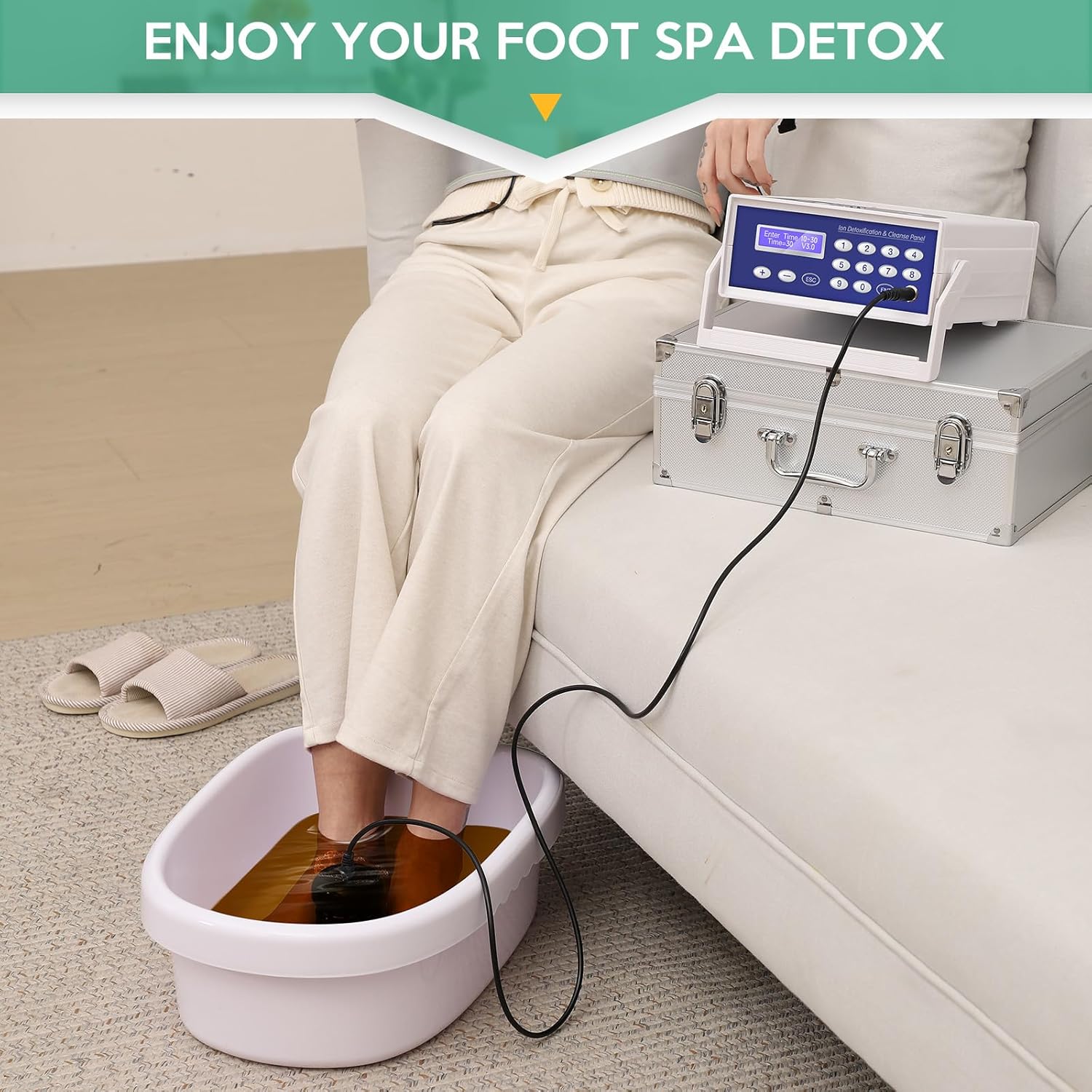
Image: A user comfortably seated, with their feet immersed in a basin connected to the Ionic Detox Foot Bath Machine, demonstrating typical usage.

Image: A user relaxing with the Ionic Detox Foot Bath Machine, demonstrating the use of the far infrared waistbelt for additional comfort and therapy during a session.

Image: An illustration showing different styles of foot basins, including foldable and rigid options, highlighting the machine's adaptability with various containers for foot soaking.

Image: A visual representation of water color changes at 5, 15, and 30 minutes during an ionic foot bath session, demonstrating the progression of the electrolytic reaction.
7. Maintenance
Proper maintenance ensures the longevity and performance of your device:
- Cleaning the Array: After each use, clean the array thoroughly with water and a brush to remove any residue. Ensure it is dry before storage.
- Cleaning the Main Unit: Wipe the main unit with a soft, damp cloth. Do not use abrasive cleaners or immerse the unit in water.
- Storage: Store the machine and its components in a cool, dry place, preferably in its original aluminum box, away from direct sunlight and extreme temperatures.
- Array Replacement: The array is a consumable part and will need periodic replacement as it corrodes over time. Replacement arrays can be purchased from the manufacturer or authorized sellers.
8. Troubleshooting
If you encounter issues during operation, refer to the following common problems and solutions:
| Problem | Possible Cause | Solution |
|---|---|---|
| Machine beeps continuously. | Too much salt in the water, or 'E' reading is too high. | Add more water to dilute the salt, or replace some water with fresh water until the 'E' reading is between 0.1 and 2.0. |
| Array not producing bubbles. | Insufficient salt in the water, or 'E' reading is too low. Array not properly connected. Array is worn out. | Add a small amount of salt to the water until the 'E' reading is between 0.1 and 2.0. Check array connection. Replace array if it is old or damaged. |
| No power to the unit. | Power cord not properly connected. Power outlet issue. | Ensure power cord is securely plugged into the unit and the wall outlet. Test the outlet with another device. |
| Wrist strap not registering. | Wrist strap not making good skin contact. Wrist strap cable loose or damaged. | Adjust wrist strap to ensure firm skin contact. Check cable connection. Replace wrist strap if damaged. |
9. Specifications
Key technical specifications of the veicomtech Ionic Detox Foot Bath Machine:
- Model Number: VEICOM-803
- Product Dimensions: 15 x 12.2 x 6.7 inches
- Weight: 9.46 Pounds
- Power Source: Corded Electric
- Material: Plastic (PP), Metal
- Color: Blue
- Manufacturer: Veicomtech

Image: A diagram illustrating the dimensions of the main control unit: 15 inches in length, 12.2 inches in width, and 6.7 inches in height.
10. Warranty and Support
veicomtech offers a 100% satisfaction guarantee for this product. For any questions, technical support, or warranty claims, please contact the manufacturer directly through their official channels. Keep your purchase receipt as proof of purchase.
11. Legal Disclaimer
Statements regarding dietary supplements and health devices have not been evaluated by the Food and Drug Administration (FDA) and are not intended to diagnose, treat, cure, or prevent any disease or health condition.