
1. Introduction
The Temtop M2000-2nd Professional Air Quality Analyzer is a multifunctional device designed for comprehensive monitoring of indoor and outdoor air quality. It integrates advanced sensors to detect various pollutants, providing accurate and reliable data for a healthier environment.
Key features include:
- 8-in-1 Multifunctional Monitoring: Detects PM2.5, PM10, Formaldehyde (HCHO), Carbon Dioxide (CO2), particles, temperature, and humidity.
- High-Precision Sensors: Equipped with SenseAir NDIR CO2 sensor, Dart HCHO sensor, and Temtop professional-grade particle sensor.
- Audio Alarm & Visual Indicator: Provides an audio alarm and colorful air quality level indicators for immediate awareness.
- Data Export Functionality: Allows export of comprehensive data via USB for detailed analysis.
- Easy Calibration: Features a built-in calibration program for CO2 and HCHO.
- Portable Design: Features a colorful TFT display with backlight, ergonomic design, and a rechargeable battery for versatile use.
2. Product Overview
Familiarize yourself with the components and key features of your Temtop M2000-2nd air quality monitor.
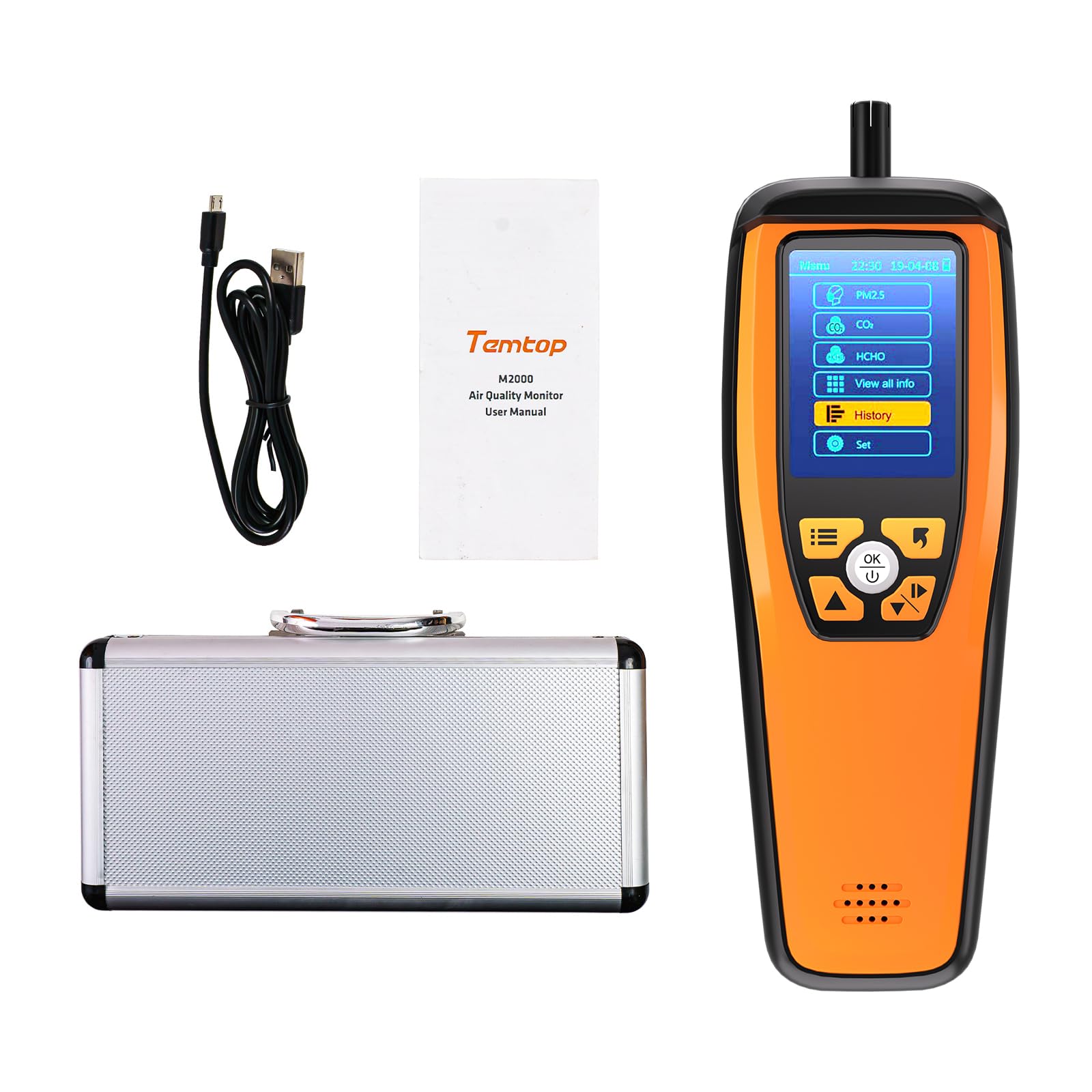
Figure 2.1: The Temtop M2000-2nd Professional Air Quality Analyzer and CO2 Monitor.

Figure 2.2: The monitor's display showing real-time measurements for various air quality parameters.

Figure 2.3: An internal view highlighting the SenseAir NDIR CO2 sensor, Dart HCHO sensor, and Temtop Laser PM2.5 sensor.

Figure 2.4: Diagram illustrating key features such as reliable sensors, buzzer alarm, bar graph, data export, calibration, brightness control, and Type-C charging.
3. Setup
Before first use, ensure the device is fully charged and properly set up.
3.1 Unpacking and Initial Charge
- Carefully unpack the Temtop M2000-2nd monitor and all accessories from the carrying case.
- Connect the provided Type-C charging cable to the device and a suitable USB power adapter (not included) or computer USB port.
- Allow the device to charge completely before its first use. The charging indicator on the screen will show the battery status.

Figure 3.1: The Temtop M2000-2nd air quality monitor, charging cable, and user manual neatly arranged in its storage case.
3.2 Power On/Off
- To power on, press and hold the power button until the screen illuminates.
- To power off, press and hold the power button until the device shuts down.
4. Operating Instructions
This section details how to operate your M2000-2nd monitor to get accurate air quality readings.
4.1 Basic Navigation
Use the directional buttons and the 'OK' button to navigate through the menu options on the TFT display. The main menu typically includes options for PM2.5, CO2, HCHO, 'View all info', 'History', and 'Set'.

Figure 4.1: The device held in hand, displaying CO2 readings, emphasizing its portability and Senseair CO2 sensor with ABC function.
4.2 Understanding Readings
The monitor displays real-time values for:
- PM2.5 & PM10: Particulate matter concentrations in micrograms per cubic meter (µg/m³).
- CO2: Carbon Dioxide concentration in parts per million (ppm).
- HCHO: Formaldehyde concentration in milligrams per cubic meter (mg/m³).
- Particles: Total particle count.
- Temperature & Humidity: Ambient temperature in Celsius/Fahrenheit and relative humidity percentage.
The device uses color-coded indicators and an audio alarm to signify air quality levels (e.g., Good, Moderate, Unhealthy). Refer to the device's on-screen guide or the manual's specifications section for detailed thresholds.
4.3 Setting Alarms
You can customize alarm thresholds for various pollutants through the 'Set' menu. When a measured value exceeds the set threshold, the device will trigger an audio alarm and visual alert.
4.4 Function Introduction Video
Video 4.1: This video provides a detailed introduction to the functions and features of the Temtop M2000-2nd air quality monitor.
5. Data Export
The M2000-2nd allows you to export recorded data for further analysis on a computer.
5.1 Exporting Data via USB
- Ensure the monitor is powered on.
- Connect the monitor to your computer using the provided Type-C USB cable.
- The device will appear as a removable storage device on your computer.
- Navigate to the 'History' folder on the device. You will find CSV format files containing recorded data (date, temperature, humidity, PM2.5, PM10, CO2, HCHO concentrations).
- Copy these files to your computer for viewing and analysis.

Figure 5.1: The monitor connected via USB to a laptop, demonstrating the data export function for analyzing recorded air quality data.
5.2 Data Export Instruction Video
Video 5.2: This video demonstrates the step-by-step process for operating the data export function of the Temtop M2000-2nd.
6. Calibration
The Temtop M2000-2nd features a built-in calibration program for CO2 and HCHO to ensure measurement accuracy over time.
6.1 CO2 Calibration
The CO2 sensor supports Automatic Baseline Correction (ABC function) and manual calibration. For manual calibration, place the device in a fresh outdoor environment for at least 10 minutes where CO2 concentration is typically around 400-450 ppm. Access the calibration option through the 'Set' menu and follow the on-screen instructions.
6.2 HCHO Calibration
To calibrate the HCHO sensor, ensure the device is in a clean air environment with minimal formaldehyde presence. Access the calibration option through the 'Set' menu and follow the on-screen instructions. Regular calibration helps maintain the accuracy of your readings.
7. Maintenance
Proper maintenance ensures the longevity and accuracy of your air quality monitor.
7.1 Cleaning
- Wipe the device's exterior with a soft, dry cloth.
- Do not use abrasive cleaners, solvents, or harsh chemicals, as these can damage the casing or internal components.
- Keep the sensor inlets clear of dust and debris. Do not attempt to clean the internal sensors directly.
7.2 Storage
- When not in use for extended periods, store the device in its original carrying case in a cool, dry place.
- Avoid extreme temperatures and high humidity.
- Charge the device periodically (e.g., every 3 months) to maintain battery health.
8. Troubleshooting
This section addresses common questions and issues you might encounter.
8.1 Frequently Asked Questions & Solutions Video
Video 8.1: This video provides answers to frequently asked questions and solutions for common issues with the Temtop M2000-2nd.
8.2 General Troubleshooting Tips
- Device not turning on: Ensure the battery is charged. Connect to a power source and try again.
- Inaccurate readings: Perform a calibration as described in Section 6. Ensure the device is in a stable environment, away from strong air currents, heat sources, or direct sunlight.
- PM2.5 values vary in different locations of the same room: PM2.5 in the air is not evenly distributed. Readings may vary slightly depending on the exact measurement spot.
- Air quality monitor readings differ from official data: Official data reflects the average air quality of a region or city. Your monitor reflects the specific air quality of your immediate location, which can differ due to local factors like geography, weather, or nearby activities.
- Data export issues: Ensure the USB cable is securely connected and the device is recognized by your computer. Try a different USB port or cable if necessary.
8.3 How to Get Accurate Readings Video
Video 8.2: This video provides guidance on how to obtain accurate readings from your air quality monitor.
9. Specifications
| Feature | Specification |
|---|---|
| Brand | Temtop |
| Model | M2000 2nd Generation |
| Dimensions (L x W x H) | 11.18 x 5.35 x 7.64 inches |
| Item Weight | 910 g |
| Material | Metal, Plastic |
| Maximum Supply Voltage | 5 volts DC |
| Response Time | 2 seconds |
| Upper Temperature Rating | 50 °C |
| Data Logging Capacity | More than 3 months of continuous data logging |
| Data Export | Via USB (CSV format) |
| Sensors Included | SenseAir NDIR CO2, Dart HCHO, Temtop Laser PM2.5 |
10. Warranty and Support
Temtop provides comprehensive support for its products.
10.1 Warranty Information
Your Temtop M2000-2nd air quality monitor comes with a 12-month warranty from the date of purchase. This warranty covers manufacturing defects and malfunctions under normal use. Please retain your proof of purchase for warranty claims.
10.2 Customer Support
For any questions, technical assistance, or warranty inquiries, please contact Temtop customer support. Support is available 24/7 via email and phone.
- Email: Refer to your product packaging or the official Temtop website for contact details.
- Phone: Refer to your product packaging or the official Temtop website for contact details.
For additional resources, including updated FAQs and software downloads, please visit the official Temtop website.


