1. Introduction and Overview
This document provides essential information for the safe and efficient use of your Magnavox MWD2206 DVD/VCR Combination Player. This unit is a pre-owned or refurbished product that has been professionally inspected and tested to ensure full functionality. It combines the capabilities of a DVD player and a VCR into a single device, allowing playback of both DVD discs and VHS tapes.
Please read this manual thoroughly before operating the device to ensure proper setup and to maximize your viewing experience.

Figure 1: Front view of the Magnavox MWD2206 DVD/VCR Combination Player. The front panel features the DVD tray, VCR slot, and control buttons.
2. Product Features
- Versatile Playback: Plays DVD, DVD-R, DVD-RW, CD-R, CD-RW, MP3, and video tapes.
- Enhanced Video Output: Features Component video output and S-video output for improved picture quality.
- Convenient Front Inputs: Includes front audio and video input jacks for easy connection of external devices like video games.
- 4-Head VCR: Equipped with a 4-head VCR for reliable VHS tape playback and recording.
3. Setup
Follow these steps to connect your Magnavox MWD2206 to your television or audio system.
3.1 Connecting to a Television
The MWD2206 offers several options for video and audio output. Choose the connection type that is compatible with your television.
- Component Video (YPbPr): For the best analog video quality, connect the green (Y), blue (Pb), and red (Pr) component video cables from the player's output to the corresponding inputs on your TV.
- S-Video: Connect an S-Video cable from the player's S-Video output to your TV's S-Video input for improved picture quality over composite video.
- Composite Video: Connect a yellow video cable from the player's Video Out to the yellow Video In on your TV.
- Audio: For all video connections, connect the red (right) and white (left) audio cables from the player's Audio Out to the corresponding audio inputs on your TV or audio receiver.
Note: This model primarily uses analog connections (Component, S-Video, Composite). It does not feature an HDMI port. Ensure your television has compatible input ports or use an appropriate adapter (not included).
3.2 Power Connection
Plug the power cord into a standard electrical outlet (AC 120V, 60Hz). The unit requires 21W of power.
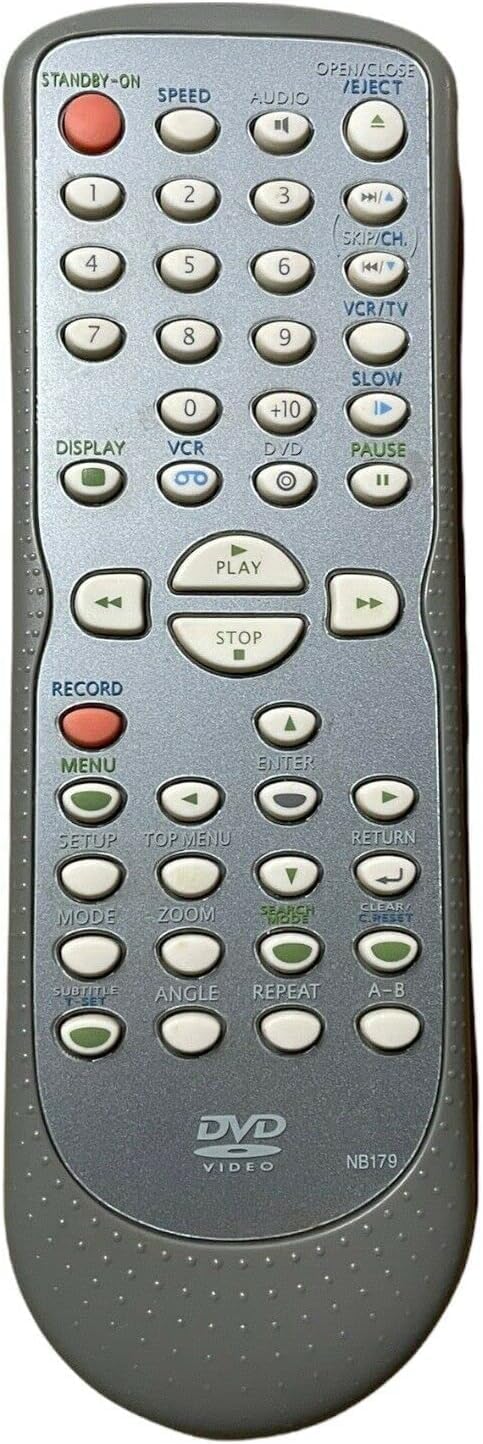
Figure 2: Rear view of the Magnavox MWD2206 DVD/VCR Combination Player showing various audio/video input and output ports. The back panel includes composite video, audio (L/R), and component video outputs, along with the power input and a support contact number.
4. Operating Instructions
This section details how to play DVDs and VHS tapes on your combination player.
4.1 Playing a DVD
- Ensure the player is powered on and connected to your TV.
- Press the OPEN/CLOSE button on the front panel or remote control to open the DVD tray.
- Place a DVD disc onto the tray with the label side facing up.
- Press the OPEN/CLOSE button again to close the tray. The player will typically begin reading the disc automatically.
- If the disc does not start playing automatically, press the PLAY button on the front panel or remote control.
4.2 Playing a VHS Tape
- Ensure the player is powered on and connected to your TV.
- Insert a VHS tape into the VCR slot. The player will automatically load the tape.
- Press the PLAY button on the front panel or remote control.
- To stop playback, press the STOP button. To eject the tape, press the EJECT button.
4.3 Using the Remote Control
The included remote control provides full access to all functions of the DVD/VCR player. Familiarize yourself with the button layout for convenient operation.

Figure 3: Remote control for the Magnavox MWD2206 DVD/VCR Combination Player, showing various playback and function buttons. The remote control provides full functionality for both DVD and VCR operations, including play, stop, fast forward, rewind, and menu navigation.
5. Maintenance
Regular maintenance helps ensure the longevity and optimal performance of your DVD/VCR player.
- Cleaning the Exterior: Use a soft, dry cloth to wipe the exterior surfaces of the unit. Avoid using liquid cleaners or abrasive materials, as they may damage the finish.
- Cleaning the Disc Tray: Periodically clean the disc tray with a soft, lint-free cloth. Ensure no dust or debris accumulates in the tray mechanism.
- Ventilation: Ensure the ventilation grilles on the sides and top of the unit are not obstructed to prevent overheating. Maintain adequate space around the player for proper airflow.
- VCR Head Cleaning: If you experience poor picture quality or audio issues during VHS playback, a VCR head cleaner tape (not included) may be used. Follow the instructions provided with the cleaner tape.

Figure 4: Side view of the Magnavox MWD2206 DVD/VCR Combination Player showing ventilation grilles. The side of the unit features ventilation grilles to ensure proper airflow and prevent overheating.
6. Troubleshooting
If you encounter issues with your player, refer to the following common problems and solutions.
- No Power: Ensure the power cord is securely plugged into both the player and a working electrical outlet.
- No Picture/Sound:
- Verify all audio and video cables are correctly connected to the appropriate input/output ports on both the player and your TV.
- Ensure your TV is set to the correct input source (e.g., AV1, Component, S-Video) corresponding to the player's connection.
- Check that the VCR/DVD source selector on the player is set to the correct mode (VCR for tapes, DVD for discs).
- Disc/Tape Not Playing:
- For DVDs, ensure the disc is clean and free of scratches. Try another disc to rule out a disc-specific issue.
- For VHS tapes, ensure the tape is fully inserted and not damaged.
- Compatibility with Smart TVs: Some older models of DVD/VCR players may not integrate seamlessly with modern smart TVs, particularly if the TV lacks analog input ports. An external converter (e.g., analog to HDMI) may be required for optimal compatibility.
7. Specifications
| Feature | Specification |
|---|---|
| Brand | Magnavox |
| Model Name | MWD2206 |
| Media Type | CD, DVD, VHS |
| Resolution | 720 x 576 pixels |
| Connector Type | Super Video (S-Video), Component Video, Composite Video |
| Connectivity Technology | Analog (No HDMI) |
| Audio Output Mode | Stereo, Surround Sound |
| Item Weight | 5.8 pounds |
| Package Dimensions | 20.25 x 16.55 x 8 inches |
| Color | Gray |
| Batteries (for remote) | 2 AA batteries required (not included) |
8. Warranty and Support
As an Amazon Renewed product, this unit is eligible for replacement or refund under the Amazon Renewed Guarantee for 90 days from the date of purchase if you are not satisfied.
For additional assistance with setup or operation, please call the support line:
1-800-605-8610
Please have your model number (MWD2206) ready when contacting support.