1. Introduction
This manual provides detailed instructions for the proper setup, operation, maintenance, and troubleshooting of your Bonvoisin Digital Counting Scale, Model XXX-28. Please read this manual thoroughly before using the scale to ensure accurate results and safe operation. Keep this manual for future reference.
2. Product Overview
The Bonvoisin Digital Counting Scale is designed for precise weighing and counting of various items such as coins, parts, and accessories. It features a durable construction and multiple functions to enhance efficiency.
2.1 Key Components
- Weighing Platter: A 300x220mm (11.8x8.6 inch) stainless steel platform. It is reversible, offering a flat surface for general weighing and a concave surface for holding small parts during counting.
- Display: Three LED display windows show weight, unit weight, and quantity simultaneously.
- Keypad: Numeric and function keys for operation and setting parameters.
- RS232 Interface: For connecting to external devices like computers or printers.
- Level Bubble: Integrated for ensuring proper scale leveling.
- Adjustable Feet: For fine-tuning the scale's level.

Figure 1: Bonvoisin Digital Counting Scale showing its wide application for counting various small items.
2.2 Features
- Unit Conversion: Easily switch between kilograms (kg) and pounds (lb).
- Counting Function: Accurately counts multiple pieces of the same item.
- RS232 Interface: Enables data exchange with computers or printers for analysis and record-keeping.
- Reversible Platter: Provides versatility for different weighing and counting needs.
- Durable Construction: Made with a stainless steel weighing pan and an aluminum alloy shell.
- Quantity Alarm: Alerts the user when a preset quantity limit is exceeded.

Figure 2: Multi-Function Counting Scale highlighting its various operational features.
3. Setup
3.1 Unpacking and Placement
- Carefully remove the scale from its packaging.
- Place the scale on a stable, level surface, free from vibrations, drafts, and direct sunlight.
- Adjust the scale's feet until the bubble in the level indicator is centered. This ensures accurate measurements.
3.2 Platter Installation
The scale comes with a reversible platter. Choose the appropriate side based on your application:
- Flat Side Up: For general weighing of larger items.
- Concave Side Up: Ideal for counting small, round, or irregularly shaped parts and coins, preventing them from rolling off.

Figure 3: Reversible platter for versatile weighing and counting.
3.3 Power Connection
Connect the provided power cable to the 110V socket on the back of the scale and then to a suitable power outlet. The scale operates only when plugged in. Note: A battery is not included due to shipping restrictions but can be purchased separately (6V 4AH Sealed Lead Acid Rechargeable).

Figure 4: Battery information and specification.
4. Operation
4.1 Basic Weighing
- Press the ON/OFF button to power on the scale.
- Ensure the display shows "0.000" before placing any items. If not, press the TARE button to zero the scale.
- Place the item(s) to be weighed on the center of the platter.
- Read the weight displayed in the "WEIGHT" window.
4.2 Unit Conversion (kg/lb)
To switch between kilograms (kg) and pounds (lb):
- With the scale powered on, place an item on the platter or ensure it is zeroed.
- Press the kg/lb key. The display will switch between the two units.
Note: Only the gross weight can be converted between kg and lb.

Figure 5: Unit conversion from kilograms to pounds.
4.3 Counting Function
The counting function allows you to determine the quantity of multiple identical items by weighing a sample.
- Ensure the scale is powered on and zeroed.
- Place a known quantity of sample items (e.g., 10, 20, 50, 100 pieces) on the platter.
- Using the numeric keypad, enter the exact quantity of the sample items you placed on the platter.
- Press the SMPL key to confirm the sample quantity. The scale will calculate the unit weight.
- You can now add more items of the same type to the platter, and the "QUANTITY" window will display the total count.
Video 1: Demonstration of the Bonvoisin Counting Scale's weighing and counting functions, including unit conversion and quantity preset alarm.
4.4 Quantity Preset Alarm
This feature allows you to set a target quantity, and the scale will alert you when that quantity is reached or exceeded.
- While in counting mode, enter the desired quantity limit using the numeric keypad.
- Press the QTY PST key to set the alarm.
- As you add items, if the total quantity exceeds the preset limit, the scale will emit an alarm sound, and the unit weight window will flash "-H-".
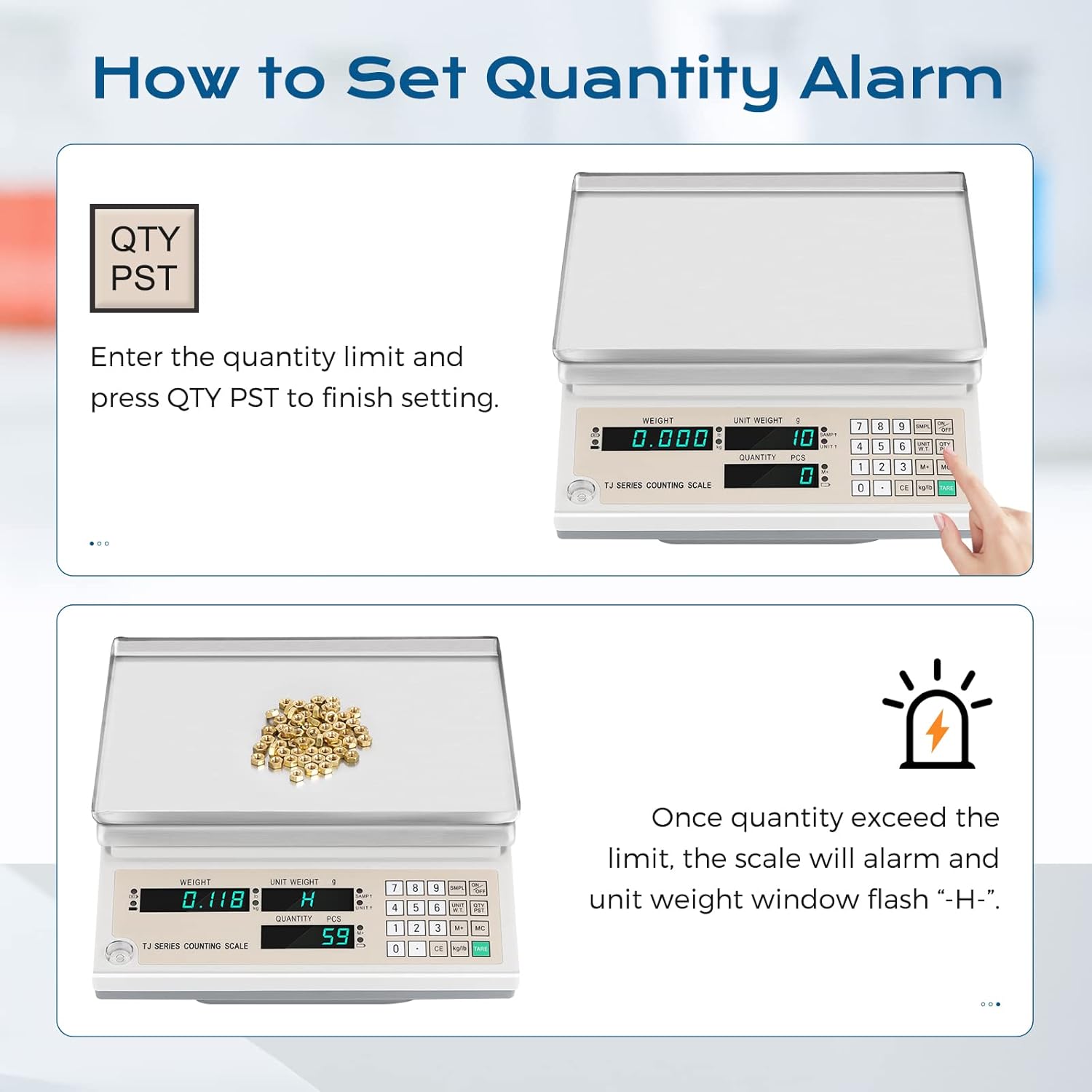
Figure 6: Setting and triggering the quantity alarm.
4.5 RS232 Interface Usage
The RS232 interface allows for serial data exchange with external devices.
- Connect the RS232 cable (not included) from the scale's RS232 port to your computer or printer.
- For computer connection, specific software (e.g., hyper terminal or STC ISP) is required for data output, as the balance uses a null modem serial connection (TX/RX switched).
- Refer to your computer or printer's manual for specific communication settings.

Figure 7: RS232 interface for data connectivity.
5. Maintenance
5.1 Cleaning
- Always disconnect the scale from the power source before cleaning.
- Wipe the scale's surfaces with a soft, damp cloth. Avoid abrasive cleaners, solvents, or harsh chemicals.
- Ensure no liquids enter the scale's internal components.
- Keep the weighing platter clean to prevent residue buildup that could affect accuracy.
5.2 Storage
- Store the scale in a dry, dust-free environment.
- Avoid extreme temperatures and humidity.
6. Troubleshooting
| Problem | Possible Cause | Solution |
|---|---|---|
| Scale does not turn on | No power supply; loose power cable. | Check power connection; ensure outlet is functional. The scale requires constant power as battery is not included. |
| Inaccurate readings | Scale not level; unstable surface; drafts; dirty platter; overload. | Adjust feet to level scale; move to stable surface; avoid drafts; clean platter; do not exceed maximum capacity. |
| Counting error | Incorrect sample quantity entered; sample items not uniform in weight. | Re-enter correct sample quantity; ensure sample items are identical in weight for best accuracy. |
| RS232 data transfer issues | Incorrect cable; wrong software settings; driver issues. | Ensure correct null modem cable is used; verify software settings (baud rate, parity, data bits, stop bits); install necessary drivers. |
7. Specifications
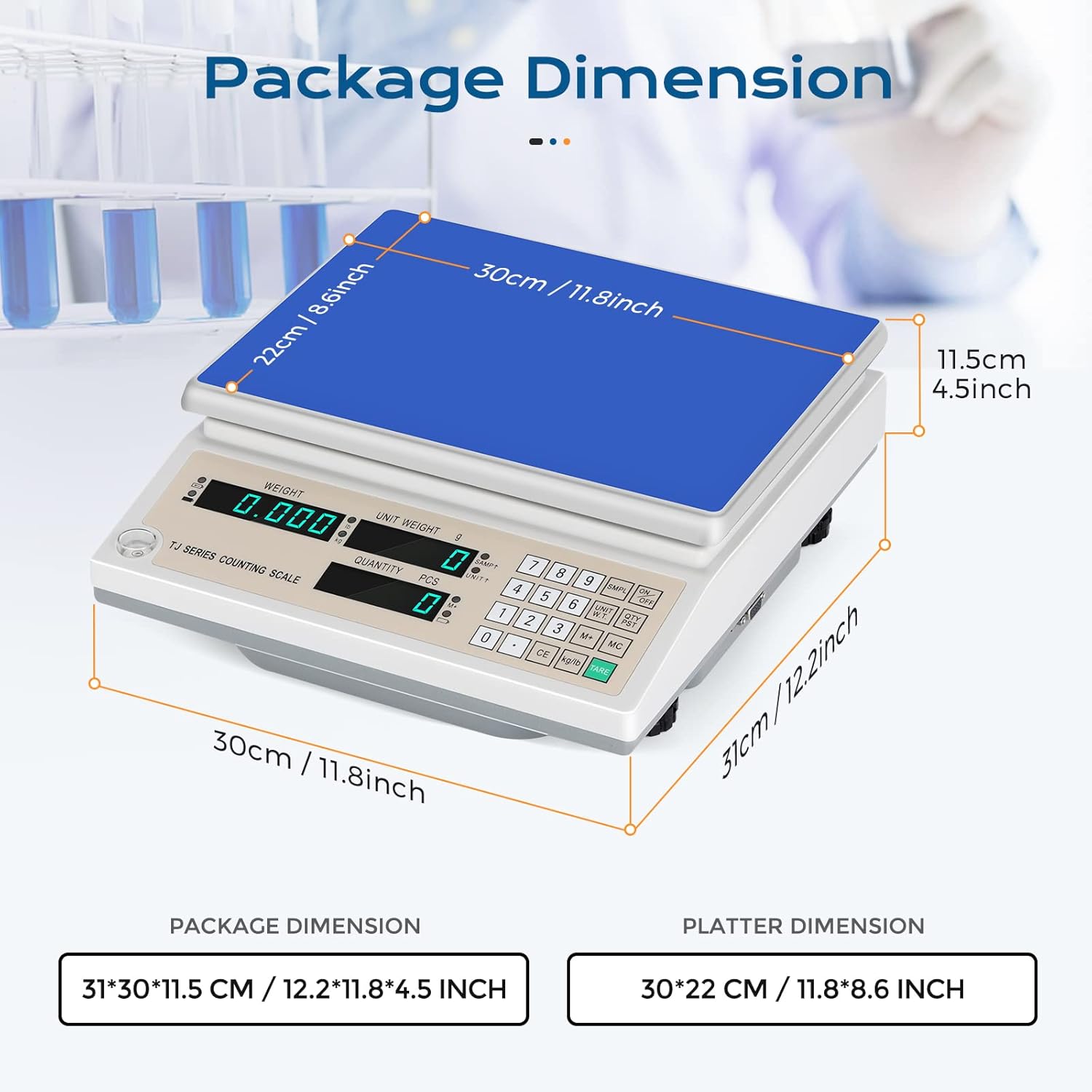
Figure 8: Package and platter dimensions.
| Specification | Detail |
|---|---|
| Brand | Bonvoisin |
| Model Number | XXX-28 |
| Weight Limit | 30 Kilograms (66 lbs) |
| Readout Accuracy | 1 Gram (0.0022 lbs) |
| Display Type | LED (Backlit) |
| Material | Stainless Steel (platter), Aluminum Alloy (shell), Acrylonitrile Butadiene Styrene |
| Platter Dimensions | 300 x 220 mm (11.8 x 8.6 inches) |
| Package Dimensions | 31 x 30 x 11.5 cm (12.2 x 11.8 x 4.5 inches) |
| Item Weight | 11.09 pounds |
| Recommended Uses | Coins, parts, general counting |
| Connectivity | RS232 Interface |
| Power Source | AC 110V (plug-in operation) |
8. Warranty and Support
For warranty information or technical support, please contact Bonvoisin customer service. Details can typically be found on the product packaging or the official Bonvoisin website. Please have your model number (XXX-28) and purchase date available when contacting support.