
Minlu RE-DC-4 IN1
MINLU Multi Charging Cable 4A, 2-Pack 4Ft Retractable Multi-Port Charger Manual
Model: RE-DC-4 IN1 | Brand: Minlu
1. Introduction
Thank you for choosing the MINLU Multi Charging Cable 4A. This versatile 4-in-1 retractable cable is designed to simplify your charging needs by offering multiple connector types in a compact, tangle-free design. This manual will guide you through the proper use and care of your charging cable.
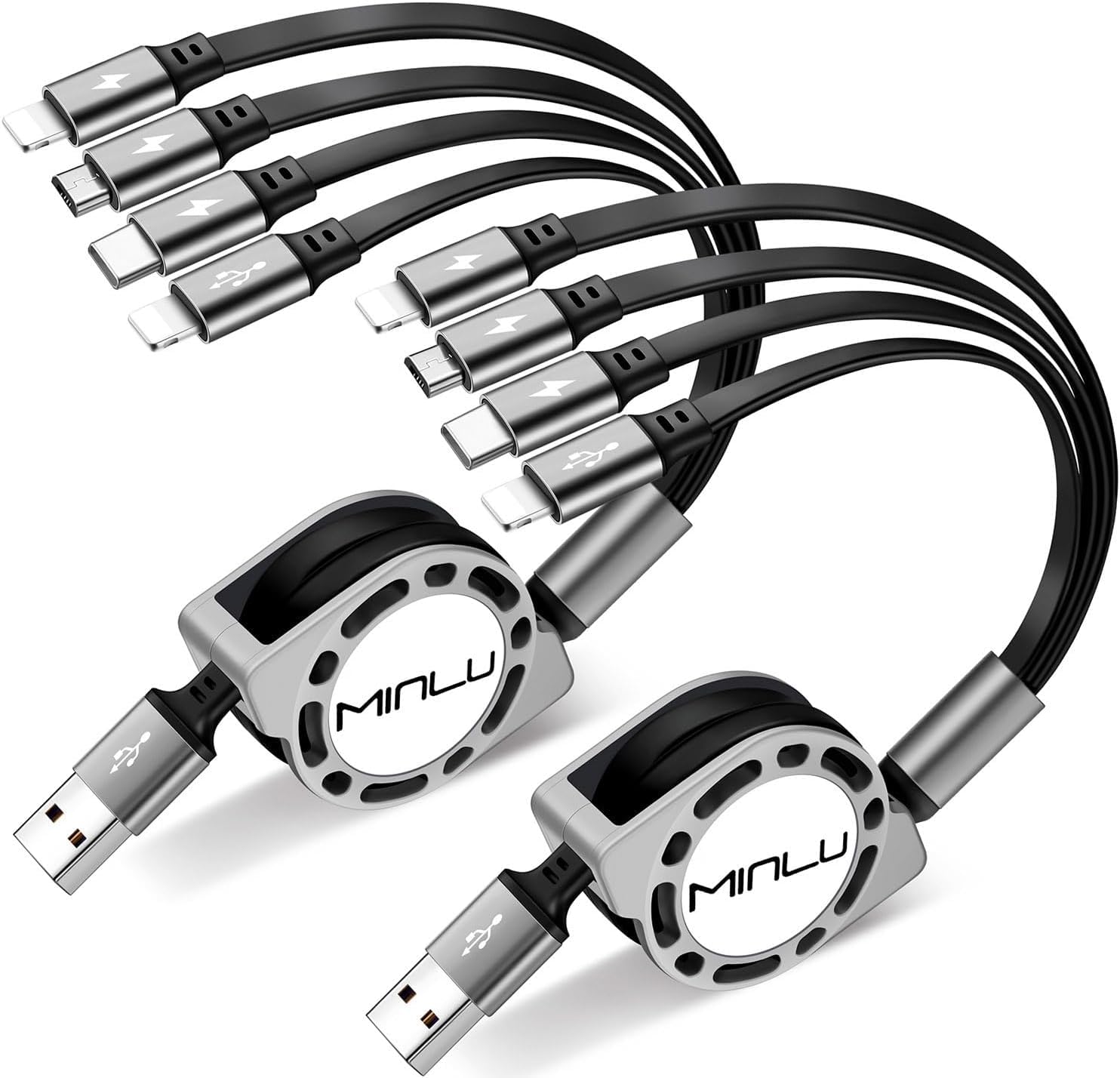
Image 1: The MINLU Multi Charging Cable 4A in use, charging multiple devices simultaneously from a single power source.
2. Product Features
- 4-in-1 Versatility: Features dual Lightning connectors, one USB-C connector, and one Micro-USB connector, allowing charging for a wide range of devices.
- Fast Charging: Supports a maximum total output current of up to 4.0A, enabling faster charging for compatible devices.
- Retractable Design: The cable extends up to 4 feet (1.2 meters) and retracts neatly into a compact housing, preventing tangles and simplifying storage.
- Data Transfer: The iOS (Lightning) connector supports data transfer at speeds up to 480 Mbps and Apple CarPlay functionality. Other connectors are for charging only.
- Durable Construction: Made with aluminum and Thermoplastic Elastomer (TPE) for enhanced durability.

Image 2: Detail of the 4-in-1 connectors: two Lightning, one USB-C, and one Micro-USB.
3. Setup
- Extend the Cable: Gently pull both ends of the cable simultaneously to extend it to the desired length. The cable will lock at various intervals. Do not pull only one side, as this can damage the retraction mechanism.
- Connect to Power Source: Plug the USB-A end of the cable into a compatible USB power adapter, computer USB port, or power bank.
- Connect to Device: Select the appropriate connector (Lightning, USB-C, or Micro-USB) and plug it into your device's charging port.

Image 3: Proper technique for extending the retractable cable by pulling both ends simultaneously.
4. Operating Instructions
- Charging Multiple Devices: The MINLU Multi Charging Cable 4A allows you to charge up to four devices simultaneously. Connect each device to its corresponding connector. Note that the 4.0A total output is shared among all connected devices, which may result in slower charging speeds when multiple devices are connected concurrently.
- Data Transfer (Lightning Only): To transfer data or use Apple CarPlay, connect an iOS device to one of the Lightning connectors and the USB-A end to a computer or compatible car system. Data transfer is not supported by the USB-C or Micro-USB connectors.
- Retracting the Cable: To retract the cable, gently pull both ends slightly further until the locking mechanism releases, then allow it to retract slowly and evenly.
Video 1: Official product video demonstrating the MINLU 4Ft/1.2M Multi Retractable USB Fast Charger Cord 4A in use, showcasing its features and functionality.
5. Compatibility
The MINLU Multi Charging Cable 4A is compatible with a wide range of devices, including but not limited to:
- Lightning Devices: Apple iPhone (17 Air/16/15/14 Plus/Pro Max/Pro/Mini/SE/XS/XR/X/8/7/6S/6 Plus/5s/5), iPads (Air/Mini/Pro), iPod.
- USB-C Devices: Samsung Galaxy (Z Fold/Ultra/S25+/S25/S24+/S24/S23+/S23/S22/S22+/S21+/S21/S10+/S10/S9/S8/Note 9/8), Google Pixel, OnePlus Nord N200, New Book 2015/2016, ChromeBook Pixel 2015, Nexus 5X/6P, LG V30/V20/G6/G5, HTC 10, Huawei P9/10/20, Mate 10/20, Lenovo ZUK Z1, Lumia 950/950 XL, Nokia N1.
- Micro-USB Devices: Samsung Galaxy S7/S6/S5, most Android phones, Kindle, Tablets, Bluetooth headsets, Power banks, PS 5/4 controllers, GPS devices.

Image 4: Visual representation of the cable's broad compatibility with different device types.
6. Maintenance
- Proper Retraction: Always pull both ends of the cable simultaneously when extending or retracting to ensure smooth operation and prevent damage to the internal mechanism. Avoid forcing the retraction or pulling only one side.
- Cleaning: Use a soft, dry cloth to clean the cable and connectors. Avoid using liquids or abrasive cleaners.
- Storage: Store the cable in its fully retracted state in a cool, dry place away from direct sunlight and extreme temperatures.
- Avoid Stress: Do not bend the cable sharply at the connectors or place heavy objects on it.
7. Troubleshooting
| Problem | Possible Cause | Solution |
|---|---|---|
| Cable not charging device. | Loose connection, incompatible power source, damaged cable/connector. | Ensure all connections are secure. Try a different power adapter or USB port. Inspect the cable and connectors for visible damage. |
| Slow charging speed. | Multiple devices connected, low-power USB port, device's charging limit. | Disconnect other devices to charge one at a time. Use a higher-amperage USB power adapter. Check your device's charging specifications. |
| Cable not retracting properly. | Improper retraction technique, internal mechanism issue. | Ensure you pull both ends simultaneously to release the lock. Avoid pulling only one side. If the issue persists, the mechanism may be worn. |
| Data transfer not working. | Incorrect connector used, device not recognized. | Only the Lightning connector supports data transfer. Ensure your iOS device is properly connected and recognized by the computer/car system. |
8. Specifications
- Brand: Minlu
- Model Name: Multi Charging Cable 4A
- Model Number: RE-DC-4 IN1
- Connector Type: Lightning (x2), Micro USB (x1), USB Type C (x1)
- Input Connector: USB-A
- Cable Type: 4 in 1 Retractable charging cable
- Cable Length: 4 feet (1.2 meters)
- Maximum Current: 4 Amps (total output)
- Maximum Voltage: 5 Volts
- Wattage: 41 watts
- Data Transfer Rate (Lightning only): 480 Megabits Per Second
- Outer Material: Aluminum, Thermoplastic Elastomer (TPE)
- Certification: CE
- Included Components: 2 x 4-in-1 Charger Cable Retractable
9. Warranty and Support
Minlu provides a 30-day return guarantee and a 12-month worry-free warranty for this product. For any inquiries or support, please contact Minlu customer service, available 7 days a week, 24 hours a day.
Ask a question about this manual
Ask about setup, troubleshooting, compatibility, parts, safety, or missing instructions. Manuals+ will review the question and use this page’s manual context to help answer it.