
1. Introduction
Thank you for purchasing the ZKYMZL RGBW Moving Head DJ Light. This manual provides essential information for the safe and effective operation of your new lighting fixture. Please read this manual thoroughly before use and retain it for future reference.
This versatile stage lighting unit features RGBW LEDs, sound activation, and DMX512 control, making it ideal for parties, discos, clubs, weddings, and various event settings.
2. Safety Information
- Electrical Safety: Ensure the power supply voltage matches the requirements of the fixture. Always connect to a grounded outlet. Disconnect power before cleaning or servicing.
- Installation: Mount the fixture securely using appropriate hardware. Ensure adequate ventilation around the unit to prevent overheating. Do not block ventilation openings.
- Operation: Avoid direct eye exposure to the light source. Do not operate the fixture in wet or damp conditions. Keep away from flammable materials.
- Maintenance: Refer all servicing to qualified personnel. Do not attempt to repair the unit yourself.
- Temperature: The fixture's surface may become hot during operation. Allow sufficient cooling time before handling.
3. What's in the Box
Upon opening the package, please verify that all items listed below are included and in good condition:
- 1 x ZKYMZL RGBW Moving Head DJ Light
- 1 x Power Cable
- 1 x Mounting Bracket
- 2 x Screws (pre-installed on the bottom of the light)
- 1 x User Manual (this document)
4. Setup
4.1 Mounting the Fixture
The ZKYMZL Moving Head DJ Light can be placed on a flat surface, mounted on a T-bar, T-truss, or ceiling. Use the included bracket and screws for secure installation.
- Ensure the mounting surface or truss system can support the weight of the fixture.
- Attach the mounting bracket to the fixture using the pre-installed screws.
- Securely fasten the fixture to your desired location using appropriate clamps or bolts (not included).
- Always use a safety cable when suspending the fixture overhead.

Image: The ZKYMZL DJ Light shown with its mounting bracket, illustrating how it can be positioned for various setups.
4.2 Power Connection
Connect the provided power cable to the power input on the rear of the fixture and then to a suitable power outlet (100-240V AC, 50/60Hz).
4.3 DMX Connection (Optional)
For DMX control, connect a DMX cable from your DMX controller's output to the DMX IN port on the fixture. For multiple fixtures, daisy-chain them by connecting the DMX OUT of the first fixture to the DMX IN of the next, and so on.

Image: Close-up of the rear control panel, highlighting the DMX IN, DMX OUT, and power input connections for easy setup.
5. Operation
The ZKYMZL Moving Head DJ Light offers four operational modes: Automatic, Sound Activated, Master-slave, and DMX 512. Use the control panel on the rear of the unit to navigate settings.
5.1 Control Panel Overview
The control panel features a digital display and four buttons: MENU, UP, DOWN, and ENTER.
Image: The control panel with its digital display and four navigation buttons (MENU, UP, DOWN, ENTER) for mode selection and parameter adjustment.
5.2 Operational Modes
5.2.1 Automatic Mode
In Automatic mode, the light will cycle through pre-programmed patterns and colors. This mode is ideal for quick setup and continuous light shows without external control.
- Press MENU until "Auto" is displayed.
- Press ENTER.
- Use DOWN/UP to select "on" (to activate) or "off" (to deactivate).
- Press ENTER to confirm.

Image: Step-by-step visual guide for setting the light to Automatic mode using the control panel.
5.2.2 Sound Activated Mode
The light will react to ambient sound, changing patterns and intensity based on the music's rhythm. Ensure Automatic mode is OFF when using Sound Activated mode.
- Press MENU until "SoUn" is displayed.
- Press ENTER.
- Use DOWN/UP to select "on" (to activate) or "off" (to deactivate).
- Press ENTER to confirm.
Adjusting Sound Sensitivity:
- Press MENU until "SenS" is displayed.
- Press ENTER.
- Use DOWN/UP to adjust the sensitivity (range 1-100). 50 is generally recommended.
- Press ENTER to confirm.
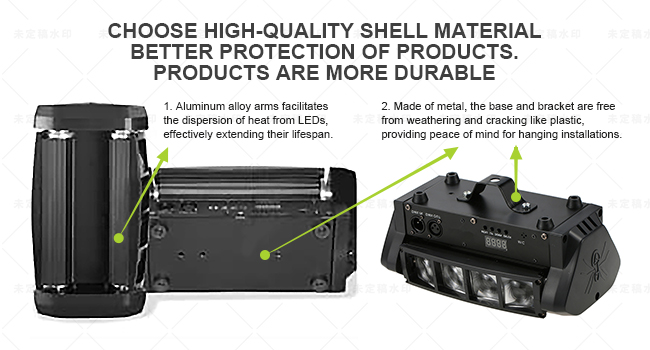
Image: Visual instructions for enabling Sound Activated mode and fine-tuning its sensitivity for optimal performance with music.
5.2.3 Master-slave Mode
Connect multiple fixtures using DMX cables. The first fixture in the chain will act as the Master, controlling all subsequent Slave fixtures. The Master unit should be set to Automatic or Sound Activated mode.
- Connect DMX OUT of the Master unit to DMX IN of the first Slave unit.
- Connect DMX OUT of the first Slave unit to DMX IN of the second Slave unit, and so on.
- The Slave units will automatically link and synchronize with the Master.
5.2.4 DMX 512 Control Mode
For advanced control, connect the fixture to a DMX 512 controller. The light will automatically turn off its internal programs when a DMX signal is detected, without needing to set D001.
- Set the DMX address for each fixture using the control panel. Refer to your DMX controller's manual for specific channel assignments.
- Press MENU until "d001" (or similar DMX address display) is shown.
- Press ENTER.
- Use DOWN/UP to set the desired DMX address.
- Press ENTER to confirm.
5.3 Additional Settings
5.3.1 LED Display Always On/Off
You can choose to keep the LED display on or off during operation.
- Press MENU until "LEd" is displayed.
- Press ENTER.
- Use DOWN/UP to select "on" (always on) or "off" (turns off after a few seconds).
- Press ENTER to confirm.

Image: Instructions for configuring the LED display to remain on or turn off automatically.
5.3.2 Display Text Orientation (Reversed)
If the display text appears garbled or reversed, you can adjust its orientation.
- Press MENU until "dSIP" is displayed.
- Press ENTER.
- Use DOWN/UP to toggle the display orientation.
- Press ENTER to confirm.

Image: Guide for correcting the display text orientation if it appears incorrect.
5.4 Product Features in Action

Image: The ZKYMZL DJ Light demonstrating its ability to project multiple colorful beam patterns, highlighting its dynamic visual effects.

Image: Multiple ZKYMZL DJ Lights creating a vibrant stage atmosphere with distinct red, green, blue, and white light beams.

Image: Examples of the ZKYMZL DJ Light being used in different event environments, showcasing its versatility for parties, discos, and weddings.

Image: An internal view of the light, detailing the import lamp beads for effective and long-lasting illumination, and the smooth swivel bearing for steady movement.

Image: A collage of different stage and event lighting setups, demonstrating the ZKYMZL DJ Light's capability to create diverse and impactful visual experiences.
6. Maintenance
Regular maintenance ensures optimal performance and extends the lifespan of your ZKYMZL DJ Light.
- Cleaning: Periodically clean the lens and housing with a soft, lint-free cloth. Do not use abrasive cleaners or solvents. Ensure the unit is unplugged before cleaning.
- Ventilation: Keep ventilation openings clear of dust and debris to prevent overheating.
- Inspection: Regularly inspect power cables, DMX cables, and mounting hardware for any signs of damage or wear. Replace damaged components immediately.
- Storage: When not in use for extended periods, store the fixture in a dry, dust-free environment.
7. Troubleshooting
| Problem | Possible Cause | Solution |
|---|---|---|
| Light does not power on. | No power supply; faulty cable. | Check power connection and outlet. Test with a different power cable. |
| No light output. | Fixture in standby; DMX signal issue; internal fault. | Check operational mode. Verify DMX connection and address. If problem persists, contact support. |
| Light not responding to sound. | Sound Activated mode not enabled; sensitivity too low; Automatic mode active. | Ensure Sound Activated mode is ON and Automatic mode is OFF. Increase sound sensitivity. |
| Movement is erratic or non-responsive. | Motor issue; DMX signal interference. | Check DMX connections. Power cycle the unit. If motor is stripped (as per customer review), contact support. |
| Display text is garbled. | Display orientation setting incorrect. | Adjust the "dSIP" setting in the menu as described in section 5.3.2. |
8. Specifications
| Feature | Detail |
|---|---|
| Model Number | RAHY-01 |
| Color | Multicolor (RGBW) |
| Material | Iron, Plastic |
| Light Source Type | LED |
| Number of Light Sources | 8 |
| Output Wattage | 30 Watts |
| Voltage | 120 Volts |
| Operational Modes | Automatic, Sound Activated, Master-slave, DMX 512 |
| Product Dimensions | 11.02"L x 3.94"W x 4.72"H |
| Item Weight | 4.4 Pounds |
| Mounting Type | Rack Mount |
| UPC | 606157108073 |
9. Warranty and Support
ZKYMZL is committed to providing high-quality products and excellent customer service. As a professional stage lighting manufacturer, we offer strong technical support and quality service consultation.
- Warranty: Please refer to your purchase documentation or contact ZKYMZL customer service for detailed warranty information.
- Customer Support: For any questions, technical assistance, or service inquiries, please contact ZKYMZL customer support. We aim to reply to all emails promptly until you are satisfied.
- Online Resources: Visit the official ZKYMZL store for additional product information and support: ZKYMZL Amazon Store.


