
1. Introduction
Thank you for choosing the DEWALT DCMPH566N XR Pole Hedge Trimmer. This manual provides essential information for the safe and effective operation, maintenance, and troubleshooting of your new tool. Please read this manual thoroughly before first use and keep it for future reference.
The DEWALT DCMPH566N is an 18V bare unit pole hedge trimmer designed for efficient and precise trimming of hedges and shrubs, especially at height, without the need for a ladder. Its lightweight construction and extended reach make it ideal for both home users and tradesmen.

Figure 1: DEWALT DCMPH566N XR Pole Hedge Trimmer, showing the full assembly with the extended pole and cutting blade.
2. General Safety Instructions
WARNING: Read all safety warnings, instructions, illustrations and specifications provided with this power tool. Failure to follow all instructions listed below may result in electric shock, fire and/or serious injury.
2.1 Work Area Safety
- Keep work area clean and well lit. Cluttered or dark areas invite accidents.
- Do not operate power tools in explosive atmospheres, such as in the presence of flammable liquids, gases or dust. Power tools create sparks which may ignite the dust or fumes.
- Keep children and bystanders away while operating a power tool. Distractions can cause you to lose control.
2.2 Electrical Safety
- Avoid body contact with earthed or grounded surfaces, such as pipes, radiators, ranges and refrigerators. There is an increased risk of electric shock if your body is earthed or grounded.
- Do not expose power tools to rain or wet conditions. Water entering a power tool will increase the risk of electric shock.
2.3 Personal Safety
- Always wear appropriate personal protective equipment (PPE) including eye protection, hearing protection, gloves, and sturdy footwear.
- Stay alert, watch what you are doing and use common sense when operating a power tool. Do not use a power tool while you are tired or under the influence of drugs, alcohol or medication.
- Prevent unintentional starting. Ensure the switch is in the off-position before connecting to battery pack, picking up or carrying the tool.
- Do not overreach. Keep proper footing and balance at all times. This enables better control of the power tool in unexpected situations.
- Dress properly. Do not wear loose clothing or jewelry. Keep your hair and clothing away from moving parts. Loose clothes, jewelry or long hair can be caught in moving parts.
2.4 Power Tool Use and Care
- Do not force the power tool. Use the correct power tool for your application. The correct power tool will do the job better and safer at the rate for which it was designed.
- Do not use the power tool if the switch does not turn it on and off. Any power tool that cannot be controlled with the switch is dangerous and must be repaired.
- Disconnect the battery pack from the power tool before making any adjustments, changing accessories, or storing power tools. Such preventive safety measures reduce the risk of starting the power tool accidentally.
- Store idle power tools out of the reach of children and do not allow persons unfamiliar with the power tool or these instructions to operate the power tool. Power tools are dangerous in the hands of untrained users.
- Maintain power tools and accessories. Check for misalignment or binding of moving parts, breakage of parts and any other condition that may affect the power tool’s operation. If damaged, have the power tool repaired before use. Many accidents are caused by poorly maintained power tools.
- Keep cutting tools sharp and clean. Properly maintained cutting tools with sharp cutting edges are less likely to bind and are easier to control.
- Use the power tool, accessories and tool bits etc. in accordance with these instructions, taking into account the working conditions and the work to be performed. Use of the power tool for operations different from those intended could result in a hazardous situation.
2.5 Battery Tool Use and Care
- Recharge only with the charger specified by the manufacturer. A charger that is suitable for one type of battery pack may create a risk of fire when used with another battery pack.
- Use power tools only with specifically designated battery packs. Use of any other battery packs may create a risk of injury and fire.
- When battery pack is not in use, keep it away from other metal objects, like paper clips, coins, keys, nails, screws or other small metal objects, that can make a connection from one terminal to another. Shorting the battery terminals together may cause burns or a fire.
- Under abusive conditions, liquid may be ejected from the battery; avoid contact. If contact accidentally occurs, flush with water. If liquid contacts eyes, additionally seek medical help. Liquid ejected from the battery may cause irritation or burns.
3. Components Overview
Familiarize yourself with the parts of your DEWALT DCMPH566N XR Pole Hedge Trimmer before operation.
- Cutting Blade
- Blade Guard
- Adjustable Head
- Pole Extension
- Main Handle
- Auxiliary Handle
- Trigger Switch
- Safety Lock-off Button
- Battery Port
- Adjustable Collar
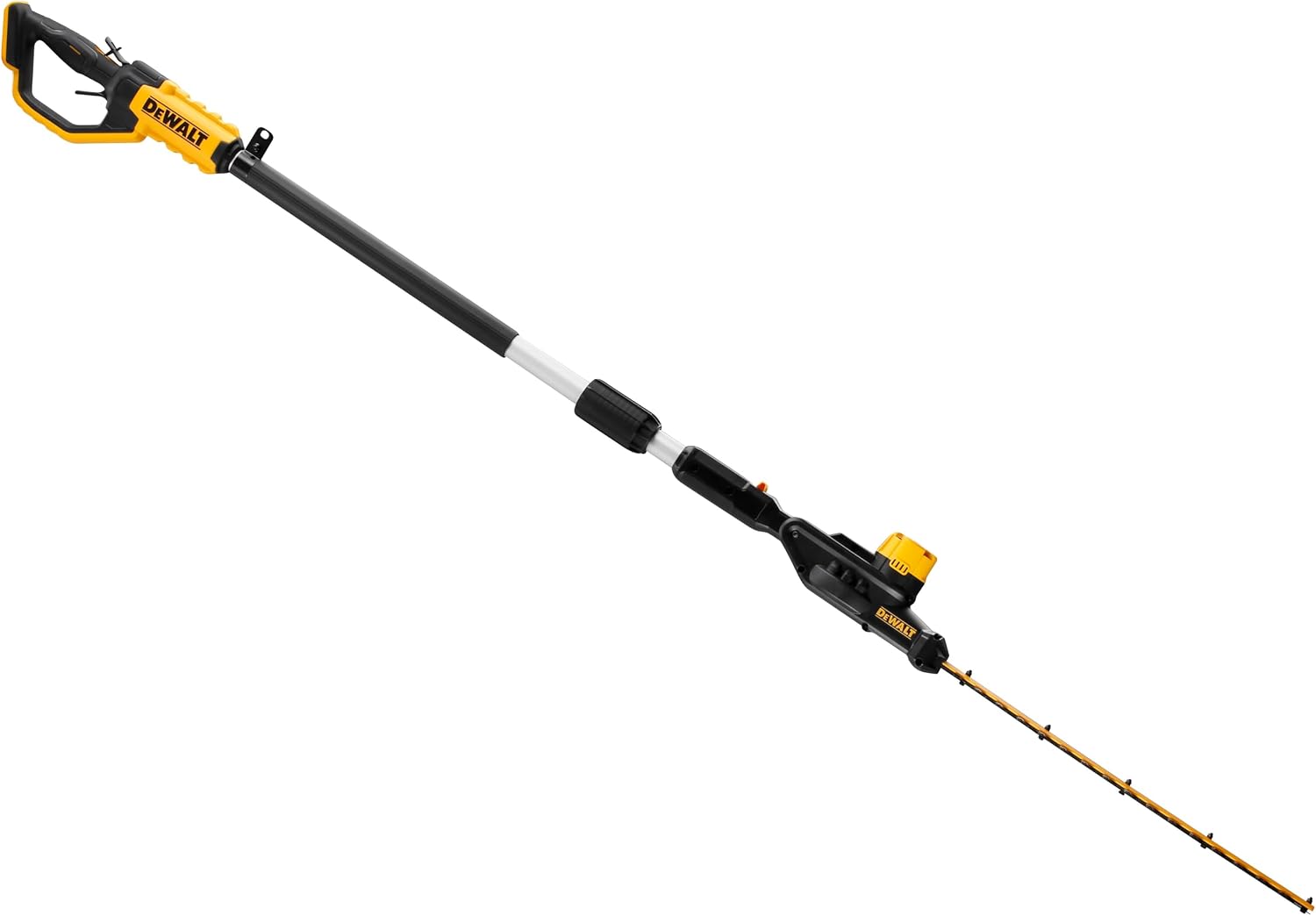
Figure 2: Front view of the pole hedge trimmer, highlighting the blade and adjustable head.

Figure 3: Side view of the pole hedge trimmer, showing the extended pole and handle assembly.

Figure 4: Detailed view of the main handle, trigger, and battery port area.

Figure 5: Close-up of the safety lock-off button, which must be pressed before engaging the trigger.
4. Setup
4.1 Unpacking
Carefully remove the hedge trimmer and all accessories from the packaging. Ensure all components listed in Section 3 are present and undamaged. Do not discard packaging until you are satisfied with the product.
4.2 Attaching the Battery Pack
The DCMPH566N is a bare unit and requires a DEWALT 18V XR Li-Ion battery pack (sold separately). Ensure the battery is fully charged before use.
- Align the battery pack with the battery port on the main handle.
- Slide the battery pack into the port until it clicks securely into place.
- To remove the battery, press the release button on the battery pack and slide it out.
4.3 Adjusting the Pole Length
The pole length can be adjusted to suit your reach requirements.
- Loosen the adjustable collar (10) by twisting it counter-clockwise.
- Extend or retract the pole extension (4) to the desired length.
- Tighten the adjustable collar (10) by twisting it clockwise until it is secure. Ensure the pole is firmly locked before operation.
4.4 Adjusting the Head Angle
The cutting head can be angled for optimal trimming of various hedge shapes and heights.
- Locate the head adjustment button/lever near the adjustable head (3).
- Press or release the button/lever and adjust the head to the desired angle.
- Ensure the head locks securely into position before use.
5. Operating Instructions
5.1 Before Starting
- Ensure the work area is clear of debris, wires, and other obstructions.
- Inspect the hedge for any hidden objects such as wires, fences, or foreign materials that could damage the blade.
- Wear all recommended personal protective equipment (PPE).
- Ensure the blade guard is removed before operation and re-attached immediately after use.
5.2 Starting and Stopping the Trimmer
- To start the trimmer, first press the safety lock-off button (8) with your thumb.
- While holding the safety lock-off button, squeeze the trigger switch (7) with your fingers. The trimmer will start.
- To stop the trimmer, release the trigger switch (7). The blade will stop quickly.
5.3 Trimming Techniques
- Horizontal Trimming: For the top of hedges, hold the trimmer with the blade flat and sweep it across the top in a smooth, even motion. Overlap each pass slightly.
- Vertical Trimming: For the sides of hedges, hold the trimmer with the blade vertical and sweep it upwards or downwards, depending on your comfort and the hedge's shape.
- High Hedges: Utilize the extended pole and adjustable head to reach high areas. Maintain a stable stance and avoid overreaching.
- Cutting Capacity: Do not attempt to cut branches thicker than the specified cutting capacity (25mm). For thicker branches, use appropriate pruning tools.
- Blade Movement: Allow the blade to do the work. Do not force the trimmer through thick material, as this can cause the motor to stall or damage the blade.

Figure 6: Operator using the pole hedge trimmer to trim the top of a tall hedge, demonstrating extended reach.

Figure 7: Operator using the pole hedge trimmer for lower hedge trimming, showing the versatility of the tool.
6. Maintenance
WARNING: Always remove the battery pack before performing any maintenance, cleaning, or storage procedures.
6.1 Cleaning
- After each use, clean the cutting blade (1) thoroughly. Remove any sap, leaves, or debris using a stiff brush or cloth.
- Wipe down the main body of the trimmer with a damp cloth. Do not use harsh chemicals or abrasive cleaners.
- Ensure all vents are clear of obstructions to prevent overheating.
6.2 Blade Care
- Regularly lubricate the cutting blade with a light machine oil or blade lubricant. Apply a thin coat along the entire length of the blade.
- Inspect the blade for any signs of damage, dullness, or bent teeth. A dull blade can cause excessive strain on the motor and poor cutting performance.
- If the blade is dull or damaged, it should be sharpened or replaced by a qualified service technician.
6.3 Storage
- Before storing, ensure the trimmer is clean and dry.
- Always attach the blade guard (2) to protect the blade and prevent accidental injury.
- Store the trimmer in a dry, secure location, out of reach of children and away from direct sunlight or extreme temperatures.
- If storing for an extended period, remove the battery pack from the tool.
7. Troubleshooting
This section addresses common issues you might encounter with your DEWALT DCMPH566N XR Pole Hedge Trimmer.
| Problem | Possible Cause | Solution |
|---|---|---|
| Trimmer does not start. |
|
|
| Poor cutting performance. |
|
|
| Excessive vibration. |
|
|
If you encounter a problem not listed here, or if the suggested solutions do not resolve the issue, please contact DEWALT customer service or an authorized service center.
8. Specifications
| Feature | Detail |
|---|---|
| Brand | DEWALT |
| Model Number | DCMPH566N-XJ |
| Power Source | Battery (18V XR Li-Ion, not included) |
| Product Dimensions (L x W x H) | 45.67"L x 6.5"W x 6.1"H |
| Item Weight | 4.4 Kilograms (9.68 pounds) |
| Blade Length | 18 Inches |
| Cutting Width / Capacity | 25 Millimeters |
| Blade Material | Alloy Steel |
| Color | Black & Yellow |
9. Warranty and Support
DEWALT stands behind the quality of its products. For specific warranty information, please refer to the warranty card included with your purchase or visit the official DEWALT website. Keep your proof of purchase for warranty claims.
9.1 Customer Support
If you have any questions regarding the operation, maintenance, or repair of your DEWALT DCMPH566N XR Pole Hedge Trimmer, please contact DEWALT customer service. Contact information can typically be found on the DEWALT website or in the documentation provided with your tool.
For service, always use identical replacement parts. Use of unauthorized parts may create a risk of injury or damage to the tool.


