
Azuri Mini 2
Azuri Mini 2 True Wireless Twin BT Earphones User Manual
Model: Mini 2 (AZTWMINI2V2-BLK)
Introduction
This manual provides comprehensive instructions for the safe and efficient use of your Azuri Mini 2 True Wireless Twin BT Earphones. Please read this manual thoroughly before using the product and retain it for future reference.
Safety Information
- Do not expose the earphones or charging case to extreme temperatures, direct sunlight, or fire.
- Avoid using the earphones at high volume levels for extended periods to prevent hearing damage.
- Keep the device away from water and moisture. This product is not water-resistant.
- Do not attempt to disassemble or modify the product. This may void the warranty and cause damage.
- Use only the provided or certified charging cables and adapters.
Package Contents
- Azuri Mini 2 True Wireless Twin BT Earphones (Left and Right)
- Charging Case
- Ear tips (various sizes)
- USB Charging Cable
- User Manual
Product Overview
Familiarize yourself with the components of your Azuri Mini 2 earphones.
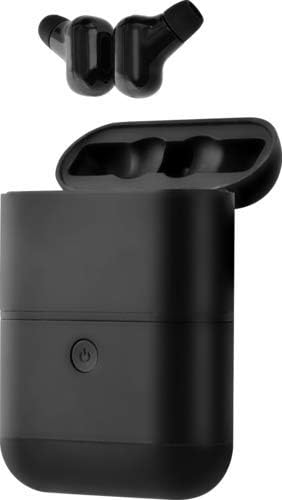
This image displays the Azuri Mini 2 True Wireless Twin BT Earphones, showing both earbuds removed from their charging case, which is open. The earbuds are black, and the charging case is also black with a power button visible on its front.
- Earbuds: Left and Right, with ear tips.
- Charging Case: Houses and charges the earbuds, includes a power button.
- Power Button: Located on the charging case, used for power management and pairing.
Setup
1. Charging the Charging Case
- Connect the provided USB charging cable to the charging port on the case.
- Connect the other end of the cable to a USB power adapter (not included) or a computer's USB port.
- The indicator light on the case will show charging status. A full charge is indicated when the light changes or turns off.
2. Charging the Earbuds
- Place the earbuds into their respective slots in the fully charged charging case.
- The earbuds will automatically begin charging. Indicator lights on the earbuds will show charging status.
- Ensure the charging contacts on both the earbuds and the case are clean and dry.
3. Bluetooth Pairing
- Initial Pairing:
- Open the charging case and remove both earbuds. They will automatically power on and enter pairing mode.
- On your device (smartphone, tablet, etc.), enable Bluetooth.
- Search for available Bluetooth devices and select "Azuri Mini 2" from the list.
- Once connected, a voice prompt will confirm successful pairing.
- Re-pairing: If the earbuds do not automatically connect to your device, repeat the steps above.
- Single Earbud Use: Either earbud can be used independently. Simply remove one earbud from the case, and it will enter pairing mode.
Operating Instructions
Power On/Off
- Power On: Remove earbuds from the charging case. They will power on automatically. Alternatively, press and hold the touch control area on each earbud for 3 seconds.
- Power Off: Place earbuds back into the charging case. They will power off automatically. Alternatively, press and hold the touch control area on each earbud for 5 seconds.
Music Playback
- Play/Pause: Tap the touch control area on either earbud once.
- Next Track: Double-tap the touch control area on the right earbud.
- Previous Track: Double-tap the touch control area on the left earbud.
- Volume Control: Adjust volume directly on your connected device.
Call Management
- Answer/End Call: Tap the touch control area on either earbud once.
- Reject Call: Press and hold the touch control area on either earbud for 2 seconds.
Voice Assistant
- Activate Voice Assistant: Triple-tap the touch control area on either earbud.
Maintenance
Cleaning
- Use a soft, dry, lint-free cloth to clean the earbuds and charging case.
- Gently clean the charging contacts on both the earbuds and the case to ensure proper charging.
- Remove ear tips and clean them with a mild soap solution if necessary, then rinse and dry thoroughly before reattaching.
- Do not use harsh chemicals, cleaning solvents, or strong detergents.
Storage
- When not in use, store the earbuds in their charging case to protect them and keep them charged.
- Store the device in a cool, dry place, away from extreme temperatures and direct sunlight.
Troubleshooting
| Problem | Possible Solution |
|---|---|
| Earbuds not pairing with device. |
|
| Only one earbud is working. |
|
| Earbuds not charging. |
|
| Poor sound quality. |
|
Specifications
| Feature | Detail |
|---|---|
| Model Name | Mini 2 |
| Model Number | AZTWMINI2V2-BLK |
| Connectivity Technology | Bluetooth, Wireless |
| Wireless Communication Technology | Bluetooth |
| Frequency Range | 20 Hz - 20,000 Hz |
| Control Method | Remote Control (Touch Control) |
| Ear Placement | In-Ear |
| Form Factor | In-Ear |
| Noise Isolation | None |
| Water Resistance Level | Not Water Resistant |
| Compatible Devices | Cell Phone, Tablet, Laptop, Computer, Vehicle |
| Color | Black |
| Included Components | Ear tips |
Warranty Information
Specific warranty details for the Azuri Mini 2 True Wireless Twin BT Earphones are not provided in the product information. Please refer to the warranty card included in your product packaging or contact Azuri customer support for detailed warranty terms and conditions.
Support
For further assistance, technical support, or inquiries regarding your Azuri Mini 2 True Wireless Twin BT Earphones, please visit the official Azuri website or contact their customer service department. Contact information is typically available on the product packaging or the brand's official online presence.
Ask a question about this manual
Ask about setup, troubleshooting, compatibility, parts, safety, or missing instructions. Manuals+ will review the question and use this page’s manual context to help answer it.