Introduction
The Goodnature A24 Home Trapping Kit provides an effective, humane, and toxin-free solution for controlling rat and mouse populations. This automatic trap is designed to reset itself after each kill, offering continuous pest control with minimal effort. The included Digital Strike Counter helps you monitor your success.

Figure 1: The Goodnature A24 Home Trapping Kit, fully assembled on its portable stand with the digital strike counter attached.
What's in the Box
Your Goodnature A24 Home Trapping Kit includes the following components:
- Goodnature A24 Rat & Mouse Trap
- Digital Strike Counter
- A24 Portable Trap Stand
- Goodnature Automatic Paste Pump
- 6 Paste Tasters
- Goodnature CO2 Canister
- Quick Start Guide
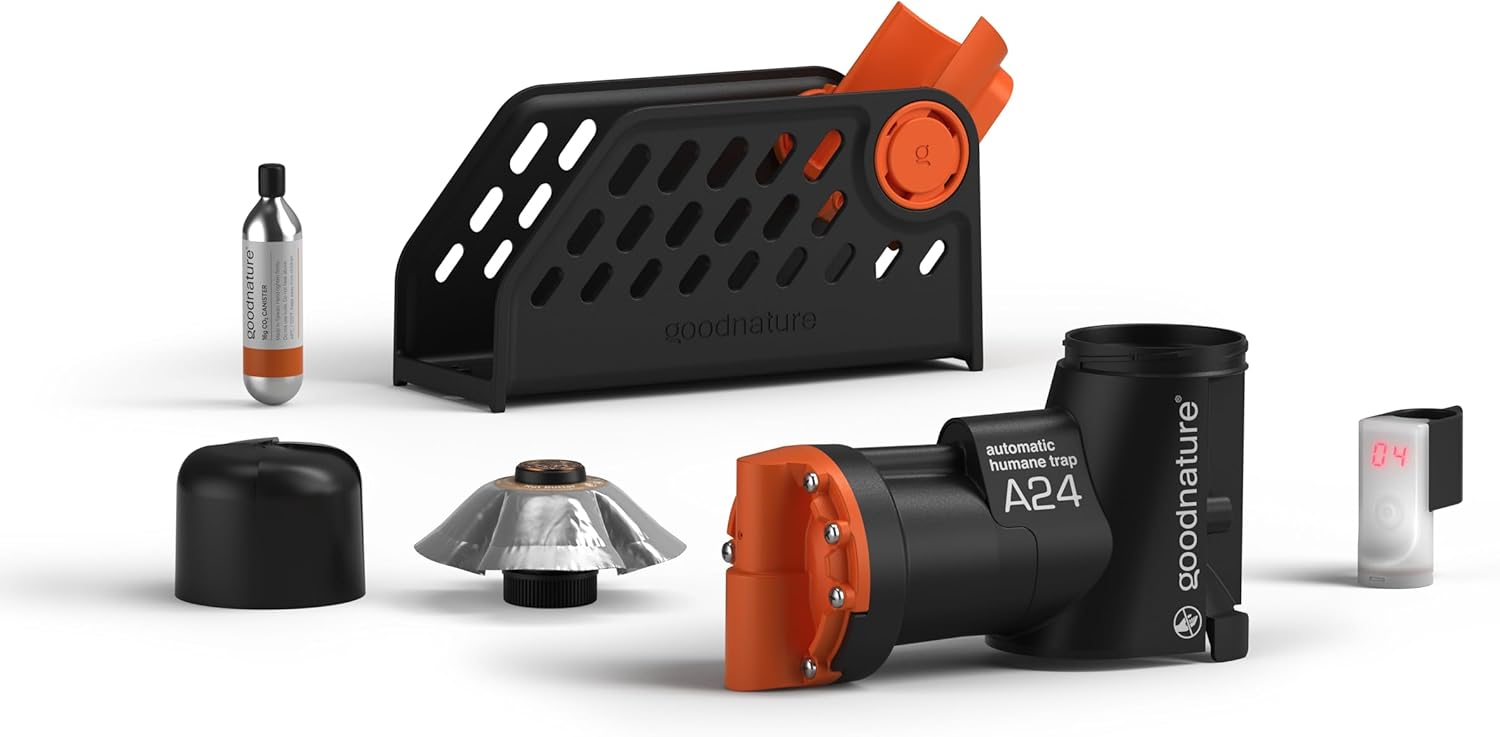
Figure 2: All individual components of the Goodnature A24 Home Trapping Kit, including the trap, stand, counter, paste pump, and CO2 canister.
Setup Instructions
- Assemble the Trap and Stand: Securely attach the A24 trap to the portable trap stand. Ensure it clicks firmly into place.
- Install the Digital Strike Counter: Slide the Digital Strike Counter onto the CO2 canister adapter at the top of the trap. It should fit snugly. The counter will activate when the trap is triggered.
- Insert the CO2 Canister: Carefully screw the Goodnature CO2 canister into the trap's CO2 port until it is finger-tight. You may hear a small hiss as the seal engages. Do not overtighten.
- Prepare the Automatic Paste Pump: Remove the cap from the Automatic Paste Pump and screw it into the bait chamber at the base of the trap. The pump will slowly dispense fresh lure over time.
- Strategic Placement: Identifying the right location is crucial for success. Rats and mice prefer sheltered areas where they feel safe. Use the provided Trap Location Cards to identify ideal spots.

Figure 3: Guidance on optimal trap placement, highlighting sheltered areas and advising against open, exposed locations.
Pre-feeding and Lure Management
To maximize effectiveness, it is recommended to remove competing food sources from the area and consider pre-feeding. This familiarizes rodents with the lure and encourages them to approach the trap.
- Remove Competing Food: Clear away rubbish bins, compost, pet food, and other potential food sources that might distract rodents.
- Pre-feed Your Site: Place small amounts of the Goodnature paste (using the Paste Tasters) near the trap location for a few nights before setting the trap. This helps rodents become familiar with the lure as a safe food source.
- Automatic Paste Pump: The Automatic Paste Pump continuously releases fresh paste to attract rodents into the A24 trap. This ensures a consistent lure supply for up to six months.

Figure 4: Illustration of pre-feeding techniques and the function of the Automatic Paste Pump for continuous lure dispensing.
Operating the Trap
The Goodnature A24 trap operates automatically once set up. Its cycle is designed for continuous, hands-free rodent control.

Figure 5: The operational cycle of the A24 trap: Sniff (attraction), Kapow (trigger), Auto-reset, and Scavenged (removal).
- Sniff: Rodents are attracted to the long-life lure dispensed by the Automatic Paste Pump.
- Kapow!: When a rodent attempts to access the lure, it triggers the trap, resulting in a quick, humane kill.
- Auto-reset: The trap automatically resets itself immediately after a kill, powered by the CO2 canister, ready for the next rodent.
- Scavenged: Dead pests are typically removed by scavengers, eliminating the need for you to handle carcasses.
Monitoring Kills with the Digital Strike Counter
The Digital Strike Counter provides an easy way to track how many times your trap has been triggered. It records up to 99 strikes. Check the counter periodically to monitor activity and determine when to replace the CO2 canister or lure.
Maintenance
- CO2 Canister Replacement: Each CO2 canister provides power for approximately 24 kills. When the trap stops resetting or the Digital Strike Counter approaches 24 (or multiples thereof), it's time to replace the canister. Unscrew the old canister and screw in a new one.
- Lure Replacement: The Automatic Paste Pump dispenses lure for up to six months. After this period, or if you notice reduced activity, replace the paste pump with a new one.
- Cleaning: Periodically inspect the trap for any debris or blockages around the trigger mechanism. While the trap is designed to be low-maintenance, a quick visual check can ensure optimal performance. Always ensure the trap is de-gassed (CO2 canister removed) before any inspection or cleaning.
Troubleshooting
| Problem | Possible Cause | Solution |
|---|---|---|
| Trap not catching rodents | Incorrect placement, competing food sources, old lure, trap not armed. | Review trap placement using location cards. Remove all competing food sources. Ensure lure is fresh (replace paste pump every 6 months). Verify CO2 canister is full and properly installed. Consider pre-feeding. |
| CO2 cartridge leaking | Canister not seated correctly, faulty canister, damaged seal. | Ensure canister is screwed in firmly but not overtightened. If leaking persists, replace the canister. If new canisters also leak, contact support. Some users have found Teflon tape helpful for sealing. |
| Digital Strike Counter not increasing | Counter not properly attached, trap not triggering, counter battery low. | Ensure the counter is securely attached to the CO2 adapter. Verify the trap is armed and triggering correctly (carefully test with a stick, ensuring safety). The counter uses a Lithium Metal battery; if it's not displaying, the battery may need replacement. |
| Bait mechanism clogged or flooding | Excessive bait flow, debris in bait chamber. | Ensure the Automatic Paste Pump is correctly installed. If clogging occurs, remove the paste pump and clear any blockages. If flooding, ensure the pump is not damaged and is dispensing at the correct rate. |
| Trap not resetting | Empty CO2 canister, mechanical issue. | Replace the CO2 canister. If the issue persists with a new canister, inspect the trap for any visible damage or obstructions in the firing mechanism. |
Important Note: Trapping rodents can be challenging, and success may not be immediate. It can take days or even weeks to find the optimal trap placement and for rodents to become accustomed to the lure. Persistence and adherence to setup guidelines are key.
Specifications
| Feature | Detail |
|---|---|
| Brand | Goodnature |
| Model Number | A24CMR-HTK |
| Color | 24 Trap Kit with Digital Strike Counter |
| Style | Portable, Digital |
| Material | Plastic |
| Item Weight | 1.5 Pounds (0.68 kg) |
| Product Dimensions | 9 x 4 x 6 inches (22.86 x 10.16 x 15.24 cm) |
| Power Source | CO2 Canister (for trap mechanism), 1 Lithium Metal battery (for Digital Strike Counter) |
| Target Species | Mouse, Rat |
| Unit Count | 1 Count |
Safety Information
- Always handle the trap with care. Keep hands and fingers clear of the trap's firing mechanism when the CO2 canister is installed.
- Keep the trap out of reach of children and pets.
- Do not attempt to disassemble the trap beyond routine maintenance as described in this manual.
- CO2 canisters contain compressed gas. Store them in a cool, dry place away from direct sunlight and heat. Do not puncture or incinerate.
- Always remove the CO2 canister before performing any maintenance or moving the trap.
Warranty and Support
Goodnature is committed to customer satisfaction. If you encounter any issues with your A24 Home Trapping Kit or require assistance with troubleshooting, please refer to the troubleshooting section of this manual or contact Goodnature customer support.
Goodnature offers a hassle-free return policy. For specific warranty details and to initiate a return or seek further support, please visit the official Goodnature website or contact their customer service directly.
Product Videos
No official product videos from the seller were available for embedding in this manual.