Introduction
Welcome to your new Hitachi CV-W2000RR Canister Vacuum Cleaner. This manual provides essential information for safe and efficient operation, maintenance, and troubleshooting. Please read it thoroughly before first use and keep it for future reference.
This vacuum cleaner features a powerful 2000W motor and an advanced 7-stage filtration system, including Nano Titanium technology for superior odor removal. Its large 6.5-liter dust capacity and dust compression technology ensure efficient cleaning with minimal dust exposure during disposal.
Important Safety Instructions
To reduce the risk of fire, electric shock, or injury, always follow basic safety precautions when using an electrical appliance, including the following:
- Read all instructions before using this appliance.
- Do not leave the appliance unattended when plugged in. Unplug from outlet when not in use and before servicing.
- Do not use outdoors or on wet surfaces.
- Do not allow to be used as a toy. Close attention is necessary when used by or near children.
- Use only as described in this manual. Use only manufacturer’s recommended attachments.
- Do not use with a damaged cord or plug. If appliance is not working as it should, has been dropped, damaged, left outdoors, or dropped into water, return it to a service center.
- Do not pull or carry by cord, use cord as a handle, close a door on cord, or pull cord around sharp edges or corners. Do not run appliance over cord. Keep cord away from heated surfaces.
- Do not unplug by pulling on cord. To unplug, grasp the plug, not the cord.
- Do not handle plug or appliance with wet hands.
- Do not put any object into openings. Do not use with any opening blocked; keep free of dust, lint, hair, and anything that may reduce airflow.
- Keep hair, loose clothing, fingers, and all parts of body away from openings and moving parts.
- Do not pick up anything that is burning or smoking, such as cigarettes, matches, or hot ashes.
- Do not use to pick up flammable or combustible liquids, such as gasoline, or use in areas where they may be present.
- Do not pick up toxic material (e.g., chlorine bleach, ammonia cleaner, drain cleaner).
- Do not use without dust compartment and/or filters in place.
- Turn off all controls before unplugging.
- Use extra care when cleaning on stairs.
Package Contents
Verify that all items are present in the package:
- Hitachi CV-W2000RR Vacuum Cleaner Unit
- Crevice Tool
- Dust Brush
- Carpet/Hard Floor Nozzle
- 5-meter Power Cable (integrated)
- Aluminum Telescopic Extension Tube
- Hose Assembly
- 4 Filters (pre-installed or separate)

Product Overview
Familiarize yourself with the main components of your vacuum cleaner.
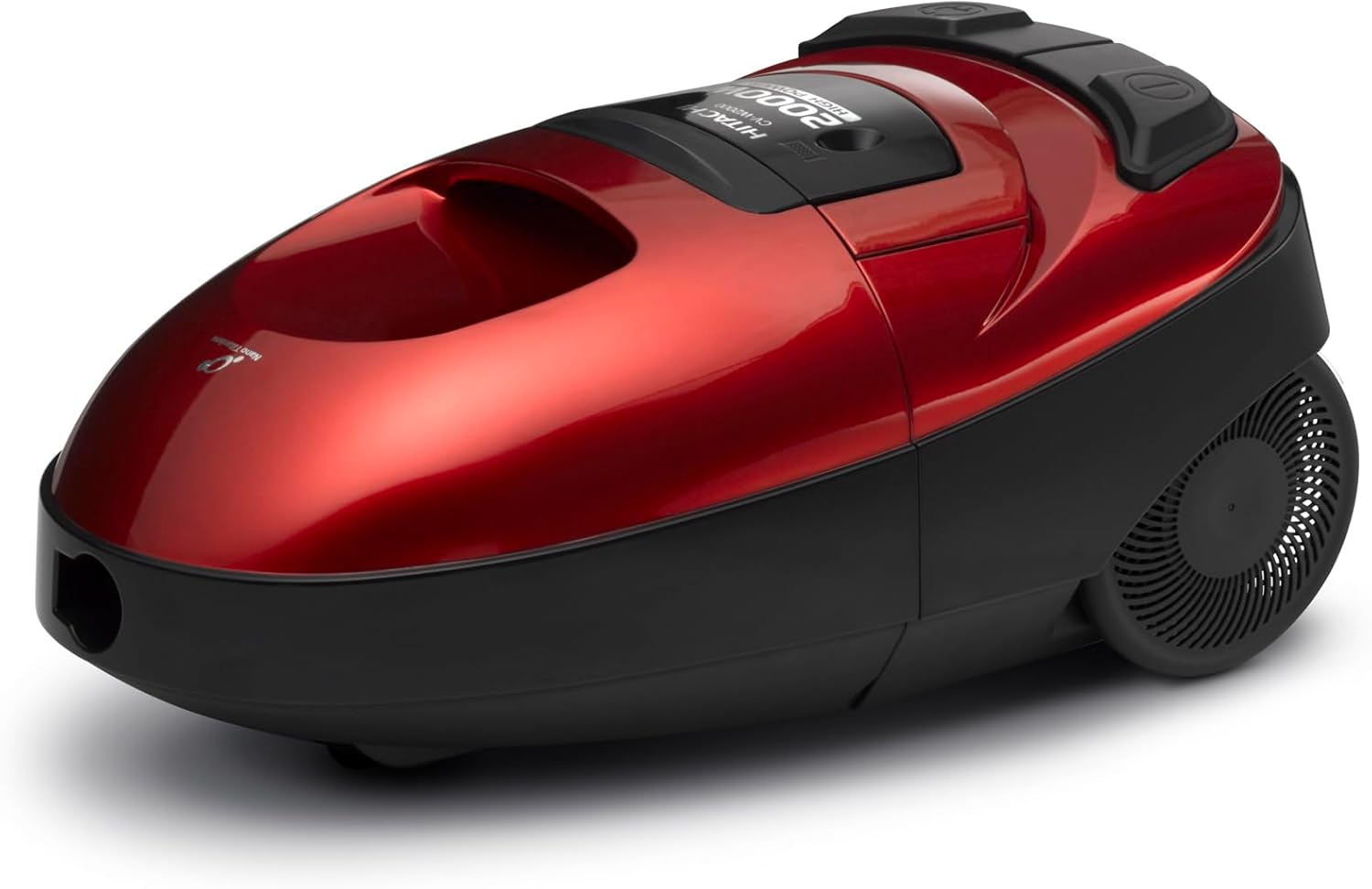
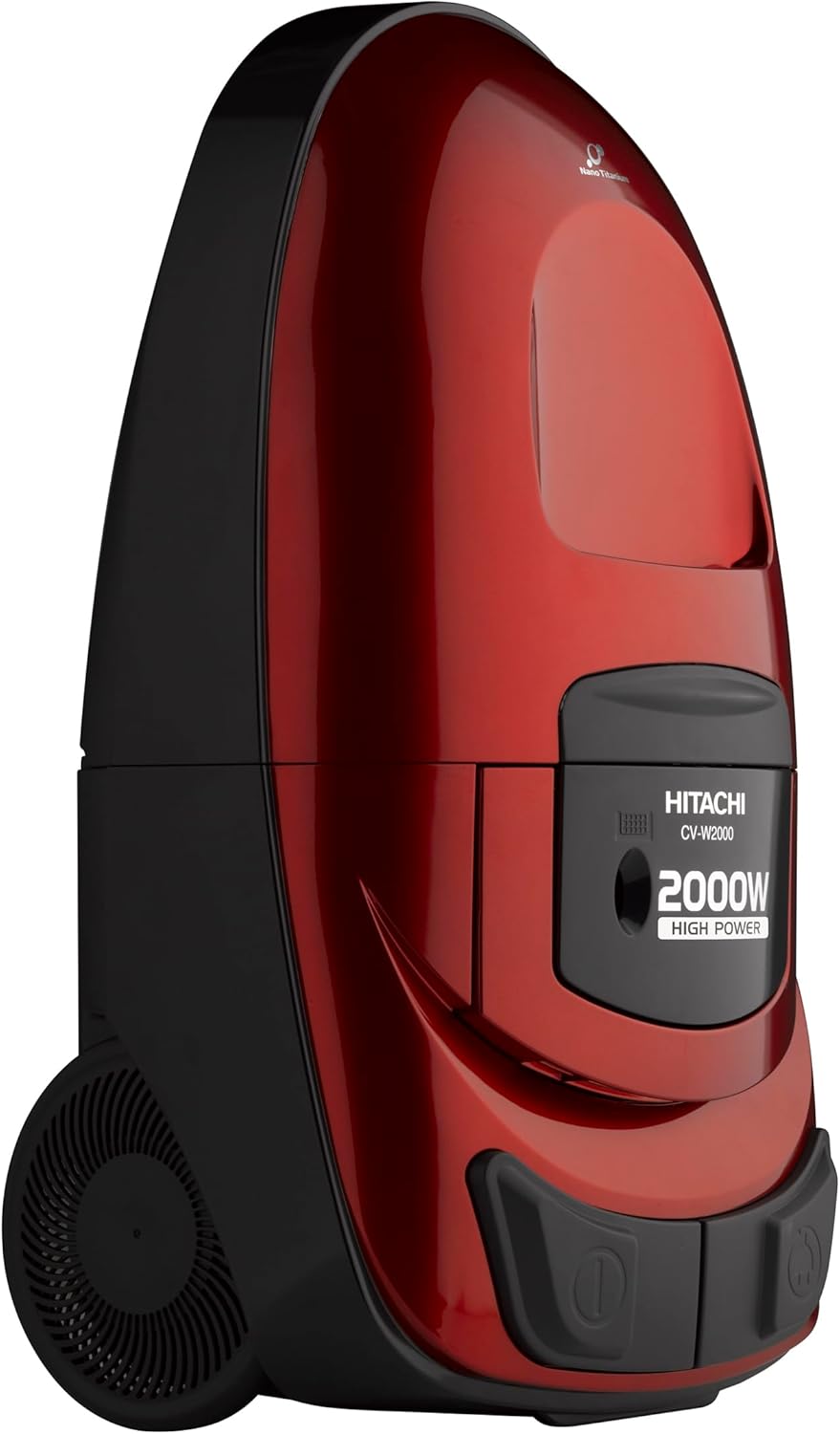

Setup and Assembly
Follow these steps to set up your vacuum cleaner:
- Unpack: Carefully remove all components from the packaging.
- Connect Hose: Insert the hose end into the suction inlet on the main vacuum cleaner unit until it clicks securely into place.
- Attach Extension Tube: Connect the aluminum telescopic extension tube to the hose handle. Adjust the length of the tube by pressing the release button and sliding it to the desired position.
- Attach Nozzle: Select the appropriate cleaning nozzle (carpet/hard floor, crevice tool, or dust brush) and attach it firmly to the end of the telescopic tube.
- Power Connection: Ensure all connections are secure before plugging the power cord into an electrical outlet.
Operating Instructions
Powering On/Off
1. Insert the power plug into a suitable electrical outlet (220V).
2. Press the power button on the main unit to turn the vacuum cleaner ON.
3. Press the power button again to turn it OFF.
Adjusting Suction Power
Use the suction control slider or dial (if present) on the main unit or hose handle to adjust suction power according to the cleaning task. Higher suction is suitable for carpets, while lower suction is better for delicate surfaces or curtains.
Using Attachments
- Carpet/Hard Floor Nozzle: Ideal for general floor cleaning on both carpets and hard surfaces.
- Crevice Tool: Designed for cleaning narrow spaces, corners, and edges.
- Dust Brush: Suitable for delicate surfaces, upholstery, and curtains.
Dust Indicator
The dust indicator will visually signal when the dust compartment is full and needs to be emptied to maintain optimal performance.
Blower Function
To utilize the blower function, detach the hose from the suction inlet and connect it to the blower port (typically located at the rear of the unit). This function is useful for blowing dust and debris from hard-to-reach areas or for inflating small items.
Maintenance
Emptying the Dust Compartment
Your vacuum cleaner features a large 6.5-liter dust capacity and advanced dust compression technology. When the dust indicator signals that the compartment is full:
- Ensure the vacuum cleaner is turned OFF and unplugged.
- Press the one-touch release button to detach the dust compartment from the main unit.
- Position the dust compartment over a waste bin and open its lid to empty the compressed dust. The dust compression technology helps minimize airborne dust during disposal.
- Close the lid and reattach the dust compartment securely to the vacuum cleaner until it clicks into place.
Cleaning the Filters
Your vacuum cleaner is equipped with a 7-stage filtration system, including a Nano Titanium filter for odor removal and a cloth filter. Regular filter cleaning is crucial for maintaining optimal suction performance and air quality.
- Ensure the vacuum cleaner is turned OFF and unplugged.
- Remove the dust compartment as described above.
- Locate and carefully remove the filters. The pleated black filter at the back can be cleaned using a special brush (included) to remove fine dust.
- For washable filters, rinse them under cool running water until the water runs clear. Do not use detergents.
- Allow all filters to air dry completely for at least 24 hours before reinstallation. Do not use a dryer or direct heat.
- Reinstall the dry filters in their correct positions and reattach the dust compartment.
General Cleaning
- Wipe the exterior surfaces of the vacuum cleaner with a soft, damp cloth. Do not use abrasive cleaners, solvents, or harsh chemicals.
- Periodically check the nozzles, hose, and telescopic tube for any blockages. Clear any debris to ensure unobstructed airflow.
Troubleshooting
Before contacting customer support, please refer to the following table for common issues and their solutions:
| Problem | Possible Cause | Solution |
|---|---|---|
| Vacuum cleaner does not turn on. | Not plugged in securely. | Ensure the power plug is fully inserted into a working electrical outlet. |
| Power outlet faulty. | Test the outlet with another appliance to confirm it is working. | |
| Circuit breaker tripped. | Check your home's circuit breaker and reset if necessary. | |
| Low or no suction power. | Dust compartment is full. | Empty the dust compartment as described in the Maintenance section. |
| Filters are clogged. | Clean or replace the filters according to the Maintenance section. | |
| Hose or nozzle is blocked. | Turn off and unplug the unit. Carefully check the hose, telescopic tube, and nozzles for any blockages and remove them. | |
| Unusual noise during operation. | Blockage in hose or nozzle. | Turn off and unplug the unit. Check and clear any blockages. |
| Motor issue. | If the noise persists after checking for blockages, contact customer support. |
If the problem persists after attempting these solutions, please contact Hitachi customer support for further assistance.
Specifications
Key technical specifications for the Hitachi CV-W2000RR Vacuum Cleaner:
| Feature | Detail |
|---|---|
| Model Number | CV-W2000RR |
| Power | 2000W (Maximum) |
| Dust Capacity | 6.5 Liters |
| Filtration System | 7-stage with Nano Titanium filter |
| Power Source | Corded Electric |
| Voltage | 220 Volts |
| Product Dimensions (L x W x H) | 55 x 19 x 23 cm |
| Item Weight | 7.03 kg |
| Special Features | Bagless, Corded, Dust Compression, Blower Function |
| Filter Type | Disc (Cloth) |
| Surface Recommendation | All Floors |
| Included Components | Crevice tool, Dust brush, Carpet/Hard floor nozzle, 5-meter cable, Aluminum telescopic tube, 4 filters |
Warranty and Customer Support
This Hitachi CV-W2000RR vacuum cleaner comes with a 2-year manufacturer warranty. Please retain your proof of purchase for any warranty claims.
For technical assistance, spare parts, or warranty service, please contact your local Hitachi customer service center or visit the official Hitachi website. You can find more information and support on the Hitachi Brand Store.


