
1. Introduction
This manual provides essential information for the safe and efficient operation, maintenance, and troubleshooting of your Omcan TURBOVAC Heavy-Duty Vacuum Packaging Machine. Designed for demanding environments, this machine is a primary choice for butcher shops, restaurants, hotel kitchens, hospitals, caterers, and the food processing industry. Please read this manual thoroughly before operating the machine to ensure proper use and longevity.
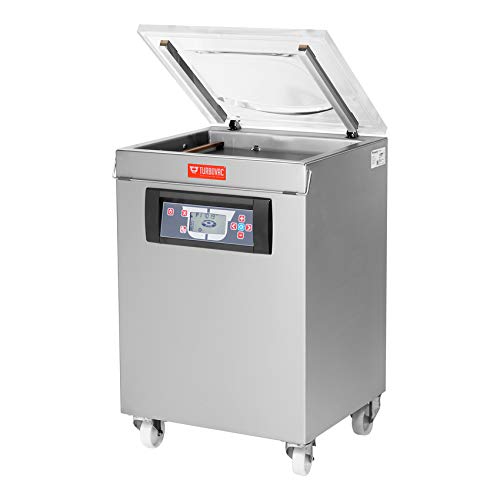
An image of the Omcan TURBOVAC Heavy-Duty Vacuum Packaging Machine, constructed from stainless steel, with its transparent lid open, revealing the vacuum chamber. The control panel is visible on the front, and the machine is equipped with casters for mobility.
2. Safety Instructions
Always adhere to the following safety guidelines to prevent injury or damage to the machine:
- Ensure the machine is connected to a properly grounded electrical outlet (120V/60Hz/1).
- Do not operate the machine with wet hands or in wet environments.
- Keep hands and clothing clear of moving parts, especially the lid and seal bar, during operation.
- Never attempt to open the lid during a vacuum cycle.
- Disconnect power before cleaning or performing any maintenance.
- Only use the machine for its intended purpose of vacuum packaging food products.
- Keep children and unauthorized personnel away from the machine.
3. Setup
Follow these steps for initial setup:
- Unpacking: Carefully remove the machine from its packaging. Inspect for any shipping damage.
- Placement: Position the machine on a stable, level surface. The integrated casters allow for mobility; ensure they are locked once the desired position is achieved.
- Electrical Connection: Connect the power cord to a dedicated 120V/60Hz/1 electrical outlet.
- Initial Cleaning: Before first use, wipe down all food-contact surfaces, including the chamber and seal bar, with a damp cloth and mild, food-safe detergent. Rinse thoroughly and dry.
4. Operating Instructions
This machine features a user-friendly control panel for efficient operation.
- Power On: Ensure the machine is plugged in. Press the main power switch, usually located on the side or back of the unit. The control panel display will illuminate.
- Prepare Product: Place the item to be vacuum-sealed inside a vacuum bag. Ensure the open end of the bag is clean and dry.
- Load Chamber: Open the transparent lid. Place the vacuum bag inside the chamber, ensuring the open end of the bag lies flat and smooth across the seal bar. Make sure no wrinkles or folds are present on the sealing area. The useful chamber size is 16.5" x 17.3" x 8.7" (DWH).
- Close Lid: Firmly close the transparent lid. The machine will automatically initiate the vacuum cycle. The transparent cover allows for visual control of the packaging process.
- Vacuum and Seal Cycle: The machine will draw a vacuum, removing air from the chamber and bag. Once the desired vacuum level is reached, the 16.5" seal bar will activate to seal the bag. The machine does not feature 10 programmable controls, so the cycle will operate based on its default settings or basic adjustments available on the control panel.
- Cycle Completion: After sealing, air will be reintroduced into the chamber, and the lid will release. Carefully remove the sealed product.
- Power Off: When finished, turn off the main power switch and unplug the machine if it will not be used for an extended period.
5. Maintenance
Regular maintenance ensures optimal performance and extends the life of your vacuum packaging machine.
- Daily Cleaning: After each use, clean the stainless steel exterior and the vacuum chamber. Use a damp cloth with mild, food-safe detergent. Wipe down the flat working surface. Avoid abrasive cleaners or scouring pads that can scratch the surface.
- Seal Bar and Gasket: Inspect the seal bar and the rubber gasket around the chamber opening for any food debris, wear, or damage. Clean them regularly. A damaged gasket can lead to poor vacuum performance.
- Oil Change (Vacuum Pump): The 21 m³ vacuum pump requires periodic oil changes. Refer to the pump manufacturer's guidelines or consult a qualified technician for specific intervals and procedures.
- General Inspection: Periodically check all electrical connections and hoses for signs of wear or damage.
6. Troubleshooting
If you encounter issues, consult this section before contacting support.
- Machine Does Not Power On:
- Check if the power cord is securely plugged into a live outlet.
- Verify the main power switch is in the 'ON' position.
- Check the circuit breaker or fuse for the outlet.
- Poor Vacuum or No Vacuum:
- Ensure the lid is closed firmly and completely sealed.
- Inspect the chamber gasket for debris, cracks, or improper seating. Clean or replace if necessary.
- Check the vacuum bag for holes or leaks.
- Verify the vacuum pump oil level and condition.
- Poor Seal or No Seal:
- Ensure the open end of the bag is clean, dry, and flat on the seal bar.
- Check the seal bar heating element and Teflon strip for damage or wear.
- Adjust the sealing time if available on the control panel (if bags are melting or not sealing).
7. Specifications
| Feature | Detail |
|---|---|
| Model | B08574BNXS |
| Seal Length | 16.5 inches |
| Vacuum Pump Capacity | 21 m³ |
| Maximum Product Height | 8.7 inches |
| Useful Chamber Size (DWH) | 16.5" x 17.3" x 8.7" |
| Power | 1.3 - 3.3 kW |
| Electrical Requirements | 120V/60Hz/1 |
| Dimensions (DWH) | 25.2" x 26.2" x 40.15" |
| Weight | 265 lbs. / 120 kg. |
| Manufacturer | OMCAN |
| Certifications | cMETus / NSF |
| Country of Origin | NETHERLANDS |
| Date First Available | February 27, 2020 |
8. Warranty
This Omcan TURBOVAC Heavy-Duty Vacuum Packaging Machine comes with a 1 Year Parts and Labor warranty. Please retain your proof of purchase for warranty claims. For detailed warranty terms and conditions, refer to the documentation provided at the time of purchase or contact Omcan customer service.
9. Support
For technical assistance, parts, or service inquiries, please contact your authorized Omcan dealer or Omcan customer support. Have your model number (B08574BNXS) and purchase date ready when contacting support.


