
RIBIMEX PE200/400T
Ribimex Electric Hoist User Manual
Model: PE200/400T
1. Safety Instructions
Read this manual thoroughly before operating the Ribimex Electric Hoist. Failure to follow safety instructions can result in serious injury or property damage.
- General Safety: Always wear appropriate personal protective equipment (PPE) such as safety gloves and eye protection. Ensure the work area is clear of obstructions.
- Load Capacity: Do not exceed the maximum load capacity: 200 kg for single-line operation and 400 kg for double-line operation. Overloading can cause equipment failure and injury.
- Installation: Ensure the hoist is securely mounted to a structure capable of supporting the hoist's weight plus the maximum load. Use the provided mounting brackets.
- Electrical Safety: Connect the hoist only to a grounded 230V ~ 50Hz power supply. Do not operate with damaged cables or plugs. Keep hands and body clear of moving parts.
- Cable Inspection: Regularly inspect the steel cable for fraying, kinks, or damage. Replace the cable if any damage is observed.
- Remote Control: The wireless remote control has a range of up to 30 meters. Always maintain a safe distance from the load during operation.
- Environmental Conditions: Do not operate the hoist in wet or hazardous conditions.
2. Product Overview
The Ribimex PE200/400T Electric Hoist is designed for efficient and safe lifting of heavy loads in various environments. It features a robust single-phase motor, a durable braided steel cable, and a convenient wireless remote control.

Image: The Ribimex Electric Hoist, showing the main unit, steel cable with hook, and the orange wireless remote control.
Key Features:
- High Lifting Capacity: Lifts up to 200 kg (single line) or 400 kg (double line).
- Wireless Remote Control: Operates from up to 30 meters away for enhanced safety and convenience.
- Powerful Motor: Single-phase 230V ~ 50Hz electric motor with a pressure-cast aluminum alloy casing.
- Durable Cable: 18-meter braided steel wire cable with pre-attached hook.
- Included Pulley: For doubling the load capacity and converting to double-line operation.
- Mounting Brackets: Two robust brackets for secure installation.
3. Setup and Installation
Proper installation is crucial for safe and effective operation.
3.1 Mounting the Hoist
- Identify a sturdy, load-bearing structure (e.g., a steel beam or reinforced concrete ceiling) capable of supporting the hoist's weight plus the maximum intended load.
- Use the two provided mounting brackets. Securely attach them to the chosen structure using appropriate fasteners (not included, as fastener type depends on mounting surface). Ensure the brackets are level and firmly tightened.
- Carefully lift the hoist and slide it onto the mounted brackets, ensuring it is fully seated and stable.
3.2 Electrical Connection
- Ensure the power supply is 230V ~ 50Hz and is properly grounded.
- Plug the hoist's power cord into a suitable, grounded electrical outlet.
- Verify that the power indicator on the hoist or remote (if applicable) illuminates.
3.3 Single-Line vs. Double-Line Operation
The hoist can be configured for single-line or double-line operation, affecting both lifting capacity and speed.
- Single-Line (200 kg capacity): The cable runs directly from the hoist drum to the hook. Lifting speed is 8 meters per minute.
- Double-Line (400 kg capacity): Attach the provided pulley to the main hook. Route the cable through the pulley and then secure the end of the cable to the hoist's frame (usually a dedicated attachment point). This configuration doubles the lifting capacity but halves the lifting speed to 4 meters per minute.
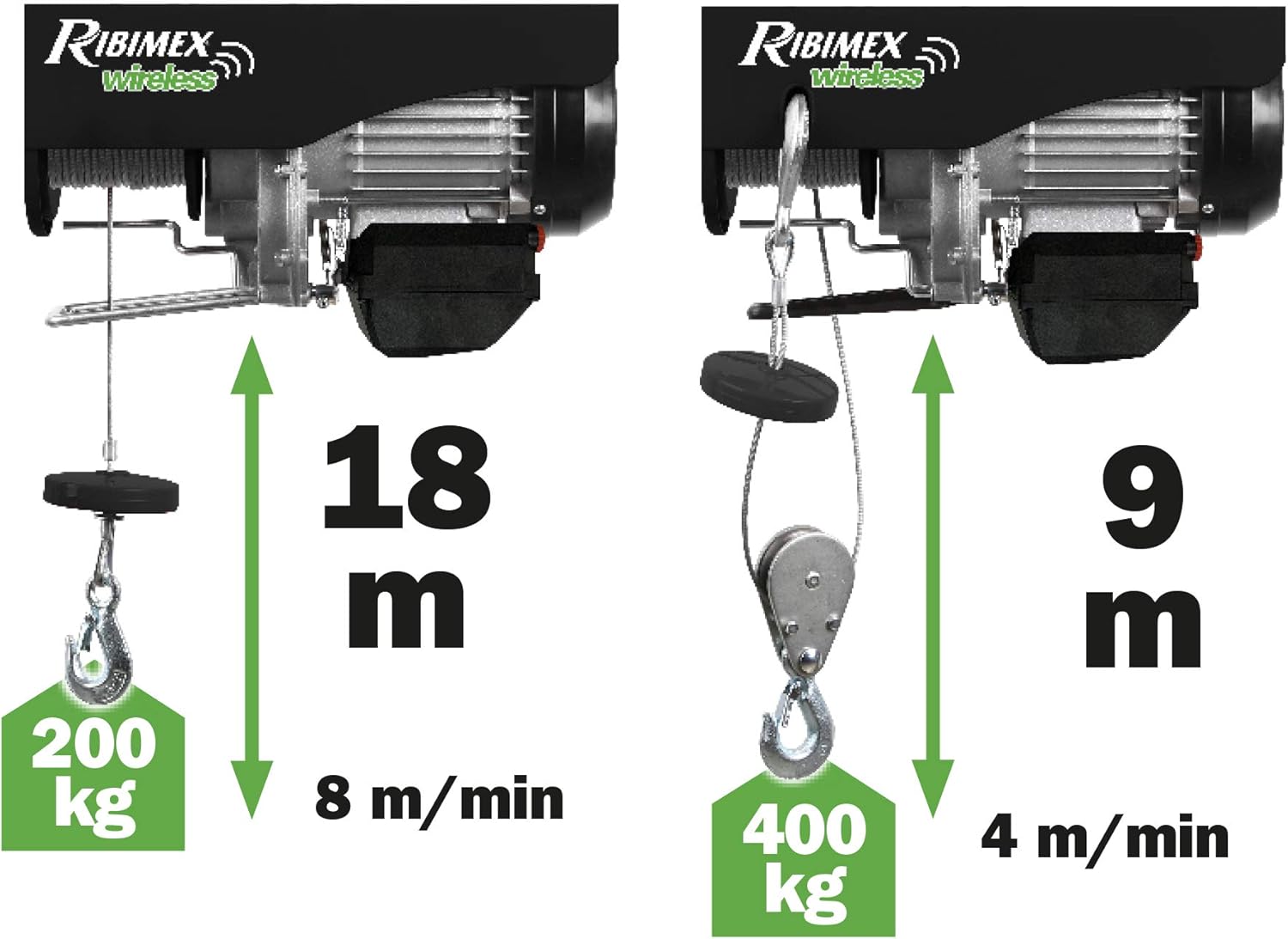
Image: Illustration showing the hoist configured for single-line operation (200 kg, 18m cable length, 8 m/min speed) and double-line operation with the pulley (400 kg, 9m cable length, 4 m/min speed).
4. Operating Instructions
Familiarize yourself with the remote control and hoist functions before lifting any loads.
4.1 Wireless Remote Control
The hoist is operated via a wireless remote control, offering flexibility and safety by allowing the user to stand clear of the load.
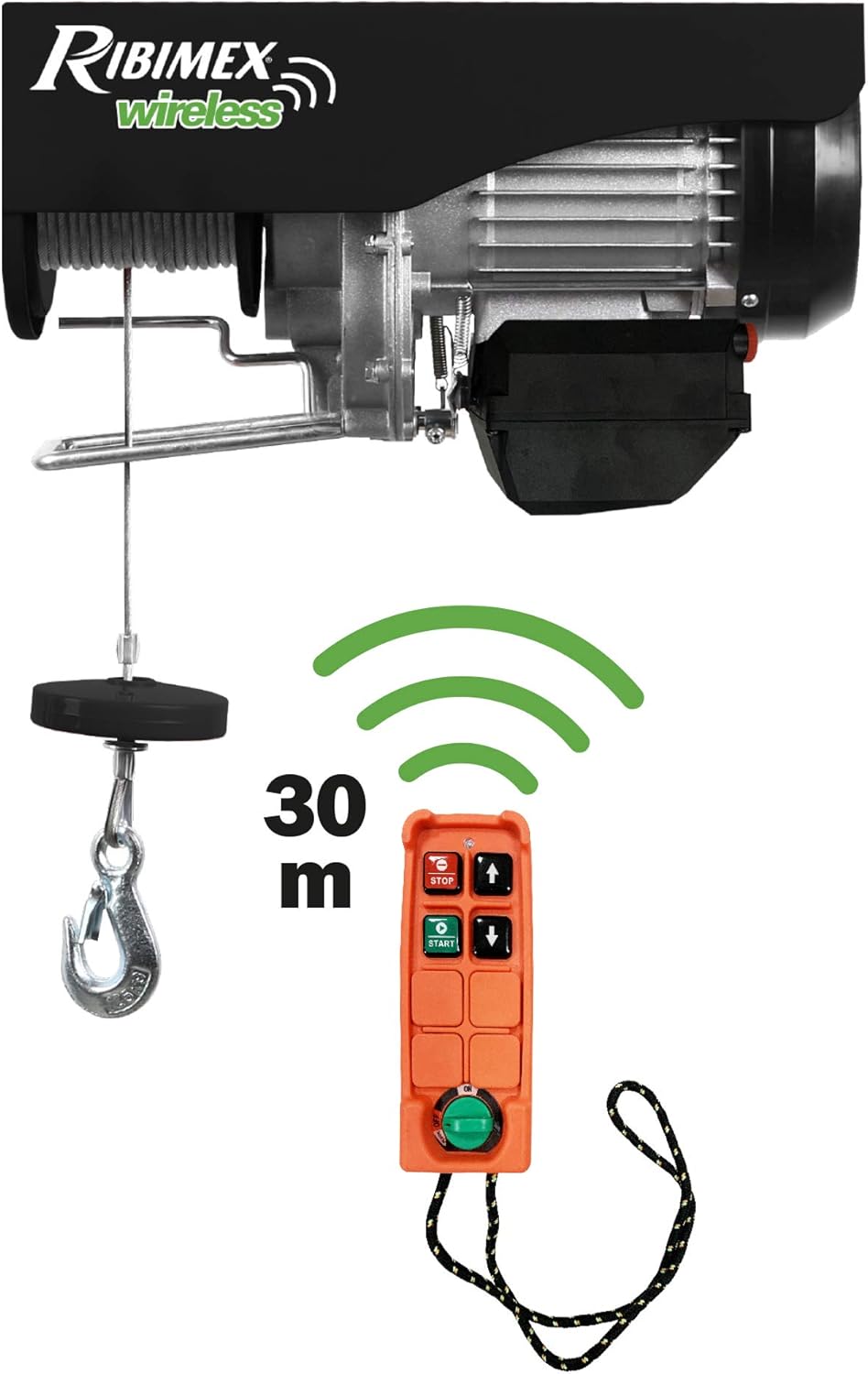
Image: The Ribimex Electric Hoist with its wireless remote control, highlighting the 30-meter operating range.
- START Button: Press to activate the hoist.
- STOP Button: Press to immediately stop all hoist movement. This is an emergency stop.
- Up Arrow Button: Press and hold to lift the load.
- Down Arrow Button: Press and hold to lower the load.
- Ensure the remote control has working batteries (if applicable, check battery compartment).
4.2 Lifting and Lowering Loads
- Before lifting, ensure the load is properly secured to the hook. Distribute the weight evenly.
- Stand clear of the load's path.
- Press the START button on the remote.
- Use the Up or Down arrow buttons to control the movement of the load. Operate smoothly, avoiding sudden starts or stops.
- Monitor the load and cable for any signs of stress or imbalance.
- Once the operation is complete, press the STOP button and disconnect power if the hoist will not be used for an extended period.
5. Maintenance
Regular maintenance ensures the longevity and safe operation of your hoist.
- Daily/Before Use: Inspect the steel cable for any signs of wear, fraying, kinks, or corrosion. Check the hook for deformation or damage. Ensure all bolts and fasteners are tight.
- Monthly: Clean the hoist's exterior, especially the motor housing and fan cover, to prevent dust and debris buildup. Check electrical connections for any signs of wear or loose wiring.
- Lubrication: Consult a qualified technician for periodic lubrication of internal moving parts if required. Do not attempt to lubricate the cable unless specifically instructed by the manufacturer.
- Storage: When not in use, store the hoist in a dry, clean environment, protected from extreme temperatures and moisture.
- Professional Inspection: It is recommended to have the hoist inspected by a qualified professional at least once a year, or more frequently with heavy use.
6. Troubleshooting
This section addresses common issues you might encounter.
| Problem | Possible Cause | Solution |
|---|---|---|
| Hoist does not power on. | No power supply; tripped circuit breaker; faulty power cord. | Check power outlet and circuit breaker. Inspect power cord for damage. |
| Remote control not responding. | Remote batteries low/dead; out of range; interference. | Replace remote batteries. Move closer to the hoist (within 30m). Reduce electrical interference. |
| Motor overheats and stops. | Overloading; continuous operation without rest; poor ventilation. | Reduce load. Allow motor to cool down. Ensure fan cover is clear and ventilation is adequate. |
| Cable is tangled or damaged. | Improper winding; excessive wear. | Carefully unwind the cable. If damaged, replace the cable immediately (consult professional). |
If the problem persists after attempting these solutions, contact customer support or a qualified technician.
7. Specifications
- Model: PE200/400T
- Manufacturer: Ribimex
- Dimensions (L x W x H): 15 x 43 x 24 cm
- Weight: 18.11 kg
- Power: 750W
- Voltage: 230 Volts
- Frequency: 50 Hz
- Load Capacity (Single Line): 200 kg
- Load Capacity (Double Line): 400 kg
- Cable Length: 18 meters
- Cable Lifting Speed (Single Line): 8 m/min
- Cable Lifting Speed (Double Line): 4 m/min
- Wireless Remote Range: Up to 30 meters
- Included Components: Electric Hoist, Pulley, Wireless Remote Control, 2 Mounting Brackets.
8. Warranty and Support
Ribimex provides a commitment to quality and support for its products.
8.1 Warranty Information
This product comes with a 2-year availability for spare parts, indicating support for potential repairs and component replacements within this period from the date of purchase. Please retain your proof of purchase for warranty claims.
8.2 Customer Support
For technical assistance, warranty claims, or inquiries regarding spare parts, please contact Ribimex customer service. Refer to the product packaging or the official Ribimex website for the most current contact information.
When contacting support, please have your product model number (PE200/400T) and purchase details ready.
Ask a question about this manual
Ask about setup, troubleshooting, compatibility, parts, safety, or missing instructions. Manuals+ will review the question and use this page’s manual context to help answer it.