
1. Introduction
The Onelap GO Portable Wireless GPS Tracker is a versatile device designed for real-time tracking of vehicles, bags, or other valuable assets. It features a powerful 10000 mAh battery, voice monitoring capabilities, and a magnetic grip for easy, discreet placement. This manual provides essential information for setting up, operating, and maintaining your Onelap GO tracker.
2. What's Included
Your Onelap GO Portable Wireless GPS Tracker package includes:
- Onelap GO Portable Wireless GPS Tracker (10000 mAh USB Rechargeable Battery)
- 1 Year of Doorsteps Replacement Warranty
- Access to Android & iOS Mobile Application
- 1 Year of Location Data Storage on App Cloud Server
- 12 Months of Pre-Recharged Activated 4G Data Device SIM Card

Image: The Onelap GO Portable GPS Tracker, its packaging, a 4G SIM card, and a smartphone displaying the Onelap tracking application.
3. Key Features
- Real-Time GPS Tracking: Monitor live location and full-day movement history.
- 10000 mAh Rechargeable Battery: Provides extended battery life, varying with vehicle movement frequency.
- Voice Monitoring: Listen to the surroundings of the device by calling its SIM card (requires a calling SIM).
- Magnetic Body: Equipped with powerful magnets for secure and discreet placement.
- Geo-fencing: Define safe zones and receive alerts upon entry or exit.
- Over-speeding Alerts: Get notifications when a set speed limit is exceeded.
- User-Friendly Mobile App: Manage tracking, view performance data, and access features via Android and iOS apps.
- Pre-installed 4G SIM Card: Includes 12 months of pre-recharged 4G data.

Image: A table highlighting key features such as product rating, active customer base, GPS accuracy, data privacy, support response time, SIM flexibility, vehicle analytics, magnetic strength, mobile application, battery capacity, and SIM recharge.
4. Setup Instructions
4.1 SIM Card Activation
The Onelap GO tracker requires an active and recharged SIM card to send location data to the mobile application. Your device comes with a 12-month pre-recharged 4G data SIM card. Ensure this SIM is properly inserted and activated. You have the option to replace this SIM with your own normal SIM card with a recharge after the initial 12 months.
4.2 Powering On
The device is USB rechargeable. Ensure it is fully charged before first use. Locate the ON/OFF switch and slide it to the 'ON' position to power on the device.
4.3 Mobile App Installation
Download the Onelap mobile application from the App Store (iOS) or Google Play Store (Android). Follow the on-screen instructions to register your device and begin tracking.

Image: Multiple smartphone screens displaying the user-friendly Onelap mobile application interface, including maps, tracking data, and settings.
5. Operating Instructions
5.1 Real-Time Tracking and Travel History
The highly sensitive GPS chip in your Onelap GO tracker sends accurate location data to your mobile app. You can view your asset's live location and review its full-day movement history directly within the application.

Image: A man holding the Onelap GO tracker, a car, and a smartphone displaying the Onelap app with live GPS tracking and battery status.
5.2 Geo-fencing and Over-speed Limits
Utilize the mobile app to define custom safe zones on the map. You will receive instant alerts whenever the tracked asset enters or exits these designated areas (e.g., office, school). Additionally, set speed limits to receive alerts if the asset exceeds the configured speed.

Image: A smartphone displaying the Onelap app with features for playback history and an overspeeding alert, shown alongside a car.
5.3 Voice Monitoring
The Onelap GO device supports voice monitoring. By calling the SIM card installed in the device, you can listen to the sounds in its immediate surroundings. Please note that this feature requires a SIM card with calling capabilities.
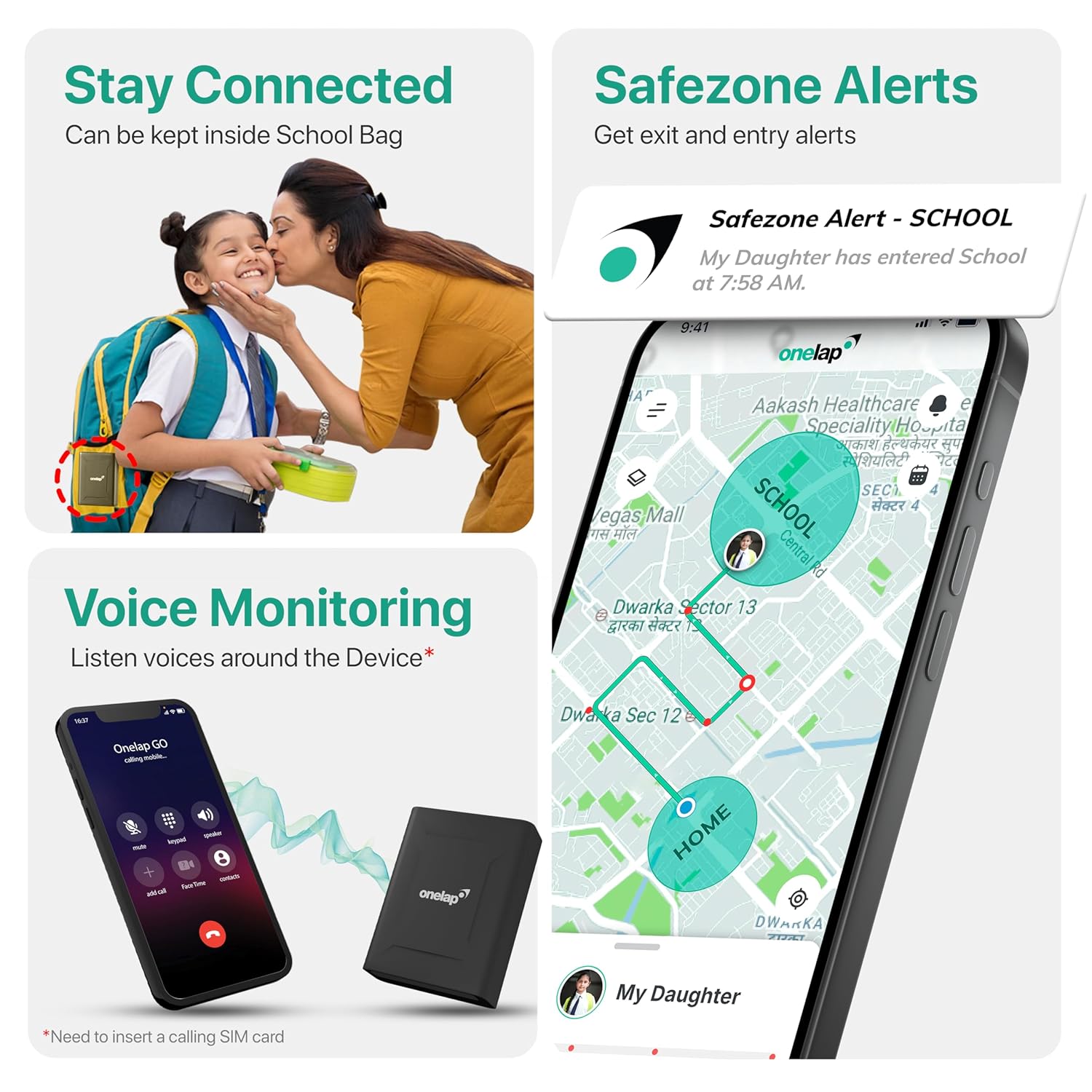
Image: A smartphone displaying safezone alerts and a phone making a call to the Onelap GO device for voice monitoring, with the device shown nearby.
5.4 Device Placement
The Onelap GO features a magnetic body for easy and secure attachment. It can be discreetly placed in various locations, such as under a car seat, in the glove box, within the boot space, or inside a school bag. Its versatile design makes it compatible with cars, scooters, electric vehicles, trucks, and more.

Image: Illustrations showing the Onelap GO tracker being used to track a truck, car, scooter, and placed inside a car's boot space and a child's school bag.
6. Maintenance
6.1 Battery Management
The 10000 mAh battery provides several days of backup, depending on the frequency of movement of the tracked asset. For optimal performance, ensure regular charging of the device. Use a standard USB charger to recharge the battery.
6.2 SIM Card Replacement
After the initial 12 months, you may need to recharge the pre-installed SIM card or replace it with your own active SIM card. Refer to the SIM card provider's instructions for recharge or activation procedures.
7. Troubleshooting
If you encounter any issues with your Onelap GO tracker, consider the following:
- No Location Data: Ensure the SIM card is active and has a valid data plan. Check if the device is powered on and has sufficient battery.
- Inaccurate Location: Ensure the device has a clear line of sight to the sky for optimal GPS signal reception. Avoid placing it in areas with heavy metal obstruction.
- App Issues: Ensure your mobile app is updated to the latest version. Try restarting the app or your smartphone.
- Battery Draining Quickly: Frequent movement and constant tracking updates can consume more battery. Adjust tracking frequency settings in the app if available, or ensure regular charging.
For further assistance, please contact customer support.
8. Specifications
| Brand | Onelap |
| Model Number | onelapgpstracker12 |
| Product Dimensions | 8.6 x 6.2 x 3 cm |
| Item Weight | 255 g |
| Battery | 1 Lithium Ion battery required (included) |
| Battery Capacity | 10000 Milliamp Hours |
| Special Features | Rechargeable, Voice Monitoring, Magnetic Grip |
| Connectivity Technology | Cellular |
| Supported Application | GPS (Android, iOS) |
| Material | Plastic |
| Country of Origin | India |
9. Warranty and Support
9.1 Warranty Information
The Onelap GO Portable Wireless GPS Tracker comes with a 1-year hardware box-to-box replacement warranty. This warranty covers manufacturing defects and ensures doorstep pickup and drop service.
9.2 Customer Support
For any technical queries, SIM card preferences, or other support needs, please contact Onelap customer support:
- Whatsapp Helpline: +91-7217760961 (24/7)
- Email: support@onelap.in
- Toll-free number: 1800 103 0274
Image: An illustration showing customer support contact details and a depiction of doorstep pickup and drop warranty service.
10. Product Videos
10.1 Onelap GO Portable GPS Tracker Overview
Video: This video provides a brief overview of the Onelap GO Portable GPS Tracker, highlighting its key features and benefits, including the 10000 mAh battery, voice monitoring, and magnetic grip.
10.2 Onelap Micro vs. GO Comparison
Video: This video compares the Onelap Micro (wired) and Onelap GO (wireless) GPS trackers, detailing their power sources, installation methods, size, weight, and exclusive features like engine access for Micro and voice monitoring for GO. It helps users decide which model is suitable for their needs.

