Important Safeguards
When using electrical appliances, basic safety precautions should be followed to reduce the risk of burns, electric shock, fire, injury to persons, or exposure to excessive microwave energy. These include:
- Read all instructions thoroughly before operating the appliance.
- Do not operate the microwave oven if it has a damaged cord or plug, if it is malfunctioning, or if it has been damaged or dropped.
- Do not attempt to service or repair the appliance yourself. Contact qualified service personnel for examination, repair, or adjustment.
- Do not use the microwave oven for purposes other than its intended use for heating food.
- Do not heat liquids or other foods in sealed containers as they are liable to explode.
- Always ensure the glass turntable and roller ring are correctly positioned before operation.
- Close supervision is necessary when the appliance is used by or near children.
- This product is not for sale in California.
Product Overview
The GLACER Retro Countertop Microwave Oven is a compact appliance designed for efficient food heating. It features a 0.7 cubic feet capacity and 700 watts of cooking power, suitable for various kitchen environments. The oven includes multiple power levels, pre-programmed cooking settings, an LED display, and a child lock function for safety.

Image: The GLACER Retro Countertop Microwave Oven, showcasing its compact size and retro design on a kitchen counter.
Key Features:
- 5 Microwave Power Levels: Offers adjustable power from 100% to 20% for diverse cooking requirements.
- Removable Glass Turntable: Ensures even heat distribution for consistent cooking results.
- LED Digital Display: Provides clear visibility of time, cooking settings, and remaining cooking duration.
- Auto Reminder Function: Emits a beep sound upon completion of the cooking cycle.
- Auto-cook Preset Programs: Facilitates one-touch cooking for popular food items.
- Child Safety Lock: Prevents unintended operation, enhancing household safety.
- Retro Design: Features a classic aesthetic with rounded buttons and a curved handle.
Package Contents
Upon unpacking, please verify that the following items are included and in good condition:
- 1 x GLACER Retro Countertop Microwave Oven
- 1 x Glass Turntable Plate
- 1 x Roller Ring
- 1 x Instruction Manual
Setup
1. Choosing a Location:
- Place the oven on a flat, stable surface capable of safely supporting its weight.
- Ensure adequate ventilation by leaving at least 4 inches (10 cm) of clear space around the sides, back, and top of the oven.
- Keep the oven away from heat sources, steam, or splashing liquids.
- Do not obstruct the air vents located on the oven.
2. Electrical Requirements:
- The microwave oven requires a standard 120V, 60Hz AC electrical outlet with a dedicated circuit.
- Avoid using extension cords or multi-outlet adapters with this appliance.
3. Turntable Installation:
- Place the roller ring securely in the circular indentation on the oven cavity floor.
- Position the glass turntable plate on top of the roller ring, ensuring it rests firmly on the center hub.

Image: Interior view of the microwave oven, showing the glass turntable and roller ring correctly installed.
Operating Instructions
Control Panel Overview:

Image: Detailed view of the control panel, highlighting the LED display, function buttons, and the Time/Weight knob.
- LED Display: Shows current time, cooking settings, and operational status.
- Micro Power Button: Used to select desired microwave power levels.
- Express Button: Initiates quick cooking at full power for preset durations.
- Clock/Defrost Button: Sets the clock or selects defrost mode (Time Defrost or Weight Defrost).
- Auto Cooking Button: Accesses pre-programmed cooking menus for common food items.
- Instant/Start Button: Starts cooking, adds 30 seconds to a cooking cycle, or initiates quick 30-second cooking.
- Pause/Cancel Button: Stops cooking, clears current settings, or activates/deactivates the child lock.
- Time/Weight Knob: Adjusts cooking time, sets weight for defrosting, or navigates auto-cook menu options.
1. Setting the Clock:
- Press the Clock/Defrost button once. The hour digits will flash.
- Turn the Time/Weight Knob to set the correct hour.
- Press Clock/Defrost again. The minute digits will flash.
- Turn the Time/Weight Knob to set the correct minutes.
- Press Clock/Defrost one more time to confirm the time setting.
2. Basic Microwave Cooking (Time Cook):
- Place food in a microwave-safe container inside the oven. Close the door securely.
- Turn the Time/Weight Knob to set the desired cooking time.
- Press the Micro Power button repeatedly to select a power level (P100 for 100%, P80 for 80%, P60 for 60%, P40 for 40%, P20 for 20%).
- Press Instant/Start to begin cooking.
3. Auto Cooking Programs:
The oven features 8 default auto-cook menus for convenient preparation of common foods:

Image: Visual representation of the 8 auto cooking functions available on the microwave oven.
- Press the Auto Cooking button. The display will show 'A-1'.
- Turn the Time/Weight Knob to cycle through the menu options (A-1: Popcorn, A-2: Beverage, A-3: Potato, A-4: Meat, A-5: Reheat, A-6: Pizza, A-7: Vegetable, A-8: Fish).
- Press Auto Cooking again to confirm your selected menu.
- Turn the Time/Weight Knob to select the appropriate weight or quantity for the food item (if applicable for the chosen menu).
- Press Instant/Start to begin the auto-cooking process.
4. Defrosting:
The oven provides both time-based and weight-based defrosting options.
Time Defrost:
- Press the Clock/Defrost button twice. The display will show 'dEF2'.
- Turn the Time/Weight Knob to set the desired defrosting time.
- Press Instant/Start to begin defrosting.
Weight Defrost:
- Press the Clock/Defrost button once. The display will show 'dEF1'.
- Turn the Time/Weight Knob to set the weight of the food in the specified range (refer to the oven's internal guide for weight units).
- Press Instant/Start to begin defrosting.
5. Express Cooking:
For quick heating at 100% power:
- Press the Express button repeatedly to select a quick cooking time (e.g., 30 seconds, 1 minute, 1 minute 30 seconds). The oven will start immediately.
- Alternatively, press Instant/Start to add 30 seconds to an ongoing cooking cycle or to initiate a 30-second cooking cycle at 100% power if no other settings are entered.
6. Child Safety Lock:
To prevent unsupervised operation, particularly by children, activate the child safety lock:
- To activate: Press and hold the Pause/Cancel button for 3 seconds. A lock indicator will appear on the display.
- To deactivate: Press and hold the Pause/Cancel button for 3 seconds again. The lock indicator will disappear from the display.
Maintenance and Cleaning
Regular cleaning and maintenance are essential to ensure the longevity and optimal performance of your microwave oven.
1. Cleaning the Oven Interior:
- Wipe the interior cavity with a damp cloth immediately after each use to remove food splatters and spills.
- For stubborn stains, place a bowl of water with a few slices of lemon inside and microwave for 2-3 minutes. The steam will help loosen the stains, making them easier to wipe away.
- Do not use abrasive cleaners, steel wool, or harsh scouring pads, as these can damage the interior surface.
2. Cleaning the Turntable and Roller Ring:
- Remove the glass turntable and the roller ring from the oven cavity.
- Wash them in warm, soapy water or place them in the dishwasher.
- Rinse thoroughly and ensure they are completely dry before returning them to the oven.
3. Cleaning the Exterior:
- Wipe the exterior surfaces with a soft, damp cloth.
- Avoid allowing water to enter the ventilation openings.
- Regularly clean the oven door and door seal to ensure proper closure and efficient operation.
Troubleshooting
If you encounter issues with your microwave oven, refer to the following common problems and their potential solutions:
| Problem | Possible Cause | Solution |
|---|---|---|
| Oven will not start | Power cord not firmly plugged in; Oven door not closed properly; Household fuse blown or circuit breaker tripped; Child lock activated. | Ensure the power plug is securely inserted into the outlet; Close the oven door firmly; Check your household fuse or reset the circuit breaker; Deactivate the child lock by holding the Pause/Cancel button for 3 seconds. |
| Food not heating | Oven door not closed properly; Cooking time or power level set too low. | Ensure the oven door is completely closed; Increase the cooking time or select a higher power level. |
| Turntable not rotating | Glass turntable or roller ring not positioned correctly; Obstruction under the turntable. | Verify that the turntable and roller ring are properly seated on the center hub; Remove any food debris or obstructions from beneath the turntable. |
| Display shows error or erratic numbers | Temporary electronic glitch. | Unplug the oven from the power outlet for approximately 5 minutes, then plug it back in. If the problem persists, contact customer support. |
Specifications
| Feature | Detail |
|---|---|
| Brand | GLACER |
| Model Number | B0854K55S3 |
| Capacity | 0.7 Cubic Feet (20 L) |
| Output Power | 700 Watts |
| Rated Voltage | 120 V |
| Frequency | 60 Hz |
| Number of Power Levels | 5 |
| Material | Steel, Glass (Inner Material: Stainless Steel) |
| Product Dimensions (D x W x H) | 14" x 18" x 10" |
| Weight | 23 lbs |
| Installation Type | Countertop |
| Control Type | Buttons, Knob |
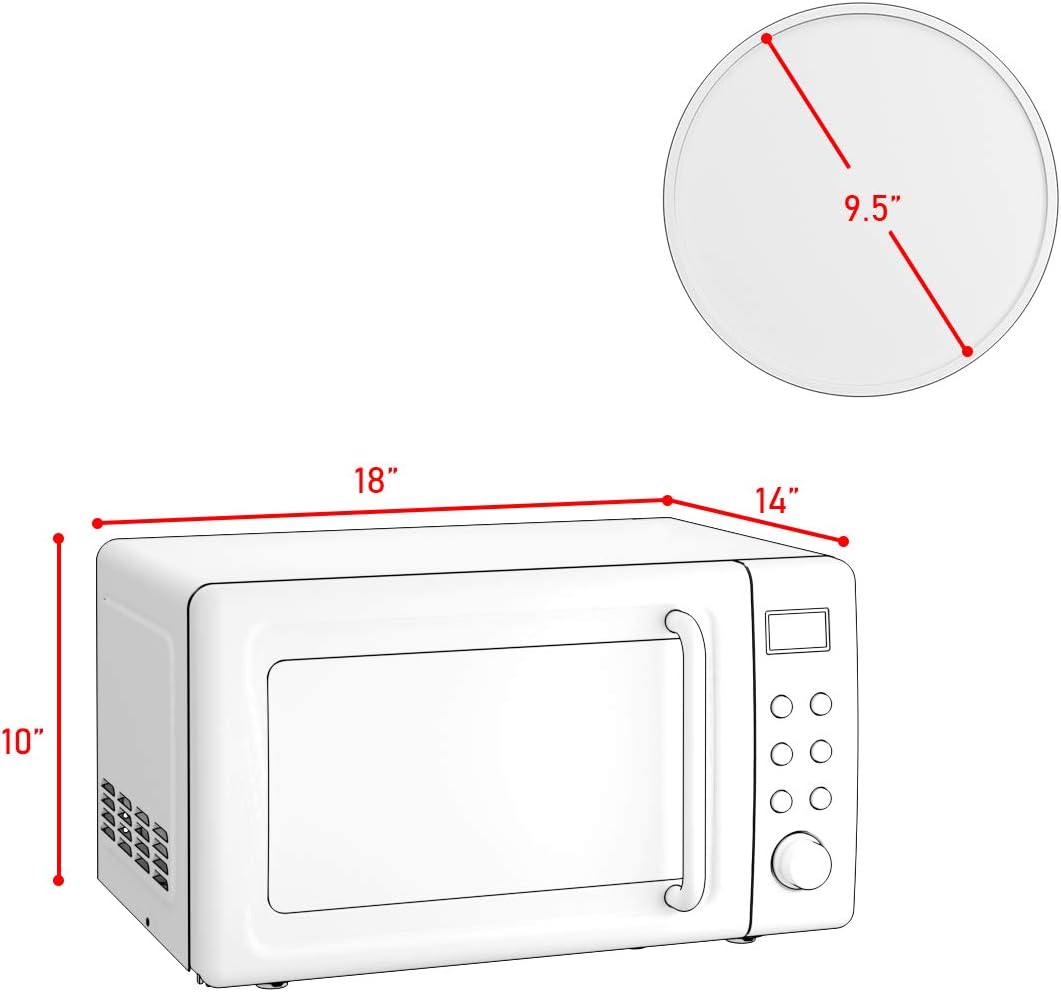
Image: Dimensional diagram of the microwave oven, indicating its length, width, and height for placement reference.
Warranty and Support
Warranty Information:
This GLACER microwave oven is covered by a 6-month warranty from the original date of purchase. This warranty specifically covers manufacturing defects under normal household use. It does not extend to damage resulting from misuse, accidental damage, unauthorized alterations, or repairs performed by non-authorized personnel.
Customer Support:
For technical assistance, to inquire about warranty claims, or for any general questions regarding your GLACER microwave oven, please contact GLACER customer support. Refer to your purchase documentation or the official GLACER website for the most current contact information.
When contacting customer support, please have your product model number (B0854K55S3) and the date of purchase readily available to expedite service.