
1. Product Overview
The maylit 16.4ft RGB LED Strip Lights are designed to enhance your viewing experience and room ambiance. This lighting kit features 5050 LEDs, Bluetooth app control, music synchronization, and a remote control. It is suitable for 65-75 inch TVs and can be powered via a 5V TV USB interface.
Key Features:
- Bluetooth App Control: Manage colors, modes, and settings directly from your smartphone.
- Music Sync Function: Lights change and sync with music or ambient sound via a built-in microphone.
- Remote Control: Includes a 24-key IR remote for convenient control of 16 colors and 4 flash modes.
- Timing Function: Schedule automatic on/off times for your preferred lighting.
- Color Memory: Retains the last selected color setting when powered off.
- USB Powered: Operates on DC 5V, typically from a TV USB port or a USB plug.
- Flexible Installation: Features double-sided adhesive tape and fixing buckles for secure mounting, allowing for flexible placement around TV corners.
2. What's in the Box
- 16.4ft RGB LED Strip Light
- 24-Key Remote Control
- Adhesive Tape (pre-applied)
- Fixing Buckles
- USB Power Cable
- 1 CR2 battery (for remote, included)
3. Setup and Installation
Follow these steps for proper installation of your LED strip lights:
- Check the Light Strip: Before installation, unroll the LED strip and connect it to a USB power source to ensure all lights are working correctly.
- Clean the Surface: Thoroughly clean the installation area on the back of your TV. Remove any dust, oil, or moisture to ensure optimal adhesion of the tape.
- Plan Placement: Determine the path for the LED strip around the back of your TV. Avoid sharp 90-degree bends; use the included fixing buckles or gently curve the strip. Do not force fold the strip 360 degrees.
- Adhesive Installation: Peel off the backing from the double-sided adhesive tape on the LED strip. Carefully press the strip onto the cleaned surface, applying firm pressure along its entire length. Use the fixing buckles at corners or critical points for added security.
- Connect Power: Plug the USB power cable into the LED strip controller, then connect the USB end to a 5V TV USB interface. If your TV does not have a USB interface, use a compatible USB wall adapter (not included).
- Test and Adjust: Once installed and powered, use the remote control or the Bluetooth app to test the lights and adjust settings to your preference.
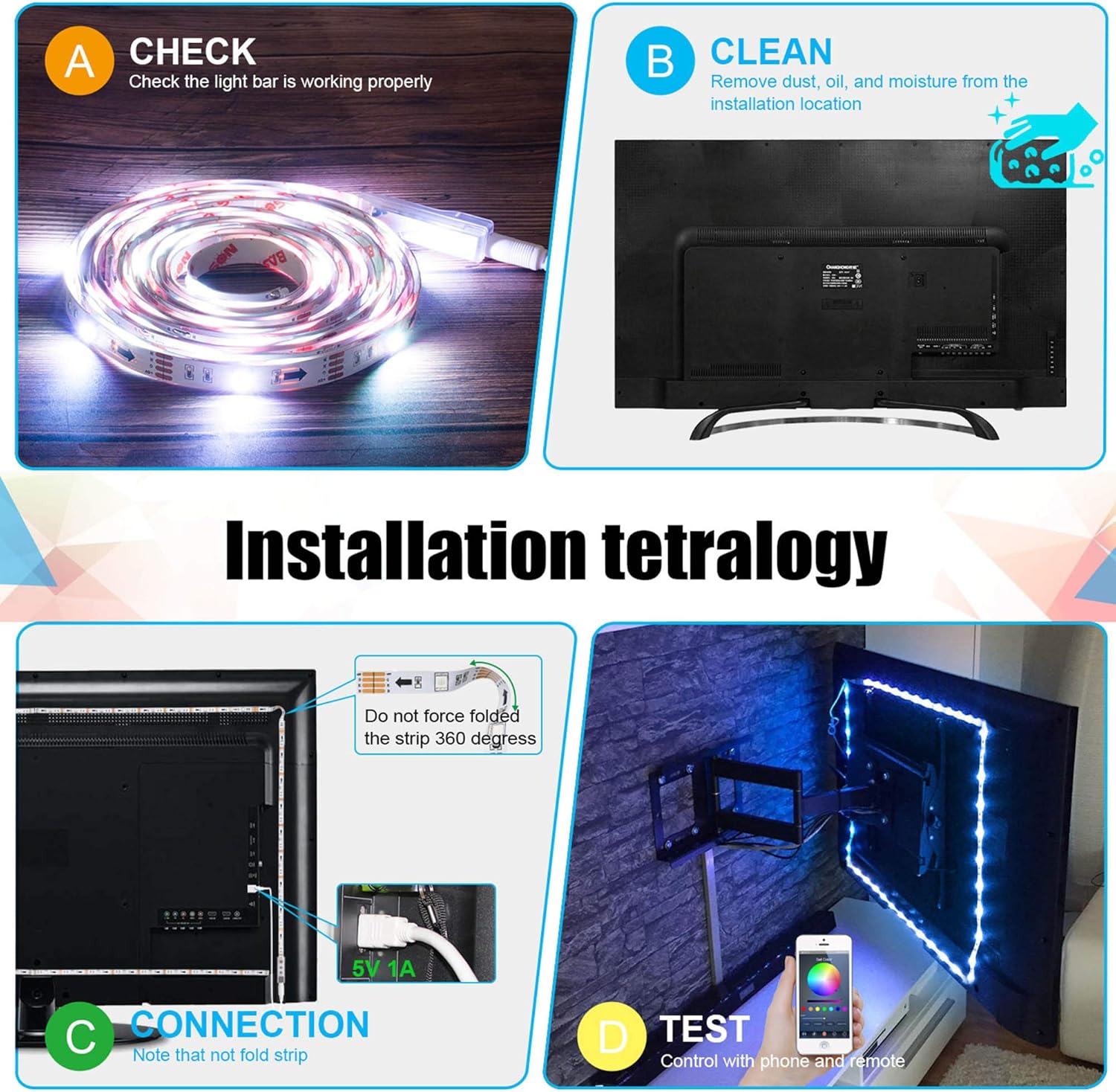
Image: Detailed steps for installing the LED strip lights, including checking the strip, cleaning the surface, connecting the power, and testing.

Image: An overview of the maylit TV LED Backlight, highlighting Bluetooth APP Control, RGB 5050 LEDs, and 16 million colors.
4. Operating Instructions
4.1 Remote Control Operation
The included 24-key remote control allows for basic functions:
- Power On/Off: Use the dedicated buttons to turn the lights on or off.
- Color Selection: Choose from 16 preset colors.
- Brightness Adjustment: Increase or decrease the light intensity.
- Mode Selection: Cycle through 4 flash modes (e.g., flash, strobe, fade, smooth).

Image: A visual representation of the LED strip lights, showing both the physical remote control and the smartphone app interface for controlling the lights.
4.2 Bluetooth App Control
For advanced control and customization, download the dedicated Bluetooth app (refer to the product packaging or included quick start guide for app name and QR code).
- Pairing: Enable Bluetooth on your smartphone and open the app. The app should automatically detect and connect to your LED strip lights.
- Color Wheel: Access a full 16 million color spectrum for precise color selection.
- Brightness & Saturation: Fine-tune the brightness and color saturation.
- Music Mode: Activate the music sync feature. The lights will respond to music played through your phone or ambient sounds picked up by the built-in microphone.
- Timing Function: Set schedules for the lights to turn on or off automatically at specific times.
- DIY Modes: Create and save custom lighting effects and color sequences.

Image: The LED strip lights displaying dynamic color changes in sync with music, controlled via a smartphone app.

Image: Illustrates the smart timing function of the LED strip lights, showing how they can be set to promote sleep at night and assist with waking up in the morning.
5. Maintenance
- Cleaning: Gently wipe the LED strip with a dry, soft cloth to remove dust. Do not use liquid cleaners or abrasive materials.
- Adhesion: If the strip begins to peel, re-secure it with additional fixing buckles or a strong adhesive suitable for electronics.
- Storage: If removing the lights for storage, carefully peel them off and coil them loosely. Store in a cool, dry place.
- Remote Battery: Replace the CR2 battery in the remote control when its range or responsiveness decreases.
6. Troubleshooting
- Lights not turning on:
- Ensure the USB cable is securely connected to both the LED strip controller and a functioning 5V USB power source.
- Check if the remote control battery is inserted correctly and has sufficient charge.
- Try a different USB port or power adapter.
- Remote control not working:
- Point the remote directly at the IR receiver on the LED strip controller.
- Replace the CR2 battery in the remote.
- Ensure there are no obstructions between the remote and the receiver.
- Bluetooth app not connecting:
- Ensure Bluetooth is enabled on your smartphone.
- Restart the app and try connecting again.
- Ensure the LED strip is powered on.
- If issues persist, try uninstalling and reinstalling the app.
- Lights not syncing with music:
- Ensure the music mode is activated in the app or via the remote.
- Check if the built-in microphone is unobstructed and close enough to the audio source.
- Adjust the microphone sensitivity settings in the app, if available.
7. Specifications
| Feature | Specification |
|---|---|
| Brand | maylit |
| Model Number | MAYLIT-LANY-DACHICU-002 |
| Color | RGB (Red, Green, Blue) |
| Indoor/Outdoor Usage | Indoor |
| Special Features | Bluetooth Control, Remote Controlled, Sync to Music, Timer, Mic Sync, App Control |
| Light Source Type | LED |
| Power Source | USB Powered |
| Light Color | Multicolor |
| Voltage | 5 Volts |
| Wattage | 4.25 watts |
| Number of Light Sources | 132 |
| Controller Type | App Control, Bluetooth, Remote Control |
| Material | Plastic + LED |
| Item Weight | 3.84 ounces |
| Product Dimensions | 4.72 x 4.72 x 1.18 inches |
| Batteries | 1 CR2 battery required (included) |
8. Warranty and Support
For warranty information and customer support, please refer to the contact details provided on the product packaging or the official maylit website. Keep your purchase receipt for any warranty claims.
9. Product Videos
Video: A customer demonstrates the maylit LED strip lights behind a TV, showcasing various color changes and the overall effect on the room's ambiance. The video highlights the ease of use and visual impact.
Video: An honest review of the LED strip lights, showing the installation process on the back of a 75-inch TV and demonstrating the remote control's color-changing capabilities. The reviewer praises the ease of installation and various settings.
Video: A demonstration of the LED light strip's color-changing features, showing how the lights can be adjusted to different hues to match various moods or content displayed on the TV.
Video: A user demonstrates the installation of the LED strip lights on the back of a TV, emphasizing the importance of taking time for proper placement and showing the remote control functionality.
Video: A short clip showcasing the LED strip lights installed behind a TV, demonstrating the vibrant colors and how they enhance the entertainment setup.