1. Important Safety Information
Read all instructions before operating the LH-X6 Intruder quadcopter. Failure to follow these instructions may result in injury or damage to the product.
- Age Recommendation: This product is recommended for users aged 14 years and above. Adult supervision is advised for younger users (Manufacturer Recommended Age: 3 Years & Above for general product suitability).
- Battery Safety: The drone uses a 7.4V 650 mAh Li-Po battery. Always use the provided charger. Do not overcharge, short-circuit, or expose batteries to extreme temperatures. Dispose of batteries responsibly. The product contains a Lithium Ion Polymer battery, which is considered a dangerous good or hazardous material for transportation, storage, and disposal.
- Flight Environment: Operate the quadcopter in open, clear areas, away from people, animals, buildings, and power lines. Avoid flying in strong winds or rain.
- Propeller Safety: Keep hands, face, and loose clothing away from rotating propellers. Always turn off the quadcopter and remote control before handling the propellers.
- Visual Line of Sight: Always maintain visual line of sight with the quadcopter during flight.
- Modifications: Do not modify the quadcopter or its components. Unauthorized modifications may void the warranty and compromise safety.
2. Product Overview
The WLTOYS LH-X6 Intruder is a 4-channel remote control quadcopter equipped with a built-in 6-axis gyro for stable flight. It operates on a 2.4G frequency, offering a control distance of approximately 100 meters and a flying altitude of about 100 meters. Its functions include ascending, descending, moving forward, backward, turning left, turning right, hovering, and flying sideward (left and right).
3. Package Contents
Carefully unpack the box and ensure all items are present and in good condition. The standard package includes:
- LH-X6 Intruder Quadcopter
- Remote Control
- 7.4V 650 mAh Li-Po Drone Battery
- Battery Charger
- Spare Propellers
- Propeller Guards (if included)
- Screwdriver
- User Manual (this document)
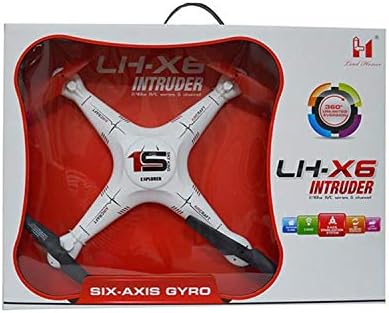
Image 1: The LH-X6 Intruder quadcopter displayed in its retail box.
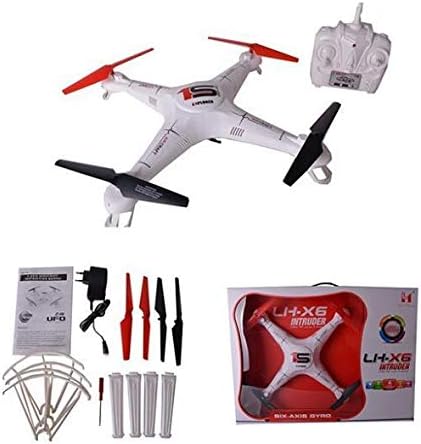
Image 2: Contents of the LH-X6 Intruder package, including the quadcopter, remote, battery, charger, and spare parts.
4. Setup
4.1. Charging the Drone Battery
- Connect the 7.4V 650 mAh Li-Po drone battery to the provided charger.
- Plug the charger into a suitable power source.
- The charging indicator light will show the charging status (refer to charger manual for specific light patterns).
- Charging typically takes approximately 110-120 minutes for a full charge. Do not leave batteries unattended while charging.
4.2. Drone Battery Installation
- Ensure the drone is powered off.
- Locate the battery compartment on the quadcopter.
- Carefully insert the fully charged 7.4V 650 mAh Li-Po battery into the compartment.
- Connect the battery plug to the drone's power connector, ensuring correct polarity.
- Close the battery compartment securely.
4.3. Remote Control Battery Installation
- Open the battery cover on the back of the remote control.
- Insert 6x AA batteries (not included) into the battery compartment, observing the correct polarity (+/-).
- Close the battery cover securely.
4.4. Propeller Installation (if required)
If propellers are not pre-installed or need replacement:
- Identify the correct propeller for each motor. Propellers are typically marked 'A' or 'B' (or similar) and must match the corresponding motor.
- Carefully attach each propeller to its motor shaft, ensuring it is seated firmly. Use the provided screwdriver if screws are required.
- Ensure propeller guards are also securely attached if you choose to use them.
5. Operating Instructions
5.1. Power On and Pairing
- Place the quadcopter on a flat, level surface.
- Turn on the quadcopter's power switch. The indicator lights will flash.
- Turn on the remote control's power switch.
- Move the left throttle stick (up/down) fully up, then fully down. The remote control will beep, and the quadcopter's lights will become solid, indicating successful pairing.
5.2. 6-Axis Gyro Calibration
For stable flight, calibrate the gyro before each flight or if the quadcopter drifts:
- Ensure the quadcopter is on a flat, level surface and powered on/paired.
- Move both control sticks to the bottom-right corner simultaneously (or as per specific remote instructions).
- The quadcopter's lights will flash rapidly and then become solid, indicating successful calibration.
5.3. Basic Flight Controls
- Ascend/Descend: Push the left throttle stick up to ascend, pull down to descend.
- Forward/Backward: Push the right direction stick up to fly forward, pull down to fly backward.
- Turn Left/Right: Push the left throttle stick left to turn left, push right to turn right (yaw).
- Left/Right Sideward Fly: Push the right direction stick left to fly left sideward, push right to fly right sideward (roll).
- Hover: Release the sticks to their center positions for stable hovering.
5.4. Take-off and Landing
- Take-off: After pairing and calibration, slowly push the left throttle stick up to make the quadcopter ascend.
- Landing: Slowly pull the left throttle stick down to make the quadcopter descend gently. Once on the ground, release the stick and power off the drone and remote.
6. Maintenance
6.1. Cleaning
Regularly clean the quadcopter to remove dust, dirt, and debris. Use a soft, dry cloth. Do not use water or solvents.
6.2. Propeller Replacement
If a propeller is damaged or bent, replace it immediately with a new one from the spare parts. Ensure the correct type ('A' or 'B') is used for each motor.
6.3. Battery Care and Storage
- Always disconnect the drone battery after use.
- Store Li-Po batteries in a cool, dry place, away from direct sunlight and heat.
- Do not store fully charged or fully discharged Li-Po batteries for extended periods. Charge them to approximately 50% for long-term storage.
- Remove AA batteries from the remote control if not used for an extended period to prevent leakage.
6.4. Storage
When not in use, store the quadcopter and its components in a safe, dry place, preferably in its original packaging or a protective case, to prevent damage.
7. Troubleshooting
- Quadcopter not powering on: Ensure the drone battery is fully charged and correctly connected. Check the drone's power switch.
- Remote control not pairing: Ensure the remote control has fresh AA batteries and is powered on. Repeat the pairing procedure (Section 5.1).
- Unstable flight or drifting: Perform a 6-axis gyro calibration (Section 5.2) on a flat surface. Check for damaged or bent propellers and replace if necessary.
- Short flight time: Ensure the drone battery is fully charged (110-120 minutes). Battery performance may degrade over time; consider replacing an old battery.
- Motors not spinning: Check for obstructions around the propellers. Ensure the drone is paired correctly.
8. Specifications
| Model Name | LH X6 |
| Brand | WLTOYS |
| Functions | Ascend, Descend, Forward, Backward, Turn Left, Turn Right, Hover, Left Sideward Fly, Right Sideward Fly |
| Channel | 4CH |
| Frequency | 2.4G |
| Gyro | Built-in 6-Axis Gyro |
| Drone Battery | 7.4V 650 mAh Li-Po (Included) |
| Controller Battery | 6x AA Battery (Not Included) |
| Flying Time | Approx. 7-8 minutes |
| Charging Time | Approx. 110-120 minutes |
| Control Distance | Approx. 100 meters |
| Flying Altitude | Approx. 100 meters |
| Scale | 1:16 scale |
| Material | Plastic |
| Recommended Age | 14 Years & Above |
| Connectivity Technology | Radio Frequency (RF) |
| Included Components | Drone, Drone Battery, Remote Control |
| Skill Level | Advanced, Professional |
9. Warranty and Support
For warranty information, technical support, or service inquiries, please refer to the contact information provided with your purchase or visit the official WLTOYS website. Keep your proof of purchase for warranty claims.


