
1. Introduction
Thank you for choosing the Havit 60% Wireless Mechanical Keyboard and Wired Mouse combo. This manual provides detailed instructions for setup, operation, maintenance, and troubleshooting to ensure optimal performance and longevity of your devices. This compact and versatile set is designed for multi-device compatibility, offering both Bluetooth 5.1 wireless and Type-C wired connectivity for the keyboard, alongside a programmable wired gaming mouse.

Image: The Havit 60% Wireless Mechanical Keyboard and Wired Mouse, showcasing the compact keyboard with RGB lighting and the wired mouse.
2. Package Contents
Please check the package contents upon unboxing:
- Havit 60% Wireless Mechanical Keyboard
- Havit Wired Gaming Mouse
- USB Type-C Cable (for keyboard wired connection and charging)
- User Manual
3. Product Overview
3.1 Keyboard Features
- Compact 60% Layout: Designed for portability and space-saving, ideal for various setups.
- Brown Mechanical Switches: Provide a tactile typing experience with a quiet click, suitable for both gaming and typing.
- Dual-Mode Connectivity: Supports Bluetooth 5.1 for wireless use (up to 10m transmission) and Type-C wired connection.
- Multi-Device Pairing: Connects to up to 5 different devices simultaneously (Fn+Q/W/E/R/T).
- RGB Backlighting: Features 19 kinds of backlight modes for customizable aesthetics.
- Long-lasting Battery: Built-in 1450mAh battery provides continuous use for at least 10 hours.

Image: A hand holding the Havit 60% Mechanical Keyboard, illustrating its compact size and portability.

Image: A close-up view of the Havit keyboard's brown mechanical switches, highlighting their design.
3.2 Mouse Features
- Programmable Gaming Mouse: Designed for precision and responsiveness in gaming.
- Adjustable DPI: Six DPI settings (800-1600-2400-3200-4800-6400) for varied sensitivity.
- RGB Backlighting: Features 7 kinds of light modes (Breathing, Colorful Streaming, Rainbow, Floe light, Waltz, 4-seasons, Off).
- Wired Connection: Ensures stable and lag-free performance.

Image: The Havit RGB Backlit Programmable Gaming Mouse, illustrating its various light modes and DPI settings.
4. Setup
4.1 Keyboard Setup
Wired Connection:
- Locate the USB Type-C port on the back of the keyboard.
- Connect one end of the provided Type-C cable to the keyboard.
- Connect the other end of the cable to an available USB port on your computer.
- The keyboard will automatically be recognized and ready for use.
Bluetooth Wireless Connection:
- Ensure the keyboard's mode switch (located on the back) is set to 'On' for wireless mode.
- On your computer or device, enable Bluetooth.
- Press and hold Fn + Q (or W/E/R/T for other device slots) for 3 seconds until the corresponding key flashes, indicating pairing mode.
- On your device's Bluetooth settings, search for 'Havit KB498L' and select it to pair.
- Once connected, the key will stop flashing. You can pair up to 5 devices and switch between them using Fn + Q/W/E/R/T.

Image: The Havit keyboard highlighting its dual-mode connectivity: Bluetooth for wireless and Type-C for wired use.

Image: The Havit keyboard shown connected to a laptop, tablet, and smartphone, demonstrating its multi-device pairing capability.
4.2 Mouse Setup
Wired Connection:
- Connect the USB cable of the mouse to an available USB port on your computer.
- The mouse will automatically be recognized and its RGB lighting will activate.
5. Operating Instructions
5.1 Keyboard Operation
- Backlight Adjustment: Press Fn + \ to cycle through 19 different backlight modes.
- Mode Switching: Use the switch on the back of the keyboard to toggle between wired ('Off') and wireless ('On') modes.
- Device Switching (Wireless): Once paired, quickly press Fn + Q/W/E/R/T to switch between connected devices.
- Typing Experience: The brown mechanical switches provide a responsive and tactile feel for comfortable and efficient typing.

Image: The Havit Bluetooth Keyboard with an overlay indicating its long-lasting battery life of at least 10 hours.
5.2 Mouse Operation
- DPI Adjustment: Use the DPI buttons on the top of the mouse to cycle through 6 different DPI settings (800-1600-2400-3200-4800-6400) to adjust cursor sensitivity.
- RGB Lighting Modes: The mouse features 7 light modes including Breathing, Colorful Streaming, Rainbow, Floe light, Waltz, 4-seasons, and Off. These can typically be cycled or adjusted via dedicated buttons or software (if applicable).
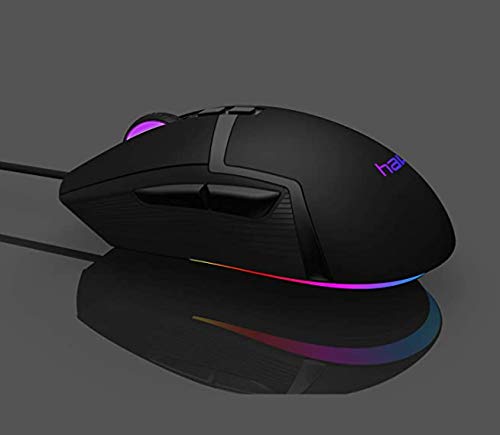
Image: A close-up of the Havit gaming mouse, showcasing its vibrant RGB lighting effects.
6. Maintenance
- Cleaning: Use a soft, dry cloth to wipe down the keyboard and mouse. For deeper cleaning, use compressed air to remove dust and debris from between keys. Avoid using harsh chemicals or abrasive materials.
- Battery Care (Keyboard): To prolong battery life, avoid fully discharging the keyboard frequently. Charge the keyboard when the battery indicator is low. If storing for an extended period, charge it to about 50% and turn off the wireless mode.
- Cable Management: Avoid sharp bends or excessive pulling on the cables to prevent damage.
7. Troubleshooting
| Issue | Possible Cause | Solution |
|---|---|---|
| Keyboard/Mouse not responding (Wired) | Loose connection, faulty port/cable. | Ensure cable is securely connected. Try a different USB port or cable. |
| Keyboard not connecting (Bluetooth) | Keyboard not in pairing mode, Bluetooth off on device, interference. | Ensure keyboard switch is 'On'. Press Fn+Q/W/E for 3s. Check device Bluetooth settings. Move closer to device. |
| Keyboard/Mouse lighting not working | Lighting mode off, low battery (keyboard). | Cycle through lighting modes (Fn+\ for keyboard, mouse buttons). Charge keyboard. |
| Mouse cursor erratic/unresponsive | Incorrect DPI setting, dirty sensor, surface issues. | Adjust DPI. Clean mouse sensor. Use on a clean, flat surface or mouse pad. |
| Keyboard keys not registering | Software issue, physical damage. | Restart computer. Test on another device. If issue persists, contact support. |
8. Specifications
8.1 Keyboard Specifications
- Model: KB498L-Brown-US
- Interface Type: USB Type-C
- Connection: Dual mode (Bluetooth 5.1 & Type-C Wired)
- Size: 12.8 x 3.9 x 1.6 inches (325 x 101 x 38mm)
- Key Number: 68 Keys
- Key Life: 50,000,000 times
- Cable Length: 1.5m (1500mm)
- Wireless Distance: 10m
- Operating Voltage: 5V ± 0.25V
- Battery Capacity: 1450mAh
- System Supported: Windows 2000/XP/Vista/7/8/10, Linux, MacOS, Android
8.2 Mouse Specifications
- Resolution (DPI): 800-1600-2400-3200-4800-6400
- Key Life: 20,000,000 times
- Cable Length: 1.8m (1800mm)
9. Warranty and Support
Havit products come with a standard warranty. For detailed warranty information, please refer to the warranty card included in your package or visit the official Havit website. If you encounter any issues or require technical assistance, please contact Havit customer support.
An electronic version of this user manual is available for download: Download User Manual (PDF)