Introduction
The Motorola Talkabout T200 Two-Way Radio provides reliable communication for various activities. Designed for ease of use and portability, this radio features 22 channels and 121 privacy codes, offering numerous communication combinations. Its compact design makes it suitable for use in diverse environments, from recreational outings to everyday tasks. The T200 supports flexible power options and includes features to enhance user experience.
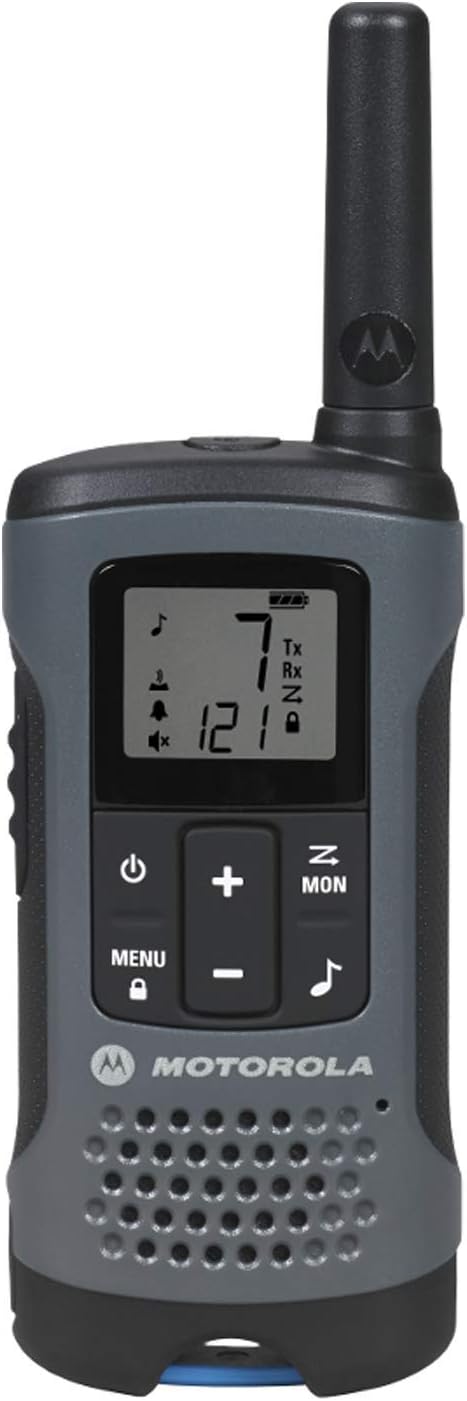
Figure 1: Front view of the Motorola Talkabout T200 Two-Way Radio, showing the display and control buttons.
Setup
Battery Installation
The T200 radio can be powered using either the included NiMH rechargeable batteries or 3 AA alkaline batteries (not included). To install batteries:
- Ensure the radio is powered off.
- Locate the battery compartment cover on the back of the radio.
- Press down on the latch and slide the cover off.
- Insert the NiMH rechargeable battery pack or 3 AA alkaline batteries, observing the polarity markings (+/-) inside the compartment.
- Replace the battery compartment cover and ensure it clicks securely into place.

Figure 2: Back view of the Motorola Talkabout T200 Two-Way Radio, illustrating the battery compartment area.
Charging the NiMH Battery Pack
To charge the NiMH battery pack, use the provided charging adapter. Connect the adapter to the radio's charging port. A full charge typically takes several hours. The radio can operate for up to 10 hours on NiMH batteries or up to 29 hours on AA batteries.
Operating Instructions
Power On/Off
To power on the radio, press and hold the Power button until the display illuminates. To power off, press and hold the Power button again until the display turns off.
Channel Selection
The T200 features 22 channels. To change channels:
- Press the Menu button once. The channel number will flash.
- Use the Up or Down buttons to select your desired channel.
- Press the Menu button again or wait for 5 seconds for the selection to be confirmed.
Privacy Codes
To ensure private communication, the T200 offers 121 privacy codes for each channel, creating 2,662 possible combinations. To set a privacy code:
- Press the Menu button twice. The privacy code will flash.
- Use the Up or Down buttons to select your desired code.
- Press the Menu button again or wait for 5 seconds for the selection to be confirmed.
Note: Both radios must be on the same channel and privacy code to communicate.
Push-to-Talk (PTT)
To transmit, press and hold the large PTT button located on the side of the radio. Speak clearly into the microphone. Release the PTT button to listen.

Figure 3: Side view of the Motorola Talkabout T200 Two-Way Radio, highlighting the Push-to-Talk (PTT) button.
Call Tones
The T200 offers 20 call tones. To select a call tone:
- Press the Menu button three times. The current call tone number will flash.
- Use the Up or Down buttons to cycle through the available tones.
- Press the Menu button again or wait for 5 seconds to confirm.
Scanning Feature
To quickly find an active channel, use the scanning feature. Press the Scan button (often labeled 'Z' or similar icon) to activate channel scanning. The radio will cycle through channels until it detects activity.
Key Features
- Dual Power Options: Use the included NiMH rechargeable batteries for up to 10 hours of operation or 3 AA alkaline batteries for up to 29 hours.
- Extensive Channel Combinations: 22 channels with 121 privacy codes provide 2,662 unique communication options.
- Channel Scan: Quickly locate active channels to join conversations or find an open frequency.
- Low Battery Alert: An audible and visual alert notifies you when battery levels are low, allowing time to recharge or replace batteries.
- Customizable Call Tones: Select from 20 distinct call tones to alert other users before speaking.
- Universal Compatibility: Communicate with any other FRS/GMRS radio, regardless of brand, by setting to the same channel and privacy code.
- Eco Smart: Designed to minimize energy waste during charging.
Maintenance
General Care
To ensure optimal performance and longevity of your Motorola Talkabout T200 radios:
- Clean the radio with a soft, damp cloth. Do not use abrasive cleaners or solvents.
- Avoid exposing the radio to extreme temperatures, direct sunlight for extended periods, or excessive moisture.
- Keep the radio away from dust and dirt, which can interfere with buttons and speaker performance.
Battery Care
- Always use the specified NiMH rechargeable battery pack or high-quality AA alkaline batteries.
- If using rechargeable batteries, fully charge them before initial use.
- Remove batteries from the radio if it will not be used for an extended period to prevent leakage.
- Dispose of batteries responsibly according to local regulations.
Troubleshooting
No Power
- Check if batteries are installed correctly with proper polarity.
- Ensure batteries are fully charged or replaced with fresh ones.
- Verify the battery compartment cover is securely closed.
Cannot Communicate with Other Radios
- Confirm both radios are on the same channel.
- Verify both radios are set to the same privacy code.
- Ensure radios are within range. Obstructions like buildings, dense foliage, or terrain can significantly reduce range.
- Check for low battery alerts on both radios.
Poor Audio Quality or Static
- Move to an open area to reduce interference from obstructions.
- Ensure the antenna is not obstructed.
- Check for electromagnetic interference from other electronic devices.
- Adjust the volume level.
Range Limitations
The advertised communication range of up to 20 miles is calculated under optimal, unobstructed line-of-sight conditions. Actual range will vary significantly based on terrain, weather conditions, electromagnetic interference, and physical obstructions. Expect reduced range in urban areas, dense forests, or mountainous regions.
Specifications
| Feature | Detail |
|---|---|
| Brand | Motorola |
| Model Number | T200 |
| Number of Channels | 22 FRS/GMRS Channels |
| Privacy Codes | 121 Codes |
| Maximum Talking Range | Up to 20 Miles (optimal conditions) |
| Power Source | NiMH Rechargeable Battery (included) or 3 AA Alkaline Batteries (not included) |
| Battery Life (NiMH) | Up to 10 hours |
| Battery Life (AA) | Up to 29 hours |
| Frequency Range | UHF band |
| Special Features | Keypad Lock, Low Battery Alert, Call Tones, Channel Scan, Eco Smart |
| Item Weight | 6.84 pounds (for 12-pack) |
| Product Dimensions | 6.4 x 2.1 x 1.2 inches |
| Water Resistance Level | Waterproof (as per product description, though IP rating not specified) |
Warranty and Support
For warranty information and customer support, please refer to the documentation included with your product or visit the official Motorola Solutions website. Keep your proof of purchase for any warranty claims.
Product Videos
No official seller videos were found for this product to embed in the manual.


