
1. Introduction
This instruction manual provides essential information for the safe and efficient use of the Walfront DC-DC Boost Converter Module. Please read this manual thoroughly before installation and operation to ensure proper functionality and to prevent damage to the module or connected devices.
The Walfront DC-DC Boost Converter Module is a compact step-up voltage regulator designed to convert a lower DC input voltage to a higher, stable DC output voltage. It is suitable for various applications requiring a boosted power supply.
2. Key Features
- High Efficiency: Operating frequency of 1MHz with up to 93% efficiency.
- Protection Features: Includes over-current, over-voltage, short-circuit, and over-temperature protection.
- Wide Input Voltage Range: Accepts DC 2.6V to 5.5V.
- Selectable Output Voltages: Provides DC 5V, 6V, 9V, or 12V (optional, depending on model configuration).
- Compact Design: Small form factor for integration into various projects.
3. Setup and Installation
3.1 Component Identification
Familiarize yourself with the module's components and pin assignments.
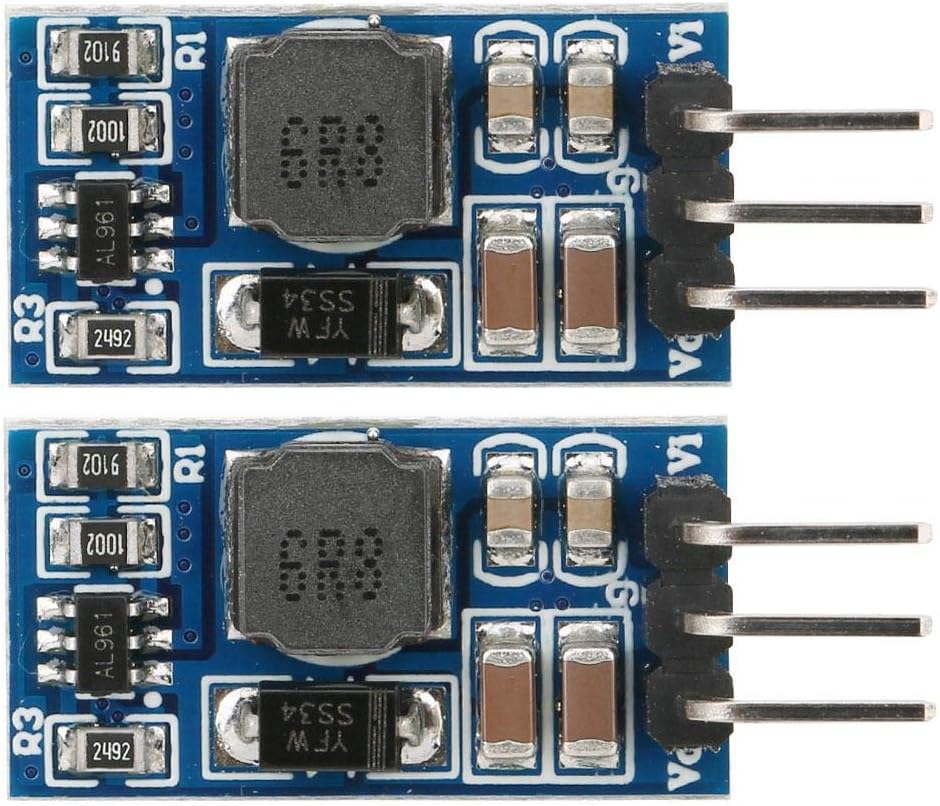
Figure 1: Top view of two Walfront DC-DC Boost Converter Modules. Each module features an inductor, various capacitors, and integrated circuits on a blue PCB. Pins for connection are visible on the right side.

Figure 2: Angled view of the Walfront DC-DC Boost Converter Module, showcasing its compact dimensions and the arrangement of its surface-mount components.
3.2 Pin Description
- Vi: Input positive (+) voltage. Connect your DC power source here.
- GND: Input and Output negative (-) / Ground. This is the common ground for both input and output.
- Vo: Output positive (+) voltage. Connect your load requiring the boosted voltage here.
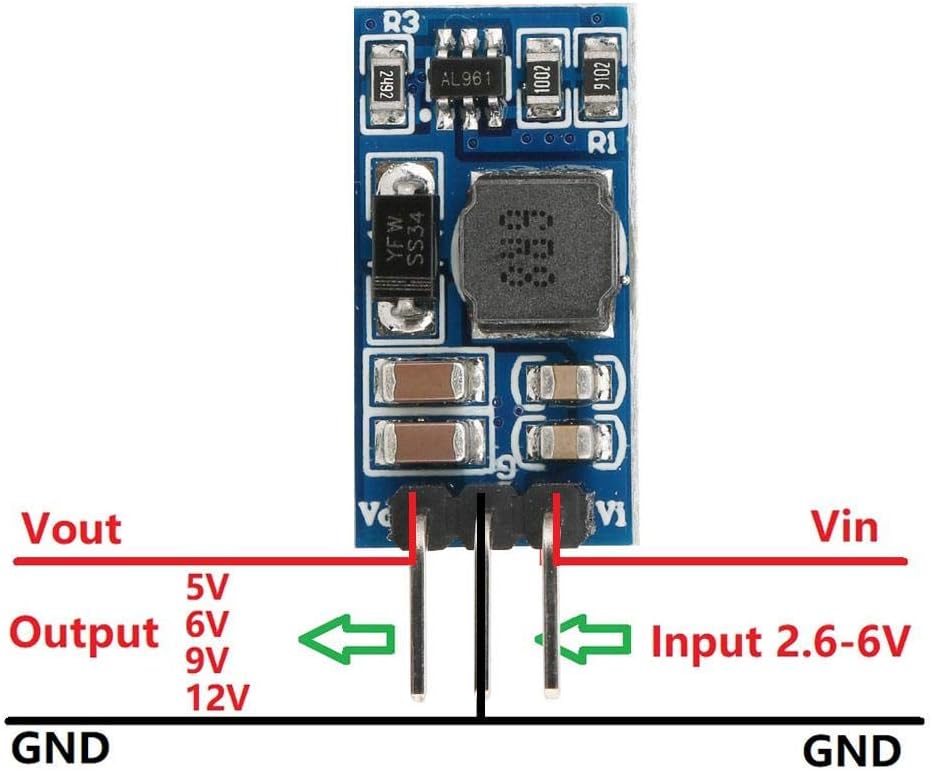
Figure 3: Connection diagram for the boost converter module. It illustrates the input (Vin) and output (Vout) voltage pins, along with the common ground (GND) connection. Input voltage range is 2.6-6V, and output options are 5V, 6V, 9V, 12V.
3.3 Output Voltage Selection (for adjustable models)
Some models allow for output voltage selection via solder pads or external resistors. The specific model (WALFRONTi1zh84cdtw-12) is listed as 6V, with other options available. If your module has selectable output pads, ensure the correct pad is soldered or configured for your desired output voltage (5V, 6V, 9V, 12V).
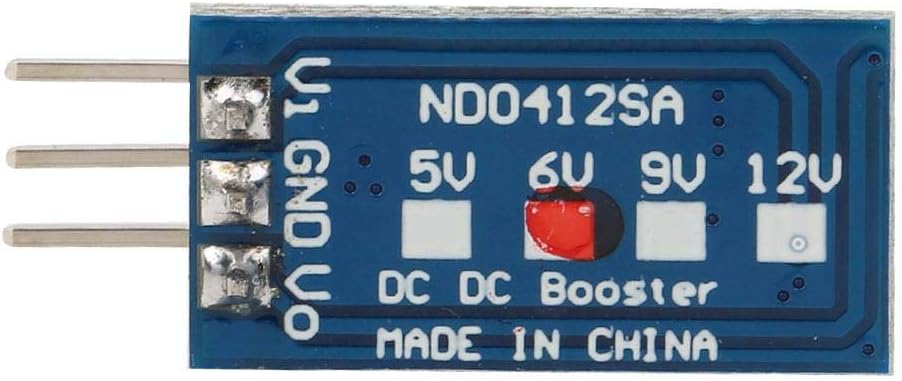
Figure 4: Bottom view of the module, displaying solder pads labeled for 5V, 6V, 9V, and 12V output selection. A red mark indicates the 6V selection for this specific module.
For models where output voltage is set by an external resistor (R1), refer to the following formula and table:
R1(KΩ) = 10 * (Vout / 0.6 - 1)

Figure 5: Diagram showing the location of resistor R1 for output voltage setting and R3 for current limit programming. A table provides example R1 values for different output voltages (3.7V, 4.2V, 5V, 6V, 7.5V, 9V, 10V, 12V).
3.4 Current Limit Programming
The R3 resistor programs the peak switch current. The resistor value should be between 10kΩ and 100kΩ. The current limit will be set from 2.5A to 0.5A according to the formula:
Iin = 48000 / R3
Where Iin is the input current limit in Amperes and R3 is the resistance in Ohms.
4. Operation
4.1 Connecting Power
- Ensure your input power source is within the specified range of DC 2.6V to 5.5V.
- Connect the positive terminal of your input power source to the Vi pin.
- Connect the negative terminal (ground) of your input power source to the GND pin.
4.2 Connecting Load
- Connect the positive terminal of your load to the Vo pin.
- Connect the negative terminal (ground) of your load to the GND pin.
- Verify that your load's voltage requirement matches the output voltage configured on the module.
4.3 Performance Considerations
The module's efficiency can reach up to 93%, but typical efficiency ranges from 84% to 91%. Performance may vary based on input voltage, output voltage, and load current. Refer to the specifications for detailed performance data.
Example performance data for 6V output:
| Input Voltage | Input Current | Output Voltage | Output Current |
|---|---|---|---|
| 2.6V | 1.35A | 6V | 0.48A |
| 3V | 1.63A | 6V | 0.67A |
| 3.3V | 1.76A | 6V | 0.80A |
| 3.7V | 1.74A | 6V | 0.90A |
| 4.2V | 1.65A | 6V | 1.00A |
| 5V | 1.62A | 6V | 1.20A |
Table 1: Typical performance data for 6V output. Measurement results are for reference only.
5. Maintenance
The Walfront DC-DC Boost Converter Module is designed for reliable operation and generally requires minimal maintenance.
- Cleaning: Keep the module free from dust and debris. If cleaning is necessary, use a soft, dry brush or compressed air. Do not use liquids or solvents.
- Inspection: Periodically inspect the module for any signs of physical damage, loose connections, or discoloration of components.
- Environmental Conditions: Ensure the module operates within its specified temperature range (-40°C to +85°C) and avoid excessive humidity.
6. Troubleshooting
If you encounter issues with your DC-DC Boost Converter Module, refer to the following common problems and solutions:
| Problem | Possible Cause | Solution |
|---|---|---|
| No output voltage. |
|
|
| Output voltage is incorrect. |
|
|
| Module gets excessively hot. |
|
|
7. Specifications
| Parameter | Value |
|---|---|
| Model Number | WALFRONTi1zh84cdtw-12 |
| Input Voltage (Vi) | DC 2.6V ~ 5.5V |
| Output Voltage (Vo) | DC 5V / 6V / 9V / 12V (Optional, 6V for this model) |
| Maximum Output Current (6V) | 1200mA (1.2A) |
| Working Frequency | 1MHz |
| Efficiency | Up to 93% (typically 84%-91%) |
| Quiescent Current | 190µA |
| Current Limit Program | 0.5A - 2.5A (Default 1.8A) |
| Operating Temperature Range | -40°C ~ +85°C |
| Storage Temperature Range | -65°C ~ +150°C |
| Dimensions (approx., no Pin) | 21 x 11 x 4mm (0.8 x 0.4 x 0.2in) |
| Weight (approx., with Pin) | 1.5g |
| Protection Features | Over-current, Over-voltage, Short-circuit, Over-temperature |
8. Warranty Information
Specific warranty details for Walfront products may vary. Please refer to the retailer's return policy or contact Walfront customer support for information regarding warranty coverage and terms.
As per Amazon's buybox winner information, a return policy of 30 days for refund/replacement is typically available.
9. Customer Support
For technical assistance, product inquiries, or support, please contact Walfront customer service through their official channels or the retailer from whom the product was purchased.
You can visit the Walfront Store on Amazon for more information: Walfront Amazon Store