
1. Introduction
This manual provides comprehensive instructions for the installation, operation, and maintenance of your XTRONS Android 12 Octa Core Car Stereo (Model IAP9290BS). Please read this manual thoroughly before installation and use to ensure proper function and safety.
Package Contents
Verify that all items listed below are included in your package:
- 1 × ISO Wiring Harness
- 1 × RCA Cable
- 2 × USB Cable
- 1 × GPS Antenna
- 1 × CANbus Cable
- 1 × Camera Cable
- 1 × Radio Antenna Cable
- 1 × CANbus Box
- 2 × Air-conditioning Cover
- 1 × 4G Antenna
- 1 × Air-conditioning Bracket
- 2 × Screw & 2 × Plastic Stopper
- 1 × User Manual
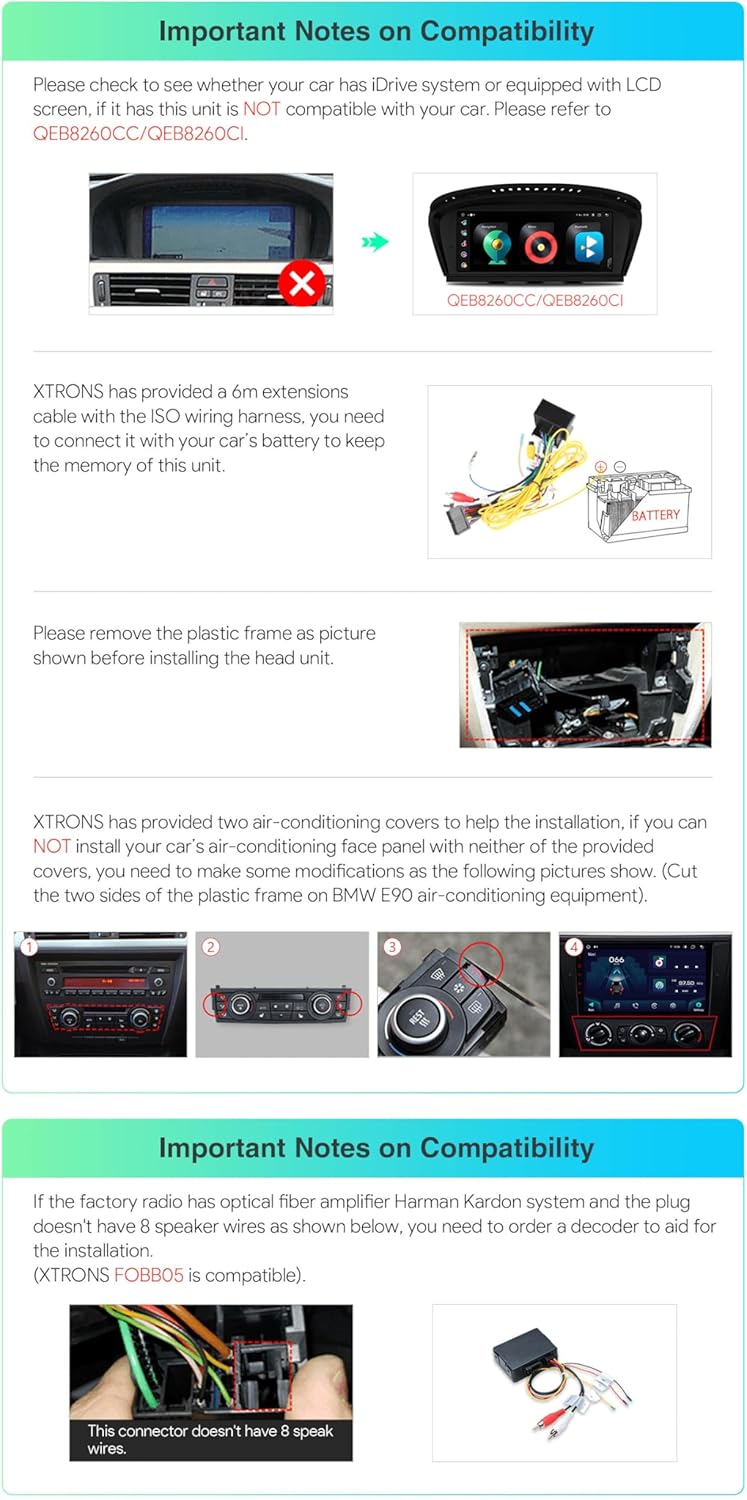
Image 1.1: All accessories included with the XTRONS IAP9290BS car stereo.
2. Compatibility
Applicable Models & Years:
- For BMW E90 Sedan (2005-2012)
- For BMW E91 Touring (2005-2012)
- For BMW E92 Coupe (2006-2013)
- For BMW E93 Convertible (2007-2013)
- For (E90 / E92 / E93) M3 (2007-2012)

Image 2.1: Visual comparison of the car's dashboard before and after installing the XTRONS car stereo.
Important Compatibility Notes:
- Please check if your car has an iDrive system or is equipped with an LCD screen. This unit is NOT compatible with vehicles featuring these systems.
- An included 6m extension cable for the ISO wiring harness is provided. This is necessary to connect to your car's battery to maintain the unit's memory.
- The plastic frame must be removed before installing the head unit.
- Two air-conditioning covers are provided to assist with installation. Modifications to the original air-conditioning face panel may be required, such as cutting the two sides of the plastic frame on BMW E90 air-conditioning equipment.
- If the factory radio has an optical fiber amplifier Harman Kardon system and the plug does not have 8 speaker wires, you will need to order a decoder to aid in the installation.

Image 2.2: Visual guide for important compatibility checks and installation considerations.
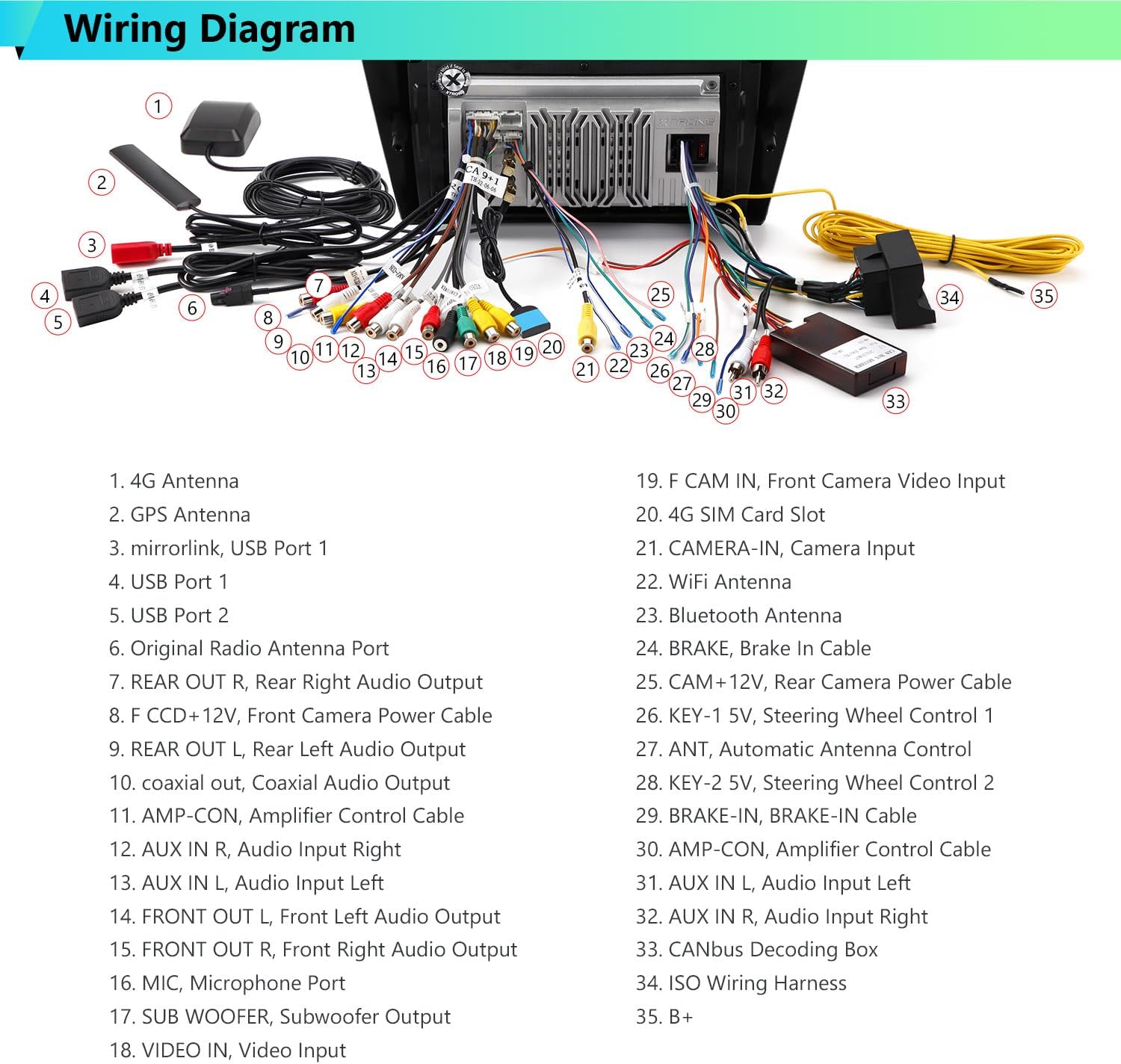
Image 2.3: Illustration of the Harman Kardon system connector and the need for a decoder if applicable.
3. Setup & Installation
Installation of the XTRONS car stereo requires technical knowledge. It is recommended that installation be performed by a qualified professional. Incorrect installation may damage the unit or your vehicle.
General Installation Steps (Consult a professional for detailed vehicle-specific instructions):
- Disconnect the vehicle's battery to prevent electrical shorts.
- Carefully remove the existing factory radio and trim panels. Refer to your vehicle's service manual for specific removal procedures.
- Connect the provided ISO wiring harness to the vehicle's wiring and the XTRONS unit. Ensure all connections are secure.
- Connect the GPS antenna, 4G antenna, and radio antenna cable. Position antennas in locations with clear reception.
- If applicable, connect the CANbus box and camera cable.
- Install the air-conditioning covers and bracket as needed, making any necessary modifications to the vehicle's dashboard.
- Mount the XTRONS car stereo securely into the dashboard opening using the provided screws and plastic stoppers.
- Reconnect the vehicle's battery.
- Power on the unit and perform initial setup and testing.
Wiring Diagram

Image 3.1: Detailed wiring diagram for connecting the XTRONS IAP9290BS car stereo. Refer to this diagram for correct cable connections.
4. Operating Instructions
The XTRONS IAP9290BS operates on Android 12, offering a user-friendly interface and a wide range of features.
4.1 User Interface (UI)
The unit features optimized and intuitive icons for a distraction-free driving experience. You can switch between different UI themes to personalize the look and feel of your stereo.

Image 4.1: Demonstrates the customizable UI themes and multi-tasking capabilities like Picture-in-Picture and Split Screen.
4.2 Smartphone Connectivity (CarAutoPlay & Android Auto)
The unit supports both Wireless CarAutoPlay and Wireless/Wired Android Auto, allowing seamless integration with your smartphone.
- CarAutoPlay: Connect your iPhone to the car stereo via Bluetooth or through a cable. You can tap to use apps on the large screen or ask Siri to perform tasks safely.
- Android Auto: Connect your Android phone to the car stereo through a cable. You can either cast the apps to use on the large screen or control them with voice commands via Google Assistant.

Image 4.2: Overview of CarAutoPlay, Android Auto, and Screen Mirroring functionalities.
4.3 Digital Sound Processor (DSP)
The built-in DSP enhances audio quality, offering advanced sound customization options to optimize your listening experience.
4.4 Radio with RDS
The unit features a built-in ST TDA7708 radio chip, covering AM/FM bands and providing state-of-the-art performance with multipath noise mitigation and RDS decoding.
4.5 Dual Band WiFi & 4G Connectivity
The dual-band WiFi module supports both 2.4GHz and 5GHz bands for faster data transmission and flexible connectivity. With 4G connectivity, you can insert a Micro-SIM network card for mobile broadband access. Supported 4G bands include: 1, 2, 3, 4, 5, 7, 8, 12, 17, 20, 28, 38, 40, 41, 42. Bands 13, 25, 26 are not supported.
Image 4.3: Details on global 4G LTE connectivity, dual band WiFi, and mobile network sharing via USB tethering.
4.6 Bluetooth 5.0
Connect your mobile phone via the built-in Bluetooth 5.0 for hands-free calls, access to your phone book, call logs, contact search, and music streaming.
4.7 GPS Navigation
The unit supports various Android navigation software, including Sygic, IGO, Waze, and Google Maps. Note: This unit does not include a map card; you need to download navigation software from the Android app market.
4.8 Picture-in-Picture (PIP) & Split Screen
- Picture-in-Picture: This feature allows a floating video player to stick to the foreground of your screen, enabling you to watch videos while multitasking.
- Split Screen: Run two applications side by side. For example, you can open a navigation map on the left while using a music app on the right.
5. Optional Features
Enhance your XTRONS car stereo experience with these optional accessories:
- OBD2 Function: Retrieve real-time data and trouble codes from your vehicle's computer. (Requires optional OBD device, e.g., ASIN: B015MU8UN6 / B08HQ9LQ9X)
- TPMS Function: Monitor tire pressure. (Requires optional TPMS device, e.g., ASIN: B07WQFKV5G / B07DKB4GD2)
- Front / Reversing Camera: Improve visibility and parking safety. (Requires optional camera, e.g., ASIN: B07HMLYLJJ / B00GY3BVT6)
- External DVR: Record driving footage. (Requires optional DVR, e.g., ASIN: B07MBYCG4C / B08MF1ZRJ3)
- DAB+ Tuner: Enjoy digital audio broadcasting. (Requires optional DAB+ tuner stick)
6. Specifications
| Feature | Specification |
|---|---|
| Model Number | IAP9290BS |
| Operating System | Android 12 |
| Processor | Octa Core (2x Cortex-A75 + 6x Cortex-A55) |
| RAM | 4GB DDR4 |
| ROM | 64GB SSD |
| Display Size | 9 Inches |
| Display Type | IPS Touch Screen |
| Resolution | 1280*720 HD |
| Bluetooth | Bluetooth 5.0 |
| WiFi | Dual Band (2.4GHz & 5GHz) |
| 4G LTE | Integrated (Micro-SIM required) |
| GPS | Built-in, supports various Android navigation software |
| Audio Output Mode | Stereo |
| Special Features | Built-in DSP, CarAutoPlay, Android Auto, Screen Mirroring, PIP, Split Screen |
| Mounting Type | Panel Mount |

Image 6.1: Physical dimensions of the XTRONS IAP9290BS car stereo.
7. Troubleshooting
If you encounter issues with your XTRONS car stereo, please refer to the following general troubleshooting steps:
- No Power: Check all power connections, including the ISO wiring harness and battery connection. Ensure the vehicle's battery is charged.
- No Sound: Verify speaker connections and audio settings (e.g., volume, balance, fader, DSP settings). Check if the mute function is active.
- Poor GPS Signal: Ensure the GPS antenna is installed in a location with a clear view of the sky.
- Bluetooth Connectivity Issues: Ensure Bluetooth is enabled on both the stereo and your mobile device. Try unpairing and re-pairing the devices.
- Wi-Fi Connection Problems: Verify Wi-Fi settings and password. Ensure the unit is within range of a strong Wi-Fi signal.
- Screen Unresponsive: Try restarting the unit. If the issue persists, a factory reset may be necessary (note: this will erase all user data).
- Compatibility Issues: Re-check the compatibility notes in Section 2 to ensure your vehicle meets all requirements.
For persistent issues, please contact XTRONS customer support.
8. Maintenance
To ensure the longevity and optimal performance of your XTRONS car stereo, follow these maintenance guidelines:
- Cleaning: Use a soft, dry cloth to clean the screen and exterior. Avoid abrasive cleaners or solvents that could damage the finish.
- Software Updates: Periodically check for software updates from XTRONS to ensure your unit has the latest features and bug fixes.
- Environmental Conditions: Avoid exposing the unit to extreme temperatures, direct sunlight for prolonged periods, or excessive moisture.
- Cable Connections: Periodically check all cable connections to ensure they are secure and free from damage.
9. Warranty & Support
XTRONS provides a 1-year warranty for this unit. For warranty claims, technical assistance, or any product-related inquiries, please contact XTRONS customer support via Amazon email. Our professional technical support team will respond promptly to ensure your rights and interests are protected.
10. Product Videos
XTRONS Car Stereo for BMW E90 Android 11 Octa Core Car Radio 9 Inch IPS DSP Car Play Android Auto
Video 10.1: An overview of the XTRONS car stereo for BMW E90, highlighting its Android 11 Octa Core system, 9-inch IPS display, DSP, Car Play, and Android Auto features. This video provides a visual demonstration of the unit's capabilities and user interface.
XTRONS 9 Inch Car Stereo for BMW E90 E91 E92 E93 325 328
Video 10.2: A detailed look at the XTRONS 9-inch car stereo, specifically designed for BMW E90, E91, E92, and E93 models (including 325 and 328 variants). This video showcases the unit's fitment and various functions within the vehicle's interior.


