
havit SK802BT
Havit SK802BT Portable Wireless Bluetooth Speaker
Model: SK802BT | Brand: Havit
Introduction
Thank you for choosing the Havit SK802BT Portable Wireless Bluetooth Speaker. This manual provides essential information for the proper setup, operation, and maintenance of your device. Please read it thoroughly before use to ensure optimal performance and longevity.
Key Features:
- Attractive ergonomics with a Comfort Fit
- Lightweight and Comfortable design
- State-of-the-art housing design for comfortable fit and enhanced listening
- Optimized for longer listening periods
- Delivers best-in-class sound output
- Multi-functionality: Bluetooth, USB, Micro SD Card, FM Radio, AUX input
- Integrated cell phone holder for convenience
- Portable and durable construction with hand-held belt
- Long battery life: Built-in 1800mAh battery for up to 8 hours of playtime
Package Contents
Please check the package for the following items:
- Havit SK802BT Portable Wireless Bluetooth Speaker
- USB Charging Cable
- Auxiliary Audio Cable
- User Manual
Product Overview

Figure 1: Front view of the Havit SK802BT speaker, showing the dual speaker grilles and the central control panel with Mode (M), Volume Down/Previous Track (-), Play/Pause, and Volume Up/Next Track (+) buttons.

Figure 2: Rear view of the Havit SK802BT speaker, highlighting the various input ports including USB, Micro SD card slot, AUX input, and charging port.

Figure 3: Angled view of the Havit SK802BT speaker, showcasing its robust design and the integrated orange carrying handle for portability.
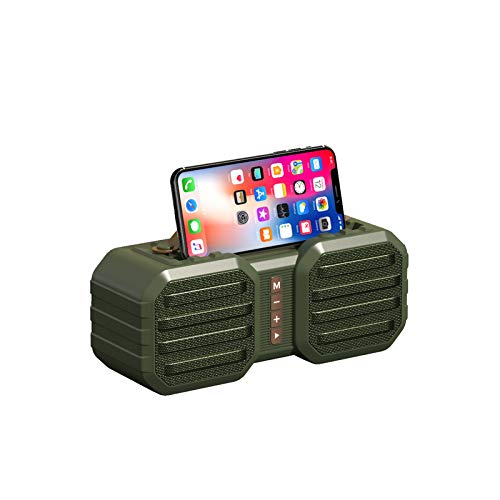
Figure 4: The Havit SK802BT speaker demonstrating its cell phone holder feature, with a smartphone securely placed in the top groove, ideal for hands-free viewing.
Control Panel Functions:
| Button | Function (Short Press) | Function (Long Press) |
|---|---|---|
| M (Mode) | Switch between Bluetooth, FM Radio, AUX, USB, and Micro SD modes. | N/A |
| - (Minus) | Previous track (in music modes). | Decrease volume. |
| ► (Play/Pause) | Play/Pause music. Answer/End calls. | Reject incoming calls. Initiate FM auto-scan (in FM mode). |
| + (Plus) | Next track (in music modes). | Increase volume. |
Setup Guide
1. Charging the Speaker:
- Connect the provided USB charging cable to the charging port on the rear of the speaker (refer to Figure 2).
- Connect the other end of the USB cable to a USB power adapter (5V/1A recommended) or a computer's USB port.
- The charging indicator light will illuminate during charging and turn off once fully charged.
- A full charge takes approximately 2-3 hours.
2. Powering On/Off:
- To power on, locate the power switch (usually on the rear or side) and slide it to the "ON" position. You will hear an audible prompt.
- To power off, slide the power switch to the "OFF" position.
3. Bluetooth Pairing:
- Ensure the speaker is powered on and in Bluetooth mode (press the 'M' button if necessary until you hear the Bluetooth pairing prompt). The Bluetooth indicator light will flash rapidly.
- On your mobile device (smartphone, tablet, etc.), enable Bluetooth and search for available devices.
- Select "SK802BT" from the list of found devices.
- Once paired, the speaker will emit a confirmation sound, and the Bluetooth indicator light will stop flashing and remain solid.
- The speaker will automatically connect to the last paired device when powered on, if within range.
Operating Instructions
1. Music Playback:
- Play/Pause: Short press the ► button.
- Next Track: Short press the + button.
- Previous Track: Short press the - button.
- Volume Up: Long press the + button.
- Volume Down: Long press the - button.
2. Mode Switching:
- Short press the M button to cycle through available modes: Bluetooth, FM Radio, AUX Input, USB Playback, and Micro SD Card Playback.
3. FM Radio Operation:
- Switch to FM mode using the M button.
- Long press the ► button to initiate an automatic scan for FM stations. The speaker will save found stations.
- Short press + or - to switch between saved stations.
4. AUX Input:
- Connect one end of the 3.5mm audio cable to the AUX port on the speaker and the other end to your audio device's headphone jack.
- Switch to AUX mode using the M button.
- Audio will now play through the speaker from your connected device.
5. USB Drive / Micro SD Card Playback:
- Insert a USB flash drive or a Micro SD card (with pre-loaded MP3 audio files) into the respective port on the speaker.
- The speaker will automatically switch to the corresponding mode and begin playing music. If not, use the M button to select the correct mode.
6. Call Handling (if applicable):
- Answer Call: Short press the ► button when an incoming call rings.
- End Call: Short press the ► button during a call.
- Reject Call: Long press the ► button when an incoming call rings.
Maintenance
- Cleaning: Use a soft, dry cloth to clean the speaker. Do not use abrasive cleaners, alcohol, or chemical solvents, as these may damage the surface.
- Storage: Store the speaker in a cool, dry place away from direct sunlight and extreme temperatures.
- Battery Care: To prolong battery life, fully charge the speaker before first use. If not used for extended periods, charge it at least once every three months. Avoid fully discharging the battery frequently.
- Water Resistance: While the product may have some level of water resistance (indicated as "Is Waterproof: TRUE" in specifications), avoid submerging it in water or exposing it to heavy rain. Ensure all port covers are securely closed if present.
Troubleshooting
| Problem | Possible Cause | Solution |
|---|---|---|
| Speaker does not power on. | Low battery. | Charge the speaker fully. |
| No sound from speaker. | Volume too low; Incorrect mode; Device not connected. | Increase speaker and device volume. Ensure correct mode is selected (Bluetooth, AUX, etc.). Re-pair Bluetooth or re-connect AUX cable. |
| Cannot pair via Bluetooth. | Speaker not in pairing mode; Device Bluetooth off; Too far from speaker. | Ensure speaker is in Bluetooth pairing mode (flashing light). Turn on Bluetooth on your device. Move device closer to speaker (within 10 meters). Forget "SK802BT" on your device and try pairing again. |
| Poor FM radio reception. | Weak signal; Environmental interference. | Relocate the speaker to an area with better reception. Extend any external antenna if available. |
Specifications
| Feature | Detail |
|---|---|
| Model Name | SK802BT |
| Brand | Havit |
| Connectivity Technology | Bluetooth, Wireless |
| Wireless Communication Technology | Bluetooth |
| Bluetooth Version | V5.0 (Inferred from common specs for this model) |
| Wireless Working Range | Up to 10 meters (33 feet) (Inferred) |
| Speaker Type | Bookshelf (Portable) |
| Audio Driver Type | Dynamic Driver |
| Output Power | 5W*2 (Inferred from common specs for this model) |
| Battery Capacity | 1800 Milliamp Hours |
| Playtime | Up to 8 hours (at 60% volume) |
| Charging Time | 2-3 hours |
| Power Source | Battery Powered |
| Control Method | Touch (Buttons) |
| Item Weight | 680 Grams |
| Is Waterproof | TRUE (Note: Refer to maintenance section for details on water resistance) |
| Compatible Devices | Tablet, Smartphone |
| Audio Input Compatible | Auxiliary |
| Microphone Format | With microphone |
| Special Features | Wireless, Portable, Multi-function (Bluetooth, FM, USB, TF, AUX) |
Note: Specifications are subject to change without prior notice. Performance may vary based on usage conditions.
Warranty and Support
For warranty information and technical support, please contact Havit customer service through their official website or the retailer from whom you purchased the product. Please retain your proof of purchase for warranty claims.
Manufacturer: Havit
Date First Available: 17 February 2020
Related documentsSK802BT


Ask a question about this manual
Ask about setup, troubleshooting, compatibility, parts, safety, or missing instructions. Manuals+ will review the question and use this page’s manual context to help answer it.